Axios 是易用、简洁且高效的 JavaScript HTTP 请求库,类似原生AJAX,基于Promise,同时支持浏览器端和 Node.js 环境,在Vue等前端项目中被广泛用来做前后端接口交互。
特性
- 浏览器端发送
XMLHttpRequest请求 - Node.js 发送 http 请求
- 完整支持 Promise API
- 拦截请求、拦截响应(请求前统一加token,响应后统一处理错误)
- 自动转换请求/响应数据
- 支持取消请求
- 自动转换 JSON 数据
- 客户端防止 XSRF 跨站请求伪造攻击
安装方式
1. npm
npm install axios2. bower
bower install axios3. CDN直接引入
<script src="[https://unpkg.com/axios/dist/axios.min.js](https://unpkg.com/axios/dist/axios.min.js)"></script>
Code language: HTML, XML (xml)
若CDN网络无法访问,可以通过nuget下载axios.js本地引入到项目。
后端示例(ASP.NET MVC)
public ActionResult User(int id)
{
    return Json(new { data = "bamn.cn:" + id },JsonRequestBehavior.AllowGet);
}
Code language: PHP (php)访问地址示例:[http://localhost:50814/home/user?ID=12345](http://localhost:50814/home/user?ID=12345)
GET请求完整HTML示例
<!DOCTYPE html>
<html>
<head>
    <meta http-equiv="Content-Type" content="text/html; charset=utf-8" />
    <meta charset="utf-8" />
    <meta name="viewport" content="width=device-width, initial-scale=1.0">
    <title>例子</title>
    <script src="~/Scripts/jquery-1.10.2.min.js"></script>
    <script src="~/Scripts/axios.js"></script>
</head>
<body>
    <div id="name"></div>
    <script>
    $(function () {
        axios({
            method: 'get',      // 请求方式,默认get
            url: '/home/user',  // 请求接口地址
            params: {           // get查询参数,拼接到url?后面
                ID: 123
            },
            headers: {          // 自定义请求头
                // "token":"xxx"
            },
            responseType: 'json'
        }).then(response => {
            // 成功回调,后端返回数据存放在 response.data
            let mydata = response.data;
            $("#name").text(mydata.data);
        }).catch(error => {
            // 请求失败回调
            console.log(error);
        });
    });
    </script>
</body>
</html>
Code language: HTML, XML (xml)
简写版get
axios.get("/home/user",{
    params:{ID:123}
}).then(res=>{
    console.log(res.data)
}).catch(err=>{
    console.log(err)
})
Code language: JavaScript (javascript)
POST请求示例
post请求参数放在
data属性,不是params;params依旧是url查询字符串。
<!DOCTYPE html>
<html>
<head>
    <meta charset="utf-8" />
    <title>post示例</title>
    <script src="~/Scripts/jquery-1.10.2.min.js"></script>
    <script src="~/Scripts/axios.js"></script>
</head>
<body>
    <div id="msg"></div>
    <script>
    $(function(){
        axios({
            method:"post",
            url:"/home/saveUser",
            // post提交json数据放在data
            data:{
                firstName:"Fred",
                lastName:"Flintstone"
            }
        }).then(res=>{
            $("#msg").text(res.data.msg)
        }).catch(err=>{
            console.error(err)
        })
    })
    </script>
</body>
</html>
Code language: HTML, XML (xml)
post简写语法
axios.post('/home/saveUser',{
    firstName:"Fred",
    lastName:"Flintstone"
}).then(res=>{
    console.log(res.data)
}).catch(err=>{
    console.log(err)
})
Code language: JavaScript (javascript)
后端接收(MVC)
// post接收json,使用对象接收
public ActionResult saveUser(UserInfo info)
{
    return Json(new {msg="接收成功",info},JsonRequestBehavior.AllowGet);
}

public class UserInfo
{
    public string firstName { get; set; }
    public string lastName { get; set; }
}
Code language: JavaScript (javascript)
async/await写法(ES2017)
更优雅,避免回调嵌套,IE不支持
async function getUser(){
    try{
        const res = await axios.get("/home/user",{params:{ID:123}})
        console.log(res.data)
    }catch(err){
        console.log(err)
    }
}
getUser()
Code language: JavaScript (javascript)
response返回结构
{
  data: {},        // 后端返回的数据
  status: 200,     // http状态码
  statusText: "OK",
  headers: {},     // 响应头
  config: {},      // 请求配置
  request: {}      // 原始请求对象
}
Code language: JavaScript (javascript)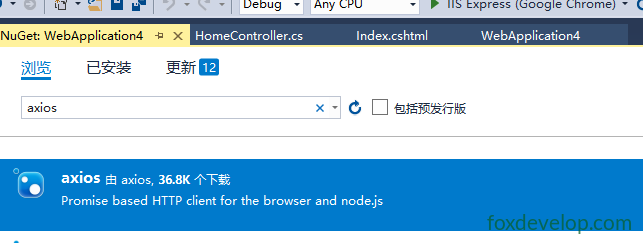
Next: Axios的Post请求