Stimulsoft Reports Web Forms 开发笔记
一、环境准备与安装
1. 创建 WebForm 项目并配置目标框架
- 创建 ASP.NET Web 应用程序(WebForm),将项目目标框架改为 .NET Framework 4.5。

2. 通过 NuGet 安装 Stimulsoft 组件
- 打开 NuGet 包管理器,搜索
Stimulsoft并安装Stimulsoft.Reports.Web(示例版本 2019.3.2)。 - 安装日志显示会自动依赖安装
Stimulsoft.Reports.Engine:
正在尝试收集与目标为“.NETFramework,Version=v4.5”的项目“WebApplication2”有关的包“Stimulsoft.Reports.Web.2019.3.2”的依赖项信息
正在尝试解析程序包“Stimulsoft.Reports.Web.2019.3.2”的依赖项,DependencyBehavior 为“Lowest”
正在解析操作以安装程序包“Stimulsoft.Reports.Web.2019.3.2”
已解析操作以安装程序包“Stimulsoft.Reports.Web.2019.3.2”
正在将程序包“Stimulsoft.Reports.Engine.2019.3.2”添加到文件夹“C:\Users\YY\Desktop\北盟网校\Stimulsoft Reports\WebApplication2\packages”
已将程序包“Stimulsoft.Reports.Engine.2019.3.2”添加到文件夹“C:\Users\YY\Desktop\北盟网校\Stimulsoft Reports\WebApplication2\packages”
已将程序包“Stimulsoft.Reports.Engine.2019.3.2”添加到“packages.config”
已将“Stimulsoft.Reports.Engine 2019.3.2”成功安装到 WebApplication2
正在将程序包“Stimulsoft.Reports.Web.2019.3.2”添加到文件夹“C:\Users\YY\Desktop\北盟网校\Stimulsoft Reports\WebApplication2\packages”
已将程序包“Stimulsoft.Reports.Web.2019.3.2”添加到文件夹“C:\Users\YY\Desktop\北盟网校\Stimulsoft Reports\WebApplication2\packages”
已将程序包“Stimulsoft.Reports.Web.2019.3.2”添加到“packages.config”
已将“Stimulsoft.Reports.Web 2019.3.2”成功安装到 WebApplication2
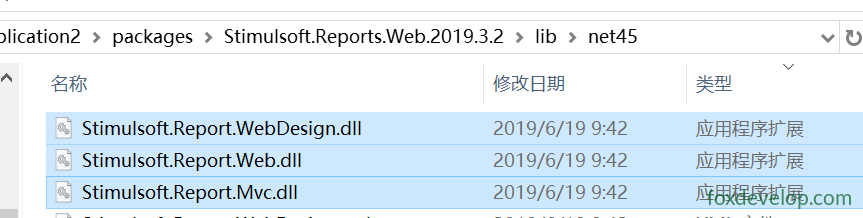
========== 已完成 ==========- 另外还需要安装 Stimulsoft Reports.Web 2015.3 Trial(Stimulsoft-Reports-Web-2015.3-Trial.zip)。
3. 工具箱引入控件
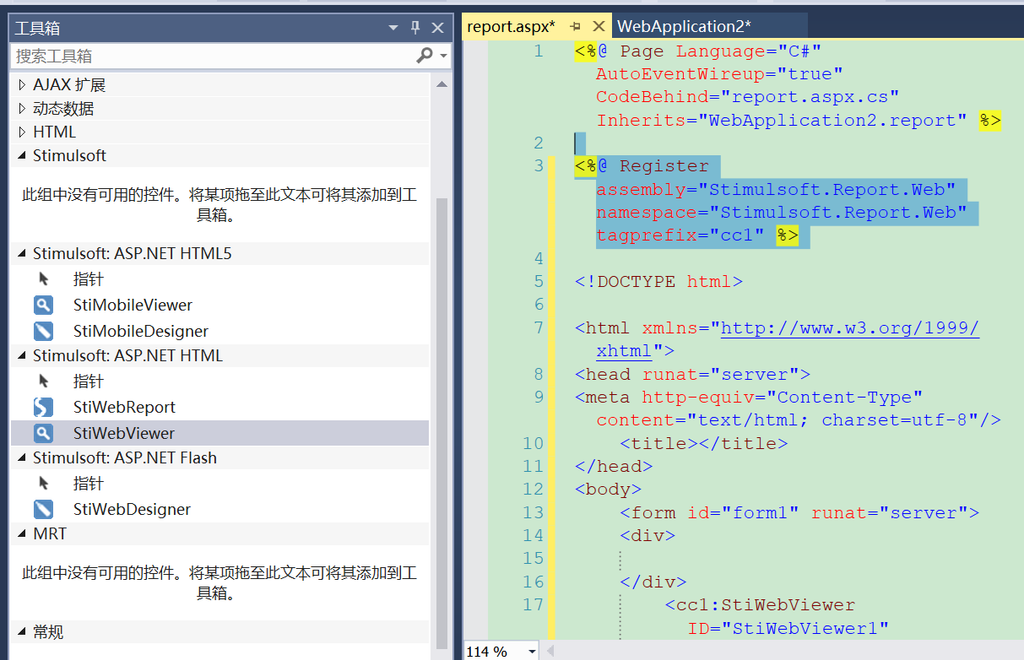
- 在 Visual Studio 工具箱中右键 → “选择项” → 浏览并引入
Stimulsoft.Report.Web.dll。 - 将
StiWebViewer控件拖放到 ASPX 页面上。
二、核心代码实现
1. 页面后置代码(report.aspx.cs)
public partial class report : System.Web.UI.Page
{
    protected void Page_Load(object sender, EventArgs e)
    {
        StiWebViewer1.Report = GetReport();
    }

    /// <summary>
    /// 获取报表
    /// </summary>
    /// <returns></returns>
    private StiReport GetReport()
    {
        var report = new StiReport();
        //根据路径加载报表文件
        report.Load(GetReportPath());
        //动态改变数据库连接
        ChangeConnectString(report);
        //设置参数等
        report.Compile();
        SetReportParamaters(report);

        return report;
    }

    private string GetReportPath()
    {
        var path = String.Format("~/Reports/{0}.mrt", Request["rpt"]);
        path = Server.MapPath(path);
        if (!System.IO.File.Exists(path))
            //如果报表文件不存在,返回默认的报表文件
            path = Server.MapPath("~/reports/default.mrt");
        return path;
    }

    private void ChangeConnectString(StiReport report)
    {
        foreach (Stimulsoft.Report.Dictionary.StiSqlDatabase item in report.Dictionary.Databases)
        {
            var prefix = item.Name.Split('_')[0];
            item.ConnectionString = ConfigurationManager.ConnectionStrings["ConnectionName"].ConnectionString;
        }
    }

    private void SetReportParamaters(StiReport report)
    {
        var dataSource = report.CompiledReport.DataSources;
        foreach (Stimulsoft.Report.Dictionary.StiDataSource ds in dataSource)
        {
            var param = Request.QueryString;
            foreach (string key in param.Keys)
            {
                if (!ds.Parameters.Contains(key)) continue;
                var p = ds.Parameters[key];
                var v = param[key];
                p.ParameterValue = v;
            }
        }
    }
}Code language: HTML, XML (xml)
2. Web.config 数据库连接配置
<connectionStrings>
  <add name="ConnectionName" connectionString="Server=.;Database=LinqSqlDemo;User ID=sa;Password=123321;"
  providerName="System.Data.SqlClient" />
</connectionStrings>Code language: HTML, XML (xml)
三、报表模板(.mrt)相关
1. 创建模板
- 使用 Stimulsoft Designer 工具创建
.mrt报表模板,保存到项目Reports目录下。 - 注意:模板中的数据库连接信息默认是加密存储的。
2. 模板中支持 C# 代码编程
- 在
.mrt文件(XML)中可嵌入脚本:
<Script>using System;
using System.Drawing;
using System.Windows.Forms;
using System.Data;
using Stimulsoft.Controls;
using Stimulsoft.Base.Drawing;
using Stimulsoft.Report;
using Stimulsoft.Report.Dialogs;
using Stimulsoft.Report.Components;

namespace Reports
{
    public class Report : Stimulsoft.Report.StiReport
    {
        public Report()        {
            this.InitializeComponent();
        }

        #region StiReport Designer generated code - do not modify
		#endregion StiReport Designer generated code - do not modify
    }
}
</Script>
<ScriptLanguage>CSharp</ScriptLanguage>Code language: HTML, XML (xml)
3. 模板其他功能
- 可设置模板背景。
- 支持在 HTML/JS 中通过 URL 调用报表。
四、访问与调用方式
1. URL 调用
- 指定不同模板:
http://localhost:56067/report.aspx?rpt=xxxx - 带参数调用:
http://localhost:56067/report.aspx?rpt=xxxx模板?dsf=1&sfds=222 - 后台通过
Request["rpt"]获取模板名,Request.QueryString获取参数并传递给报表数据源。
2. JavaScript 调用示例
this.printClick = function () {
    parent.wrapper.addTab.apply(this,{'打印报表', '/report?area=XX&rpt=helloworld', 'icon-printer_color'});
};Code language: JavaScript (javascript)
📌 补充说明:
- Stimulsoft Reports.Web 是适用于 ASP.NET WebForms 的报表组件,通过
StiWebViewer控件在页面中呈现报表。 - 报表文件(
.mrt)可通过 Designer 可视化设计,支持数据连接、参数、脚本等。 - 动态设置连接字符串和参数是实际项目中的常见做法,便于多环境部署和灵活查询。
- 如果报表文件不存在,代码会回退到
default.mrt,避免页面报错。
Previous: ASP.NET MVC教程