连接数据库
<%--声明数据库的参数,在左下角的Database属性中,选择要操作的数据库名称--%>
<%@ Property Name="SourceTable" Type="SchemaExplorer.TableSchema" Category="Context" Description="Table to get the data from." %>Code language: HTML, XML (xml)<%--引入下面的类库,操作数据库必备的。不要纠结加入就行啦。--%>
<%@ Assembly Name="SchemaExplorer" %>
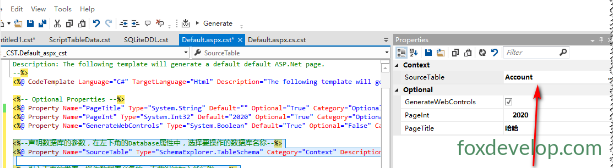
<%@ Import Namespace="SchemaExplorer" %>Code language: HTML, XML (xml)其中 Type="SchemaExplorer.TableSchema" 表示这个属性是关联到一张表,可以通过下面箭头来指定。
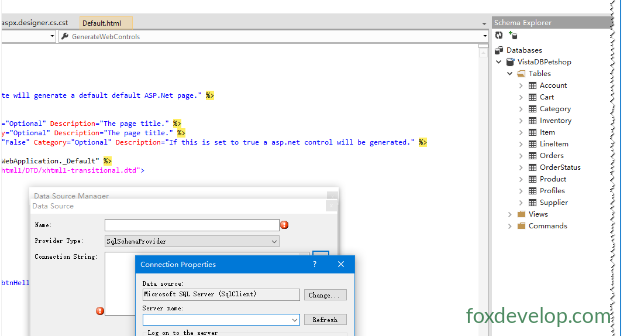
当然可以指定整个数据库:
<%@ Property Category="Database" Name="SourceDatabase" Type="SchemaExplorer.DatabaseSchema"
Optional="False" Description="Database the table enums will come from." %>Code language: HTML, XML (xml)
注意这个 Optional 设为 True,否则会报错误:
<%--声明数据库的参数,在左下角的Database属性中,选择要操作的数据库名称--%>
<%@ Property Name="SourceTable" Type="SchemaExplorer.TableSchema" Optional="True" Category="Context" Description="Table to get the data from." %>

<%@ Property Category="Database" Name="SourceDatabase" Type="SchemaExplorer.DatabaseSchema" Optional="True" Description="Database the table enums will come from." %>Code language: HTML, XML (xml)
然后遍历表里面的数据。
最后生成的
<%@ Page Language="C#" AutoEventWireup="true" CodeBehind="Default.aspx.cs" Inherits="WebApplication._Default" %>
<!DOCTYPE html PUBLIC "-//W3C//DTD XHTML 1.0 Transitional//EN" "http://www.w3.org/TR/xhtml1/DTD/xhtml1-transitional.dtd">
<html xmlns="http://www.w3.org/1999/xhtml" >
<head runat="server">
    <title>哈哈</title>
    <INT>2020</INT>
    <INT>2120</INT>
</head>
<body>
    <form id="form1" runat="server">
    <div>
    </div>
    </form>
</body>
</html>Code language: HTML, XML (xml)
public enum AccountTables
{
AccountID,
UniqueID,
Email,
FirstName,
LastName,
Address1,
Address2,
City,
State,
Zip,
Country,
Phone
}Code language: PHP (php)模板代码
<%--
Name: ASP.Net Samples
Author: Blake Niemyjski
Description: The following template will generate a default default ASP.Net page.
--%>
<%@ CodeTemplate Language="C#" TargetLanguage="Html" Description="The following template will generate a default default ASP.Net page." %>

<%-- Optional Properties --%>
<%@ Property Name="PageTitle" Type="System.String" Default="" Optional="True" Category="Optional" Description="The page title." %>
<%@ Property Name="PageInt" Type="System.Int32" Default="2020" Optional="True" Category="Optional" Description="The page title." %>
<%@ Property Name="GenerateWebControls" Type="System.Boolean" Default="True" Optional="False" Category="Optional" Description="If this is set to true a asp.net control will be generated." %>

<%--声明数据库的参数,在左下角的Database属性中,选择要操作的数据库名称--%>
<%@ Property Name="SourceTable" Type="SchemaExplorer.TableSchema" Optional="True" Category="Context" Description="Table to get the data from." %>

<%@ Property Category="Database" Name="SourceDatabase" Type="SchemaExplorer.DatabaseSchema" Optional="True" Description="Database the table enums will come from." %>

<%--引入下面的类库,操作数据库必备的。不要纠结加入就行啦。--%>
<%@ Assembly Name="SchemaExplorer" %>
<%@ Import Namespace="SchemaExplorer" %>

<%%@ Page Language="C#" AutoEventWireup="true" CodeBehind="Default.aspx.cs" Inherits="WebApplication._Default" %>
<!DOCTYPE html PUBLIC "-//W3C//DTD XHTML 1.0 Transitional//EN" "http://www.w3.org/TR/xhtml1/DTD/xhtml1-transitional.dtd">
<html xmlns="http://www.w3.org/1999/xhtml" >
<head runat="server">
    <title><%= PageTitle %></title>
    <INT><%= PageInt %></INT>
    <INT><%= PageInt+100 %></INT>
</head>
<body>
    <form id="form1" runat="server">
    <div>
        <% if(PageInt<200) { %>
        <asp:TextBox ID="txtHelloWorld" runat="server" />
        <asp:Button ID="btnHelloWorld" runat="server" Text="Display Hello World" onclick="btnHelloWorld_Click" />
        <% } %>
    </div>
    </form>
</body>
</html>Code language: JavaScript (javascript)
<%--SourceDatabase 是你选择数据库的属性类,涵盖数据库的名称、创建时间、连接字符串、描述等等,自己可以点点看 --%>
public enum <%=SourceTable.Name %>Tables
{
<%-- 遍历数据库中的表集合 --%>
<% for(int x = 0; x < SourceTable.Columns.Count; x++)
{
var table = SourceTable.Columns[x];
if (x < SourceTable.Columns.Count - 1)
//输出表名,这里是c#的注释,不会被写进生成的代码中。\t为换行符。
Response.WriteLine("\t{0},", table.Name);
else
Response.WriteLine("\t{0}", table.Name);
}
%>
}Code language: PHP (php)在 <%%> 中的代码是 C# 代码,如果需要输出文本,则需要使用 Response 对象的 WriteLine 方法来输出文本。