读取 properties 配置文件
properties 文件可以存放在多个位置:可以在 src 目录下新建文件夹存放,也可以直接放在 Java 类的包内,还可以放在 WebContent(或 webroot)目录下。读取文件本质上就是操作 IO 流。
文件存放位置与读取方式
1. 存放在 Java 包中(如 com.foxdevelop.demo 包下)
编译后文件会被复制到 WEB-INF/classes/com/foxdevelop/demo/ 目录下,通过 getResourceAsStream 读取:
InputStream in = this.getServletContext().getResourceAsStream(
    "/WEB-INF/classes/com/foxdevelop/demo/db.properties");
Properties prop = new Properties();
prop.load(in);
String username = prop.getProperty("username");Code language: JavaScript (javascript)
2. 存放在 src 下的文件夹中(如 src/configs/)
编译后文件位于 WEB-INF/classes/configs/ 目录:
// 方式一:通过 getResourceAsStream
InputStream in = this.getServletContext().getResourceAsStream(
    "/WEB-INF/classes/configs/db1.properties");

// 方式二:通过 getRealPath 获取真实路径,再用 FileInputStream
String path = this.getServletContext().getRealPath(
    "/WEB-INF/classes/configs/db1.properties");
InputStream in = new FileInputStream(path);Code language: JavaScript (javascript)
3. 存放在 WebContent(webroot)根目录下
直接通过根路径读取:
InputStream in = this.getServletContext().getResourceAsStream("/db2.properties");Code language: JavaScript (javascript)完整示例
properties 文件内容格式为键值对:
username=www.bamn.cn
password=123456
在 doGet 中同时读取两个不同位置的配置文件:
protected void doGet(HttpServletRequest request, HttpServletResponse response)
        throws ServletException, IOException {

    // 读取 WebContent 根目录下的 config.properties
    InputStream in = this.getServletContext().getResourceAsStream("/config.properties");
    Properties prop = new Properties();
    prop.load(in);
    String username = prop.getProperty("username");
    response.getWriter().write(username);

    // 读取 WEB-INF/classes 下的 config1.properties(原位于 src/cn/bamn/demo/ 包中)
    InputStream in1 = this.getServletContext().getResourceAsStream(
        "/WEB-INF/classes/cn/bamn/demo/config1.properties");
    Properties prop1 = new Properties();
    prop1.load(in1);
    String username1 = prop1.getProperty("username");
    response.getWriter().write(username1);
    String password = prop1.getProperty("password");
    response.getWriter().write(password);
}Code language: JavaScript (javascript)
路径说明与安全注意事项
| 存放位置 | 编译后路径 | 浏览器是否可直接访问 |
|---|---|---|
WebContent 根目录 | 直接位于应用根目录 | 可通过 http://localhost:8080/ServletDemo/config.properties 访问,不安全 |
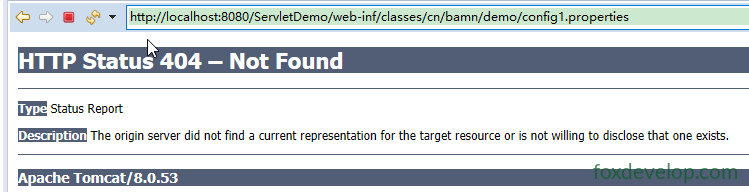
src 目录或包内 | WEB-INF/classes/ 下 | 无法直接访问,安全 |
- 放在
WebContent下的文件可以通过浏览器直接访问到,如果包含敏感配置信息则存在安全隐患。 - 放在
WEB-INF目录下的文件(包括classes子目录)客户端无法直接访问,只能通过服务器端代码读取,适合存放配置文件。
Previous: Servlet请求转发
Next: 配置客户端进行输出缓存