AesSafe – File & Folder Encryption/Decryption Utility
AesSafe is a lightweight encryption tool built around the AES‑256 cipher operating in GCM mode, delivering exceptional encryption and decryption speeds. Benchmarked on a 7th‑gen Intel Core i5 PC, the tool encrypts a 2.2 GB file in 45 seconds and decrypts the same file in just 15 seconds.
Product Overview
AesSafe enables single-file or entire-folder encryption and decryption powered by AES‑256, the industry-standard encryption algorithm trusted globally across countless software applications and communication protocols. Real-world implementations include Windows BitLocker, VeraCrypt full-disk encryption, plus mainstream cloud storage platforms such as Google Drive, Dropbox and iCloud. We adopt GCM, AES’s most secure and efficient operational mode; a typical 2 GB video file finishes full encryption or decryption in roughly one minute.
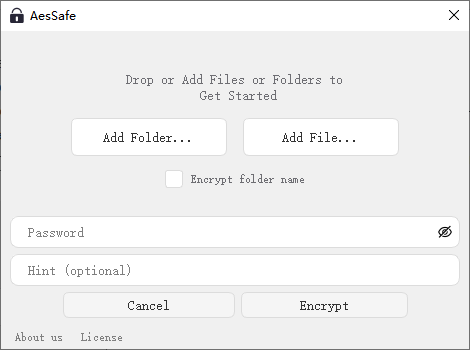
Designed for intuitive operation, the program accepts files and folders via manual path selection or direct drag‑and‑drop into the input field. Users simply enter a password to kick off encryption or decryption tasks.
While raw AES‑256 requires a 256-bit (32-byte) key, mandatory lengthy passcodes would hurt usability. To support short user passwords, the software first hashes the input passcode with SHA‑256 to generate a standard 256-bit cryptographic key, which is then fed into the AES‑256 encryption engine. This setup allows encryption even with a single-character user password, though we strongly recommend complex passwords for sensitive data.
As the most robust AES mode available, GCM includes built-in authentication checks. If encrypted files are tampered with after encryption, decryption will automatically fail and alert the user, effectively guarding against unauthorized data alteration.
0.0.2 release
Version 0.0.2 brings significant user experience enhancements and new feature additions:
Implements intuitive drag-and-drop functionality to simplify file/folder operation workflows;
Streamlines the user interface (UI) by optimizing layout and reducing redundant elements for a more concise and user-friendly interaction;
Adds a password hint feature to help users recall their passwords without compromising security;
Introduces filename encryption functionality to further protect sensitive file information, complementing the existing encryption mechanisms.