In our last lesson, we set up the GCC compiler and put together a basic Hello World sample. In today’s session, we’ll dissect this example line by line. Here’s the complete code snippet:
#include <stdio.h>

int main()
{
    printf("hello, world\n");
    return 0;
}
Code language: C/AL (cal)
This code is straightforward; its only job is to output a single line of text.
We’ll analyze each line from top to bottom next.
1. #include <stdio.h>
We briefly touched on preprocessing in the previous lesson, and this very first line is a preprocessing directive. The # symbol is how you can tell.
#: Marker for preprocessor directives, handled by the preprocessor as the very first step in code compilation.
include: Keyword used to import header files. Its function is to copy all code from the specified file into your current program.
<stdio.h>: The standard input/output header file. It contains built-in functions for screen output and keyboard input, including the printf function we use later in this code.
It’s worth noting that preprocessing is not formally part of the C language itself. Strictly speaking, C preprocessing is not part of standard C syntax — it’s an independent stage executed by the compiler before actual compilation begins. While it’s a step within the overall build workflow, it sits outside C’s core syntax and semantic rules.
In other words, a separate preprocessor program runs first to perform text replacement operations. For #include <stdio.h>, the preprocessor replaces this line by pasting the full contents of stdio.h right here. To illustrate, imagine stdio.h contained only the text AAAAAAAAA
By the time the compiler receives the code for actual compilation, the source would look like this:
 AAAAAAAAA

int main()
{
    printf("hello, world\n");
    return 0;
}
Code language: C/AL (cal)
This is purely hypothetical — the real stdio.h file holds far more content. If you’re curious, you can open and examine the actual header file yourself.
This header file is stored locally on your machine, and its file path differs across operating systems:
Linux/Unix systems: Usually located at /usr/include/stdio.h.

Windows (Visual Studio): Found under VC/include/stdio.h.

macOS (Xcode): Located inside /Applications/Xcode.app/.../usr/include/stdio.h.
You can use system search tools to locate this file on your own computer.
Does this explanation give you a solid basic understanding of preprocessing now?
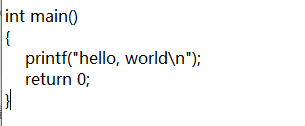
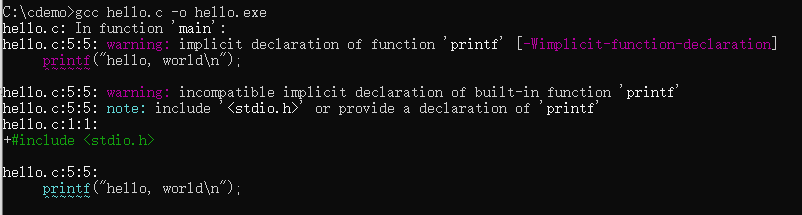
If you remove the line #include <stdio.h>, the compiler won’t recognize the printf function and will throw an error. Feel free to delete the line and recompile the code with GCC to see this error in action.
Recompiling the code will produce a compilation error message.
2. int main()
main = The entry point function for all C programs
- When any C program runs, the operating system automatically starts executing code from the
mainfunction. Every valid C program has exactly one main function, no more and no less. int: Defines the function’s return value type, short for integer.(): Parentheses mark this as a function. Input parameters go inside the parentheses; empty parentheses mean the function accepts no arguments.
Nearly all programming languages released after C adopted this main() entry point design. When you double-click an EXE file or run the program via command line (for example, typing the command hello), your operating system calls the main function automatically. It acts as the official starting point invoked by the OS.
The int at the start defines the function’s return type. Later in the course, we’ll create our own custom functions, all of which require a specified return type — this concept will click once we cover that material.
The parentheses hold the list of input parameters the function can accept. Empty parentheses mean no parameters are passed in, but functions can be written to accept input values, as shown here:
int main(int argc, char *argv[])Code language: CSS (css)This version accepts two parameters: one integer value and one array of character strings. We’ll break down these parameters in later lessons.
These parameters passed into main come directly from the operating system. But how exactly does the OS send these values over?
Have you ever used command-line tools or the ping utility? Take running ping 12.36.4.xxx as an example. Here, ping refers to the ping.exe program, and the IP address 12.36.4.xxx gets passed as an input argument to the main function inside ping.exe.
The same logic applies to our Hello World program. If you run hello abc in the terminal, abc gets passed as an input argument. The parameters inside the main parentheses catch these input values, which the operating system collects and forwards to the main function automatically.
For now, just remember these key points: main is the sole entry point of every program, it’s invoked by the operating system, and the OS passes any command-line inputs into its parameters.
3. { } Curly Braces
These mark the start and end of the function body. The opening { signals the beginning of the function’s code, while the closing } marks its end. All code belonging to the function sits between the two braces.
4. printf("hello, world\n");
printf: Short for print format, a formatted output function used to print text to the console.- Double quotes
" ": Wrap a string literal containing the text you want to print out. \n: An escape sequence representing a newline character; it moves the cursor to the next line after printing the text.;: Marks the end of a C statement. Every executable line of code must end with a semicolon — omitting it will trigger a compilation error.
The “f” in printf stands for formatted output, a feature we’ll dive deeper into later. For now, just understand that it prints the text hello, world\n to your console, with \n creating a line break after the message.
5. return 0;
return: Sends an integer value back from themainfunction and terminates the function’s execution. The int label at the start of main requires the function to return an integer value, which is why we use return here.0: A standard status code meaning the program ran successfully with no errors. This value tells the operating system whether the program encountered issues during execution:- Returning
0= Program finished execution without faults - Returning any non-zero number (e.g.,
return 1;) = The program exited due to an error or unexpected issue
- Returning
Modern C standards allow you to omit
return 0;at the end of main — the compiler will add it automatically. Even so, new developers are encouraged to write it explicitly to follow clean coding standards.