1. Minimal C++ Program
int main()  // Minimal C++ program
{

} Code language: JavaScript (javascript)- This code defines a function named
mainwith no parameters and no internal operations. - The opening brace { marks the start of the main function body, while the closing brace } marks its end. All executable logic should be placed inside the pair of braces.
- Double slashes
//represent single-line comments. All content from//to the end of the line is for human reading only and will be ignored by the compiler. - Every complete C++ program must contain exactly one global
main()function. Program execution begins atmain. intmeans the function returns an integer value. Inside the function body, returning 0 indicates normal program termination; returning a non-zero value signals an error.- The return value mentioned in point 5 is read by Unix/Linux systems, while most Windows applications do not utilize it.
2. Full Standard Output Hello World Example
#include <iostream>

int main()
{
    std::cout << "Hello, World!\n";
}Code language: C++ (cpp)
#include <iostream>: Instructs the compiler to import declarations for the standard input/output stream library. Without this line, the output statementstd::coutcannot be recognized.
iostreamis one of the standard libraries mentioned earlier, pre-written C++ code built into compilers. It handles input and output operations such as printing text to the console.
<<output operator: Writes the content on its right-hand side to the output object std::cout. In this example, the string literal"Hello, World!\n"is printed (output, not physical printer print) to the standard console terminal viastd::cout.- “Hello, World!\n” is a string literal: text enclosed by double quotes. The escape sequence
\nis a newline character that moves the cursor to the next line after output. std::: Namespace qualifier, indicatingcoutis a component inside the standardstdnamespace. Later we will introduceusing namespace std;to omit thestd::prefix and usecoutdirectly.
A namespace qualifier exists to avoid naming conflicts by adding a prefix to library components. For analogy: if two students share the same full name in a class, the teacher may assign labels like Jason One and Jason Two to distinguish them. The
stdprefix works the same way.
Complete Demo
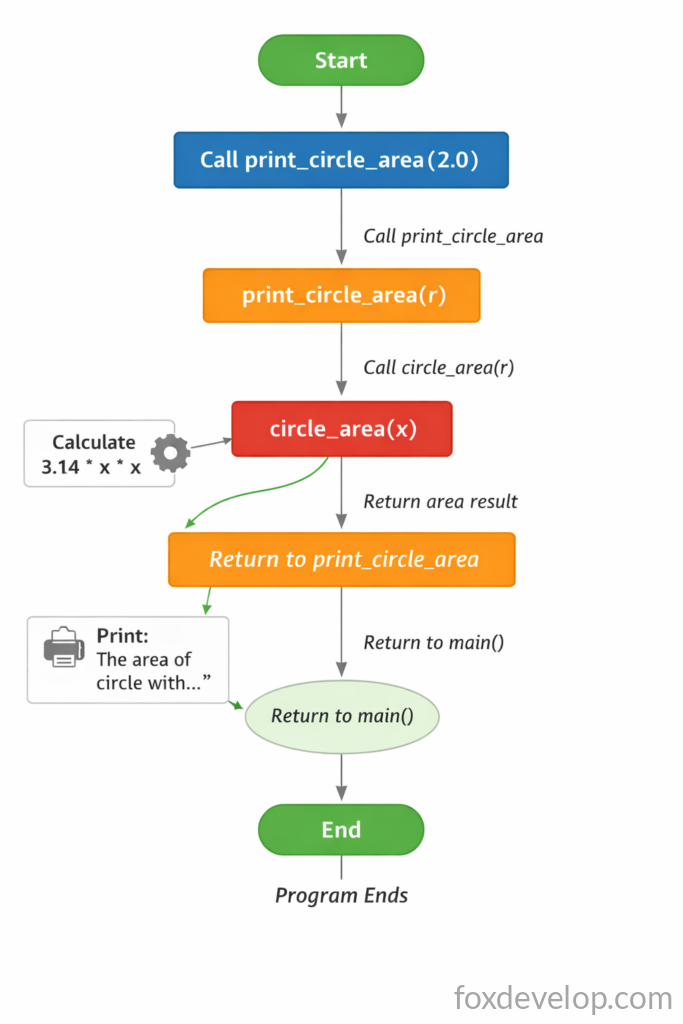
The following example defines two extra functions. One function is called inside main, which then calls the second function. This program calculates the area of a circle: input a radius value and print the resulting circle area.
#include <iostream>
using namespace std; // After importing std namespace, std:: prefix can be omitted below

// Calculate circle area
double circle_area(double x)
{
    return 3.14 * x * x;
}

// Print circle area
void print_circle_area(double r)
{
    cout << "The area of circle with radius " << r << " is " << circle_area(r) << "\n";
}

int main()
{
    print_circle_area(2.0); // Radius = 2, output circle area
    return 0;
}Code language: C++ (cpp)
Execution Output
The area of circle with radius 2 is 12.56Code language: JavaScript (javascript)Multiple << operators can be chained with cout to print multiple segments of content consecutively. Omitting \n keeps all output on one single line. Besides string literals, variables such as the double-type r can also be printed directly.
In void print_circle_area(double r), the parentheses (double r) declare formal parameters. A formal parameter r receives values passed from external calls. When print_circle_area(2.0); is invoked in main, the value 2.0 is passed into the function, assigning r = 2.0. The subsequent cout statement prints text, the variable r, then calls circle_area(r). During this call, the value 2.0 stored in r is forwarded to the parameter x of double circle_area(double x), making x equal to 2.0 inside that function. The expression 3.14 * 2 * 2 computes 12.56, which is returned via the return statement back to the caller. The runtime logic is equivalent to the code below:
cout << "The area of circle with radius " << r << " is " << 12.56 << "\n";Code language: C++ (cpp)After output finishes, the closing brace terminates print_circle_area, and execution returns to the main function.