A template engine for the .NET platform, ported from Velocity on the Java platform.
Introduction
Widely adopted within ASP.NET projects;
ASP.NET MVC ships with the Razor template engine;
Many developers turn to NVelocity when they want to introduce the MVC pattern into legacy .aspx web form projects.
NVelocity is no longer actively maintained and should only be used for older .NET Framework legacy projects. New projects are recommended to adopt modern template engines such as Razor and Handlebars.NET.
Version compatibility with .NET Framework
| .NET Framework Version | NVelocity Version |
|---|---|
| .NET 4.0 | 1.0 (latest official release) |
| .NET 2.0 | 0.5 |
| .NET 1.0 | 0.48 |
Velocity is a mature Java template engine known for its clean syntax that uses # and $ as template markers. NVelocity fully implements this syntax specification.
Download
The official repository received its last update in 2018, with version 1.2.0 being the newest release.
You can grab the source code via the link below
It is open-source and hosted on GitHub castleproject/NVelocity: Castle’s NVelocity
Official downloads do not include precompiled DLL binaries. You may compile the source yourself after downloading, or directly import the project into your existing solution.
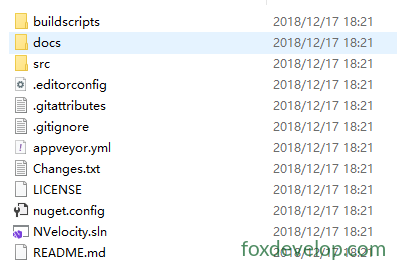
Open the solution file with Visual Studio
The final release targets .NET Core 2.1. Developers are advised to migrate it to .NET 4.8.
After compilation, you can locate the compiled DLL inside the output directory
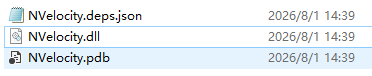
You can then reference NVelocity.dll within your other ASP.NET Web projects.
Project Integration
Reference the assembly: NVelocity.dll
Core benefit: This template engine greatly simplifies dynamic template switching (theme skinning) for websites.
Create a folder named Themes at your website root as the root directory for all templates
Inside Themes, create separate folders for different themes, for example:
Create the Themes folder at website root to store all theme resources
Theme Directory Structure
Create a folder named default for your base template set.
Additional theme folders such as Themes/blue and Themes/dark can be added later.
Website Root
└── Themes
    ├── default      # Default theme template files
    ├── dark         # Dark theme template files
    └── blue         # Blue theme template filesCode language: PHP (php)
On runtime, the engine reads the active theme name from configuration and loads templates from the corresponding theme folder.
Template switching simply updates configuration values to point to another theme directory without modifying business logic.
This approach works well for legacy ASP.NET WebForm (.aspx) projects implementing front-end skin switching.
aspx
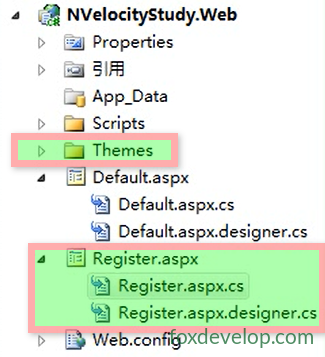
Create a new .aspx page called Register.aspx in the website root for demonstration purposes.
Create a template file named register.htm under Themes/default. This file serves as the NVelocity template containing HTML markup and Velocity syntax.
Open Register.aspx, keep only the page directive and remove all other HTML markup:
<%@ Page Language="C#" AutoEventWireup="true" CodeBehind="Register.aspx.cs" Inherits="NVelocityStudy.Web.Register" %>Code language: HTML, XML (xml)The .aspx page will no longer handle rendering directly and acts merely as an entry point. Backend code invokes NVelocity to load the register.htm template and output rendered HTML content.
Website Root
├─ Register.aspx          # Access entry point
├─ Register.aspx.cs       # Backend logic
└─ Themes
    └─ default
        └─ register.htm   # NVelocity template fileCode language: CSS (css)
You will implement logic within Register.aspx.cs to load the register.htm template from the active theme, inject model data and produce final HTML output.
To switch themes, modify the directory path setting so the engine loads register.htm from another theme folder.
aspx.cs
Open the backend file Register.aspx.cs. Implement NVelocity rendering logic inside the Page_Load method to parse templates when the page loads.
using System;
using System.Collections.Generic;
using System.Web;
using System.Web.UI;
using System.Web.UI.WebControls;

namespace NVelocityStudy.Web
{
    public partial class Register : System.Web.UI.Page
    {
        protected void Page_Load(object sender, EventArgs e)
        {
            // Implement template loading and rendering logic here
        }
    }
}Code language: C# (cs)
Insert the following code inside Page_Load
protected void Page_Load(object sender, EventArgs e)
{
    // Step 1: Instantiate VelocityEngine
    VelocityEngine ve = new VelocityEngine();

    // Step 2: Configure engine settings
    ExtendedProperties pros = new ExtendedProperties();
    pros.AddProperty(RuntimeConstants.RESOURCE_LOADER, "file"); // Load templates from local files
    pros.AddProperty(RuntimeConstants.FILE_RESOURCE_LOADER_PATH, Server.MapPath(@"")); // Template root directory
    ve.Init(pros); // Initialize engine with configuration

    // Step 3: Load template file
    Template template = ve.GetTemplate("themes/default/register.htm");

    // Step 4: Create context and pass variables to template
    IContext context = new VelocityContext();
    context.Put("websiteName", "FoxDevelop");
    context.Put("domainName", "foxdevelop.com");

    // Step 5: Merge template with data and render HTML
    StringWriter writer = new StringWriter();
    template.Merge(context, writer); // Store rendered output

    // Step 6: Send output to browser
    Response.Write(writer.ToString().Replace("\r\n", "<br/>"));
}Code language: C# (cs)
This code reads the HTML template file, defines variables and replaces placeholder markers inside the template.
- Instantiate VelocityEngine Creates an isolated engine instance, unlike the static global
Velocity.Init(), allowing separate configurations. - Engine initialization and configuration
RESOURCE_LOADER=file: Specifies local filesystem template loading;FILE_RESOURCE_LOADER_PATH: Sets root path for template lookup;ve.Init(pros): Applies settings and completes initialization.
- Template loading via
GetTemplate()Readsthemes/default/register.htmrelative to the configured root path. - VelocityContext data context
context.Put(key, value)passes C# variables into templates, accessible in htm files using$websiteName,$domainName. - Template Merge rendering
template.Merge(context, stream)injects variables into templates to build full HTML strings.StringWritercaptures rendered text output. - Response output Sends final HTML to browsers;
Replace("\r\n","<br/>")converts source line breaks into HTML break tags.
htm Template
Modify the register.htm file within your theme directory
<!DOCTYPE html PUBLIC "-//W3C//DTD XHTML 1.0 Transitional//EN" "http://www.w3.org/TR/xhtml1/DTD/xhtml1-transitional.dtd">
<html xmlns="http://www.w3.org/1999/xhtml">
<head>
    <title></title>
</head>
<body>
    Website:$websiteName <br />
    Domain:$domainName
</body>
</html>Code language: HTML, XML (xml)
These two $xxxxxxx markers correspond to variables defined in Page_Load and will be substituted with actual values during rendering.
- Variable syntax
$VariableName$websiteNameand$domainNamefollow NVelocity (VTL) variable syntax. Values assigned withcontext.Put("websiteName", "FoxDevelop")get replaced automatically by the engine:
$websiteName→FoxDevelop$domainName→foxdevelop.com
Runtime Output
Website:FoxDevelop
Domain:foxdevelop.comCode language: CSS (css)
Introduction to NVelocity