Brief Introduction to HttpLib (C# .NET Framework)
1. Library Overview
HttpLib (by James Thorne) is a .NET HTTP request helper library released under the Apache 2.0 License. It simplifies asynchronous network calls, supports file uploads and web page downloads, and adopts a fluent‑style calling pattern.
Note: Do not confuse it with the identically‑named C++ libraries
httplibandcom.daniyarkaliyev.httplib. Make sure you install the correct package: HttpLib
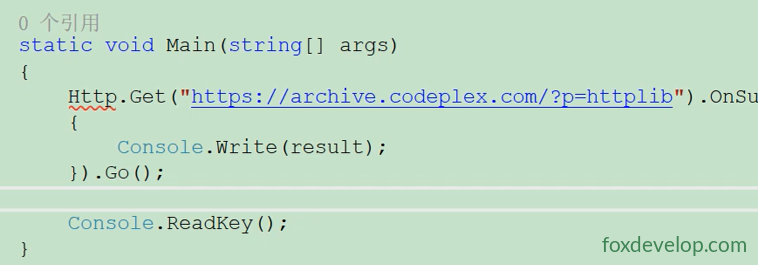
If the package is not installed, the compiler will fail to resolve the Http type in your code.
2. Installation Steps
- Right‑click your project in Solution Explorer → Manage NuGet Packages
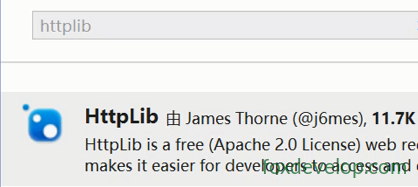
- Switch to the Browse tab and search for
HttpLib - Select the package authored by
James Thorne (@j6mes)and click Install (version v2.0.16.94) - Wait for the Output window to confirm installation has finished
3. Reference HttpLib
1. Missing Namespace Reference
You must add this directive at the very top of your source file:
using HttpLib;Without this line, Http.Get() will show a red squiggly underline.
In most scenarios, NuGet will automatically add the reference after installation, so manual importing is not required.
2. Code Sample
using System;
using HttpLib; // Critical namespace import

namespace ConsoleApplication1
{
    class Program
    {
        static void Main(string[] args)
        {
            Http.Get("https://archive.codeplex.com/?p=httplib")
                .OnSuccess(result =>
                {
                    Console.Write(result);
                })
                .Go();

            Console.ReadKey();
        }
    }
}Code language: JavaScript (javascript)
Some websites block web scraping requests, which may trigger errors; the target site might also be unreachable.
An unhandled exception of type “System.Net.WebException” occurred in JumpKick.HttpLib.dll
If you encounter the above exception, open the target URL in a browser to verify accessibility. Replace it with a different domain if the original address is down.
4. Syntax Reference
Http.Get("url")               // Create GET request
.OnSuccess(result => {})      // Success callback, result = raw webpage text
.Go(); // Trigger asynchronous request executionCode language: JavaScript (javascript).Go(): Starts asynchronous network call without blocking the main thread- Extra: You can use
.OnError()to catch network‑related exceptions
Http.Get("https://example.com")
.OnSuccess(res=>Console.WriteLine(res))
.OnError(ex=>Console.WriteLine("Request failed: "+ex.Message))
.Go();Code language: JavaScript (javascript)
The test URL shown in samples is no longer active and will return request failures when run. Use this replacement for testing:
https://httpbin.org/html
6. Full Working Example
using System;
using HttpLib;

namespace ConsoleApplication1
{
    class Program
    {
        static void Main(string[] args)
        {
            // Use valid test endpoint
            Http.Get("https://httpbin.org/html")
                .OnSuccess(result =>
                {
                    Console.WriteLine("Request succeeded:");
                    Console.Write(result);
                })
                .OnError(err =>
                {
                    Console.WriteLine("Request error: " + err.Message);
                })
                .Go();

            Console.WriteLine("Async request dispatched, press any key to exit");
            Console.ReadKey();
        }
    }
}Code language: JavaScript (javascript)
If you still see red warnings after adding using HttpLib;, I can walk you through clearing the NuGet cache and reinstalling the package.
Important Notes
httpbin.org is an open‑source free HTTP testing service built by the author of Python’s requests library, designed specifically for debugging HTTP traffic.
/html is one of its available API endpoints.
Expected output
Opening this link returns a minimal HTML document directly:
Overview