Nearly every programmer’s first taste of coding begins with the iconic “Hello, World!” program. This classic example originally appeared in The C Programming Language (Second Edition) — commonly abbreviated as K&R2 — written by one of the creators of C. It later spread across the globe, and even today, almost all programming languages use it as their introductory sample code.
Today, we will follow this tradition and write our very first C program using this example.
Before writing any C code, you first need to download a compiler: Download i686-8.1.0-release-win32-sjlj-rt_v6-rev0.7z (MinGW-w64 – for 32 and 64 bit Windows). So what exactly is a compiler?
What Is a Compiler?
Computers only understand binary numbers 0 and 1; they cannot interpret human-written code such as C/C++, Python, Java and more. A compiler acts as a translation tool: it fully converts the human-readable high-level language code you write into machine language (binary executable .exe files) that the CPU can run directly.
In short, a compiler translates human-written C code into sequences of 0s and 1s readable by computers. Only these binary instructions can be executed by the CPU. Without a compiler, your C source code is no different from plain text. In a way, every programming language is defined by its matching compiler — all the syntax, rules and specifications defined by the language are ultimately implemented by its compiler.
Download the Windows compiler via the above link for Windows users. Note that the cc compiler is exclusively used on Unix systems, while GCC is used for Windows.
Common C Language Compilers
1 GCC
Short for GNU Compiler Collection. It is open-source and free of charge, supports C, C++, Objective-C and other languages, and works cross-platform (Windows/Linux/macOS).
MinGW-w64 is a tool suite that contains the GCC compiler inside.
2 Clang (LLVM)
Built based on the LLVM framework, it is the official default compiler for Apple systems (macOS/iOS), and can also be installed on Windows.
3 MSVC
Short for Microsoft Visual C++. It is Microsoft’s native Windows compiler, pre-installed together with Visual Studio. Qt development can also use MSVC.
cl.exe is its command-line compiler program.
4 Tiny C Compiler
It can run C code directly without generating an .exe file, working similarly to scripting languages.
There are other C compilers which we won’t list here; some are outdated and no longer in use, such as Turbo C.
For beginners in the early learning stage, you may start with GCC included in MinGW-w64. Later you can switch to MSVC and develop C programs with Visual Studio.
Install MinGW
If the download link above fails to work, you can download the package here instead: Download MinGW-w64 – for 32 and 64 bit Windows
After finishing the download, extract the compressed file:
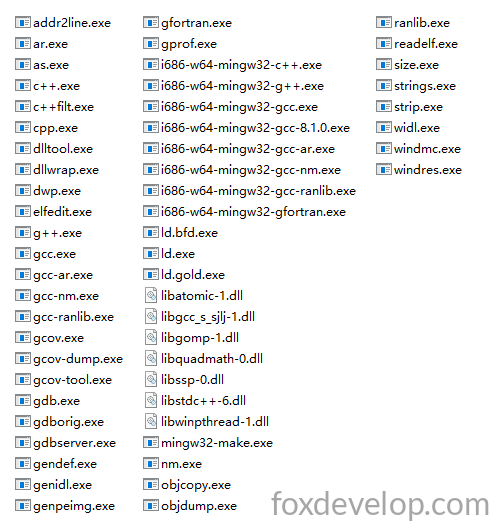
You can see gcc.exe inside this folder — this is our compiler, with a file size of only 1.77MB.
Copy all extracted files into a separate folder. For example, I use D:\mingw64; you can choose any directory you like.
Then add this bin directory path into the Path environment variable.
- Right-click “This PC” → Properties
- Select Advanced system settings on the right → switch to the Advanced tab
- Click Environment Variables. Under System variables, find the variable named
Pathand double-click to edit it. Click New, then paste the path: D:\mingw64\bin - Click OK on all open windows to save the configuration
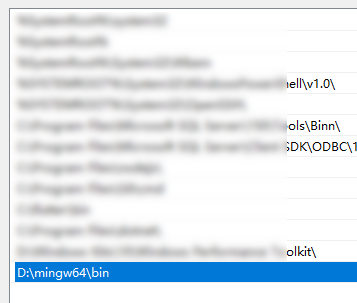
Please note that D:\mingw64\bin must contain gcc.exe. Some downloaded packages have an extra bin subfolder where gcc.exe is stored.
Verify GCC Installation
Open Command Prompt (CMD) and run the following command:
gcc --version
or
g++ --version
If you see output similar to the text below:
C:\Users\Jack>gcc --version
gcc (i686-win32-sjlj-rev0, Built by MinGW-W64 project) 8.1.0
Copyright (C) 2018 Free Software Foundation, Inc.
This is free software; see the source for copying conditions.  There is NO
warranty; not even for MERCHANTABILITY or FITNESS FOR A PARTICULAR PURPOSE.
Code language: CSS (css)C:\Users\Jack>g++ --version
g++ (i686-win32-sjlj-rev0, Built by MinGW-W64 project) 8.1.0
Copyright (C) 2018 Free Software Foundation, Inc.
This is free software; see the source for copying conditions. There is NO
warranty; not even for MERCHANTABILITY or FITNESS FOR A PARTICULAR PURPOSE.Code language: CSS (css)Both commands work fine and can be used normally. Now we can start writing our first C program.
Create a folder named cdemo in the root directory of drive C or another disk, then create a new text file and rename it hello.c.
Open hello.c with Notepad and paste the code below:
#include <stdio.h>

int main()
{
    printf("hello, world\n");
    return 0;
}Code language: Arduino (arduino)
Open CMD and use the cd command to navigate into this folder directory.
Run the following GCC command to compile the code (compilation converts your source code into binary instructions readable by computers).
Compile and Run the Program
Open CMD and switch to the source folder with cd:
C:\cdemo>gcc hello.cCode language: CSS (css)Running this command produces no text output in CMD.
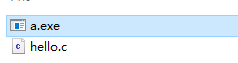
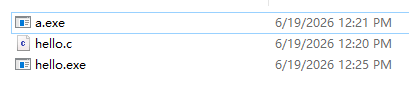
However, a new file named a.exe will appear inside the folder.
This is our compiled executable program. How do we run it?
Just type the file name a — you do not need to append the .exe suffix.
C:\cdemo>a
hello, world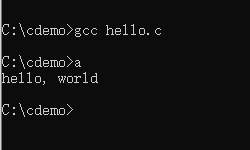
Specify a Custom Executable Name
The default output program name is a when no custom name is defined.
Use the following command to set a custom name for your generated .exe file:
gcc hello.c -o hello.exeCode language: CSS (css)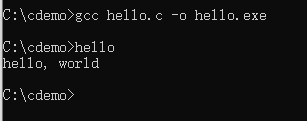
Open the folder and you will see hello.exe generated. You can replace this with any other name you prefer.
That’s the end of this lesson. Follow all the steps above by yourself to practice. Make sure you understand compilers and the full workflow of writing, compiling and running a C program.