Recently I tried publishing a WinUI 3 app to the Microsoft Store but kept getting several errors despite repeated fixes. Microsoft’s test reports were confusing and hard to understand. I finally figured out the root cause once they attached screenshots in their latest test report.
First off, the first issue:
as follow is issue report
The available product tile icons include a default image. Tile icons must uniquely represent product so users associate icons with the appropriate products and do not confuse one product for another. For information about tiles see https://docs.microsoft.com/en-us/windows/uwp/controls-and-patterns/tiles-and-notifications-app-assets, or for 3D icons for Mixed Reality products, see https://docs.microsoft.com/en-us/windows/mixed-reality/3d-app-launcher-design-guidance.
Package with Violation: XXXXX (Package)_1.0.13.0_x86_x64_bundle.msixuploa
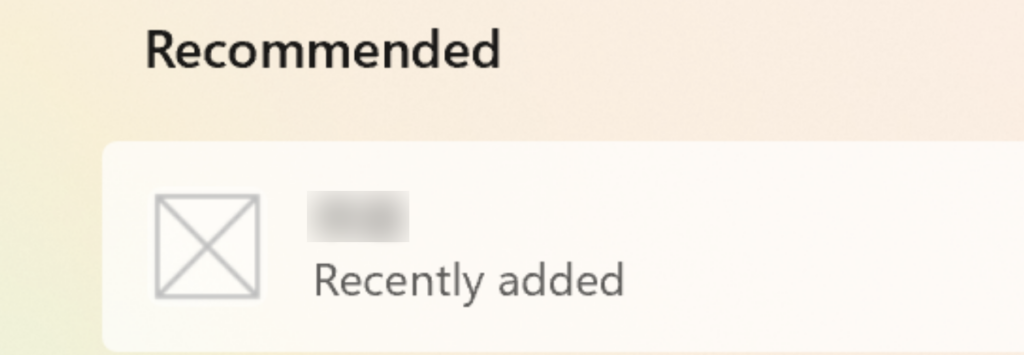
As you can see from the screenshot, when Microsoft’s testers installed my app, the icon displayed under Recently Installed in the Start Menu was WinUI 3’s default icon instead of my custom one. This happened because I failed to configure the app icons properly during packaging.
To set custom icons correctly: open your project’s Package.appxmanifest file, navigate to the Visual Assets tab, select your source image, and generate the required icon assets.
the second issue
The product name provided with the language listings does not match the product name displayed on device when installed.
Listing Name: ThaiTongXXXXX
Displayed Name: XXXXX
Found in the following languages listings: Chinese (China)
Product’s installed title documentation is available at https://docs.microsoft.com/en-us/uwp/schemas/appxpackage/uapmanifestschema/element-displayname
Listing title documentation can be found at https://learn.microsoft.com/en-us/windows/apps/publish/publish-your-app/msix/add-and-edit-store-listing-info#product-name
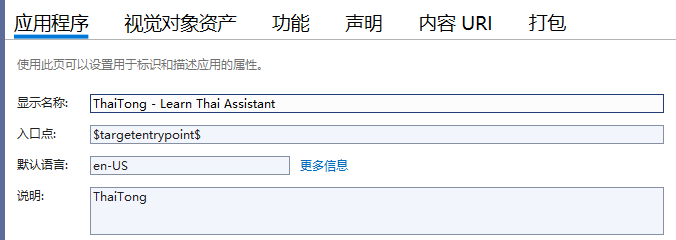
This is another similar issue: the app name specified during packaging differed from the listing name entered on Microsoft Store, resulting in a failed submission. You can fix this inside the Package.appxmanifest file. Head to the Application tab and update the Display Name field to exactly match the product name configured in your Microsoft Partner Center dashboard.
Third Issue
The product crashes at launch. The issue was observed on the following devices running OS build 26200.7623
Observed On: ASUS EXPERTBOOK P5405CSA_PX485CSA
Tested On: ASUS EXPERTBOOK P5405CSA_PX485CSA
Error Message: N/A
Tip: A Windows product may run flawlessly during development and testing, but after submitting it for certification testing, the product may crash or perform unexpectedly. Along these same lines, your product may not perform as expected after publication. You can contact Developer Support at http://aka.ms/storesupport if you need assistance with troubleshooting.
ThaiTong泰语学习_10.1.2.10_Crashlog.evtx ()
Tested devices: Microsoft Surface Laptop
错误应用程序名称: ThaiTong.exe,版本: 1.0.0.0,时间戳: 0x696f0000
错误模块名称: Microsoft.UI.Xaml.dll,版本: 3.1.7.0,时间戳: 0xabafd337
异常代码: 0xc000027b
错误偏移量: 0x00000000003a11f5
错误进程 ID: 0x0x2acc
错误应用程序启动时间: 0x0x1dcf315da5ba390
错误应用程序路径: C:\Program Files\WindowsApps\13BB6A9C.2489817D7C86E_1.0.13.0_x64__3310hcxmkktm6\ThaiTong\ThaiTong.exe
错误模块路径: C:\Program Files\WindowsApps\13BB6A9C.2489817D7C86E_1.0.13.0_x64__3310hcxmkktm6\ThaiTong\Microsoft.UI.Xaml.dll
报告 ID: 4434c917-11b5-4bdd-ac99-a28959eb9ba6
错误程序包全名: 13BB6A9C.2489817D7C86E_1.0.13.0_x64__3310hcxmkktm6
错误程序包相对应用程序 ID: App
I’m still working on resolving the third issue. I’ll share its fix once I get it sorted out. Thanks for reading.