日期选择和色彩选择控件
ColorPicker 完整取色器
ColorSpectrum 色彩色域面板
ColorSlider 单色通道滑动条(RGB/Alpha)
ColorPicker 完整取色器
ColorSpectrum 色彩色域面板
ColorSlider 单色通道滑动条(RGB/Alpha)
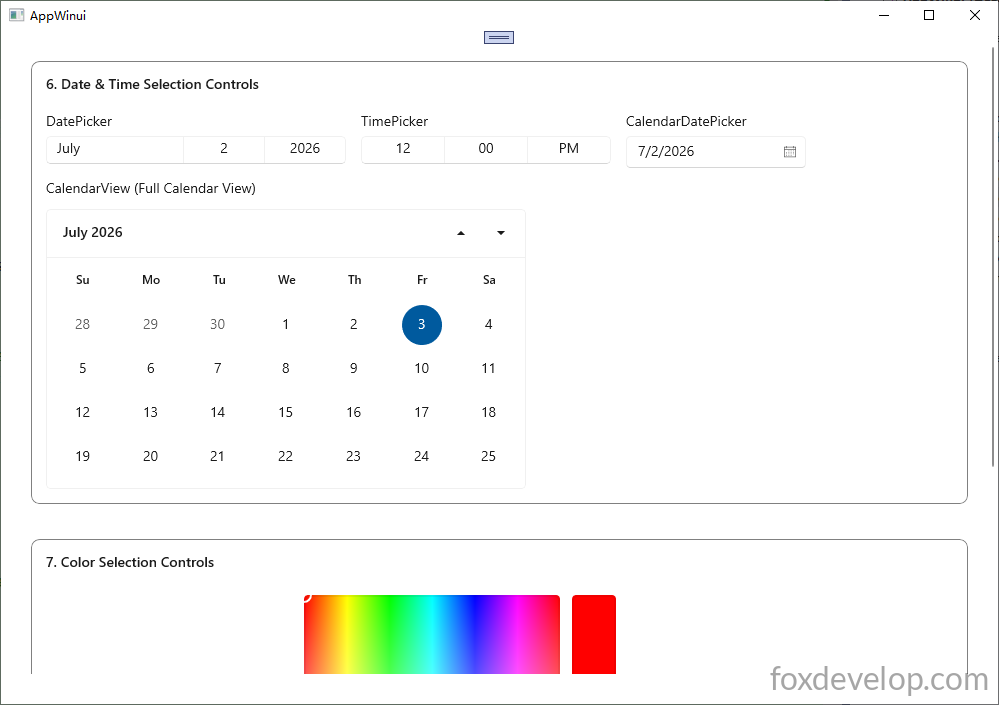
首先xaml中创建控件,要给上x:name 方便后台初始化和取值
<?xml version="1.0" encoding="utf-8"?>
<Window
x:Class="AppWinui.MainWindow"
xmlns="http://schemas.microsoft.com/winfx/2006/xaml/presentation"
xmlns:x="http://schemas.microsoft.com/winfx/2006/xaml"
xmlns:local="using:AppWinui"
xmlns:d="http://schemas.microsoft.com/expression/blend/2008"
xmlns:mc="http://schemas.openxmlformats.org/markup-compatibility/2006"
mc:Ignorable="d"
Title="AppWinui">
<ScrollViewer Padding="30" VerticalScrollBarVisibility="Auto">
<StackPanel Spacing="35">
<!-- Date & Time Controls Group -->
<Border Padding="14" BorderThickness="1" BorderBrush="Gray" CornerRadius="8">
<StackPanel Spacing="12">
<TextBlock Text="6. Date & Time Selection Controls" FontWeight="SemiBold" FontSize="14" Margin="0,0,0,8"/>
<StackPanel Orientation="Horizontal" Spacing="15" VerticalAlignment="Top">
<!-- DatePicker -->
<StackPanel Spacing="6">
<TextBlock Text="DatePicker"/>
<DatePicker x:Name="myDatePicker" Width="300"/>
</StackPanel>
<!-- TimePicker -->
<StackPanel Spacing="6">
<TextBlock Text="TimePicker"/>
<TimePicker x:Name="myTimePicker" Width="250"/>
</StackPanel>
<!-- CalendarDatePicker -->
<StackPanel Spacing="6">
<TextBlock Text="CalendarDatePicker"/>
<CalendarDatePicker x:Name="myCdp" Width="180"/>
</StackPanel>
</StackPanel>
<TextBlock Text="CalendarView (Full Calendar View)"/>
<CalendarView Width="480" Height="280">
<!-- Custom CalendarViewDayItem sample -->
<CalendarView.CalendarViewDayItemStyle>
<Style TargetType="CalendarViewDayItem">
<Setter Property="Margin" Value="2"/>
<Setter Property="Height" Value="36"/>
<Setter Property="Width" Value="36"/>
</Style>
</CalendarView.CalendarViewDayItemStyle>
</CalendarView>
</StackPanel>
</Border>
<!-- Color Picker Controls Group -->
<Border Padding="14" BorderThickness="1" BorderBrush="Gray" CornerRadius="8">
<StackPanel Spacing="12">
<TextBlock Text="7. Color Selection Controls" FontWeight="SemiBold" FontSize="14" Margin="0,0,0,8"/>
<!-- Full ColorPicker (built-in ColorSpectrum + ColorSlider internally) -->
<ColorPicker x:Name="myColorPicker" Width="420" Height="320"/>
</StackPanel>
</Border>
<Button Content="Get Value" Click="Button_Click"/>
</StackPanel>
</ScrollViewer>
</Window>
Code language: HTML, XML (xml)添加了一个按钮Click=”Button_Click”,然后F12创建点击事件
设置和获取
CPP中的构造函数去设置值,然后按钮点击事件去获取值
#include "pch.h"
#include "MainWindow.xaml.h"
#if __has_include("MainWindow.g.cpp")
#include "MainWindow.g.cpp"
#endif

#include <winrt/Windows.Foundation.h>
#include <winrt/Windows.Globalization.h>

#include <winrt/Windows.UI.h> //Windows::UI::Colors


using namespace winrt;
using namespace Windows::Globalization;
using namespace Windows::Foundation;
using namespace Microsoft::UI::Xaml::Controls;


// To learn more about WinUI, the WinUI project structure,
// and more about our project templates, see: http://aka.ms/winui-project-info.

namespace winrt::AppWinui::implementation
{
    int32_t MainWindow::MyProperty()
    {
        throw hresult_not_implemented();
    }

    void MainWindow::MyProperty(int32_t /* value */)
    {
        throw hresult_not_implemented();
    }

    MainWindow::MainWindow()
    {
        InitializeComponent();

        //set
        Windows::Globalization::Calendar cal;
        // Subtract one day to get yesterday
        cal.AddDays(-1);

        // Assign to DatePicker
        myDatePicker().SelectedDate(cal.GetDateTime());

        Windows::Foundation::TimeSpan noonTime = std::chrono::hours(12) + std::chrono::minutes(0);
        myTimePicker().SelectedTime(noonTime);

        myCdp().Date(cal.GetDateTime());

        myColorPicker().Color(Windows::UI::Colors::Red());

    }

}


void winrt::AppWinui::implementation::MainWindow::Button_Click(winrt::Windows::Foundation::IInspectable const& sender, winrt::Microsoft::UI::Xaml::RoutedEventArgs const& e)
{
    // 1. DatePicker
    winrt::Windows::Foundation::IReference<winrt::Windows::Foundation::DateTime> dateRef = myDatePicker().SelectedDate();
    if (dateRef != nullptr)
    {
        auto dt = dateRef.Value();
        // dt 是 DateTime,可以继续处理
    }


    // 2. TimePicker
    auto timeRef = myTimePicker().SelectedTime();


    // 3. CalendarDatePicker
    auto cdpRef = myCdp().Date();


    // 4. ColorPicker
    Windows::UI::Color color = myColorPicker().Color();
    std::wstring colorLog = L"ColorPicker R=" + std::to_wstring(color.R)
        + L" G=" + std::to_wstring(color.G) + L" B=" + std::to_wstring(color.B) + L"\n";

    OutputDebugStringW(colorLog.c_str());
}
Code language: C++ (cpp)
Previous: WinUI 3 C++ 控件篇-滑块、进度条控件
Next: WinUI 3 C++ 控件篇-布局相关