Contrôles de sélection de date et de couleur
ColorPicker Sélecteur de couleur complet
ColorSpectrum Panneau de gamme de couleurs
ColorSlider Curseur de canal de couleur unique (RGB/Alpha)
ColorPicker Sélecteur de couleur complet
ColorSpectrum Panneau de gamme de couleurs
ColorSlider Curseur de canal de couleur unique (RGB/Alpha)
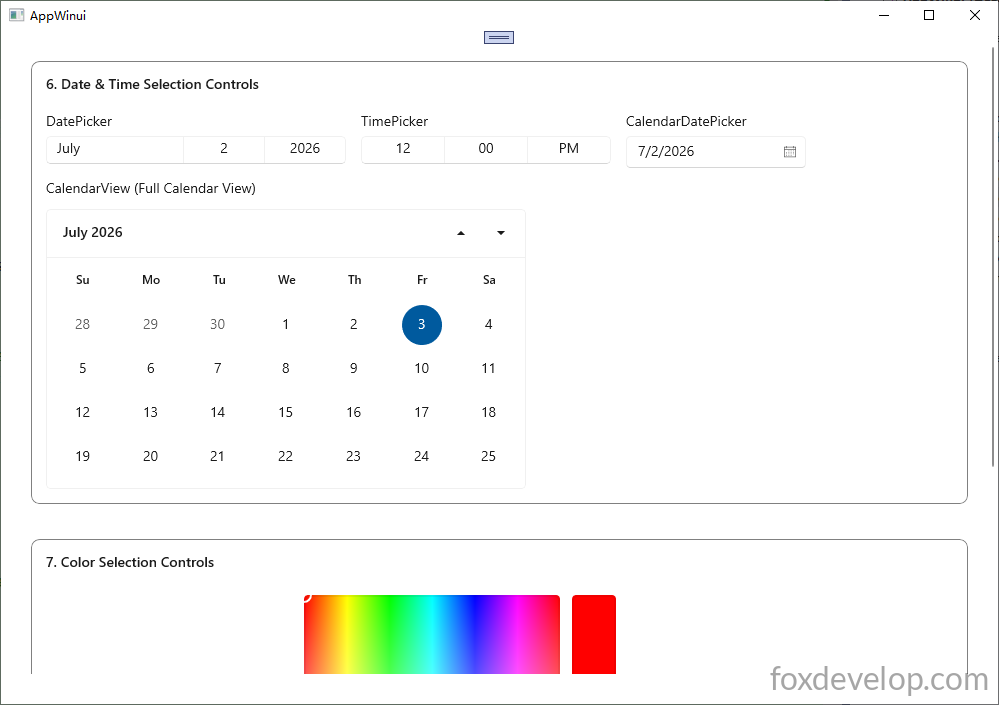
Tout d’abord créez les contrôles dans le XAML et ajoutez l’attribut x:Name pour faciliter l’initialisation et la récupération des valeurs depuis le code backend
<?xml version="1.0" encoding="utf-8"?>
<Window
x:Class="AppWinui.MainWindow"
xmlns="http://schemas.microsoft.com/winfx/2006/xaml/presentation"
xmlns:x="http://schemas.microsoft.com/winfx/2006/xaml"
xmlns:local="using:AppWinui"
xmlns:d="http://schemas.microsoft.com/expression/blend/2008"
xmlns:mc="http://schemas.openxmlformats.org/markup-compatibility/2006"
mc:Ignorable="d"
Title="AppWinui">
<ScrollViewer Padding="30" VerticalScrollBarVisibility="Auto">
<StackPanel Spacing="35">
<!-- Date & Time Controls Group -->
<Border Padding="14" BorderThickness="1" BorderBrush="Gray" CornerRadius="8">
<StackPanel Spacing="12">
<TextBlock Text="6. Date & Time Selection Controls" FontWeight="SemiBold" FontSize="14" Margin="0,0,0,8"/>
<StackPanel Orientation="Horizontal" Spacing="15" VerticalAlignment="Top">
<!-- DatePicker -->
<StackPanel Spacing="6">
<TextBlock Text="DatePicker"/>
<DatePicker x:Name="myDatePicker" Width="300"/>
</StackPanel>
<!-- TimePicker -->
<StackPanel Spacing="6">
<TextBlock Text="TimePicker"/>
<TimePicker x:Name="myTimePicker" Width="250"/>
</StackPanel>
<!-- CalendarDatePicker -->
<StackPanel Spacing="6">
<TextBlock Text="CalendarDatePicker"/>
<CalendarDatePicker x:Name="myCdp" Width="180"/>
</StackPanel>
</StackPanel>
<TextBlock Text="CalendarView (Full Calendar View)"/>
<CalendarView Width="480" Height="280">
<!-- Custom CalendarViewDayItem sample -->
<CalendarView.CalendarViewDayItemStyle>
<Style TargetType="CalendarViewDayItem">
<Setter Property="Margin" Value="2"/>
<Setter Property="Height" Value="36"/>
<Setter Property="Width" Value="36"/>
</Style>
</CalendarView.CalendarViewDayItemStyle>
</CalendarView>
</StackPanel>
</Border>
<!-- Color Picker Controls Group -->
<Border Padding="14" BorderThickness="1" BorderBrush="Gray" CornerRadius="8">
<StackPanel Spacing="12">
<TextBlock Text="7. Color Selection Controls" FontWeight="SemiBold" FontSize="14" Margin="0,0,0,8"/>
<!-- Full ColorPicker (built-in ColorSpectrum + ColorSlider internally) -->
<ColorPicker x:Name="myColorPicker" Width="420" Height="320"/>
</StackPanel>
</Border>
<Button Content="Get Value" Click="Button_Click"/>
</StackPanel>
</ScrollViewer>
</Window>
Langage du code : HTML, XML (xml)Ajoutez un bouton avec l’attribut Click= »Button_Click », appuyez sur F12 pour générer le gestionnaire d’événement de clic
Définir et Récupérer des Valeurs
Définissez les valeurs par défaut dans le constructeur du fichier CPP, récupérez les valeurs des contrôles dans l’événement de clic du bouton
#include "pch.h"
#include "MainWindow.xaml.h"
#if __has_include("MainWindow.g.cpp")
#include "MainWindow.g.cpp"
#endif

#include <winrt/Windows.Foundation.h>
#include <winrt/Windows.Globalization.h>

#include <winrt/Windows.UI.h> //Windows::UI::Colors


using namespace winrt;
using namespace Windows::Globalization;
using namespace Windows::Foundation;
using namespace Microsoft::UI::Xaml::Controls;


// To learn more about WinUI, the WinUI project structure,
// and more about our project templates, see: http://aka.ms/winui-project-info.

namespace winrt::AppWinui::implementation
{
    int32_t MainWindow::MyProperty()
    {
        throw hresult_not_implemented();
    }

    void MainWindow::MyProperty(int32_t /* value */)
    {
        throw hresult_not_implemented();
    }

    MainWindow::MainWindow()
    {
        InitializeComponent();

        //set
        Windows::Globalization::Calendar cal;
        // Subtract one day to get yesterday
        cal.AddDays(-1);

        // Assign to DatePicker
        myDatePicker().SelectedDate(cal.GetDateTime());

        Windows::Foundation::TimeSpan noonTime = std::chrono::hours(12) + std::chrono::minutes(0);
        myTimePicker().SelectedTime(noonTime);

        myCdp().Date(cal.GetDateTime());

        myColorPicker().Color(Windows::UI::Colors::Red());

    }

}


void winrt::AppWinui::implementation::MainWindow::Button_Click(winrt::Windows::Foundation::IInspectable const& sender, winrt::Microsoft::UI::Xaml::RoutedEventArgs const& e)
{
    // 1. DatePicker
    winrt::Windows::Foundation::IReference<winrt::Windows::Foundation::DateTime> dateRef = myDatePicker().SelectedDate();
    if (dateRef != nullptr)
    {
        auto dt = dateRef.Value();
        // dt est un DateTime pour traitement ultérieur
    }


    // 2. TimePicker
    auto timeRef = myTimePicker().SelectedTime();


    // 3. CalendarDatePicker
    auto cdpRef = myCdp().Date();


    // 4. ColorPicker
    Windows::UI::Color color = myColorPicker().Color();
    std::wstring colorLog = L"ColorPicker R=" + std::to_wstring(color.R)
        + L" G=" + std::to_wstring(color.G) + L" B=" + std::to_wstring(color.B) + L"\n";

    OutputDebugStringW(colorLog.c_str());
}
Langage du code : C++ (cpp)
Guide des contrôles WinUI 3 C++ — Contrôles de sélection de date et de couleur