消息框是一种有颜色的文本框。可以显示不同类型的颜色,用来表示成功,警告,或者错误等等信息。消息显示后可以关闭,可以在后台设置消息的显示和关闭。
首先在xaml中添加三个InfoBar
    <StackPanel Spacing="10">
        <TextBlock Text="InfoBar Message Bar Demo:" FontSize="16"/>
        <InfoBar x:Name="InfoSuccess" Severity="Success" Title="Success" Message="Operation completed successfully." IsOpen="False"/>
        <InfoBar x:Name="InfoWarning" Severity="Warning" Title="Warning" Message="Unsaved changes detected." IsOpen="False"/>
        <InfoBar x:Name="InfoError" Severity="Error" Title="Error" Message="Failed to load file, please retry." IsOpen="False"/>
        <StackPanel Orientation="Horizontal" Spacing="10">
            <Button Content="Show Success Info" Click="BtnShowInfoSuccess_Click"/>
            <Button Content="Show Warning Info" Click="BtnShowInfoWarning_Click"/>
            <Button Content="Show Error Info" Click="BtnShowInfoError_Click"/>
        </StackPanel>
    </StackPanel>Code language: HTML, XML (xml)
然再添加三个按钮,按钮增加点击事件,在事件里面,设置消息框的显示和关闭。
void winrt::AppWinui::implementation::MainWindow::BtnShowInfoSuccess_Click(
winrt::Windows::Foundation::IInspectable const& sender, winrt::Microsoft::UI::Xaml::RoutedEventArgs const& e)
{
    InfoSuccess().IsOpen(true);
    InfoWarning().IsOpen(false);
    InfoError().IsOpen(false);
}

void winrt::AppWinui::implementation::MainWindow::BtnShowInfoWarning_Click(
winrt::Windows::Foundation::IInspectable const& sender, winrt::Microsoft::UI::Xaml::RoutedEventArgs const& e)
{
    InfoSuccess().IsOpen(false);
    InfoWarning().IsOpen(true);
    InfoError().IsOpen(false);
}

void winrt::AppWinui::implementation::MainWindow::BtnShowInfoError_Click(
winrt::Windows::Foundation::IInspectable const& sender, winrt::Microsoft::UI::Xaml::RoutedEventArgs const& e)
{
    InfoSuccess().IsOpen(false);
    InfoWarning().IsOpen(false);
    InfoError().IsOpen(true);
}
Code language: C++ (cpp)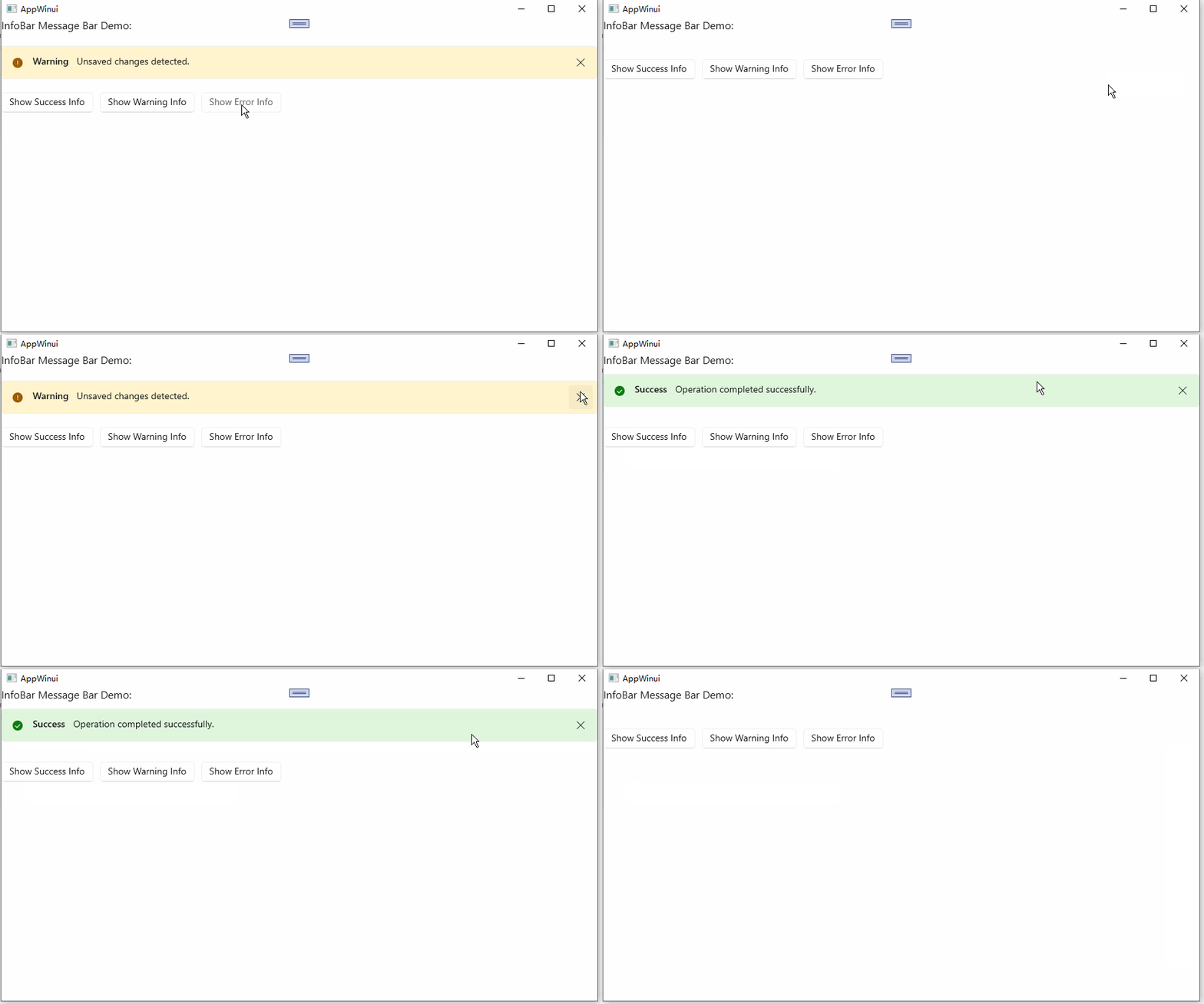
Previous: WinUI 3 C++ 控件篇-悬浮弹窗(Popup Notification)