An info bar is a colored text box control. It displays different color styles to indicate success, warning, error and other types of messages. The info bar can be closed after being shown, and its display state can be controlled programmatically in backend code.
First add three InfoBar controls in XAML
    <StackPanel Spacing="10">
        <TextBlock Text="InfoBar Message Bar Demo:" FontSize="16"/>
        <InfoBar x:Name="InfoSuccess" Severity="Success" Title="Success" Message="Operation completed successfully." IsOpen="False"/>
        <InfoBar x:Name="InfoWarning" Severity="Warning" Title="Warning" Message="Unsaved changes detected." IsOpen="False"/>
        <InfoBar x:Name="InfoError" Severity="Error" Title="Error" Message="Failed to load file, please retry." IsOpen="False"/>
        <StackPanel Orientation="Horizontal" Spacing="10">
            <Button Content="Show Success Info" Click="BtnShowInfoSuccess_Click"/>
            <Button Content="Show Warning Info" Click="BtnShowInfoWarning_Click"/>
            <Button Content="Show Error Info" Click="BtnShowInfoError_Click"/>
        </StackPanel>
    </StackPanel>Code language: HTML, XML (xml)
Then add three buttons and bind click events. Toggle the visibility state of each info bar inside the event handlers.
void winrt::AppWinui::implementation::MainWindow::BtnShowInfoSuccess_Click(
winrt::Windows::Foundation::IInspectable const& sender, winrt::Microsoft::UI::Xaml::RoutedEventArgs const& e)
{
    InfoSuccess().IsOpen(true);
    InfoWarning().IsOpen(false);
    InfoError().IsOpen(false);
}

void winrt::AppWinui::implementation::MainWindow::BtnShowInfoWarning_Click(
winrt::Windows::Foundation::IInspectable const& sender, winrt::Microsoft::UI::Xaml::RoutedEventArgs const& e)
{
    InfoSuccess().IsOpen(false);
    InfoWarning().IsOpen(true);
    InfoError().IsOpen(false);
}

void winrt::AppWinui::implementation::MainWindow::BtnShowInfoError_Click(
winrt::Windows::Foundation::IInspectable const& sender, winrt::Microsoft::UI::Xaml::RoutedEventArgs const& e)
{
    InfoSuccess().IsOpen(false);
    InfoWarning().IsOpen(false);
    InfoError().IsOpen(true);
}
Code language: C++ (cpp)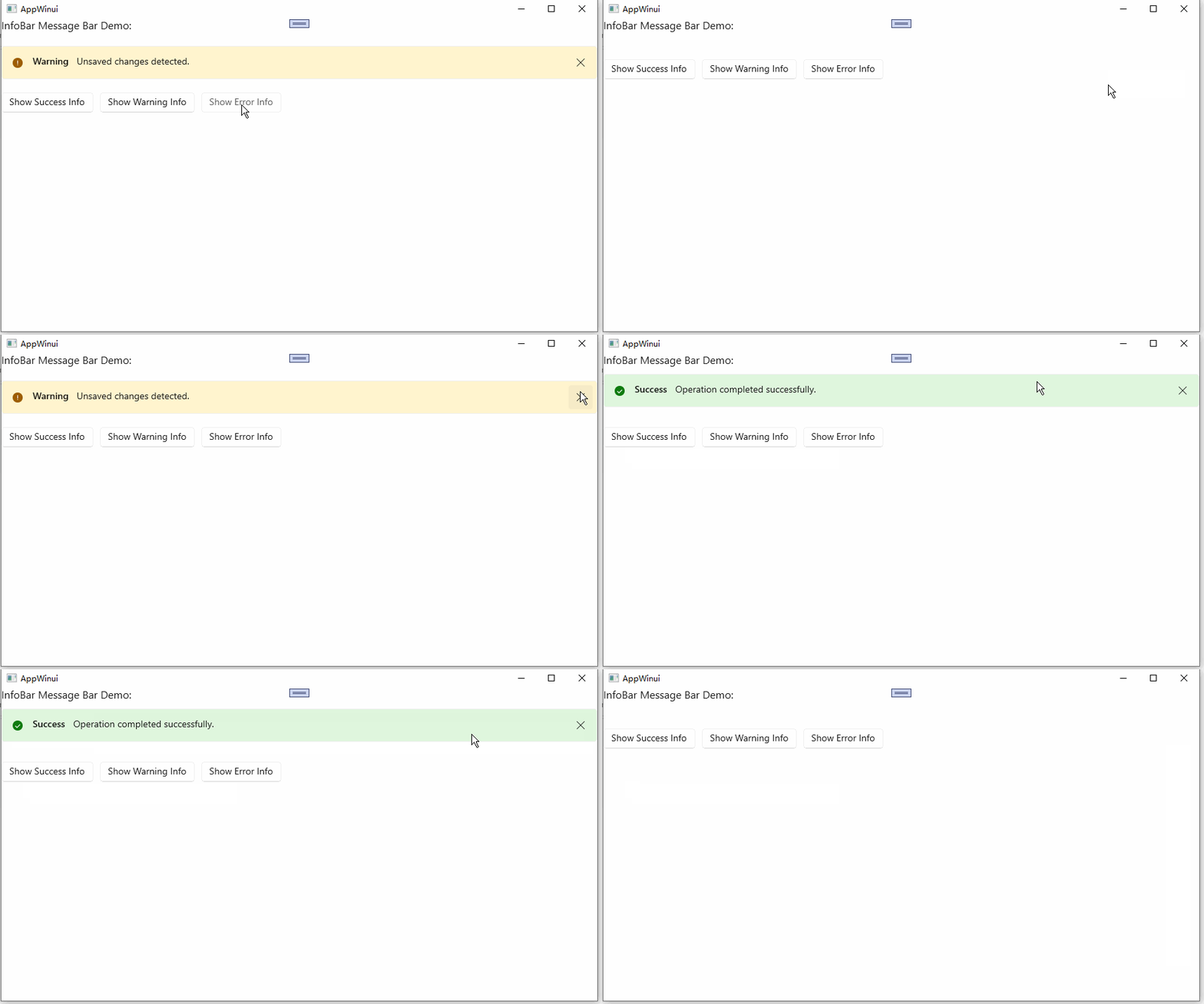
WinUI 3 C++ Controls Guide – InfoBar Message Bar