After readers upgrade VS 2022 to version 17.9.1 or newer, newly created WinUI 3 C++ projects come with a default sample containing a button. Clicking the button triggers backend logic execution.
Let’s create a new project

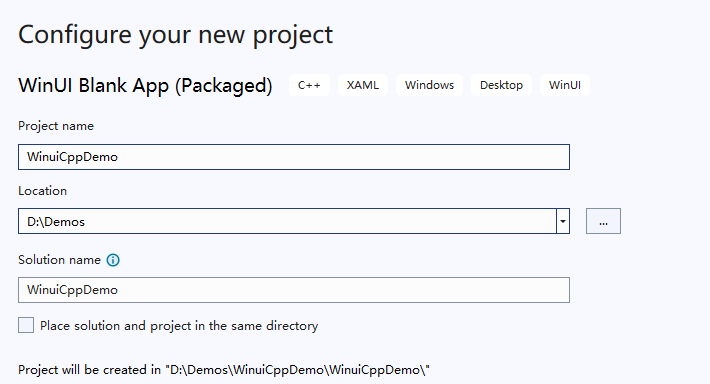
In the previous lesson, we covered all project files and their purposes. In this section, we will create a blank window, add a button to it, and implement logic for button clicks.
As mentioned earlier, our entry class is App here
    void App::OnLaunched([[maybe_unused]] LaunchActivatedEventArgs const& e)
    {
        window = make<MainWindow>();
        window.Activate();
    }Code language: C++ (cpp)
This code instantiates the main window, which is the primary window users see when launching the app. Below is our main window, followed by a breakdown of its four constituent files.
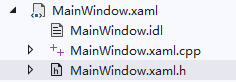
Window
MainWindow.xaml (UI Definition File)
A pure XML markup language dedicated to UI layout. It only handles visual presentation and contains no business logic.
You can declare layout panels and various window controls such as Buttons and TextBoxes here. This UI markup format originated with WPF and is fundamentally XML. It requires paired identically named .h and .cpp files to handle backend event logic.
The official default template contains an empty XAML file with zero pre-defined controls.
<?xml version="1.0" encoding="utf-8"?>
<Window
    x:Class="WinuiCppDemo.MainWindow"
    xmlns="http://schemas.microsoft.com/winfx/2006/xaml/presentation"
    xmlns:x="http://schemas.microsoft.com/winfx/2006/xaml"
    xmlns:local="using:WinuiCppDemo"
    xmlns:d="http://schemas.microsoft.com/expression/blend/2008"
    xmlns:mc="http://schemas.openxmlformats.org/markup-compatibility/2006"
    mc:Ignorable="d"
    Title="WinuiCppDemo">

    <Grid>

    </Grid>
</Window>Code language: YAML (yaml)
MainWindow.idl
Interface definition file, the core exclusive to C++/WinRT
IDL stands for Interface Definition Language. It defines APIs, properties and events exposed by the window, acting as the bridge for cross-language interoperability in C++/WinRT.
- Declares public class members for windows: custom properties, custom events, invocable methods
- The compiler auto-generates standard WinRT ABI interface code from IDL, enabling C++, C# and JS to invoke the window
- XAML data binding and custom controls rely on IDL-declared properties to function correctly
Why is .idl mandatory for WinUI 3 C++/WinRT?
Because WinRT implements a cross-language binary ABI standard.
Windows Runtime (WinRT) is not merely a C++ library; it is a universal cross-language binary interface specification. C++, C#, Python and JS can all call the same WinRT components via unified interface descriptions—direct C++ header sharing is not supported.
C++ headers are only readable by C++ compilers and unintelligible to C#/JS. IDL is a neutral interface language that compiles into ABI glue code interpretable by all programming languages.
Below is the content of the IDL file from our sample project
namespace WinuiCppDemo
{
    [default_interface]
    runtimeclass MainWindow : Microsoft.UI.Xaml.Window
    {
        MainWindow();
        Int32 MyProperty;
    }
}
As established, IDL is a descriptive language. This IDL file starts with the namespace WinuiCppDemo followed by the [default_interface] attribute.
This attribute marks the runtimeclass with its primary default interface and is a required standard for writing windows/custom controls in C++/WinRT.
The MIDL compiler auto-generates a pure virtual IMainWindow interface containing all class members: constructors, properties and methods.
[default_interface] designates IMainWindow as the class’s primary externally exposed ABI interface.
MainWindow(); inside braces declares the parameterless constructor, which must be explicitly defined. The XAML engine invokes this default constructor when instantiating windows.
It corresponds to the constructor implementation within .xaml.h.
Int32 MyProperty;
This declares a WinRT dependency property (bindable property), showcasing IDL’s core value:
Int32: Standard WinRT primitive type (equivalent to C++ int32_t);
MyProperty: Automatically generates a complete property system including:
- Getter:
int32_t MyProperty(); - Setter:
void MyProperty(int32_t value); - Property changed event:
MyPropertyChanged(triggers automatically on value edits, enabling XAMLx:Bindto refresh UI automatically)
Only members declared inside IDL support {x:Bind MyProperty} binding in XAML. If you only declare a regular member variable inside .h, XAML cannot recognize it and binding throws errors immediately.
Right-clicking an IDL file lets you compile it independently via midl.exe. This tool generates metadata files for C# consumption and C++ interface headers.
Simply put, IDL generates interfaces to enable cross-language calls and supplies metadata required for XAML data binding. WinUI 3 C# projects omit IDL because C# natively supports reflection and metadata as a managed language. Unmanaged C++ lacks built-in reflection and metadata support.
Member variables defined solely inside .h remain invisible to the XAML engine;
Only declaring Int32 MyProperty; inside IDL prompts the compiler to generate:
- Property Get/Set interfaces
MyPropertyChangedproperty change notification event- Metadata validating static XAML bindings
IDL is mandatory for all XAML usage even if your project uses C++ exclusively with zero cross-language interaction with C#/JS.
WinRT was designed around a unified ABI standard enabling mutual component invocation between C++ / C# / JS / Python:
IDL is a language-agnostic descriptive format. Compilers for all languages can read the .winmd metadata output from IDL to parse classes, properties and methods;
Right-click the IDL file to compile it
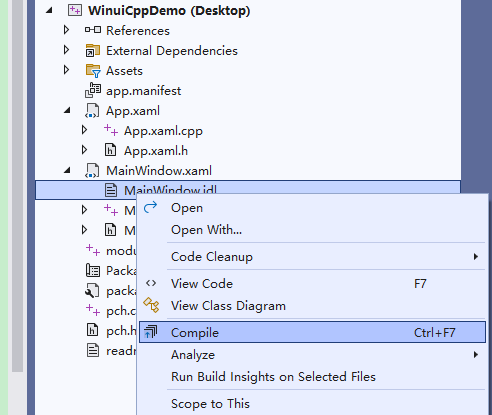
The core purpose of IDL is supplying metadata required for XAML UI binding, with cross-language interoperability as an additional benefit.
IDL compilation outputs xxxx.g.h and xxxx.g.cpp files stored within the project’s Generated Files directory.
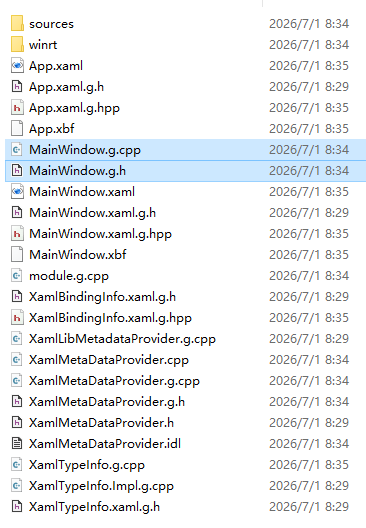
Generated Files stores auto-generated source code
- Auto-generated files produced by midl.exe, cppwinrt.exe and the XAML compiler during project builds.
- Never manually edit files here—full overwrites occur on recompilation
- VS project configurations automatically add this directory to header search paths, enabling #include “MainWindow.g.h” resolution
MainWindow.xaml.h
Standard C++ header file housing the declaration of the MainWindow class.
Automatically imports base interfaces generated from IDL;
Class fields, private variables and forward declarations reside here, identical to standard .h headers in vanilla C++ development.
Declares variables and functions without implementation logic; other classes may reference it via #include directives.
// Header guard: Prevents duplicate inclusion and duplicate definition compile errors
#pragma once

// Import auto-generated glue header compiled from MainWindow.idl
// .g.h encapsulates IDL-generated IMainWindow interface, MainWindowT<> CRTP base template, WinRT metadata definitions
// All MyProperty and constructor interfaces declared in IDL reside here
#include "MainWindow.g.h"

// Implementation Namespace: Contains business logic for window classes; custom properties/functions implemented here
namespace winrt::WinuiCppDemo::implementation
{
    // MainWindowT<MainWindow> is a CRTP base template provided by .g.h
    // 1. Automatically inherits IDL-defined IMainWindow interface, enforcing implementation of all IDL-declared members
    // 2. Wraps underlying WinUI window logic, XAML component initialization and ABI interface forwarding
    struct MainWindow : MainWindowT<MainWindow>
    {
        // Default window constructor matching MainWindow(); declared in IDL
        MainWindow()
        {
            // Official specification: Do NOT call InitializeComponent() inside constructors
            // XAML control initialization is deferred automatically by the framework; invoking it here causes lifecycle crashes
            // Reference Microsoft official cppwinrt documentation
            // See https://github.com/microsoft/cppwinrt/tree/master/nuget#initializecomponent
        }

        // Auto-generated property getter matching Int32 MyProperty; declared in IDL
        // Returns int32_t property value consumed by XAML x:Bind
        int32_t MyProperty();
        // Auto-generated property setter matching Int32 MyProperty; declared in IDL
        // Modifies property value and auto-triggers MyPropertyChanged event for XAML UI refresh
        void MyProperty(int32_t value);
    };
}

// Factory Namespace: WinRT object factory responsible for exposing and instantiating MainWindow window objects externally
namespace winrt::WinuiCppDemo::factory_implementation
{
    // Second template parameter of MainWindowT binds the implementation class implementation::MainWindow defined above
    // Purpose: Provides a unified ABI entry point for window instantiation by the XAML engine and external code (C#/other components)
    struct MainWindow : MainWindowT<MainWindow, implementation::MainWindow>
    {
    };
}Code language: C++ (cpp)
MainWindow.xaml.cpp
C++ implementation file where all business logic code resides.
- Implements all functions declared within MainWindow.xaml.h
- Control event –>
- Control event handlers (button clicks, window load events, input responses)
- Data processing, networking, file I/O and business calculations
- UI manipulation, bound property edits, dialog popups, page navigation and other interactive logic
// Import precompiled header containing shared project headers and core WinRT projections to accelerate compilation
#include "pch.h"
// Import header for current window class containing MainWindow declaration
#include "MainWindow.xaml.h"

// Conditional compilation: Detect presence of auto-generated IDL glue file MainWindow.g.cpp
// .g.cpp generated by midl+cppwinrt tools from .idl, encapsulating property change events and low-level ABI forwarding
// Included when present to enable MyPropertyChanged notifications and functional XAML runtime binding
#if __has_include("MainWindow.g.cpp")
#include "MainWindow.g.cpp"
#endif

// Global namespace alias eliminating repeated winrt:: prefixes in subsequent code
using namespace winrt;
// Namespace for core WinUI Xaml APIs: controls, windows, routed events
using namespace Microsoft::UI::Xaml;

// Official documentation reference for WinUI project templates and architecture
// To learn more about WinUI, the WinUI project structure,
// and more about our project templates, see: http://aka.ms/winui-project-info.

// Implementation namespace housing MainWindow business logic matching header declarations
namespace winrt::WinuiCppDemo::implementation
{
    // Property getter implementation for IDL-declared MyProperty
    // Returns Int32 value read by XAML x:Bind bindings
    int32_t MainWindow::MyProperty()
    {
        // Default template throws unimplemented exception; replace with real storage variable return logic
        throw hresult_not_implemented();
    }

    // Property setter implementation for IDL-declared MyProperty
    // value: New target value to assign; underlying runtime auto-raises MyPropertyChanged to refresh bound UI
    void MainWindow::MyProperty(int32_t /* value */)
    {
        // Default template throws unimplemented exception; add variable assignment logic here
        throw hresult_not_implemented();
    }
}Code language: PHP (php)
Next, we will add a button to this main window. Clicking the button increments the MyProperty value by 1 and opens a dialog displaying the updated MyProperty value.
First, insert a Button control into the XAML markup
    <Grid>
        <Button Content="Click Me" HorizontalAlignment="Center" VerticalAlignment="Center" Click="OnButtonClick"/>
    </Grid>Code language: C++ (cpp)
The button displays text “Click Me” and binds the click event handler OnButtonClick.
Place your cursor over OnButtonClick and press F12; VS auto-generates the corresponding event handler function skeleton.
New definitions will appear in MainWindow.xaml.h and MainWindow.xaml.cpp
void OnButtonClick(winrt::Windows::Foundation::IInspectable const& sender, winrt::Microsoft::UI::Xaml::RoutedEventArgs const& e);Code language: C++ (cpp)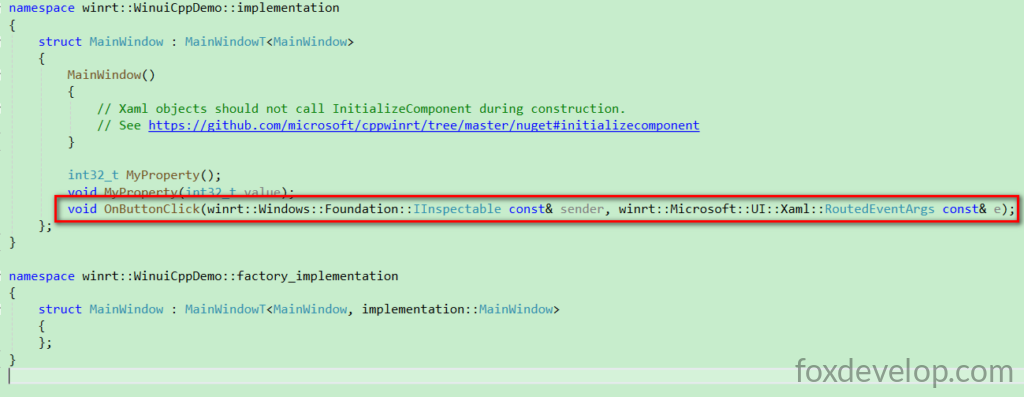
A new function declaration is added.
Its implementation resides within MainWindow.xaml.cpp
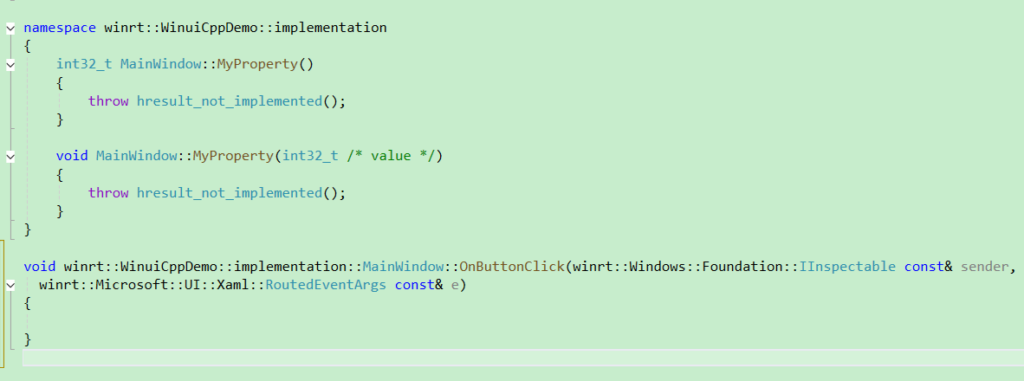
Now modify the C++ source code
This lesson concludes here. In the next session we will implement this button click functionality and explore property binding in detail.