1. Dual Forms
We will implement a popup feature with Form1 (main form) + Form2 (popup window)
1. Operation Steps
- Create a new project, drag Button1 onto Form1, set
Caption = Open Form2, and generate theOnClickevent (you can double-click the button directly in the form designer to quickly create the click event); - Use the top menu
File → New Formto create Form2; - Place Button1 on Form2, set
Caption = Close, and generate itsOnClickevent; - Shortcuts for switching forms:
Shift+F12open form list /F12toggle design/code view; - Reference Unit2 in Unit1: add
Unit2insideinterface uses.
Unit1 (Main Form)
Two key points to note: Unit2; // Import Unit2
The second point is inside the click handler: open Form2 as a modal dialog with Form2.ShowModal; // Pop up Form2 modally
unit Unit1;

{$mode objfpc}{$H+}

interface

uses
  Classes, SysUtils, Forms, Controls, Graphics, Dialogs, StdCtrls, Unit2; // Import Unit2

type

  { TForm1 }

  TForm1 = class(TForm)
    Button1: TButton;
    procedure Button1Click(Sender: TObject);
  private

  public

  end;

var
  Form1: TForm1;

implementation

{$R *.lfm}

procedure TForm1.Button1Click(Sender: TObject);
begin
  Form2.ShowModal; // Pop up Form2 modally
end;

end.
Unit2 (Child Form)
Add the second form to your project
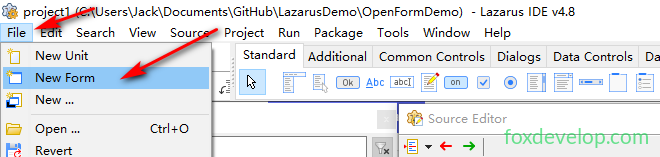
After creation, an extra tab will appear in the code editor
One tab holds the main form source code, the other stores Form2’s backend code
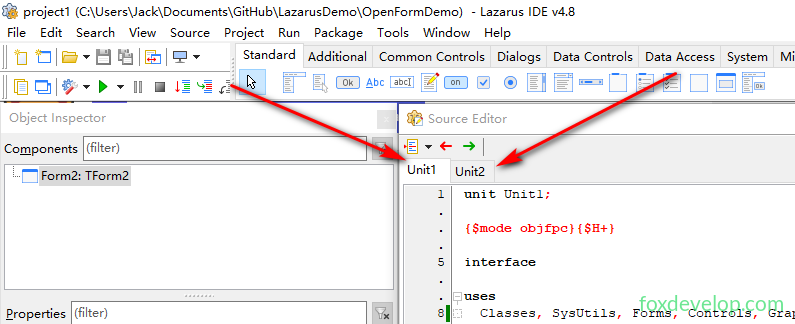
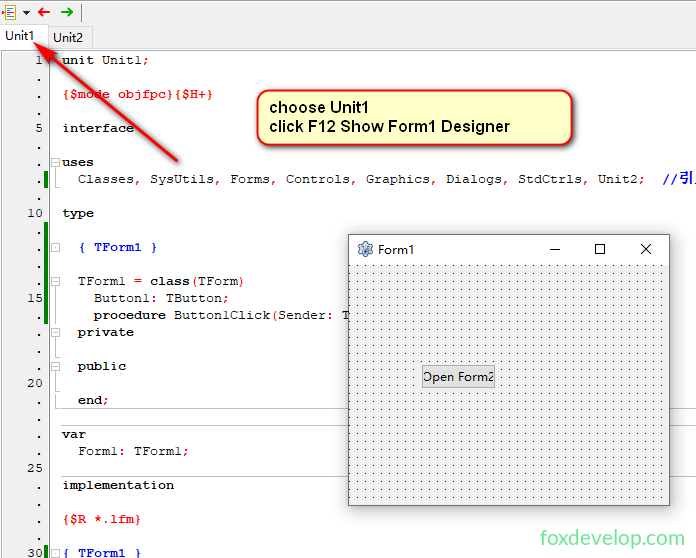
To edit Form2, select Unit2 and press F12 to open its designer window
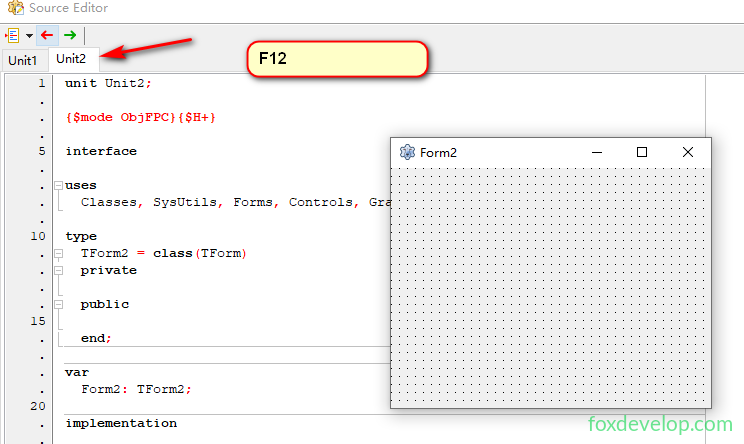
Add a button, set its caption to Close, and implement the close logic as covered in previous lessons. You may complete this part on your own.
unit Unit2;

{$mode objfpc}{$H+}

interface

uses
  Classes, SysUtils, Forms, Controls, Graphics, Dialogs, StdCtrls;

type

  { TForm2 }

  TForm2 = class(TForm)
    Button1: TButton;
    procedure Button1Click(Sender: TObject);
  private

  public

  end;

var
  Form2: TForm2;

implementation

{$R *.lfm}

procedure TForm2.Button1Click(Sender: TObject);
begin
  Close; // Close the current Form2
end;

end.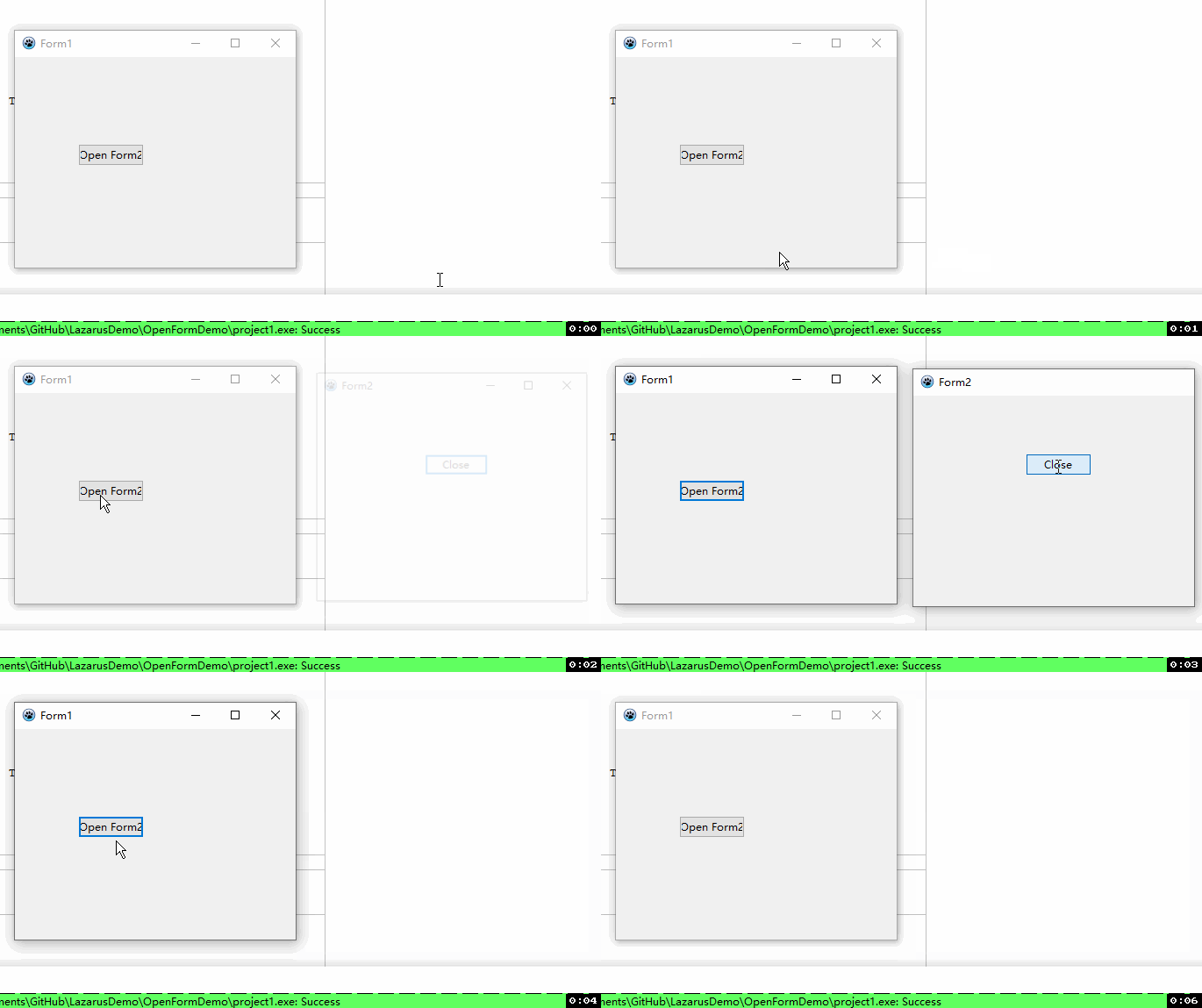
2. Core Differences Between Show and ShowModal (Comparison Demo)
UI Modification
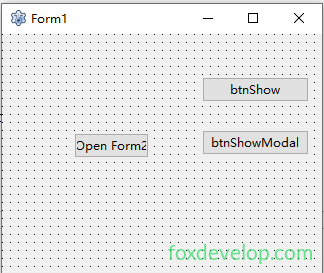
Add two buttons on Form1:
- btnShow: Caption = Show
- btnShowModal: Caption = ShowModal
// Non-modal Show
procedure TForm1.btnShowClick(Sender: TObject);
begin
  Form2.Show;
  ShowMessage('Form2 opened, main form remains interactive');
end;

// Modal ShowModal
procedure TForm1.btnShowModalClick(Sender: TObject);
begin
  Form2.ShowModal;
  ShowMessage('This prompt only appears after closing Form2');
end;Code language: JavaScript (javascript)
Difference Breakdown
Show(Non-modal)
- Code execution continues immediately after opening the child form;
- The main form can be dragged and other buttons clicked freely;
- Equivalent to
Form2.Visible := True;and auto-brings the window to front.
ShowModal(Modal Popup)
- Code pauses until the child form is closed;
- The main form is locked and cannot be operated;
- It is a function that returns
ModalResultto detect how the window was closed.
In short: A modal window blocks interaction with the main form until closed, while a non-modal window lets you operate both windows simultaneously.
3. Cross-Form Calls: Resolve Circular Reference Errors
Requirement: Form1 opens Form2, Form2 opens Form1
Mutual references inside interface uses trigger circular unit errors. Solution: Move references to the implementation section
Unit1
unit Unit1;

interface
uses Forms,StdCtrls;

type
  TForm1=class(TForm)
    Button1:TButton;
    procedure Button1Click(Sender:TObject);
  end;
var Form1:TForm1;

implementation
uses Unit2; // Place reference here
{$R *.lfm}

procedure TForm1.Button1Click(Sender:TObject);
begin
  Form2.Show;
end;
end.
Unit2
unit Unit2;

interface
uses Forms,StdCtrls;

type
  TForm2=class(TForm)
    Button1:TButton;
    procedure Button1Click(Sender:TObject);
  end;
var Form2:TForm2;

implementation
uses Unit1; // Mutual references go in implementation
{$R *.lfm}

procedure TForm2.Button1Click(Sender:TObject);
begin
  Form1.Show;
end;
end.
4. Pass Values Between Forms (Public Member Variable Example)
Function: Increment a counter each time the main form opens the child form; the child form can display the open count
Define Public Integer Variable in Unit2
type
  TForm2 = class(TForm)
    Button1: TButton;
    procedure Button1Click(Sender: TObject);
  private
  public
    Count: Integer; // Public variable accessible from Unit1
  end;
Increment Counter on Unit1 Button Click
procedure TForm1.Button1Click(Sender: TObject);
begin
  Inc(Form2.Count); // Increase counter by 1
  Form2.ShowModal;
end;Code language: JavaScript (javascript)
Display Open Count Popup in Unit2
procedure TForm2.Button1Click(Sender: TObject);
begin
  ShowMessage('This form has been opened '+IntToStr(Count)+' times');
end;Code language: JavaScript (javascript)
Coding standard recommendation: Minimize use of global/public variables; prefer Property parameters for value passing.
5. Dynamically Create Forms
No reliance on auto-generated global form variables from the project
Method 1: Dynamic Creation of Pre-designed Form2
- Open
Project.lprand deleteApplication.CreateForm(TForm2, Form2); - Form1 button code:
procedure TForm1.Button1Click(Sender: TObject);
var
  frm2: TForm2;
begin
  frm2 := TForm2.Create(nil); // Manual instance creation
  frm2.ShowModal;
  FreeAndNil(frm2); // Release memory to avoid leaks
end;Code language: JavaScript (javascript)
Method 2: Fully Code-generated Form (No Pre-design Required)
Click the button to generate a brand new form with a built-in close button
unit Unit1;

interface

uses Classes, SysUtils, Forms, Controls, Graphics, Dialogs, StdCtrls;

type
  TForm1 = class(TForm)
    Button1: TButton;
    procedure Button1Click(Sender: TObject);
  private
    procedure DynamicBtnClick(Sender: TObject); // Custom dynamic button click handler
  public
  end;

var Form1: TForm1;

implementation
{$R *.lfm}

procedure TForm1.DynamicBtnClick(Sender: TObject);
begin
  ShowMessage('Closing dynamic form now');
  TForm(TButton(Sender).Parent).Close;
end;

procedure TForm1.Button1Click(Sender: TObject);
var
  MyForm: TForm;
  MyBtn: TButton;
begin
  MyForm := TForm.Create(nil);
  MyForm.SetBounds(100,100,220,150);
  MyForm.Caption := 'Dynamically Generated Form';

  // Create button owned by MyForm; auto-destroyed when form closes
  MyBtn := TButton.Create(MyForm);
  MyBtn.SetBounds(10,10,200,30);
  MyBtn.Caption := 'Close Form';
  MyBtn.Parent := MyForm;
  MyBtn.OnClick := @DynamicBtnClick;

  MyForm.ShowModal;
  FreeAndNil(MyForm);
end;
end.
Choose Debug Information format Prompt Appears
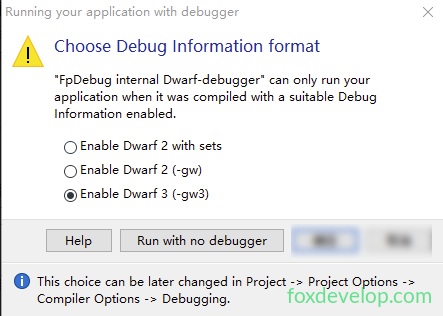
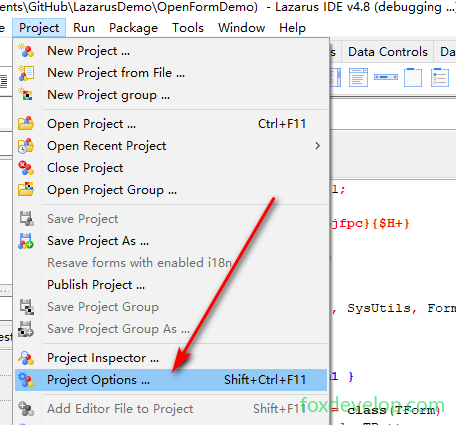
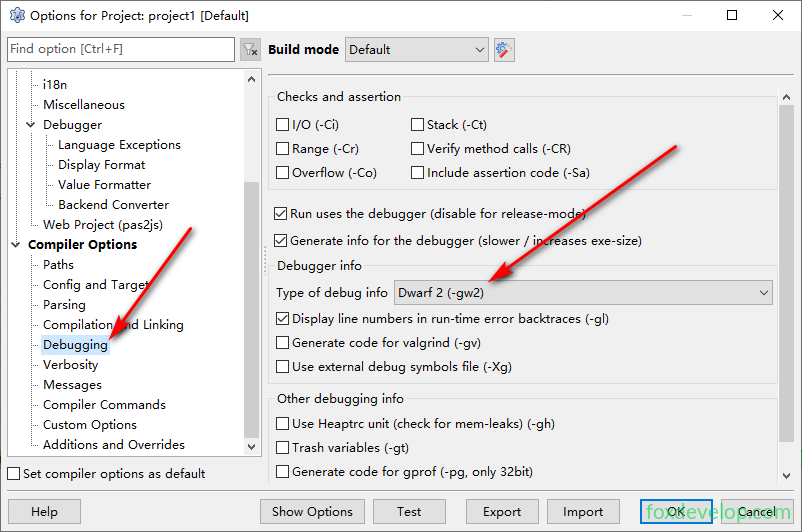
Simply configure the debug format to resolve this.
Multi-form development in Lazarus