Com o NativePHP, você não precisa perder tempo configurando o Xcode ou o Android Studio. Basta instalar o aplicativo Jump em seu dispositivo iOS ou Android.
Laravel – Uma estrutura moderna para desenvolvedores
Execute os comandos abaixo para criar um novo projeto Laravel
laravel new my-app --using=nativephp/mobile-starter

cd my-app

php artisan native:jumpCode language: JavaScript (javascript)
Observação: O Laravel deve estar instalado antes de executar esses comandos.
Como instalar o Laravel?
O que é exatamente o Laravel?
O Laravel é um framework web em PHP popular e fácil de usar. Ele conta com ferramentas integradas para login e cadastro de usuários, upload de arquivos, envio de e-mails, operações com banco de dados e validação de formulários, acelerando bastante o desenvolvimento em PHP.
Como o Laravel funciona sobre o PHP, configure primeiro o ambiente PHP. Além disso, siga os requisitos de versão: versões antigas do PHP não são compatíveis com as versões mais recentes do Laravel.
PHP 8.1 ou superior (versões recomendadas: 8.2 a 8.4)
Instalando o PHP
Consulte o guia dedicado para instalar o PHP:
Instalando o ambiente PHP – FoxDevelop
Instalando o Composer
O Composer é o gerenciador de pacotes do PHP, semelhante ao NuGet para .NET e ao Maven/Gradle para Java.
Veja o tutorial separado para os passos de instalação.
Instalando o Composer, gerenciador de pacotes PHP – FoxDevelop
Após instalar o PHP e o Composer, você pode prosseguir com a instalação do Laravel.
Abra o prompt de comando e verifique primeiramente as versões dos programas.
Requisito de versão do PHP: 8.1 ou superior (recomendado 8.2 / 8.5). Verifique com o comando php -v.
Requisito de versão do Composer: 2.5 ou superior. Verifique com o comando composer -V.
Em seguida, verifique as extensões obrigatórias do PHP:
php -m | findstr mbstring
php -m | findstr openssl
php -m | findstr pdo
Usuários na China podem mudar para o espelho da Alibaba para corrigir lentidão no download. Cole o comando abaixo no prompt de comando:
composer config -g repo.packagist composer https://mirrors.aliyun.com/composer/Code language: JavaScript (javascript)Agora inicie a instalação com o comando create-project:
composer create-project laravel/laravel myproject
cd myproject
Ocorreu um erro por falta da extensão zip. Se a instalação for bem-sucedida, pule as etapas de solução de problemas abaixo e acesse diretamente aqui.
A mensagem de erro é a seguinte:
C:\Users\xxxx>composer create-project laravel/laravel myproject
Creating a "laravel/laravel" project at "./myproject"
Installing laravel/laravel (v12.10.0)
    Failed to download laravel/laravel from dist: The zip extension and unzip/7z commands are both missing, skipping.
The php.ini used by your command-line PHP is: D:\php8.2\php.ini
    Now trying to download from source
  - Syncing laravel/laravel (v12.10.0) into cacheCode language: JavaScript (javascript)
Execute o comando de verificação para confirmar que a extensão zip está desativada:
php -m | findstr zipSe não houver retorno, a extensão zip ainda não está ativada.
Editando o php.ini para habilitar a extensão zip
Caminho do arquivo de configuração do PHP: D:\php8.2\php.ini
Localize a linha ;extension=zip e remova o ponto e vírgula no início.
Execute novamente php -m | findstr zip. O retorno de conteúdo indica que a extensão foi ativada com sucesso.
Depois, tente instalar novamente
Execute o comando de instalação mais uma vez:
composer create-project laravel/laravel myprojectA instalação falhou novamente, os logs são apresentados abaixo:
composer create-project laravel/laravel myproject
Creating a "laravel/laravel" project at "./myproject"
Installing laravel/laravel (v12.10.0)
  - Downloading laravel/laravel (v12.10.0)
    Failed downloading laravel/laravel, trying the next URL (404: The "https://mirrors.aliyun.com/composer/dists/laravel/laravel/76396a056d552b8a34077f151775037ac44b431a.zip" file could not be downloaded (HTTP/2 404 ))
  - Downloading laravel/laravel (v12.10.0)
  - Installing laravel/laravel (v12.10.0): Extracting archive
Created project in C:\Users\maiwu\myproject
> @php -r "file_exists('.env') || copy('.env.example', '.env');"
Loading composer repositories with package information
Updating dependencies
Your requirements could not be resolved to an installable set of packages.

  Problem 1
    - Root composer.json requires laravel/tinker ^2.10.1, it is satisfiable by laravel/tinker[v2.10.1, v2.10.2, v2.11.0, v2.11.1] from composer repo (https://repo.packagist.org) but laravel/tinker[2.x-dev] from composer repo (https://mirrors.aliyun.com/composer) has higher repository priority. The packages from the higher priority repository do not match your minimum-stability and are therefore not installable. That repository is canonical so the lower priority repo's packages are not installable. See https://getcomposer.org/repoprio for details and assistance.
  Problem 2
    - Root composer.json requires phpunit/phpunit ^11.5.3, found phpunit/phpunit[11.5.3, ..., 11.5.44] but these were not loaded, because they are affected by security advisories ("PKSA-z3gr-8qht-p93v", "PKSA-z3gr-8qht-p93v"). Go to https://packagist.org/security-advisories/ to find advisory details. To ignore the advisories, add them to the audit "ignore" config. To turn the feature off entirely, you can set "block-insecure" to false in your "audit" config.
  Problem 3
    - Root composer.json requires laravel/sail ^1.41 -> satisfiable by laravel/sail[v1.41.0, ..., v1.46.0].
    - laravel/sail[v1.41.0, ..., v1.46.0] require symfony/yaml ^6.0|^7.0 -> found symfony/yaml[v6.0.0, ..., v6.4.30, v7.0.0, ..., v7.4.1] but these were not loaded, because they are affected by security advisories ("PKSA-v5yj-8nmz-sk2q", "PKSA-ft77-7h5f-p3r6", "PKSA-b14r-zh1d-vdrc", "PKSA-v5yj-8nmz-sk2q", "PKSA-ft77-7h5f-p3r6", "PKSA-b14r-zh1d-vdrc"). Go to https://packagist.org/security-advisories/ to find advisory details. To ignore the advisories, add them to the audit "ignore" config. To turn the feature off entirely, you can set "block-insecure" to false in your "audit" config.
  Problem 4
    - Root composer.json requires laravel/framework ^12.0 -> satisfiable by laravel/framework[v12.1.1, ..., v12.40.0].
    - laravel/framework[v12.1.1, ..., v12.12.0] require league/commonmark ^2.6 -> found league/commonmark[2.6.0] but these were not loaded, because they are affected by security advisories ("PKSA-21fb-n1x5-5nf7", "PKSA-2cx9-ynrq-qdk3", "PKSA-rqc2-tcc6-nc79", "PKSA-21fb-n1x5-5nf7", "PKSA-2cx9-ynrq-qdk3", "PKSA-rqc2-tcc6-nc79"). Go to https://packagist.org/security-advisories/ to find advisory details. To ignore the advisories, add them to the audit "ignore" config. To turn the feature off entirely, you can set "block-insecure" to false in your "audit" config.
    - laravel/framework[v12.13.0, ..., v12.40.0] require league/commonmark ^2.7 -> satisfiable by league/commonmark[2.7.0, ..., 2.8.2] from composer repo (https://repo.packagist.org) but league/commonmark[dev-main, 2.7.x-dev, 2.8.x-dev, 2.9.x-dev (alias of dev-main)] from composer repo (https://mirrors.aliyun.com/composer) has higher repository priority. The packages from the higher priority repository do not match your minimum-stability and are therefore not installable. That repository is canonical so the lower priority repo's packages are not installable. See https://getcomposer.org/repoprio for details and assistance.Code language: PHP (php)
Causa: O espelho Composer da Alibaba está apresentando mau funcionamento.
Primeiro exclua a pasta do projeto com erro e retorne ao repositório oficial:
rmdir /s /q myproject
composer config -g --unset repos.packagist
composer create-project laravel/laravel myproject --no-auditCode language: PHP (php)
Se a instalação continuar falhando, limpe os arquivos residuais novamente:
- Downloading phpunit/php-code-coverage (11.0.12)
  - Downloading phar-io/version (3.2.1)
  - Downloading phar-io/manifest (2.0.4)
  - Downloading myclabs/deep-copy (1.13.4)
  - Downloading phpunit/phpunit (11.5.55)
 110/111 [===========================>]  99%A connection timeout was encountered. If you intend to run Composer without connecting to the internet, run the command again prefixed with COMPOSER_DISABLE_NETWORK=1 to make Composer run in offline mode.
    Failed to download laravel/pint from dist: The "https://codeload.github.com/laravel/pint/legacy.zip/0770e9b7fafd50d4586881d456d6eb41c9247a80" file could not be written to C:\Users\maiwu\myproject/vendor/composer/tmp-60f6b8b4815321558e13bb1ac74423ee.zip: Failed to open stream: Permission denied
    Now trying to download from source
  - Syncing laravel/pint (v1.29.1) into cache
Cloning failed using an ssh key for authentication, enter your GitHub credentials to access private repos
You need to provide a GitHub access token.
Tokens will be stored in plain text in "C:/Users/maiwu/AppData/Roaming/Composer/auth.json" for future use by Composer.
Due to the security risk of tokens being exfiltrated, use tokens with short expiration times and only the minimum permissions necessary.

Carefully consider the following options in order:

1. When you don't use 'vcs'  type 'repositories'  in composer.json and do not need to clone source or download dist files
from private GitHub repositories over HTTPS, use a fine-grained token with read-only access to public information.
Use the following URL to create such a token:
https://github.com/settings/personal-access-tokens/new?name=Composer+on+DESKTOP-1OHC5Q4+2026-05-27+0946

2. When all relevant _private_ GitHub repositories belong to a single user or organisation, use a fine-grained token with
repository "content" read-only permissions. You can start with the following URL, but you may need to change the resource owner
to the right user or organisation. Additionally, you can scope permissions down to apply only to selected repositories.
https://github.com/settings/personal-access-tokens/new?contents=read&name=Composer+on+DESKTOP-1OHC5Q4+2026-05-27+0946

3. A "classic" token grants broad permissions on your behalf to all repositories accessible by you.
This may include write permissions, even though not needed by Composer. Use it only when you need to access
private repositories across multiple organisations at the same time and using directory-specific authentication sources
is not an option. You can generate a classic token here:
https://github.com/settings/tokens/new?scopes=repo&description=Composer+on+DESKTOP-1OHC5Q4+2026-05-27+0946

For additional information, check https://getcomposer.org/doc/articles/authentication-for-private-packages.md#github-oauth
Token (hidden):Code language: PHP (php)
Em seguida, execute o comando de instalação ajustado:
composer create-project laravel/laravel myproject --no-dev --no-auditEsse comando instala o Laravel sem solicitar token do GitHub e ignora dependências desnecessárias:
Os parâmetros –no-dev e –no-audit pulam pacotes como pint e phpunit, que baixam código-fonte do GitHub.
Uma saída similar à abaixo significa que a instalação foi concluída com sucesso:
- Installing league/commonmark (2.8.2): Extracting archive
  - Installing laravel/framework (v12.61.0): Extracting archive
75 package suggestions were added by new dependencies, use `composer suggest` to see details.
Package sebastian/code-unit is abandoned, you should avoid using it. No replacement was suggested.
Package sebastian/code-unit-reverse-lookup is abandoned, you should avoid using it. No replacement was suggested.
Generating optimized autoload files
> Illuminate\Foundation\ComposerScripts::postAutoloadDump
> @php artisan package:discover --ansi

   INFO  Discovering packages.

  laravel/tinker .............................................................................................................................. DONE
  nesbot/carbon ............................................................................................................................... DONE
  nunomaduro/termwind ......................................................................................................................... DONECode language: JavaScript (javascript)
Agora teste o projeto criado. O comando anterior gera a pasta myproject com todos os arquivos de código.
No prompt de comando aberto, execute os dois comandos a seguir:
cd myproject
php artisan serve
O prompt de comando exibirá o seguinte conteúdo:
C:\Users\xxxx>cd myproject
C:\Users\xxxx\myproject>php artisan serve
   INFO  Server running on [http://127.0.0.1:8000].
   Press Ctrl+C to stop the server
Code language: JavaScript (javascript)
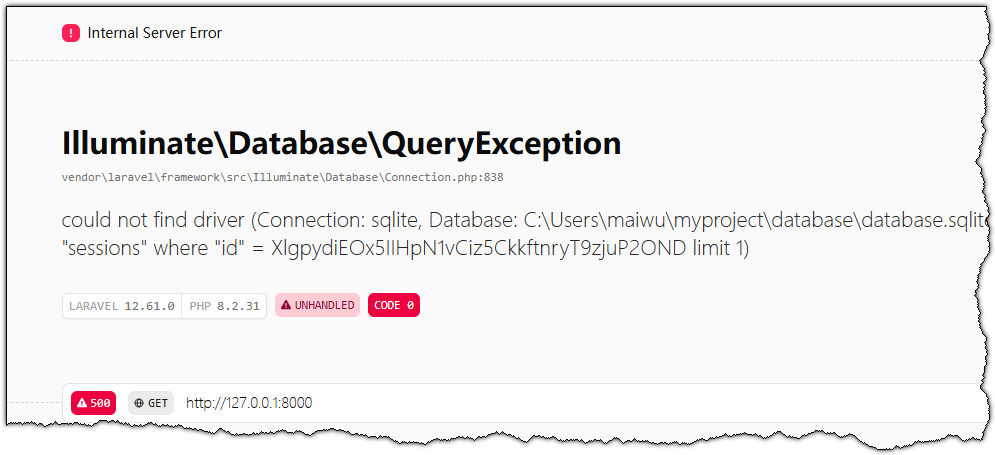
Cole o link http://127.0.0.1:8000 na barra de endereço do navegador para acessar a página inicial padrão do Laravel.