為什麼要先理解並學好這個函式呢?因為我們後續學習 C 語言時,大多場景都會用到它,這個函式的用途是將內容輸出至控制台。
1 printf 函式
前面的範例就已經使用到它
// 呼叫 printf 輸出字串,\n 代表換行
printf("hello, world\n");
Code language: C/AL (cal)
printf() 標準輸出程式庫函式
printf("內容") 就是傳入一個字串做為參數;會把雙引號內的所有字元輸出到控制台;
每行程式敘述結尾必須加上分號 ;,代表該行敘述結束,若遺漏分號會發生編譯錯誤。以下是錯誤訊息範例:
C:\cdemo>gcc hello.c -o hello.exe
hello.c: In function 'main':
hello.c:5:29: error: expected ';' before 'return'
     printf("hello, world\n")
                             ^
                             ;
     return 0;
     ~~~~~~Code language: PHP (php)
如果想要輸出多行文字,可以這樣撰寫:
#include <stdio.h>
main()
{
    printf("第一行文字\n");
    printf("第二行文字\n");
}Code language: PHP (php)
2 字串
被英文半形雙引號 " " 包覆的一連串字元,例如 "hello, world\n"
前面所有範例當中,字串都是做為 printf 的參數,直接將該段文字輸出到控制台
字串不能拆成多行書寫,下方程式碼會直接編譯失敗:
// 錯誤示範:將字串拆分成兩行
printf("hello, world
");
Code language: C/AL (cal)
編譯錯誤回報
C:\cdemo>gcc hello.c -o hello.exe
hello.c: In function 'main':
hello.c:6:11: warning: missing terminating " character
    printf("hello, world
           ^
hello.c:6:11: error: missing terminating " character
    printf("hello, world
           ^~~~~~~~~~~~~
hello.c:7:4: warning: missing terminating " character
    ");
    ^
hello.c:7:4: error: missing terminating " character
    ");
    ^~~
hello.c:8:5: error: expected expression before 'return'
     return 0;
     ^~~~~~
hello.c:8:14: error: expected ';' before '}' token
     return 0;
              ^
              ;
 }
 ~Code language: PHP (php)
3 跳脫字元 \n 換行符號
\n 是 C 語言專用標記,代表換行字元;
printf 不會自動換行,必須手動加上 \n,游標才會跳到下一行;
若沒有加上 \n,所有文字都會顯示在同一行,參考下方範例
#include <stdio.h>

int main()
{
    // 未加\n:兩段文字會擠在同一行輸出
    printf("hello");
    printf("world");

    // 加上\n:輸出後自動換行
    printf("\nhello\n");
    printf("world\n");

    return 0;
}Code language: PHP (php)C:\cdemo>gcc hello.c -o hello.exe
C:\cdemo>hello
helloworld
hello
world
C:\cdemo>Code language: CSS (css)hello 和 world 會緊貼著輸出在同一行。所以使用 printf 輸出內容時,若需要換行記得加上 \n,一個 \n 等同按下一次 Enter 鍵;連續兩個 \n 就會輸出兩次換行,兩段文字中間會多出一個空白行,效果就像在記事本連按兩次 Enter。
#include <stdio.h>

int main()
{
    printf("one\n\n");
    printf("two");
    return 0;
}Code language: PHP (php)
執行結果
C:\cdemo>gcc hello.c -o hello.exe

C:\cdemo>hello
one

two
C:\cdemo>Code language: CSS (css)
分段輸出、透過多個 printf 拼接成同一行
參考範例如下
#include <stdio.h>

int main()
{
    printf("hello, ");
    printf("world");
    printf("\n"); // 最後統一換行
}Code language: PHP (php)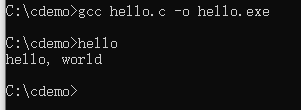
常見錯誤補充
#include <stdio.h>
這一行前置處理引入標頭檔的語法,結尾不需要加上分號 ;
要使用 printf 函式,必須引入 #include <stdio.h>,否則會觸發編譯錯誤
Previous: C語言是什麼
Next: C語言編譯器與第一個C語言程式