RelativeLayout 按照控件之间的相对位置摆放元素,可以指定控件和其他控件、父容器的对齐关系。
LinearLayout只能线性顺序排布;RelativeLayout可以让一个控件摆放在另一个控件的下方、右侧、父容器右边等位置,布局更加灵活。
常用属性
android:layout_below="@id/xxx":当前控件摆放在指定ID控件下方android:layout_alignParentRight="true":和父容器右边缘对齐android:layout_alignParentLeft="true":和父容器左边缘对齐
layout_above:放在目标控件上方layout_toRightOf:放在目标控件右侧layout_toLeftOf:放在目标控件左侧
示例源码
<?xml version="1.0" encoding="utf-8"?>
<RelativeLayout xmlns:android="http://schemas.android.com/apk/res/android"
    android:layout_width="fill_parent"
    android:layout_height="fill_parent">

    <TextView
        android:id="@+id/textview1"
        android:layout_width="fill_parent"
        android:layout_height="wrap_content"
        android:text="What's your name ?"/>

    <EditText
        android:id="@+id/editText1"
        android:layout_width="fill_parent"
        android:layout_height="wrap_content"
        android:background="@android:drawable/editbox_background"
        android:layout_below="@id/textview1"/>

    <Button
        android:id="@+id/button1"
        android:layout_width="wrap_content"
        android:layout_height="wrap_content"
        android:layout_below="@id/editText1"
        android:layout_alignParentRight="true"
        android:layout_marginLeft="10dip"
        android:text="GO" />

</RelativeLayout>Code language: HTML, XML (xml)
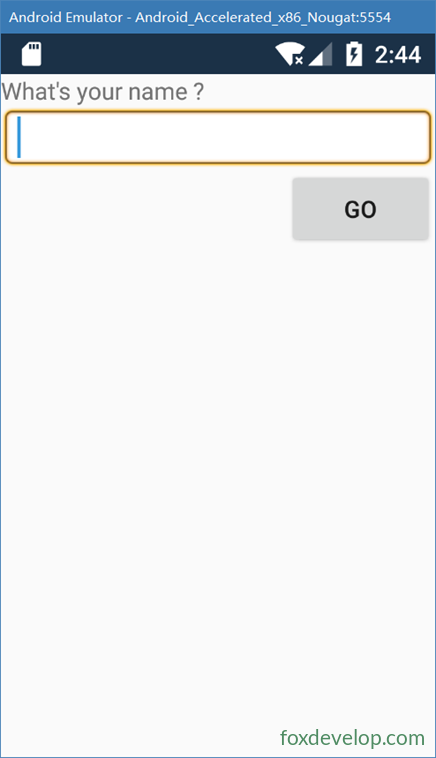
界面呈现
TextView:顶部显示文字“What’s your name ?”EditText:通过layout_below,摆放在textview1的正下方,输入框占满屏幕宽度Button:摆放在editText1下方;layout_alignParentRight="true",按钮停靠在屏幕右下角
Previous: 线性布局 LinearLayout
Next: 表格布局 TableLayout