XMLHttpRequest 对象用于在后台与服务器交换数据。 请求后端的文档 有可能是静态 也有可能是动态的。
什么是 XMLHttpRequest 对象?
XMLHttpRequest 对象用于在后台与服务器交换数据。
XMLHttpRequest 对象是开发者的梦想,因为您能够:
- 在不重新加载页面的情况下更新网页
- 在页面已加载后从服务器请求数据
- 在页面已加载后从服务器接收数据
- 在后台向服务器发送数据
所有现代的浏览器都支持 XMLHttpRequest 对象。
创建 XMLHttpRequest 对象
所有现代浏览器 (IE7+、Firefox、Chrome、Safari 以及 Opera) 都内建了 XMLHttpRequest 对象。
通过一行简单的 JavaScript 代码,我们就可以创建 XMLHttpRequest 对象。
创建 XMLHttpRequest 对象的语法:
xmlhttp=new XMLHttpRequest();
老版本的 Internet Explorer (IE5 和 IE6)使用 ActiveX 对象:
xmlhttp=new ActiveXObject(“Microsoft.XMLHTTP”);
代码说明
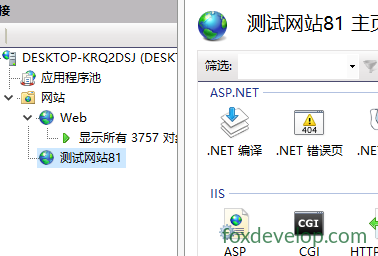
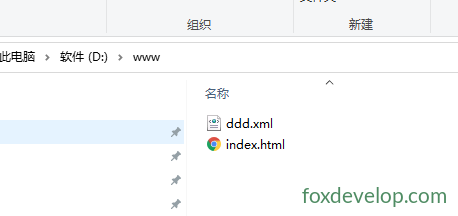
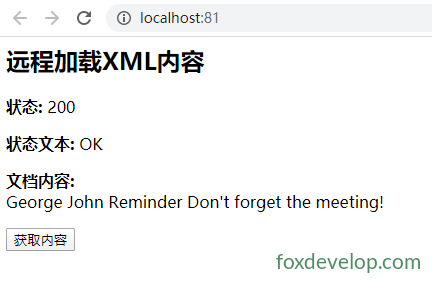
这段经典的 XHR(XMLHttpRequest)AJAX 示例,在 IIS 站点下实现:点击按钮异步请求同服务器上的 ddd.xml,在页面展示 HTTP 状态、状态文字、XML 原始文本,页面不刷新。
文件清单
1. ddd.xml
xml
<?xml version="1.0" ?>
<note>
	<to>George</to>
	<from>John</from>
	<heading>Reminder</heading>
	<body>Don't forget the meeting!</body>
</note>
Code language: HTML, XML (xml)
2. index.html
html
预览
<html>
<head>
    <script type="text/javascript">
        var xmlhttp;
        //通过URL加载XML文档
        function loadXMLDoc(url) {
            xmlhttp = null;
            if (window.XMLHttpRequest) {// code for IE7, Firefox, Opera, etc.
                xmlhttp = new XMLHttpRequest();
            }
            else if (window.ActiveXObject) {// code for IE6, IE5
                xmlhttp = new ActiveXObject("Microsoft.XMLHTTP");
            }
            if (xmlhttp != null) {
                xmlhttp.onreadystatechange = state_Change;
                xmlhttp.open("GET", url, true);
                xmlhttp.send(null);
            }
            else {
                alert("你的浏览器不支持XMLHttpRequest");
            }
        }

        //根据状态 显示内容
        function state_Change() {
            if (xmlhttp.readyState == 4) {// 4 = "loaded"
                if (xmlhttp.status == 200) {// 200 = "OK"
                    document.getElementById('A1').innerHTML = xmlhttp.status;
                    document.getElementById('A2').innerHTML = xmlhttp.statusText;
                    document.getElementById('A3').innerHTML = xmlhttp.responseText;
                }
                else {
                    alert("Problem retrieving XML data:" + xmlhttp.statusText);
                }
            }
        }
    </script>
</head>

<body>
    <h2>远程加载XML内容</h2>

    <p>
        <b>状态:</b>
        <span id="A1"></span>
    </p>

    <p>
        <b>状态文本:</b>
        <span id="A2"></span>
    </p>

    <p>
        <b>文档内容:</b>
        <br /><span id="A3"></span>
    </p>

    <button onclick="loadXMLDoc('/ddd.xml?t=1')">获取内容</button>

</body>
</html>Code language: HTML, XML (xml)