The WinUI 3 app runs fine under Debug mode but crashes when built in Release, with the error shown below.
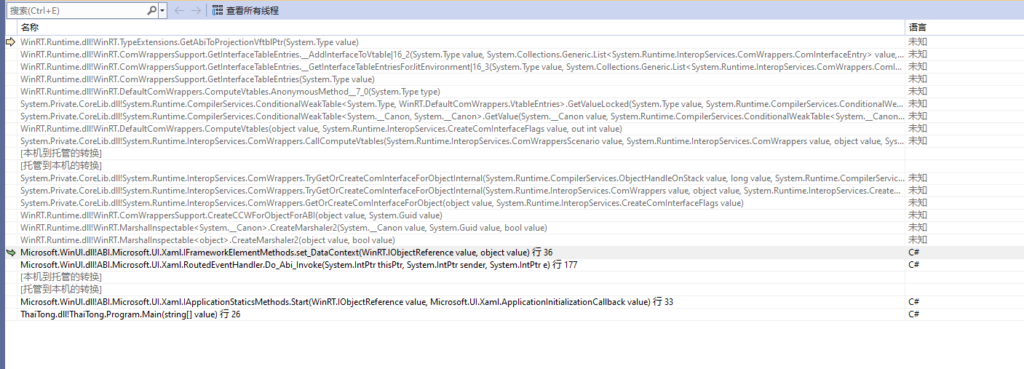
I rarely encounter such weird issues in regular development. WinUI 3 throws internal runtime exceptions most of the time, making it tough to pinpoint useful clues from exception stacks.
After rounds of elimination testing, I traced the crash to a null reference triggered while initializing the ViewModel inside a Page. Here’s my project structure: one main window with a sidebar navigation menu. Tapping menu items loads target Pages into the main content area on the right. The main window uses this XAML snippet:
<TabView Name="tabView" IsAddTabButtonVisible="False" Margin="10" VerticalAlignment="Stretch" TabCloseRequested="TabView_TabCloseRequested">
    <TabViewItem x:Uid="tabConsonant" Name="tvHome">
    </TabViewItem>
</TabView>Code language: HTML, XML (xml)
This TabView hosts content pages on the right side. I assign the target Page instance to tvHome from the backend code:
private void MainWindow_Activated(object sender, WindowActivatedEventArgs args)
{
    tvHome.Content = new ConsonantsPage();
}Code language: JavaScript (javascript)
Further debugging confirmed the crash happens exactly at the line this.DataContext = vm; within the target Page.
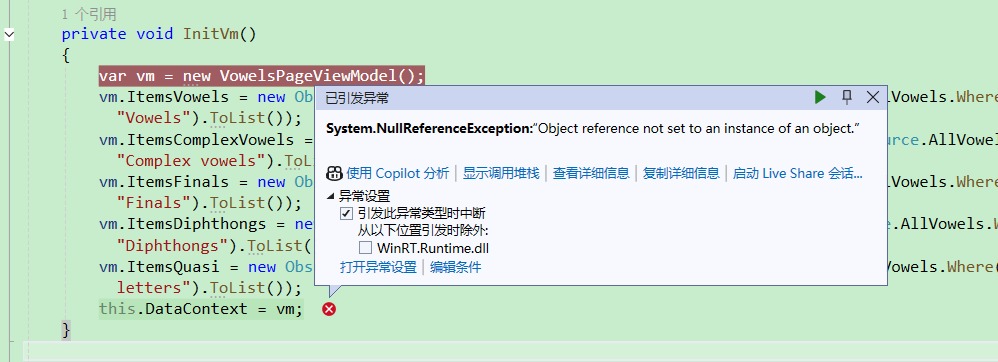
I then tested another clean Page with zero DataContext and data binding, which loads perfectly without errors. So the root cause is definitely related to XAML binding logic. Instead of continuing with standard MVVM binding, I switched to building UI elements programmatically directly in code-behind as a workaround.
Final working fix:
Construct controls and bind values entirely from backend C#:
 public TonePage()
        {
            InitializeComponent();
            Loaded += Page_Loaded;
        }

        private void Page_Loaded(object sender, RoutedEventArgs e)
        {
            var toneData = ThaiAlphabetSource.Tones;
            FillToneGrid(gvToneList, toneData);
        }

        private void FillToneGrid(GridView grid, List<ToneInfo> source)
        {
            foreach (var item in source)
            {
                Button btnRoot = new Button
                {
                    HorizontalContentAlignment = HorizontalAlignment.Center,
                    VerticalContentAlignment = VerticalAlignment.Center,
                    Tag = item.Audio
                };
                btnRoot.Click += PlayClick;

                StackPanel sp = new StackPanel
                {
                    Width = 240,
                    Orientation = Orientation.Vertical,
                    HorizontalAlignment = HorizontalAlignment.Center,
                    VerticalAlignment = VerticalAlignment.Center
                };

                TextBlock tbTitle = new TextBlock
                {
                    HorizontalAlignment = HorizontalAlignment.Center,
                    FontSize = 50,
                    Foreground = new SolidColorBrush(Color.FromArgb(0xFF, 0x01, 0xA0, 0xC7)),
                    Text = item.Letter_Title
                };
                TextBlock tbName = new TextBlock
                {
                    HorizontalAlignment = HorizontalAlignment.Center,
                    FontSize = 30,
                    Text = item.Letter_Name
                };
                TextBlock tbScript = new TextBlock
                {
                    HorizontalAlignment = HorizontalAlignment.Center,
                    FontSize = 30,
                    Text = item.Letter_Script
                };

                sp.Children.Add(tbTitle);
                sp.Children.Add(tbName);
                sp.Children.Add(tbScript);
                btnRoot.Content = sp;

                grid.Items.Add(btnRoot);
            }
        }Code language: PHP (php)
I didn’t dig deeper to locate the exact underlying bug, but I suspect the issue originates from command binding syntax like Command="{Binding PlayCommand}". This assumption is backed by another test case: pages using plain property-only binding without any Command binding run smoothly, demonstrated below:
<Button Content="{Binding}" Grid.Row="0" Grid.Column="1" BorderBrush="#ccc" Foreground="Black" FontSize="50" Height="100" Width="130" Click="Button_Click"/>Code language: HTML, XML (xml)This variant works normally in Release configuration.