Output Macros
Rust’s print and output functionality is powered by a set of macros from the std::fmt module. Here are the most commonly used ones:
format!: Writes formatted text into a stringprint!: Prints content to the standard console outputprintln!: Works the same asprint!, and appends a newline at the endeprint!: Prints content to the standard error streameprintln!: Works the same aseprint!, and appends a newline at the end
Any macro ending with
lnwill automatically add a line break after the output.The prefix
estands for error, which is used specifically for printing error messages.
All these macros share the exact same formatting syntax. What’s more, Rust verifies whether your formatting code is valid during compilation.
Practical Examples
Basic Placeholder {}
The curly brace {} is a universal placeholder. It gets replaced sequentially with the passed arguments and converts values into strings automatically for output.
fn main() {
    println!("{} days", 31);
    // Output: 31 days
}Code language: JavaScript (javascript)
Positional Arguments
You can put a numeric index inside {} (starting from 0) to explicitly specify which argument to use. This approach also lets you reuse arguments or reorder them freely.
fn main() {
    println!("{0}, this is {1}. {1}, this is {0}", "Alice", "Bob");
    // Output: Alice, this is Bob. Bob, this is Alice
}Code language: JavaScript (javascript)
As shown in the example above, argument indexes do not have to follow strict sequential order. In this case, “Alice” corresponds to index 0 and “Bob” corresponds to index 1.
Named Arguments
If numeric indexes feel unclear to you, you can use named arguments. Inside the format string, write {argument_name}, and pass values in the format of argument_name=value when calling the macro. The order no longer matters, and the code becomes much more readable.
fn main() {
    println!("{subject} {verb} {object}",
         object="the lazy dog",
         subject="the quick brown fox",
         verb="jumps over");
    // Output: the quick brown fox jumps over the lazy dog
}Code language: JavaScript (javascript)
Simply assign names to your arguments, then reference those names directly inside the format string. This method makes your code far more intuitive.
Base Formatting (:format_specifier)
Add a colon followed by a format specifier inside the placeholder to convert numbers into different bases such as binary, octal and hexadecimal.
:b: Binary format:o: Octal format:x: Lowercase hexadecimal format
fn main() {
    println!("Decimal:    {}",   69420);    // 69420
    println!("Binary:    {:b}", 69420);    // 10000111100101100
    println!("Octal:     {:o}", 69420);    // 207454
    println!("Hex:       {:x}", 69420);    // 10f2c
}Code language: JavaScript (javascript)
Text Alignment & Padding
1. Right Alignment (>width)
The syntax {:>n} sets the total display width to n. The content will be right-aligned, with spaces filling the empty space on the left.
fn main() {
	println!("{number:>5}", number=1);
	// Total width: 5, padded with 4 spaces on the left → Output:     1
}Code language: JavaScript (javascript)
2. Zero Padding
Place a 0 before the alignment symbol to use the digit 0 instead of spaces for padding.
:0>5: Right aligned, padded with zeros on the left:0<5: Left aligned, padded with zeros on the right
fn main() {
	println!("{number:0>5}", number=1); // Right align with zero padding → 00001
	println!("{number:0<5}", number=1); // Left align with zero padding → 10000
}Code language: JavaScript (javascript)
You are not limited to using zeros. You can fill empty space with any character. The example below uses uppercase letter A for padding.
fn main() {
	println!("{number:A>5}", number=1); // Right align with A padding → AAAAA1
	println!("{number:A<5}", number=1); // Left align with A padding → 1AAAAA
}Code language: PHP (php)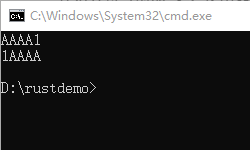
3. Dynamic Width (variable$)
Instead of hardcoding the width value, use variable$ to reference external named arguments or variables, so you can adjust the display width dynamically.
In short, the display width can be controlled by variables rather than fixed values written directly in code.
fn main() {
	// Method 1: Work with named arguments
	println!("{number:0>width$}", number=1, width=8);

	// Method 2: Directly use local variables (Supported since Rust 1.58+)
	let number: f64 = 1.0;
	let width: usize = 8;
	println!("{number:>width$}"); // Output:     1
}Code language: JavaScript (javascript)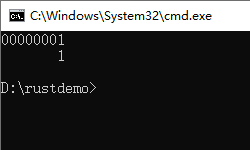
Compile-Time Argument Validation
Rust checks whether the number of placeholders matches the number of passed arguments during compilation. Your code will fail to compile immediately if arguments are missing.
fn main() {
	// Two placeholders but only one argument provided → Compilation fails
	println!("My name is {0}, {1} {0}", "Bond");
	// Fixed: Add the missing argument "James"
	println!("My name is {0}, {1} {0}", "Bond", "James");
}Code language: JavaScript (javascript)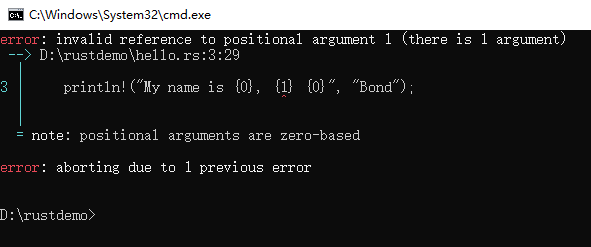
The compiler will throw an error for the placeholder {1}, because only one argument is supplied.
error: invalid reference to positional argument 1 (there is 1 argument)
 --> D:\rustdemo\hello.rs:3:29
  |
3 |     println!("My name is {0}, {1} {0}", "Bond");
  |                                ^
  |
  = note: positional arguments are zero-based

error: aborting due to 1 previous errorCode language: JavaScript (javascript)
Formatting Limits for Custom Types
By default, the basic placeholder {} only works with types that implement the fmt::Display trait. Custom structs do not implement this trait automatically, so printing them directly with {} will cause a compilation error.
fn main() {
    struct Structure(i32);
	// The line below will fail to compile
    println!("{}", Structure(3));
}Code language: PHP (php)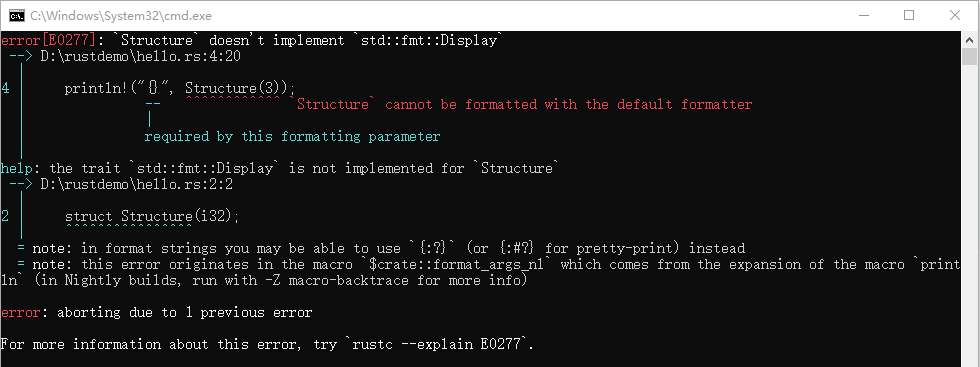
error[E0277]: `Structure` doesn't implement `std::fmt::Display`
 --> D:\rustdemo\hello.rs:4:20
4 |     println!("{}", Structure(3));
  |               --   ^^^^^^^^^^^^ `Structure` cannot be formatted with the default formatter
  |               |
  |               required by this formatting parameter

help: the trait `std::fmt::Display` is not implemented for `Structure`
 --> D:\rustdemo\hello.rs:2:2
2 |     struct Structure(i32);
  |     ^^^^^^^^^^^^^^^^

note: in format strings you may be able to use `{:?}` (or {:#?} for pretty-print) instead
error: aborting due to 1 previous error

For more information about this error, try `rustc --explain E0277`
1. To print a custom struct normally, you need to implement the Display trait (we will cover this in detail later).
use std::fmt;

struct Structure(i32);

// Implement the Display trait for the custom struct
impl fmt::Display for Structure {
    fn fmt(&self, f: &mut fmt::Formatter<'_>) -> fmt::Result {
        // Access the inner i32 value of the tuple struct via self.0
        write!(f, "Value: {}", self.0)
    }
}

fn main() {
    println!("{}", Structure(3));
}Code language: PHP (php)
2. Temporary Debugging: Use Debug Format {:?} / {:#?}
This method is mainly for debugging purposes. If you just want to check the internal values of a struct during development instead of building production code, use the built-in Debug trait.
Rust provides default support for the Debug trait on custom types. You can use {:?} to print struct content easily.
#[derive(Debug)]
#[allow(dead_code)] // Suppress unused code/field warnings
struct Structure(i32);

fn main() {
    println!("{:?}", Structure(3));
    println!("{:#?}", Structure(3));
}Code language: PHP (php)
Two Core Formatting Traits in std::fmt
The std::fmt module includes a variety of traits to control text presentation. The two most essential ones are listed below:
- fmt::Debug: Used with the
{:?}placeholder, designed specifically for debugging output. - fmt::Display: Used with the
{}placeholder. It produces clean, user-friendly output for regular end users.
All built-in types from the standard library already implement these two traits and can be printed directly. For custom types, you have to implement the corresponding traits manually.
Once a type implements fmt::Display, it automatically gains the ToString trait, which lets you convert the type into a standard string.
#[allow(dead_code)]
#[allow(dead_code)] is an attribute that applies to the code element immediately after it. Its purpose is to suppress compiler warnings about unused code or variables.
Take the following code as an example:
fn main() {
    struct Structure(i32);
	// This line will cause a compile error, so we comment it out
    //println!("{}", Structure(3));
}Code language: JavaScript (javascript)
Since the print statement is commented out, the struct definition is never actually used, which triggers a compiler warning.
warning: struct `Structure` is never constructed
 --> D:\rustdemo\hello.rs:2:12
  |
2 |     struct Structure(i32);
  |            ^^^^^^^^^
  |
  = note: `#[warn(dead_code)]` (part of `#[warn(unused)]`) on by default

warning: 1 warning emitted
Code language: JavaScript (javascript)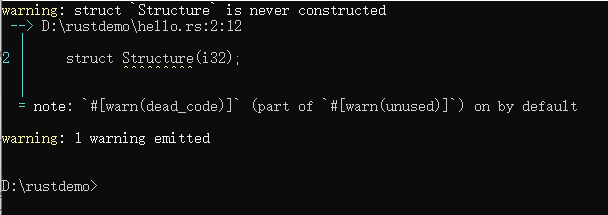
To get rid of this warning, add the #[allow(dead_code)] attribute above the struct.
fn main() {
	#[allow(dead_code)]
    struct Structure(i32);
	// This line will cause a compile error, so we comment it out
    //println!("{}", Structure(3));
}Code language: PHP (php)
Set Decimal Places for Floating-Point Numbers
Define a variable pi = 3.141592 and format the output to keep three decimal places. The final result should print: Pi is roughly 3.142.
fn main() {
	let pi = 3.141592;
	println!("Pi is roughly {:.3}", pi);// Output: 3.142
	println!("Pi is roughly {0}", pi); // Output: 3.141592
}Code language: JavaScript (javascript)