What Is C#
C# was built exclusively for Microsoft’s .NET Framework platform and is pronounced “See Sharp”.
Microsoft needed a unified, fully object-oriented integrated development framework to fix flaws in legacy technologies, so it set out to build a brand-new code execution environment paired with a complete toolchain for development.
After more than two decades of evolution, C# has evolved from a Windows-only language into a multi-platform language that runs across numerous operating systems today.
Nowadays, C# and .NET form a complete cross-platform solution for building Windows, macOS, Linux and Android applications. It also stands as the preferred runtime for the vast majority of cloud systems.
Thanks to heavy investment and ongoing backing from Microsoft, C# receives frequent major updates. Version 7 launched back in 2022. The language still maintains full backward compatibility with legacy code written two decades ago, yet newer releases deliver cleaner, more elegant syntax and more streamlined structures. As of 2026, we’re already at Version 15.
Brief History of Major C# Versions (Partial List)
- C# 1.0 (2001): Official public release
- C# 2.0 (VS2005): Generics, iterators, anonymous methods
- C# 3.0 (VS2008): Extension methods, Lambdas, LINQ (Language Integrated Query)
- C# 4.0 (2010): Named / optional parameters, dynamic type, TPL Task Parallel Library for full multi-core utilization
- C# 5.0: Native async/await asynchronous task support
- C# 6.0: String interpolation, expression-bodied members, simplified property syntax
- C# 7.0~7.3: Tuple multi-value returns, simplified out parameters, pattern matching, async Main methods
- C# 8.0/9.0/10.0: Records (immutable reference types), top-level statements (no Main required), default interface methods, static local functions, async disposable types, full-range pattern matching
- C#11 (.NET7): Raw string literals, generic math, required properties
- C#12 (.NET8): Primary constructors, collection initializer shorthand, inline arrays
- C#13 (.NET9): Partial properties, extension indexers, ref locals in iterators
- C#14 (.NET10): Generic type aliases, deep collection pattern matching, SIMD syntactic sugar
Windows remains C#’s primary target platform, but powered by the .NET Runtime, compiled code can run natively on Linux and other operating systems, enabling write-once deployments across multiple OSes.
The .NET Framework
The original .NET Framework debuted in 2002
The .NET Framework resolved critical pain points found in older development stacks, with these core advantages:
- Multi-Device Compatibility: Runs on servers, PCs, PDAs, mobile hardware and more;
- Industry Standard Compliance: Native support for universal communication protocols including XML, HTTP, SOAP, JSON, WSDL;
- Secure Sandbox Execution: Isolates untrusted code to prevent unsafe operations during runtime.
Three Core Components of the .NET Framework
- CLR (Common Language Runtime / Execution Engine) governs the full application lifecycle: memory management & garbage collection, code security validation, thread scheduling and exception handling.
- Developer Tooling Suite including integrated IDEs, multi-language .NET compilers (C#/VB.NET/F#, etc.), debuggers, and backend web frameworks like ASP.NET/WCF.
- BCL (Base Class Library, also called FCL Framework Class Library) a massive library of pre-built generic classes ready for direct developer use.
Key Improvements of .NET Over Traditional Windows Development
Unified Object-Oriented Model
Tight integration between CLR, BCL and C# delivers a single consistent OOP paradigm usable across desktop, mobile, web and distributed applications, with identical syntax and logic across all supported hardware.
Automatic Garbage Collection (GC)
The CLR ships with a built-in garbage collector that automatically reclaims memory from unused objects. Developers no longer need manual memory release or leak debugging, drastically cutting maintenance overhead.
Multi-Layer Interoperability
- Cross-.NET Language Interop: Classes written in different .NET languages can freely call and inherit from one another; the platform is not locked to a single programming language;
- P/Invoke Platform Invocation: Direct access to native Win32 C-language DLL entry points;
- COM Compatibility: Bidirectional calling support between .NET assemblies and legacy COM components.
Simplified Deployment: No registry dependencies; minimal deployments only require copying program files to run;
Side-by-Side Assemblies: Multiple DLL versions can coexist on one machine; each application binds to its matching compiled library build, eliminating DLL version conflicts.
Type Safety Enforcement The CLR (Common Language Runtime) strictly validates parameters and data types. Interactions between cross-language assemblies retain type safety and block illegal memory access attempts.
Comprehensive Base Class Library (BCL)
Pre-built utility classes covering common development tasks
- File I/O, string manipulation, cryptography & security utilities;
- Collections: lists, dictionaries, hash tables and more;
- Multithreading, synchronization and concurrency primitives;
- XML document read/write processing classes
- …
All low-level universal logic comes pre-implemented, leaving developers to write only business-specific logic and reuse mature tooling instead of rebuilding standard functionality from scratch.
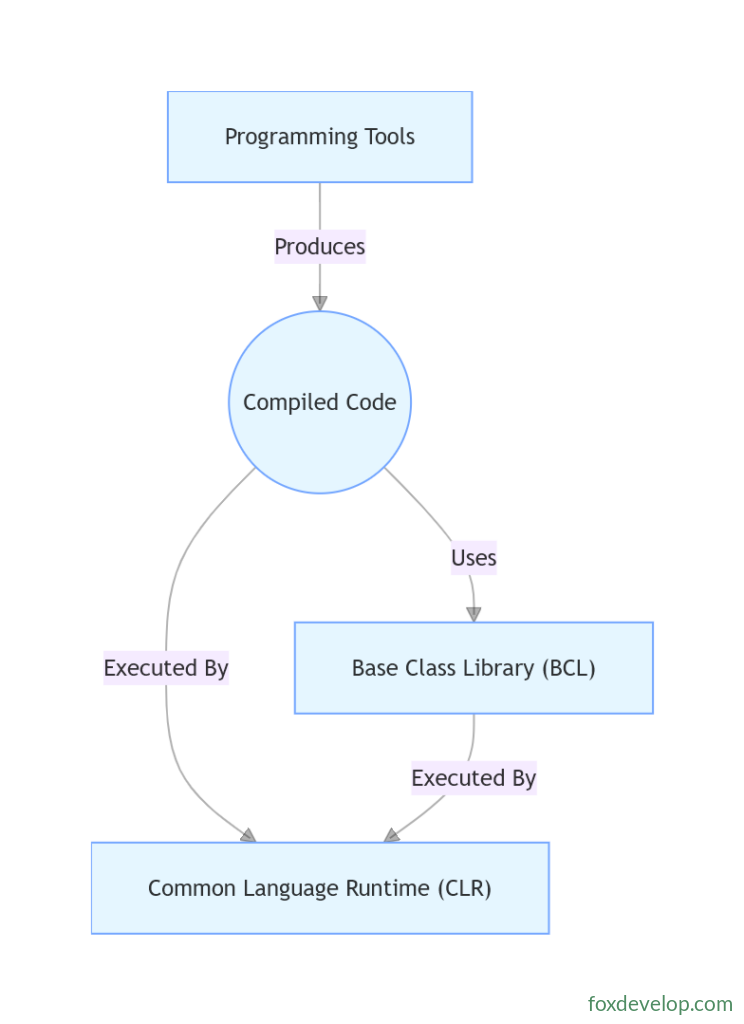
This flowchart illustrates the .NET application workflow: your handwritten source code compiles down to Intermediate Language (IL). The IL may reference functionality exposed by the BCL, before finally being handed off to the CLR for execution.
The Relationship Between C# and .NET
.NET Framework: A complete end-to-end development & runtime platform built around two core modules
- CLR (Common Language Runtime): Manages memory allocation, code execution and security validation
- BCL (Base Class Library): Extensive pre-written utility code for file operations, networking, UI rendering, concurrency and more
C#: A dedicated programming language designed exclusively for the .NET platform, used to author code that runs on top of the CLR
C# is not the only language with .NET support; other compatible languages include F# and VB.NET.
The core design goals of the .NET Framework are cross-platform and cross-language operation. Cross-platform means compatibility with multiple operating systems; cross-language means modules written in different .NET languages can interoperate seamlessly.
Compilation to Common Intermediate Language (CIL)
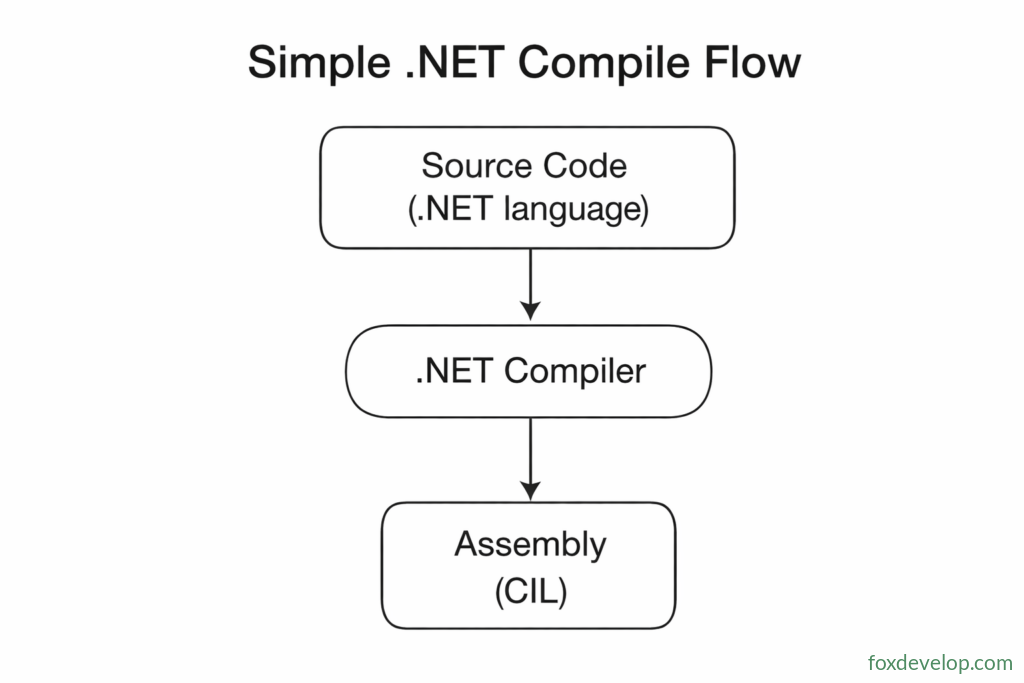
Compilers for all .NET languages process source files and output binary files known as assemblies
Assemblies fall into two categories: executable applications (.exe) or dynamic link libraries (.dll)
The executable logic inside assemblies is not native CPU machine code, but an intermediate bytecode standard called Common Intermediate Language (CIL).
A typical assembly contains three primary components:
- CIL instruction set for program logic
- Metadata describing every custom type defined within the program
- Metadata tracking references to external dependent assemblies
The shorthand name for this intermediate bytecode has shifted throughout .NET’s evolution, leading to multiple interchangeable terms in documentation. Labels such as Intermediate Language (IL) and Microsoft Intermediate Language (MSIL) both refer to CIL.
JIT Compilation to Native Machine Code & Execution
CIL is not pre-converted to native machine code ahead of time. When an application launches, the CLR executes three sequential steps:
- Validate assembly security metadata
- Allocate runtime memory space
- Pass CIL segments to the JIT compiler for on-demand native code translation
Just-In-Time (JIT) On-Demand Compilation Mechanism
Only code paths actively executed are compiled, with compiled native code cached for repeated reuse. Uninvoked code segments remain untranslated, and each logical block is compiled exactly once per process lifetime.
Assembly (CIL + Type Metadata) → CLR (JIT Compiler) → Native Machine Code → OS System Calls
Managed Responsibilities Handled by the CLR
After CIL is translated to native instructions, the CLR automatically manages garbage collection, array out-of-bounds checking, parameter type validation and runtime exception handling.
Managed vs Unmanaged Code
- Managed Code: Source written in any .NET language, fully governed by the CLR during execution
- Unmanaged Code: Binaries outside CLR supervision, such as raw C/C++ Win32 DLLs
Microsoft now offers AOT compilation technology, which directly compiles raw C# source into standalone native binaries similar to C++. The resulting EXE can run without requiring a pre-installed .NET Runtime on the target machine.
The NGen Utility Tool
NGen performs offline pre-compilation of assemblies into persistent native image caches. Applications built with precompiled images skip runtime JIT translation to drastically reduce startup latency.
.NET Core AOT is the modern replacement for offline precompilation workflows, capable of generating fully self-contained native executables with zero external runtime dependencies
Assembly (Type Info, CIL)
        ↓
JIT Compiler
        ↓
Native Code
        ↓
Operating System Services
Every .NET language follows this identical compilation and execution pipeline, regardless of which original language was used to write source files.
Each .NET language ships with its dedicated compiler: VB.NET has its own compiler, and C# includes its separate compiler front-end. All compilers output standardized CIL bytecode, which the JIT engine converts into CPU-native instructions before execution by the hardware. This dependency on a shared runtime layer explains why software built with .NET requires the .NET Runtime installed on end-user devices, much like Java applications demand a functional JRE.
flowchart TD
    subgraph Compile_Time
        A[C# Source] --> B[C# Compiler]
        B --> C[Assembly CIL]
        D[VB Source] --> E[VB Compiler]
        E --> C
        F[Xyz.NET Source] --> G[Xyz.NET Compiler]
        G --> C
    end

    subgraph Run_Time
        C --> H[JIT Compiler]
        H --> I[Native Code]
        I --> J[Operating System Services]
    end
The diagram above visualizes the unified compile-and-run pipeline for all .NET languages
Common Language Runtime (CLR)
The CLR serves as the core foundational component of the .NET Framework, sitting as an abstraction layer on top of the host operating system to oversee all application execution logic
- Automatic garbage collection (GC)
- Security validation and identity authentication powered by the Base Class Library (BCL)
- Rich built-in programming capabilities including web services, data access layers and more
flowchart TD
    subgraph Unmanaged_Code
        A[Non-.NET Program] --> OS[Operating System]
    end

    subgraph Managed_Code
        B[Assembly] --> CLR[Common Language Runtime]
        C[Assembly] --> CLR
        D[Assembly] --> CLR

        subgraph CLR[Common Language Runtime]
            M[Memory Management] --- E[Exception Handling]
            G[Garbage Collection] --- R[Reflection Services]
            J[JIT Compiler] --- L[Class Loader]
            S[Security Services]
        end

        CLR --> OS
    end
Common Language Infrastructure (CLI)
Every programming language defines its own set of primitive built-in types to represent integers, floating-point values, characters and other core data forms.
Common Language Infrastructure (CLI) is a formal set of standards that unifies all separate .NET Framework modules into one consistent, interoperable ecosystem.
For instance, the fixed bit width allocated to integer values is standardized uniformly across all compatible .NET languages.
flowchart TD
    subgraph CLI[CLI]
        CLR[Common Language Runtime] --- CLS[Common Language Specification]
        BCL[Base Class Library] --- MDS[Metadata Definition & Semantics]
        CTS[Common Type System] --- CIL[Common Intermediate Language]
    end
Most developers never need to dive deep into the full CLI specification, yet working familiarity with the CTS Common Type System and CLS Common Language Specification remains mandatory.
Common Type System (CTS)
- Defines a standardized catalog of fundamental data types with fixed consistent properties;
- All custom native types from individual .NET languages map into subsets of this shared standard type hierarchy;
- Every single type, without exception, inherits from the root base class
object; - This universal standard enables full bidirectional interoperability between system primitive types and user-defined classes across any .NET language boundary.
Common Language Specification (CLS)
Defines mandatory uniform rules that all .NET-compatible languages must adhere to, covering cross-language interoperability constraints for data types, class construction, parameter passing and more.
Key Differences Between .NET and .NET Framework
.NET is Microsoft’s modern cross-platform development stack, while the legacy .NET Framework is a Windows-exclusive runtime and library suite. All new feature development targets modern .NET exclusively; .NET Framework has entered maintenance mode and only receives critical security patches moving forward.
.NET delivers true cross-platform functionality and serves as Microsoft’s primary active development platform. All subsequent content in this guide will focus primarily on modern .NET.
| Feature | .NET | .NET Framework |
|---|---|---|
| Platform Support | Cross-platform (Windows, Linux, macOS, containers, mobile via MAUI) | Windows-only |
| Development Status | Actively updated (.NET 5 through .NET 10, annual releases with long-term LTS support) | Maintenance-only (v4.8 final release, limited to security hotfixes) |
| Performance Profile | Faster startup times, higher throughput, improved garbage collection algorithms | Older performance profile, tightly coupled to native Windows APIs |
| Target Use Cases | New projects: Web APIs, microservices, cloud-native workloads, cross-platform desktop & mobile apps | Legacy projects: Web Forms, WCF, Windows Workflow Foundation, etc. |
| Deployment Models | Full Docker & containerization support, optimized for cloud hosting | No container compatibility, reliant on Windows Server infrastructure |
| Supported Languages | C#, F#, VB.NET (fully cross-platform capable) | C#, VB.NET (Windows-bound only) |
The core gap between .NET and .NET Framework is relatively minor. Both platforms fully support languages including C#, F#, VB.NET with nearly identical core syntax. The vast majority of C# source code compiles and runs unmodified on both .NET Framework and modern .NET (Core/5/6/7/8…).
Nearly all meaningful discrepancies lie in available library APIs, rather than core language syntax rules.
Several legacy components native to .NET Framework such as WCF, Web Forms and Windows Workflow have been removed or replaced within contemporary .NET releases.
Modern .NET introduces brand-new APIs absent from the old .NET Framework stack, such as Span<T>, ValueTask and Records.
Since .NET Framework is restricted solely to Windows and modern .NET operates cross-platform, certain Windows-specific standard libraries were removed from new .NET releases. As an example: System.Drawing functions normally on Windows builds but is marked Windows-only in cross-platform .NET deployments. If you require graphics rendering functionality for cross-platform .NET applications, System.Drawing cannot be used; developers typically turn to third-party alternatives such as Google’s SkiaSharp library.
It’s critical to clarify that these differences apply to framework libraries and runtime environments. At the language level (for example C#), there are virtually zero breaking syntax changes—your C# code’s grammar remains consistent on both platforms. The real divergence comes down to available libraries and runtime host, meaning the full set of accessible APIs will not match one-to-one.
C# and .NET