Complete Example: XML + XSLT Convert to HTML
Prepare two files:
students.xml: Raw XML document storing student informationtransform.xsl: XSL stylesheet used to convert XML into HTML page
When the browser loadsstudents.xml, it will automatically reference XSLT rules and render as a web‑page.
The XML file declares encoding as
ISO‑8859‑1(Western‑European character set). Some non‑English text cannot be stored properly and will directly cause garbled characters. You need to uniformly change the encoding to UTF‑8 in code to completely fix garbling issues.
students.xml
<?xml version="1.0" encoding="UTF-8"?>
<?xml-stylesheet type="text/xsl" href="transform.xsl"?>
<class>
    <student>
        <name>Tom</name>
        <age>12</age>
        <height>145</height>
    </student>
    <student>
        <name>Jack</name>
        <age>16</age>
        <height>175</height>
    </student>
    <student>
        <name>Smiths</name>
        <age>22</age>
        <height>245</height>
    </student>
</class>Code language: HTML, XML (xml)
Key Notes:
<?xml-stylesheet ... ?>processing instruction: tells browser to apply transform.xsl for converting current XMLencoding="UTF-8"supports characters from all languages and avoids messy text
transform.xsl
<?xml version="1.0" encoding="UTF-8"?>
<xsl:stylesheet version="1.0" xmlns:xsl="http://www.w3.org/1999/XSL/Transform">
    <xsl:template match="/">
        <html>
            <head>
                <meta http-equiv="Content-Type" content="text/html; charset=UTF-8" />
                <title>Student List</title>
            </head>
            <body>
                <h3>Student Name List</h3>
                <ul>
                    <!-- Loop through all class/student nodes -->
                    <xsl:for-each select="class/student">
                        <li>
                            <xsl:value-of select="name"/>
                        </li>
                    </xsl:for-each>
                </ul>
            </body>
        </html>
    </xsl:template>
</xsl:stylesheet>Code language: HTML, XML (xml)
Core Syntax Explanation
<xsl:stylesheet>: XSLT root tag, declares namespace<xsl:template match="/">: Matches XML root node, entry point for transformation<xsl:for-each select="class/student">: Iterates each student node<xsl:value-of select="name"/>: Extract text content inside<name>node
3. How To Run
- Put both files inside the same folder
- Open
students.xmldirectly with web‑browser - The XSLT engine runs conversion automatically and renders final HTML list page
Garbled Characters Appear
- XML header uses
encoding="ISO-8859-1", this charset does not support non‑English content; - Encoding set inside HTML meta tag mismatches actual file encoding;
- Editor encoding is not UTF‑8 when saving file;
Show Complete Student Information
If you want to display name, age and height together, replace the loop segment:
<xsl:for-each select="class/student">
    <li>
        Name: <xsl:value-of select="name"/> ,
        Age: <xsl:value-of select="age"/> ,
        Height: <xsl:value-of select="height"/>
    </li>
</xsl:for-each>Code language: HTML, XML (xml)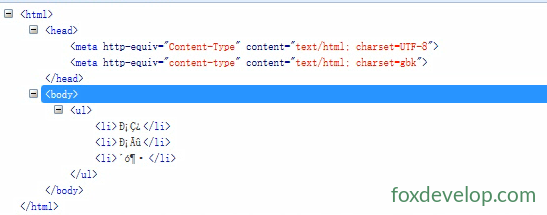
XSLT example
Previous: Introduction
Next: Loop