NativePHPを利用すれば、XcodeやAndroid Studioの環境構築に時間を割く必要がありません。iOSまたはAndroidスマートフォンにJumpアプリをインストールするだけで大丈夫です。
以下のコマンドを実行して、新規Laravelプロジェクトを作成してください
laravel new my-app --using=nativephp/mobile-starter

cd my-app

php artisan native:jumpCode language: JavaScript (javascript)
補足:これらのコマンドを実行する前に、Laravelを事前にインストールしておく必要があります。
Laravel のインストール方法
Laravelとは一体何なのか
Laravelは人気が高く使い勝手に優れたPHPウェブフレームワークです。ユーザー認証・会員登録、ファイルアップロード、メール送信、データベース操作、フォーム検証といった機能が標準搭載されており、PHP開発の効率を大幅に高めてくれます。
LaravelはPHP上で動作するため、先にPHP環境を整えてください。またバージョン要件を守る必要があり、古いPHPでは最新のLaravelを動かすことができません。
PHP 8.1 以上(推奨バージョン:8.2 ~ 8.4)
PHPをインストールする
専用のガイドを参照してPHPをインストールしてください:
Composerのインストール
ComposerはPHPのパッケージ管理ツールで、.NETのNuGet、JavaのMavenやGradleに相当します。
インストール手順については別の解説記事を参照してください。
PHPパッケージ管理ツール Composer のインストール – FoxDevelop
PHPとComposerの準備が完了したら、Laravelのインストール作業に移れます。
コマンドプロンプトを起動し、まず各ソフトのバージョンを確認します。
PHPのバージョン要件:PHP 8.1 以上(推奨:8.2 / 8.5)。コマンド php -v で確認できます。
Composerのバージョン要件:Composer 2.5 以上。コマンド composer -V で確認できます。
次に必要なPHP拡張機能を確認します。
php -m | findstr mbstring
php -m | findstr openssl
php -m | findstr pdo
国内のユーザーはアリクラウドのミラーサイトに切り替えることで、ダウンロード速度の遅延を解消できます。コマンドプロンプトに以下のコマンドを貼り付けてください。
composer config -g repo.packagist composer https://mirrors.aliyun.com/composer/Code language: JavaScript (javascript)続いて create-project コマンドを使用してインストールを開始します。
composer create-project laravel/laravel myproject
cd myprojectここでzip拡張機能が存在しないため、エラーが発生しました。インストールが正常に完了した場合は、以下のトラブルシューティング手順を飛ばし、こちらへ進んでください。
発生したエラーメッセージは以下の通りです。
C:\Users\xxxx>composer create-project laravel/laravel myproject
Creating a "laravel/laravel" project at "./myproject"
Installing laravel/laravel (v12.10.0)
    Failed to download laravel/laravel from dist: The zip extension and unzip/7z commands are both missing, skipping.
The php.ini used by your command-line PHP is: D:\php8.2\php.ini
    Now trying to download from source
  - Syncing laravel/laravel (v12.10.0) into cacheCode language: JavaScript (javascript)
コマンドプロンプトで以下の確認コマンドを実行し、zip拡張機能が無効になっていることを確認します。
php -m | findstr zip出力が空の場合、zip拡張機能がまだ有効化されていません。
php.iniを編集し、zip拡張機能を有効にする
自身のPHP設定ファイルパス:D:\php8.2\php.ini
;extension=zip の行を探し、先頭のセミコロンを削除してください。
再度コマンドプロンプトで php -m | findstr zip を実行し、正常に出力されれば拡張機能が有効になっています。
設定後、インストールを再試行してください。
インストールコマンドをもう一度実行します。
composer create-project laravel/laravel myproject再度インストールに失敗し、ログは以下の通りです。
composer create-project laravel/laravel myproject
Creating a "laravel/laravel" project at "./myproject"
Installing laravel/laravel (v12.10.0)
  - Downloading laravel/laravel (v12.10.0)
    Failed downloading laravel/laravel, trying the next URL (404: The "https://mirrors.aliyun.com/composer/dists/laravel/laravel/76396a056d552b8a34077f151775037ac44b431a.zip" file could not be downloaded (HTTP/2 404 ))
  - Downloading laravel/laravel (v12.10.0)
  - Installing laravel/laravel (v12.10.0): Extracting archive
Created project in C:\Users\maiwu\myproject
> @php -r "file_exists('.env') || copy('.env.example', '.env');"
Loading composer repositories with package information
Updating dependencies
Your requirements could not be resolved to an installable set of packages.

  Problem 1
    - Root composer.json requires laravel/tinker ^2.10.1, it is satisfiable by laravel/tinker[v2.10.1, v2.10.2, v2.11.0, v2.11.1] from composer repo (https://repo.packagist.org) but laravel/tinker[2.x-dev] from composer repo (https://mirrors.aliyun.com/composer) has higher repository priority. The packages from the higher priority repository do not match your minimum-stability and are therefore not installable. That repository is canonical so the lower priority repo's packages are not installable. See https://getcomposer.org/repoprio for details and assistance.
  Problem 2
    - Root composer.json requires phpunit/phpunit ^11.5.3, found phpunit/phpunit[11.5.3, ..., 11.5.44] but these were not loaded, because they are affected by security advisories ("PKSA-z3gr-8qht-p93v", "PKSA-z3gr-8qht-p93v"). Go to https://packagist.org/security-advisories/ to find advisory details. To ignore the advisories, add them to the audit "ignore" config. To turn the feature off entirely, you can set "block-insecure" to false in your "audit" config.
  Problem 3
    - Root composer.json requires laravel/sail ^1.41 -> satisfiable by laravel/sail[v1.41.0, ..., v1.46.0].
    - laravel/sail[v1.41.0, ..., v1.46.0] require symfony/yaml ^6.0|^7.0 -> found symfony/yaml[v6.0.0, ..., v6.4.30, v7.0.0, ..., v7.4.1] but these were not loaded, because they are affected by security advisories ("PKSA-v5yj-8nmz-sk2q", "PKSA-ft77-7h5f-p3r6", "PKSA-b14r-zh1d-vdrc", "PKSA-v5yj-8nmz-sk2q", "PKSA-ft77-7h5f-p3r6", "PKSA-b14r-zh1d-vdrc"). Go to https://packagist.org/security-advisories/ to find advisory details. To ignore the advisories, add them to the audit "ignore" config. To turn the feature off entirely, you can set "block-insecure" to false in your "audit" config.
  Problem 4
    - Root composer.json requires laravel/framework ^12.0 -> satisfiable by laravel/framework[v12.1.1, ..., v12.40.0].
    - laravel/framework[v12.1.1, ..., v12.12.0] require league/commonmark ^2.6 -> found league/commonmark[2.6.0] but these were not loaded, because they are affected by security advisories ("PKSA-21fb-n1x5-5nf7", "PKSA-2cx9-ynrq-qdk3", "PKSA-rqc2-tcc6-nc79", "PKSA-21fb-n1x5-5nf7", "PKSA-2cx9-ynrq-qdk3", "PKSA-rqc2-tcc6-nc79"). Go to https://packagist.org/security-advisories/ to find advisory details. To ignore the advisories, add them to the audit "ignore" config. To turn the feature off entirely, you can set "block-insecure" to false in your "audit" config.
    - laravel/framework[v12.13.0, ..., v12.40.0] require league/commonmark ^2.7 -> satisfiable by league/commonmark[2.7.0, ..., 2.8.2] from composer repo (https://repo.packagist.org) but league/commonmark[dev-main, 2.7.x-dev, 2.8.x-dev, 2.9.x-dev (alias of dev-main)] from composer repo (https://mirrors.aliyun.com/composer) has higher repository priority. The packages from the higher priority repository do not match your minimum-stability and are therefore not installable. That repository is canonical so the lower priority repo's packages are not installable. See https://getcomposer.org/repoprio for details and assistance.Code language: PHP (php)
原因:アリクラウドのComposerミラーサイトが正常に動作しなくなっています。
まず異常なプロジェクトフォルダを削除し、公式リポジトリに戻してください。
rmdir /s /q myproject
composer config -g --unset repos.packagist
composer create-project laravel/laravel myproject --no-auditCode language: PHP (php)
インストールが依然失敗する場合は、残存ファイルを再度削除してください。
- Downloading phpunit/php-code-coverage (11.0.12)
  - Downloading phar-io/version (3.2.1)
  - Downloading phar-io/manifest (2.0.4)
  - Downloading myclabs/deep-copy (1.13.4)
  - Downloading phpunit/phpunit (11.5.55)
 110/111 [===========================>]  99%A connection timeout was encountered. If you intend to run Composer without connecting to the internet, run the command again prefixed with COMPOSER_DISABLE_NETWORK=1 to make Composer run in offline mode.
    Failed to download laravel/pint from dist: The "https://codeload.github.com/laravel/pint/legacy.zip/0770e9b7fafd50d4586881d456d6eb41c9247a80" file could not be written to C:\Users\maiwu\myproject/vendor/composer/tmp-60f6b8b4815321558e13bb1ac74423ee.zip: Failed to open stream: Permission denied
    Now trying to download from source
  - Syncing laravel/pint (v1.29.1) into cache
Cloning failed using an ssh key for authentication, enter your GitHub credentials to access private repos
You need to provide a GitHub access token.
Tokens will be stored in plain text in "C:/Users/maiwu/AppData/Roaming/Composer/auth.json" for future use by Composer.
Due to the security risk of tokens being exfiltrated, use tokens with short expiration times and only the minimum permissions necessary.

Carefully consider the following options in order:

1. When you don't use 'vcs'  type 'repositories'  in composer.json and do not need to clone source or download dist files
from private GitHub repositories over HTTPS, use a fine-grained token with read-only access to public information.
Use the following URL to create such a token:
https://github.com/settings/personal-access-tokens/new?name=Composer+on+DESKTOP-1OHC5Q4+2026-05-27+0946

2. When all relevant _private_ GitHub repositories belong to a single user or organisation, use a fine-grained token with
repository "content" read-only permissions. You can start with the following URL, but you may need to change the resource owner
to the right user or organisation. Additionally, you can scope permissions down to apply only to selected repositories.
https://github.com/settings/personal-access-tokens/new?contents=read&name=Composer+on+DESKTOP-1OHC5Q4+2026-05-27+0946

3. A "classic" token grants broad permissions on your behalf to all repositories accessible by you.
This may include write permissions, even though not needed by Composer. Use it only when you need to access
private repositories across multiple organisations at the same time and using directory-specific authentication sources
is not an option. You can generate a classic token here:
https://github.com/settings/tokens/new?scopes=repo&description=Composer+on+DESKTOP-1OHC5Q4+2026-05-27+0946

For additional information, check https://getcomposer.org/doc/articles/authentication-for-private-packages.md#github-oauth
Token (hidden):Code language: PHP (php)
修正後のインストールコマンドを実行します。
composer create-project laravel/laravel myproject --no-dev --no-auditGitHubトークンの入力画面を表示させず、不要な依存パッケージを除外してLaravelをインストールする方法:
–no-dev と –no-audit オプションを追加すると、GitHubからソースコードを取得するpintやphpunitがスキップされます。
以下のような出力が表示されたら、インストールは正常に完了しています。
- Installing league/commonmark (2.8.2): Extracting archive
  - Installing laravel/framework (v12.61.0): Extracting archive
75 package suggestions were added by new dependencies, use `composer suggest` to see details.
Package sebastian/code-unit is abandoned, you should avoid using it. No replacement was suggested.
Package sebastian/code-unit-reverse-lookup is abandoned, you should avoid using it. No replacement was suggested.
Generating optimized autoload files
> Illuminate\Foundation\ComposerScripts::postAutoloadDump
> @php artisan package:discover --ansi

   INFO  Discovering packages.

  laravel/tinker .............................................................................................................................. DONE
  nesbot/carbon ............................................................................................................................... DONE
  nunomaduro/termwind ......................................................................................................................... DONECode language: JavaScript (javascript)
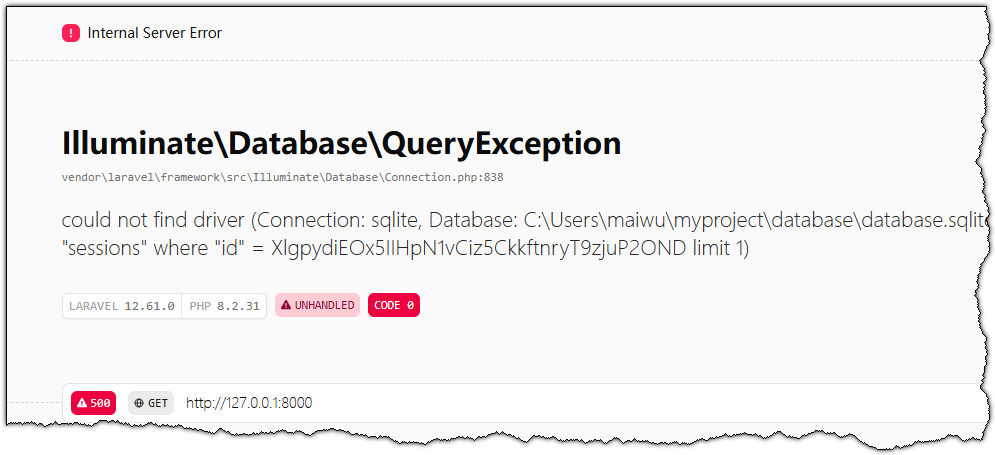
次に作成したプロジェクトを動作確認します。上記コマンドにより、全てのソースファイルを格納したmyprojectフォルダが作成されます。
開いているコマンドプロンプトから、以下2つのコマンドを実行してください。
cd myproject
php artisan serve
コマンドプロンプトには以下の内容が表示されます。
C:\Users\xxxx>cd myproject
C:\Users\xxxx\myproject>php artisan serve
   INFO  Server running on [http://127.0.0.1:8000].
   Press Ctrl+C to stop the server
Code language: JavaScript (javascript)
ブラウザのアドレスバーに http://127.0.0.1:8000 を貼り付けると、Laravelの既定のトップページが表示されます。