Mit NativePHP sparen Sie sich die zeitaufwändige Einrichtung von Xcode oder Android Studio. Sie müssen lediglich die Jump-App auf Ihrem iOS- oder Android-Gerät installieren.
Laravel – Ein modernes Framework für Entwickler
Führen Sie diese Befehle aus, um ein neues Laravel-Projekt zu erstellen
laravel new my-app --using=nativephp/mobile-starter

cd my-app

php artisan native:jumpCode-Sprache: JavaScript (javascript)
Hinweis: Laravel muss vor der Ausführung dieser Befehle bereits installiert sein.
Wie installiert man Laravel?
Was genau ist Laravel?
Laravel ist ein beliebtes und benutzerfreundliches PHP-Webframework. Es enthält integrierte Tools für Benutzeranmeldung und -registrierung, Dateiuploads, E-Mail-Versand, Datenbankoperationen und Formularvalidierung, die die PHP-Entwicklung erheblich beschleunigen.
Da Laravel auf PHP basiert, richten Sie zuerst Ihre PHP-Umgebung ein. Beachten Sie außerdem die Versionsanforderungen: Ältere PHP-Versionen funktionieren nicht mit aktuellen Laravel-Versionen.
PHP ab Version 8.1 (empfohlen: 8.2 bis 8.4)
PHP installieren
Folgen Sie unserer Anleitung zur PHP-Installation:
PHP-Umgebung einrichten – FoxDevelop
Composer installieren
Composer ist der Paketmanager für PHP, vergleichbar mit NuGet für .NET oder Maven und Gradle für Java.
Die Installationsschritte finden Sie in einem separaten Tutorial.
Composer – Der PHP-Paketmanager installieren – FoxDevelop
Sobald PHP und Composer installiert sind, können Sie mit der Laravel-Installation fortfahren.
Öffnen Sie die Eingabeaufforderung und überprüfen Sie zunächst die installierten Versionen.
PHP-Versionsanforderung: ab PHP 8.1 (empfohlen 8.2 / 8.5). Überprüfung mit dem Befehl php -v.
Composer-Versionsanforderung: ab Composer 2.5. Überprüfung mit dem Befehl composer -V.
Überprüfen Sie anschließend die erforderlichen PHP-Erweiterungen:
php -m | findstr mbstring
php -m | findstr openssl
php -m | findstr pdo
Nutzer in China können auf den Alibaba-Spiegel umwechseln, um langsame Downloads zu beheben. Fügen Sie diesen Befehl in die Eingabeaufforderung ein:
composer config -g repo.packagist composer https://mirrors.aliyun.com/composer/Code-Sprache: JavaScript (javascript)Starten Sie nun die Installation mit dem Befehl create-project:
composer create-project laravel/laravel myproject
cd myproject
Es tritt ein Fehler auf, da die ZIP-Erweiterung fehlt. Falls die Installation problemlos funktioniert hat, überspringen Sie die folgenden Fehlerbehebungsschritte und gehen Sie direkt hierhin.
Die Fehlermeldung lautet wie folgt:
C:\Users\xxxx>composer create-project laravel/laravel myproject
Creating a "laravel/laravel" project at "./myproject"
Installing laravel/laravel (v12.10.0)
    Failed to download laravel/laravel from dist: The zip extension and unzip/7z commands are both missing, skipping.
The php.ini used by your command-line PHP is: D:\php8.2\php.ini
    Now trying to download from source
  - Syncing laravel/laravel (v12.10.0) into cacheCode-Sprache: JavaScript (javascript)
Führen Sie diesen Prüfaufruf in der Eingabeaufforderung aus, um zu bestätigen, dass die ZIP-Erweiterung nicht aktiviert ist:
php -m | findstr zipWenn keine Ausgabe erfolgt, ist die ZIP-Erweiterung noch nicht aktiviert.
php.ini bearbeiten und ZIP-Erweiterung aktivieren
Pfad zur PHP-Konfigurationsdatei: D:\php8.2\php.ini
Suchen Sie nach der Zeile ;extension=zip und entfernen Sie das vorangestellte Semikolon.
Führen Sie erneut php -m | findstr zip in der Eingabeaufforderung aus. Eine Ausgabe bestätigt die erfolgreiche Aktivierung der Erweiterung.
Versuchen Sie anschließend die Installation erneut
Führen Sie den Installationsbefehl noch einmal aus:
composer create-project laravel/laravel myprojectDie Installation schlägt erneut fehl, die Protokolle lauten wie folgt:
composer create-project laravel/laravel myproject
Creating a "laravel/laravel" project at "./myproject"
Installing laravel/laravel (v12.10.0)
  - Downloading laravel/laravel (v12.10.0)
    Failed downloading laravel/laravel, trying the next URL (404: The "https://mirrors.aliyun.com/composer/dists/laravel/laravel/76396a056d552b8a34077f151775037ac44b431a.zip" file could not be downloaded (HTTP/2 404 ))
  - Downloading laravel/laravel (v12.10.0)
  - Installing laravel/laravel (v12.10.0): Extracting archive
Created project in C:\Users\maiwu\myproject
> @php -r "file_exists('.env') || copy('.env.example', '.env');"
Loading composer repositories with package information
Updating dependencies
Your requirements could not be resolved to an installable set of packages.

  Problem 1
    - Root composer.json requires laravel/tinker ^2.10.1, it is satisfiable by laravel/tinker[v2.10.1, v2.10.2, v2.11.0, v2.11.1] from composer repo (https://repo.packagist.org) but laravel/tinker[2.x-dev] from composer repo (https://mirrors.aliyun.com/composer) has higher repository priority. The packages from the higher priority repository do not match your minimum-stability and are therefore not installable. That repository is canonical so the lower priority repo's packages are not installable. See https://getcomposer.org/repoprio for details and assistance.
  Problem 2
    - Root composer.json requires phpunit/phpunit ^11.5.3, found phpunit/phpunit[11.5.3, ..., 11.5.44] but these were not loaded, because they are affected by security advisories ("PKSA-z3gr-8qht-p93v", "PKSA-z3gr-8qht-p93v"). Go to https://packagist.org/security-advisories/ to find advisory details. To ignore the advisories, add them to the audit "ignore" config. To turn the feature off entirely, you can set "block-insecure" to false in your "audit" config.
  Problem 3
    - Root composer.json requires laravel/sail ^1.41 -> satisfiable by laravel/sail[v1.41.0, ..., v1.46.0].
    - laravel/sail[v1.41.0, ..., v1.46.0] require symfony/yaml ^6.0|^7.0 -> found symfony/yaml[v6.0.0, ..., v6.4.30, v7.0.0, ..., v7.4.1] but these were not loaded, because they are affected by security advisories ("PKSA-v5yj-8nmz-sk2q", "PKSA-ft77-7h5f-p3r6", "PKSA-b14r-zh1d-vdrc", "PKSA-v5yj-8nmz-sk2q", "PKSA-ft77-7h5f-p3r6", "PKSA-b14r-zh1d-vdrc"). Go to https://packagist.org/security-advisories/ to find advisory details. To ignore the advisories, add them to the audit "ignore" config. To turn the feature off entirely, you can set "block-insecure" to false in your "audit" config.
  Problem 4
    - Root composer.json requires laravel/framework ^12.0 -> satisfiable by laravel/framework[v12.1.1, ..., v12.40.0].
    - laravel/framework[v12.11.0, ..., v12.12.0] require league/commonmark ^2.6 -> found league/commonmark[2.6.0] but these were not loaded, because they are affected by security advisories ("PKSA-21fb-n1x5-5nf7", "PKSA-2cx9-ynrq-qdk3", "PKSA-rqc2-tcc6-nc79", "PKSA-21fb-n1x5-5nf7", "PKSA-2cx9-ynrq-qdk3", "PKSA-rqc2-tcc6-nc79"). Go to https://packagist.org/security-advisories/ to find advisory details. To ignore the advisories, add them to the audit "ignore" config. To turn the feature off entirely, you can set "block-insecure" to false in your "audit" config.
    - laravel/framework[v12.13.0, ..., v12.40.0] require league/commonmark ^2.7 -> satisfiable by league/commonmark[2.7.0, ..., 2.8.2] from composer repo (https://repo.packagist.org) but league/commonmark[dev-main, 2.7.x-dev, 2.8.x-dev, 2.9.x-dev (alias of dev-main)] from composer repo (https://mirrors.aliyun.com/composer) has higher repository priority. The packages from the higher priority repository do not match your minimum-stability and are therefore not installable. That repository is canonical so the lower priority repo's packages are not installable. See https://getcomposer.org/repoprio for details and assistance.Code-Sprache: PHP (php)
Ursache: Der Alibaba-Composer-Spiegel funktioniert nicht ordnungsgemäß.
Löschen Sie zunächst den defekten Projektordner und wechseln Sie zurück zur offiziellen Quelle:
rmdir /s /q myproject
composer config -g --unset repos.packagist
composer create-project laravel/laravel myproject --no-auditCode-Sprache: PHP (php)
Wenn die Installation weiterhin fehlschlägt, bereinigen Sie verbleibende Dateien noch einmal:
- Downloading phpunit/php-code-coverage (11.0.12)
  - Downloading phar-io/version (3.2.1)
  - Downloading phar-io/manifest (2.0.4)
  - Downloading myclabs/deep-copy (1.13.4)
  - Downloading phpunit/phpunit (11.5.55)
 110/111 [===========================>]  99%A connection timeout was encountered. If you intend to run Composer without connecting to the internet, run the command again prefixed with COMPOSER_DISABLE_NETWORK=1 to make Composer run in offline mode.
    Failed to download laravel/pint from dist: The "https://codeload.github.com/laravel/pint/legacy.zip/0770e9b7fafd50d4586881d456d6eb41c9247a80" file could not be written to C:\Users\maiwu\myproject/vendor/composer/tmp-60f6b8b4815321558e13bb1ac74423ee.zip: Failed to open stream: Permission denied
    Now trying to download from source
  - Syncing laravel/pint (v1.29.1) into cache
Cloning failed using an ssh key for authentication, enter your GitHub credentials to access private repos
You need to provide a GitHub access token.
Tokens will be stored in plain text in "C:/Users/maiwu/AppData/Roaming/Composer/auth.json" for future use by Composer.
Due to the security risk of tokens being exfiltrated, use tokens with short expiration times and only the minimum permissions necessary.

Carefully consider the following options in order:

1. When you don't use 'vcs'  type 'repositories'  in composer.json and do not need to clone source or download dist files
from private GitHub repositories over HTTPS, use a fine-grained token with read-only access to public information.
Use the following URL to create such a token:
https://github.com/settings/personal-access-tokens/new?name=Composer+on+DESKTOP-1OHC5Q4+2026-05-27+0946

2. When all relevant _private_ GitHub repositories belong to a single user or organisation, use a fine-grained token with
repository "content" read-only permissions. You can start with the following URL, but you may need to change the resource owner
to the right user or organisation. Additionally, you can scope permissions down to apply only to selected repositories.
https://github.com/settings/personal-access-tokens/new?contents=read&name=Composer+on+DESKTOP-1OHC5Q4+2026-05-27+0946

3. A "classic" token grants broad permissions on your behalf to all repositories accessible by you.
This may include write permissions, even though not needed by Composer. Use it only when you need to access
private repositories across multiple organisations at the same time and using directory-specific authentication sources
is not an option. You can generate a classic token here:
https://github.com/settings/tokens/new?scopes=repo&description=Composer+on+DESKTOP-1OHC5Q4+2026-05-27+0946

For additional information, check https://getcomposer.org/doc/articles/authentication-for-private-packages.md#github-oauth
Token (hidden):Code-Sprache: PHP (php)
Führen Sie anschließend den angepassten Installationsbefehl aus:
composer create-project laravel/laravel myproject --no-dev --no-auditDieser Befehl installiert Laravel ohne GitHub-Token-Abfrage und überspringt überflüssige Abhängigkeiten:
Mit den Parametern –no-dev und –no-audit werden Pakete wie pint und phpunit ignoriert, die Quellcode von GitHub herunterladen.
Eine ähnliche Ausgabe bedeutet, dass die Installation erfolgreich abgeschlossen ist:
- Installing league/commonmark (2.8.2): Extracting archive
  - Installing laravel/framework (v12.61.0): Extracting archive
75 package suggestions were added by new dependencies, use `composer suggest` to see details.
Package sebastian/code-unit is abandoned, you should avoid using it. No replacement was suggested.
Package sebastian/code-unit-reverse-lookup is abandoned, you should avoid using it. No replacement was suggested.
Generating optimized autoload files
> Illuminate\Foundation\ComposerScripts::postAutoloadDump
> @php artisan package:discover --ansi

   INFO  Discovering packages.

  laravel/tinker .............................................................................................................................. DONE
  nesbot/carbon ............................................................................................................................... DONE
  nunomaduro/termwind ......................................................................................................................... DONECode-Sprache: JavaScript (javascript)
Testen Sie nun das neu erstellte Projekt. Der vorherige Befehl erstellt den Ordner myproject mit allen Quelldateien.
Führen Sie in der geöffneten Eingabeaufforderung diese beiden Befehle aus:
cd myproject
php artisan serve
Die Eingabeaufforderung zeigt Folgendes an:
C:\Users\xxxx>cd myproject
C:\Users\xxxx\myproject>php artisan serve
   INFO  Server running on [http://127.0.0.1:8000].
   Press Ctrl+C to stop the server
Code-Sprache: JavaScript (javascript)
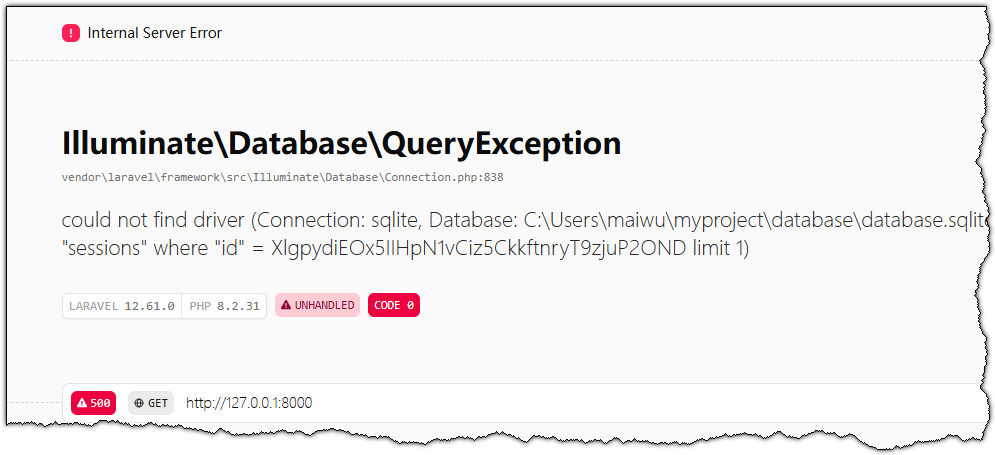
Fügen Sie http://127.0.0.1:8000 in die Adressleiste Ihres Browsers ein, um die Standard-Startseite von Laravel aufzurufen.