Avec NativePHP, vous évitez de passer des heures à configurer Xcode ou Android Studio. Il vous suffit simplement d’installer l’application Jump sur votre téléphone iOS ou Android.
Laravel – Une pile technique épurée pour les développeurs
Exécutez ces commandes pour créer un nouveau projet Laravel
laravel new my-app --using=nativephp/mobile-starter

cd my-app

php artisan native:jumpLangage du code : JavaScript (javascript)
Remarque : Laravel doit être préalablement installé avant d’exécuter ces lignes de commande.
Comment installer Laravel ?
Qu’est-ce que Laravel exactement ?
Laravel est un framework web PHP très populaire et facile à prendre en main. Il intègre nativement des outils pour la connexion et l’inscription des utilisateurs, le téléversement de fichiers, l’envoi d’e-mails, les opérations sur base de données et la validation de formulaires. Il accélère considérablement le développement en PHP.
Laravel fonctionnant sur PHP, assurez-vous d’avoir d’abord configuré votre environnement PHP. Respectez également les exigences de version : une ancienne version de PHP ne sera pas compatible avec les versions récentes de Laravel.
PHP ≥ 8.1 (versions recommandées : 8.2 à 8.4)
Installer PHP
Consultez mon guide dédié pour installer PHP :
Installer l’environnement PHP – FoxDevelop
Installer Composer
Composer est le gestionnaire de paquets de PHP, comparable à NuGet pour .NET ou Maven et Gradle pour Java.
Reportez-vous à mon tutoriel distinct pour les étapes d’installation de Composer.
Installer Composer, le gestionnaire de paquets PHP – FoxDevelop
Une fois PHP et Composer opérationnels, vous pouvez passer à l’installation de Laravel.
Ouvrez l’invite de commandes et vérifiez d’abord les versions des logiciels.
Exigence de version PHP : PHP ≥ 8.1 (8.2 / 8.5 recommandé). Exécutez la commande php -v.
Exigence de version Composer : Composer ≥ 2.5. Exécutez la commande composer -V.
Vérifiez ensuite les extensions PHP requises :
php -m | findstr mbstring
php -m | findstr openssl
php -m | findstr pdo
Les utilisateurs situés en Chine peuvent passer au miroir d’Alibaba pour résoudre les lenteurs de téléchargement. Copiez cette commande dans l’invite de commandes :
composer config -g repo.packagist composer https://mirrors.aliyun.com/composer/Langage du code : JavaScript (javascript)Lancez maintenant l’installation avec la commande create-project :
composer create-project laravel/laravel myproject
cd myproject
Une erreur survient ici car l’extension zip est manquante. Si votre installation se déroule sans problème, ignorez les étapes de dépannage ci-dessous et allez directement ici.
Le message d’erreur est le suivant :
C:\Users\xxxx>composer create-project laravel/laravel myproject
Creating a "laravel/laravel" project at "./myproject"
Installing laravel/laravel (v12.10.0)
    Failed to download laravel/laravel from dist: The zip extension and unzip/7z commands are both missing, skipping.
The php.ini used by your command-line PHP is: D:\php8.2\php.ini
    Now trying to download from source
  - Syncing laravel/laravel (v12.10.0) into cacheLangage du code : JavaScript (javascript)
Exécutez cette commande de vérification dans l’invite de commandes pour confirmer l’absence de l’extension zip :
php -m | findstr zipSi aucun résultat ne s’affiche, l’extension zip est toujours désactivée.
Modifier php.ini pour activer l’extension zip
Chemin du fichier de configuration PHP : D:\php8.2\php.ini
Recherchez la ligne ;extension=zip et supprimez le point-virgule au début.
Réexécutez php -m | findstr zip dans l’invite de commandes. Un résultat valide confirme que l’extension est bien activée.
Réessayez ensuite l’installation
Lancez à nouveau la commande d’installation :
composer create-project laravel/laravel myprojectL’installation échoue à nouveau, voici les journaux correspondants :
composer create-project laravel/laravel myproject
Creating a "laravel/laravel" project at "./myproject"
Installing laravel/laravel (v12.10.0)
  - Downloading laravel/laravel (v12.10.0)
    Failed downloading laravel/laravel, trying the next URL (404: The "https://mirrors.aliyun.com/composer/dists/laravel/laravel/76396a056d552b8a34077f151775037ac44b431a.zip" file could not be downloaded (HTTP/2 404 ))
  - Downloading laravel/laravel (v12.10.0)
  - Installing laravel/laravel (v12.10.0): Extracting archive
Created project in C:\Users\maiwu\myproject
> @php -r "file_exists('.env') || copy('.env.example', '.env');"
Loading composer repositories with package information
Updating dependencies
Your requirements could not be resolved to an installable set of packages.

  Problem 1
    - Root composer.json requires laravel/tinker ^2.10.1, it is satisfiable by laravel/tinker[v2.10.1, v2.10.2, v2.11.0, v2.11.1] from composer repo (https://repo.packagist.org) but laravel/tinker[2.x-dev] from composer repo (https://mirrors.aliyun.com/composer) has higher repository priority. The packages from the higher priority repository do not match your minimum-stability and are therefore not installable. That repository is canonical so the lower priority repo's packages are not installable. See https://getcomposer.org/repoprio for details and assistance.
  Problem 2
    - Root composer.json requires phpunit/phpunit ^11.5.3, found phpunit/phpunit[11.5.3, ..., 11.5.44] but these were not loaded, because they are affected by security advisories ("PKSA-z3gr-8qht-p93v", "PKSA-z3gr-8qht-p93v"). Go to https://packagist.org/security-advisories/ to find advisory details. To ignore the advisories, add them to the audit "ignore" config. To turn the feature off entirely, you can set "block-insecure" to false in your "audit" config.
  Problem 3
    - Root composer.json requires laravel/sail ^1.41 -> satisfiable by laravel/sail[v1.41.0, ..., v1.46.0].
    - laravel/sail[v1.41.0, ..., v1.46.0] require symfony/yaml ^6.0|^7.0 -> found symfony/yaml[v6.0.0, ..., v6.4.30, v7.0.0, ..., v7.4.1] but these were not loaded, because they are affected by security advisories ("PKSA-v5yj-8nmz-sk2q", "PKSA-ft77-7h5f-p3r6", "PKSA-b14r-zh1d-vdrc", "PKSA-v5yj-8nmz-sk2q", "PKSA-ft77-7h5f-p3r6", "PKSA-b14r-zh1d-vdrc"). Go to https://packagist.org/security-advisories/ to find advisory details. To ignore the advisories, add them to the audit "ignore" config. To turn the feature off entirely, you can set "block-insecure" to false in your "audit" config.
  Problem 4
    - Root composer.json requires laravel/framework ^12.0 -> satisfiable by laravel/framework[v12.1.1, ..., v12.40.0].
    - laravel/framework[v12.1.1, ..., v12.12.0] require league/commonmark ^2.6 -> found league/commonmark[2.6.0] but these were not loaded, because they are affected by security advisories ("PKSA-21fb-n1x5-5nf7", "PKSA-2cx9-ynrq-qdk3", "PKSA-rqc2-tcc6-nc79", "PKSA-21fb-n1x5-5nf7", "PKSA-2cx9-ynrq-qdk3", "PKSA-rqc2-tcc6-nc79"). Go to https://packagist.org/security-advisories/ to find advisory details. To ignore the advisories, add them to the audit "ignore" config. To turn the feature off entirely, you can set "block-insecure" to false in your "audit" config.
    - laravel/framework[v12.13.0, ..., v12.40.0] require league/commonmark ^2.7 -> satisfiable by league/commonmark[2.7.0, ..., 2.8.2] from composer repo (https://repo.packagist.org) but league/commonmark[dev-main, 2.7.x-dev, 2.8.x-dev, 2.9.x-dev (alias of dev-main)] from composer repo (https://mirrors.aliyun.com/composer) has higher repository priority. The packages from the higher priority repository do not match your minimum-stability and are therefore not installable. That repository is canonical so the lower priority repo's packages are not installable. See https://getcomposer.org/repoprio for details and assistance.Langage du code : PHP (php)
Cause : Le miroir Composer d’Alibaba ne fonctionne plus correctement.
Supprimez d’abord le dossier du projet défectueux, puis revenez vers la source officielle :
rmdir /s /q myproject
composer config -g --unset repos.packagist
composer create-project laravel/laravel myproject --no-auditLangage du code : PHP (php)
Si l’installation échoue encore, nettoyez à nouveau les fichiers résiduels :
- Downloading phpunit/php-code-coverage (11.0.12)
  - Downloading phar-io/version (3.2.1)
  - Downloading phar-io/manifest (2.0.4)
  - Downloading myclabs/deep-copy (1.13.4)
  - Downloading phpunit/phpunit (11.5.55)
 110/111 [===========================>]  99%A connection timeout was encountered. If you intend to run Composer without connecting to the internet, run the command again prefixed with COMPOSER_DISABLE_NETWORK=1 to make Composer run in offline mode.
    Failed to download laravel/pint from dist: The "https://codeload.github.com/laravel/pint/legacy.zip/0770e9b7fafd50d4586881d456d6eb41c9247a80" file could not be written to C:\Users\maiwu\myproject/vendor/composer/tmp-60f6b8b4815321558e13bb1ac74423ee.zip: Failed to open stream: Permission denied
    Now trying to download from source
  - Syncing laravel/pint (v1.29.1) into cache
Cloning failed using an ssh key for authentication, enter your GitHub credentials to access private repos
You need to provide a GitHub access token.
Tokens will be stored in plain text in "C:/Users/maiwu/AppData/Roaming/Composer/auth.json" for future use by Composer.
Due to the security risk of tokens being exfiltrated, use tokens with short expiration times and only the minimum permissions necessary.

Carefully consider the following options in order:

1. When you don't use 'vcs'  type 'repositories'  in composer.json and do not need to clone source or download dist files
from private GitHub repositories over HTTPS, use a fine-grained token with read-only access to public information.
Use the following URL to create such a token:
https://github.com/settings/personal-access-tokens/new?name=Composer+on+DESKTOP-1OHC5Q4+2026-05-27+0946

2. When all relevant _private_ GitHub repositories belong to a single user or organisation, use a fine-grained token with
repository "content" read-only permissions. You can start with the following URL, but you may need to change the resource owner
to the right user or organisation. Additionally, you can scope permissions down to apply only to selected repositories.
https://github.com/settings/personal-access-tokens/new?contents=read&name=Composer+on+DESKTOP-1OHC5Q4+2026-05-27+0946

3. A "classic" token grants broad permissions on your behalf to all repositories accessible by you.
This may include write permissions, even though not needed by Composer. Use it only when you need to access
private repositories across multiple organisations at the same time and using directory-specific authentication sources
is not an option. You can generate a classic token here:
https://github.com/settings/tokens/new?scopes=repo&description=Composer+on+DESKTOP-1OHC5Q4+2026-05-27+0946

For additional information, check https://getcomposer.org/doc/articles/authentication-for-private-packages.md#github-oauth
Token (hidden):Langage du code : PHP (php)
Exécutez ensuite la commande d’installation modifiée :
composer create-project laravel/laravel myproject --no-dev --no-auditInstallez Laravel sans invitation de jeton GitHub ni dépendances supplémentaires :
Ajoutez les paramètres –no-dev et –no-audit pour ignorer pint et phpunit, qui déclenchent le téléchargement de sources depuis GitHub.
L’installation est réussie lorsque vous obtenez un résultat similaire à celui-ci :
- Installing league/commonmark (2.8.2): Extracting archive
  - Installing laravel/framework (v12.61.0): Extracting archive
75 package suggestions were added by new dependencies, use `composer suggest` to see details.
Package sebastian/code-unit is abandoned, you should avoid using it. No replacement was suggested.
Package sebastian/code-unit-reverse-lookup is abandoned, you should avoid using it. No replacement was suggested.
Generating optimized autoload files
> Illuminate\Foundation\ComposerScripts::postAutoloadDump
> @php artisan package:discover --ansi

   INFO  Discovering packages.

  laravel/tinker .............................................................................................................................. DONE
  nesbot/carbon ............................................................................................................................... DONE
  nunomaduro/termwind ......................................................................................................................... DONELangage du code : JavaScript (javascript)
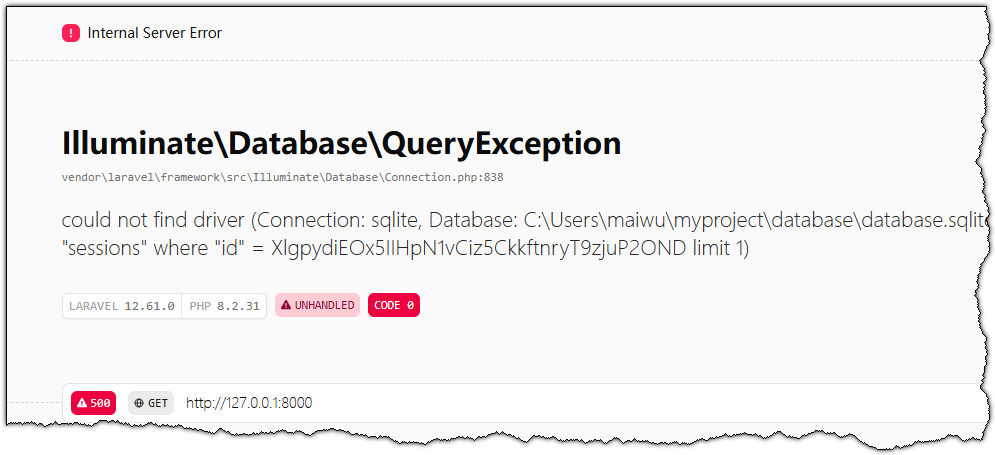
Testons maintenant le projet nouvellement créé. La commande précédente a généré le dossier myproject contenant l’ensemble des fichiers sources.
Dans la fenêtre d’invite de commandes active, exécutez ces deux lignes :
cd myproject
php artisan serve
Votre invite de commandes affichera ceci :
C:\Users\xxxx>cd myproject
C:\Users\xxxx\myproject>php artisan serve
   INFO  Server running on [http://127.0.0.1:8000].
   Press Ctrl+C to stop the server
Langage du code : JavaScript (javascript)
Collez http://127.0.0.1:8000 dans la barre d’adresse de votre navigateur pour consulter la page d’accueil par défaut de Laravel.