Having finished the Rust installation in the previous lesson, you should now have your Rust development environment set up properly. Let’s go ahead and create our very first Rust program.
First, create a new folder on your computer to store your code files. For example: D:\rustdemo
Next, create a text file and rename it to: hello.rs
Open this .rs file with Notepad or any text editor, then paste the code below inside it:
fn main() { println!("Hello World!"); }Now we will compile and run the program.
Launch Command Prompt first, then use the cd command to navigate to the directory D:\rustdemo. Alternatively, you can simply type cmd in the folder’s address bar to open Command Prompt directly in this path.
D:\rustdemo>rustc hello.rs D:\rustdemo>hello Hello World! D:\rustdemo>rustc hello.rs compiles the source code file.
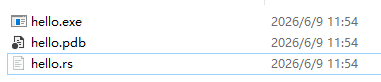
Running hello executes the generated hello.exe file in the directory. The compilation process will produce this executable file, which outputs the text Hello World! to the console.
Code Breakdown
fn: A reserved keyword used to define a function.
main: The main function. This is a mandatory entry point for all Rust programs and cannot be renamed. The operating system will call this function when you launch the application.
(): Parentheses that hold function parameters. An empty pair means the main function takes no input parameters.
{ }: Curly braces that mark the function body. All code belonging to the function is written between this pair of braces.
println!(“Hello World!”);
println! is a built-in Rust macro used to print text to the console.
(“Hello World!”): The parentheses here enclose the input argument. We pass the string Hello World! into the println! macro. This utility comes with the official Rust standard library, so you don’t need to understand its internal implementation — you only need to know it prints content to the console when invoked.
English double quotation marks surrounding Hello World! are the standard syntax for declaring string literals in Rust. All text strings must be wrapped in double quotes.