Why do we need to understand and master this function first? We will use it constantly throughout our C programming journey, as its purpose is to print content to the console.
1 The printf Function
We already used it in our earlier example
// Call printf to output a string; \n stands for a newline character
printf("hello, world\n");
Code language: C/AL (cal)
printf() — the standard library print function
When you write printf("content"), you pass a string as its argument; it prints all characters wrapped inside the double quotes to the console.
A semicolon ; must be placed at the end of every statement to mark its termination. Omitting the semicolon will trigger a compilation error. See the error output below:
C:\cdemo>gcc hello.c -o hello.exe
hello.c: In function 'main':
hello.c:5:29: error: expected ';' before 'return'
     printf("hello, world\n")
                             ^
                             ;
     return 0;
     ~~~~~~Code language: PHP (php)
If you want to output multiple lines of text, you can write it like this:
#include <stdio.h>
main()
{
    printf("First line of text\n");
    printf("Second line of text\n");
}Code language: PHP (php)
2 String Literals
A sequence of characters wrapped in English double quotation marks " ", such as "hello, world\n"
In all our previous examples, string literals are passed as arguments to printf, which prints the literal text directly to the console.
A string literal cannot be split across multiple lines. The code below will fail to compile:
// Incorrect example: splitting a string onto two separate lines
printf("hello, world
");
Code language: C/AL (cal)
Compilation error feedback
C:\cdemo>gcc hello.c -o hello.exe
hello.c: In function 'main':
hello.c:6:11: warning: missing terminating " character
    printf("hello, world
           ^
hello.c:6:11: error: missing terminating " character
    printf("hello, world
           ^~~~~~~~~~~~~
hello.c:7:4: warning: missing terminating " character
    ");
    ^
hello.c:7:4: error: missing terminating " character
    ");
    ^~~
hello.c:8:5: error: expected expression before 'return'
     return 0;
     ^~~~~~
hello.c:8:14: error: expected ';' before '}' token
     return 0;
              ^
              ;
 }
 ~Code language: PHP (php)
3 Escape Character \n — Newline Character
\n is a special C-language token that represents a newline character;
printf does not automatically wrap text to the next line. You must manually add \n to move the cursor to a new line;
Without \n, all text will print on a single line. Take the following example:
#include <stdio.h>

int main()
{
    // No \n: both text segments print side-by-side on one line
    printf("hello");
    printf("world");

    // With \n: the cursor jumps to a new line after output
    printf("\nhello\n");
    printf("world\n");

    return 0;
}Code language: PHP (php)C:\cdemo>gcc hello.c -o hello.exe
C:\cdemo>hello
helloworld
hello
world
C:\cdemo>Code language: CSS (css)“hello” and “world” are printed back-to-back on the same line. When using printf to print content, remember to add \n if you need a line break. A single \n acts like pressing the Enter key once; two consecutive \n characters insert a blank line between text segments, identical to hitting Enter twice in a Notepad file.
#include <stdio.h>

int main()
{
    printf("one\n\n");
    printf("two");
    return 0;
}Code language: PHP (php)
Program execution output
C:\cdemo>gcc hello.c -o hello.exe

C:\cdemo>hello
one

two
C:\cdemo>Code language: CSS (css)
Building a single output line across multiple separate printf calls
See the example below
#include <stdio.h>

int main()
{
    printf("hello, ");
    printf("world");
    printf("\n"); // Add a single newline at the very end
}Code language: PHP (php)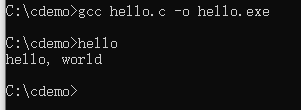
Common Pitfalls Supplement
#include <stdio.h>
This preprocessor directive imports the standard input/output header file — note that it does not end with a semicolon ;
You must include #include <stdio.h> to use the printf function, otherwise the compiler will throw an error