本章節學習屬性(Property)的定義、語法、規範與序列化機制
Property 是什麼
property 屬於 Pascal 語法糖,對外使用行為等同欄位,底層實際呼叫getter 讀取 / setter 寫入,用途為封裝私有欄位、統一讀寫邏輯、掛載額外副作用。
- 可讀寫可控屬性:賦值或取值時自動執行額外處理邏輯(介面重繪、元件同步、數值驗證);
- 唯讀屬性:外部僅可讀取、禁止直接賦值,內部透過專用程序修改資料。
program Demo;
{$ifdef FPC} {$mode objfpc}{$H+}{$J-} {$endif}
{$ifdef MSWINDOWS} {$apptype CONSOLE} {$endif}
uses
  SysUtils;

type
  TWebPage = class
  private
    FURL: string;
    FColorRGB: Integer;
    procedure SetColorRGB(const Value: Integer);
  public
    property URL: string read FURL;
    property ColorRGB: Integer read FColorRGB write SetColorRGB;

    procedure Load(const AnURL: string);
    procedure PrintStatus;
  end;

procedure TWebPage.Load(const AnURL: string);
begin
  FURL := AnURL;
  Writeln('Load page: ', AnURL);
end;

procedure TWebPage.SetColorRGB(const Value: Integer);
begin
  if FColorRGB <> Value then
  begin
    FColorRGB := Value;
    Writeln('Color updated, value = ', Value);
    Writeln('Sync component color to ', Value);
  end;
end;

procedure TWebPage.PrintStatus;
begin
  Writeln('==== Page Info ====');
  Writeln('URL(read-only): ', URL);
  Writeln('ColorRGB(rw): ', ColorRGB);
  Writeln('==================');
  Writeln;
end;

var
  Page: TWebPage;
begin
  Page := TWebPage.Create;
  try
    Page.Load('https://www.foxdevelop.com/');
    Page.ColorRGB := 255;
    Page.PrintStatus;

    Page.ColorRGB := 255;
    Page.PrintStatus;

    Page.ColorRGB := 65535;
    Page.PrintStatus;

    // Page.URL := 'test'; // 編譯錯誤,URL 為唯讀屬性
  finally
    Page.Free;
  end;
  Readln;
end.Code language: HTML, XML (xml)
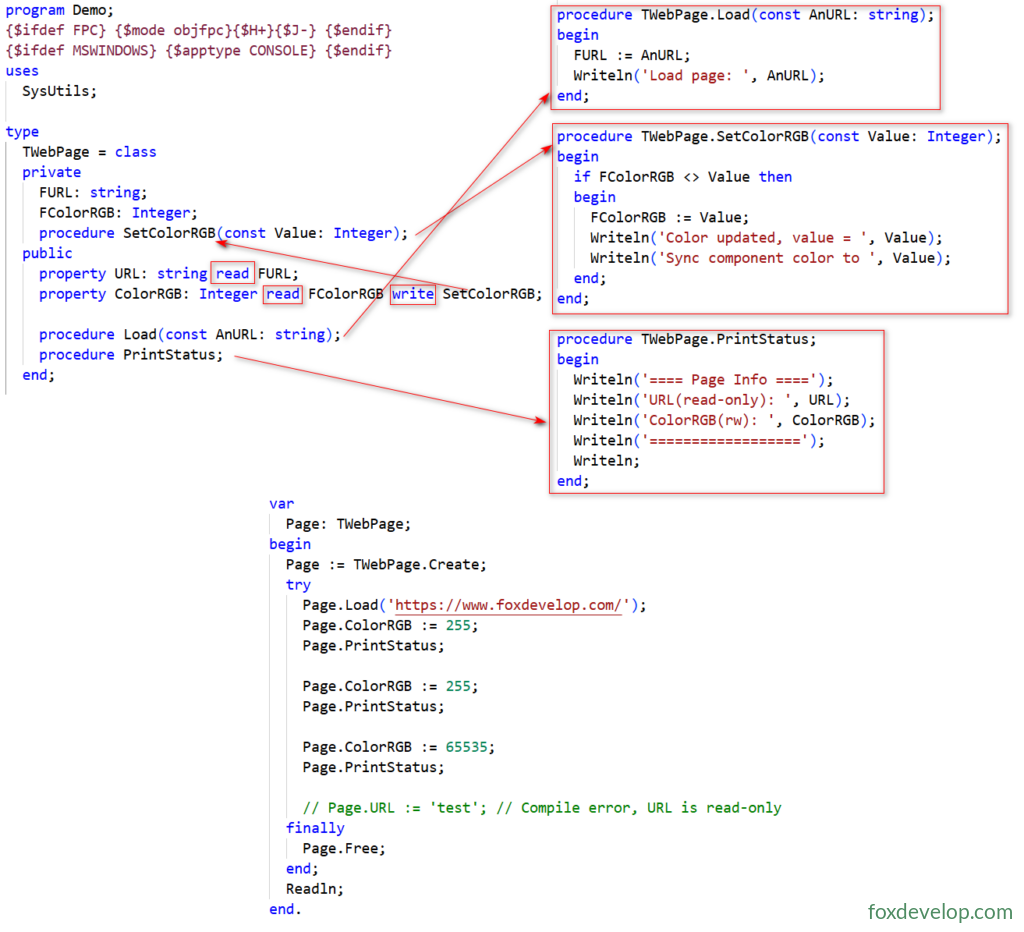
TWebPage 內的 URL 屬性僅供讀取,若需修改內容,必須透過 Load 程序處理。
FColorRGB 屬性支援讀取,寫入修改則依賴 SetColorRGB 程序。
PrintStatus 為一般程序,用途是輸出 TWebPage 的內部狀態資訊。
執行輸出結果
Load page: https://www.foxdevelop.com/
Color updated, value = 255
Sync component color to 255
==== Page Info ====
URL(read-only): https://www.foxdevelop.com/
ColorRGB(rw): 255
==================

==== Page Info ====
URL(read-only): https://www.foxdevelop.com/
ColorRGB(rw): 255
==================

Color updated, value = 65535
Sync component color to 65535
==== Page Info ====
URL(read-only): https://www.foxdevelop.com/
ColorRGB(rw): 65535
==================Code language: JavaScript (javascript)
2. 屬性三要素宣告規則
宣告屬性必須指定讀取來源,寫入來源為選填:
read 讀取來源(二擇一)
- 直接綁定私有欄位(執行速度最快,無額外函式開銷)
- 無參 getter 函式,回傳型別與屬性完全相符
write 寫入來源(選填,省略即為唯讀)二擇一
- 直接綁定私有欄位
- 單參數 setter 函式,參數型別與屬性完全相符
專供序列化使用的額外修飾子:default、stored
編譯器強制檢查型別匹配:
- Integer 型屬性:getter 須無參回傳 Integer / read 綁定 Integer 私有欄位
- String 型屬性:setter 須接收 const string 參數
Published 屬性與序列化
1. 何謂序列化
將物件完整資料寫入資料流(檔案/記憶體/JSON),後續可從資料流還原物件;
Lazarus 視窗 .lfm、Delphi .dfm 視窗檔案底層完全依賴此機制。
- 核心前提:屬性必須宣告於
published區段,RTTI 執行期型別資訊才能辨識 - 配套工具單元:
LResources:讀寫 lfm 視窗檔FpJsonRtti/CastleComponentSerialize:物件 JSON 序列化
2. 序列化專用修飾子
default <常數>:標記屬性預設值
- 僅供序列化工具判斷:物件建構完成後若屬性值等同 default,序列化時省略儲存,縮減檔案體積
- 不會自動初始化:建構函式必須手動將欄位賦值為 default 對應數值
stored <布林/方法>:控制序列化時是否儲存該屬性
stored True:預設值,序列化時寫入檔案stored False:永遠不儲存此屬性stored IsNeedSave:呼叫布林方法動態判斷是否儲存
序列化範例
type
  TWebPage = class
  private
    FColor: TColor;
    function SetColor(const Value: TColor): TColor;
  published
    // default clBlack 代表預設黑色,建構函式須手動 FColor := clBlack
    property Color: TColor read FColor write SetColor default clBlack;
    // stored False 不會儲存至 lfm/json
    property TempCache: string read FTemp write FTemp stored False;
  end;
Previous: is 與 as 總結