上一堂課我們安裝了 FPC(Free Pascal 編譯器),接下來我們測試是否安裝成功。讀者可開啟 CMD 終端機,透過開始功能表搜尋 CMD 即可打開。
檢查安裝是否成功
接著輸入 fpc 指令,若回傳以下內容,即代表安裝完成。
C:\Users\Jack>fpc
Free Pascal Compiler version 3.2.2 [2021/05/15] for i386
Copyright (c) 1993-2021 by Florian Klaempfl and others
C:\FPC\3.2.2\bin\i386-Win32\fpc.exe [options] <inputfile> [options]
 Only options valid for the default or selected platform are listed.
 Put + after a boolean switch option to enable it, - to disable it.
  @<x>   Read compiler options from <x> in addition to the default fpc.cfg
  -a     The compiler does not delete the generated assembler file
      -a5        Don't generate Big Obj COFF files for GNU Binutils older than 2.25 (Windows, NativeNT)
      -al        List sourcecode lines in assembler file
      -an        List node info in assembler file (-dEXTDEBUG compiler)
      -ao        Add an extra option to external assembler call (ignored for internal)
      -ar        List register allocation/release info in assembler file
      -at        List temp allocation/release info in assembler file
  -A<x>  Output format:
      -Adefault  Use default assembler
      -Aas       Assemble using GNU AS
      -Amacho    Mach-O (Darwin, Intel 32 bit) using internal writer
      -Anasm     Assemble using Nasm
      -Anasmcoff COFF (Go32v2) file using Nasm
*** press enter ***Code language: HTML, XML (xml)
撰寫程式碼
接下來建立我們第一個 Free Pascal 範例,請在 C 槽或 D 槽建立資料夾,用來存放所有 Free Pascal 程式碼。
D:\fpcdemo
以上是示範建立的資料夾路徑。
在該資料夾內建立純文字檔,並將檔名修改為:mydemo.dpr
使用記事本開啟該檔案,貼上以下程式內容:
program <strong>mydemo</strong>;
begin
  WriteLn('Hello foxDevelop.com!');
end.Code language: HTML, XML (xml)
編譯與執行
在終端機透過 cd 指令切換至 D:\fpcdemo 資料夾
接著執行指令:fpc mydemo.dpr
指令執行完畢後,編譯器會進行編譯與連結作業,在資料夾內產生可執行檔 mydemo.exe。
只需輸入執行檔名稱 mydemo,不需要加上 .exe 副檔名,即可執行程式。
畫面會輸出文字:Hello foxDevelop.com!
D:\fpcdemo>fpc mydemo.dpr
Free Pascal Compiler version 3.2.2 [2021/05/15] for i386
Copyright (c) 1993-2021 by Florian Klaempfl and others
Target OS: Win32 for i386
Compiling mydemo.dpr
Linking mydemo.exe
3 lines compiled, 0.1 sec, 28224 bytes code, 1316 bytes data

D:\fpcdemo>mydemo
Hello foxDevelop.com!Code language: CSS (css)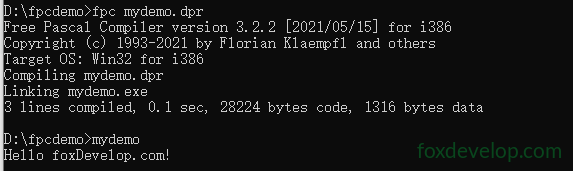
第一行指令 fpc xxxxx.dpr 會編譯 .dpr 原始碼,接著執行連結作業輸出 mydemo.exe。
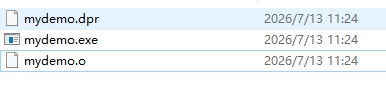
編譯階段會將原始碼轉譯為機器目標檔,副檔名為 .o。
讀者會在專案資料夾看見產生的 .o 檔案。
所謂連結,是因為程式執行需要作業系統函式庫,同時要整合多個程式單元,連結器負責完成以下工作:
補齊跨單元、函式庫內函數與變數的記憶體位址;
合併所有編譯產生的目標檔;
綁定系統函式庫與 FPC 執行階段函式庫;
重新配置記憶體位址;
封裝產生 exe、elf 等格式可執行檔。
簡單來說:將零散的編譯片段與各類函式庫整合為一套完整可執行的程式。
第一個 Free Pascal 程式範例
Previous: Free Pascal 安裝作業
Next: 認識 Free Pascal