지난 시간에 FPC (Free Pascal Compiler)를 설치했습니다. 이제 설치가 정상적으로 완료되었는지 테스트해 보겠습니다. CMD 터미널을 열어야 하는데 시작 메뉴에서 CMD를 검색하면 실행할 수 있습니다.
설치 성공 여부 확인하기
그 다음 fpc 명령어를 입력했을 때 아래 내용이 출력된다면 설치가 정상적으로 완료된 것입니다.
C:\Users\Jack>fpc
Free Pascal Compiler version 3.2.2 [2021/05/15] for i386
Copyright (c) 1993-2021 by Florian Klaempfl and others
C:\FPC\3.2.2\bin\i386-Win32\fpc.exe [options] <inputfile> [options]
 Only options valid for the default or selected platform are listed.
 Put + after a boolean switch option to enable it, - to disable it.
  @<x>   Read compiler options from <x> in addition to the default fpc.cfg
  -a     The compiler does not delete the generated assembler file
      -a5        Don't generate Big Obj COFF files for GNU Binutils older than 2.25 (Windows, NativeNT)
      -al        List sourcecode lines in assembler file
      -an        List node info in assembler file (-dEXTDEBUG compiler)
      -ao        Add an extra option to external assembler call (ignored for internal)
      -ar        List register allocation/release info in assembler file
      -at        List temp allocation/release info in assembler file
  -A<x>  Output format:
      -Adefault  Use default assembler
      -Aas       Assemble using GNU AS
      -Amacho    Mach-O (Darwin, Intel 32 bit) using internal writer
      -Anasm     Assemble using Nasm
      -Anasmcoff COFF (Go32v2) file using Nasm
*** press enter ***Code language: HTML, XML (xml)
코드 작성하기
이제 첫 Free Pascal 예제를 만들어 보겠습니다. C드라이브나 D드라이브에 폴더를 생성해서 Free Pascal 소스 코드를 저장할 공간으로 사용합니다.
D:\fpcdemo
위 경로는 제가 생성한 폴더입니다.
해당 폴더 안에 텍스트 파일을 새로 만들고 파일 이름을 mydemo.dpr로 수정합니다.
메모장으로 파일을 열고 아래 내용을 입력합니다.
program <strong>mydemo</strong>;
begin
  WriteLn('Hello foxDevelop.com!');
end.Code language: HTML, XML (xml)
컴파일 및 실행하기
터미널에서 cd 명령어로 D:\fpcdemo 디렉터리로 이동합니다.
그 다음 아래 명령어를 실행합니다:fpc mydemo.dpr
명령 실행이 완료되면 폴더 내에서 컴파일 및 링크 작업이 진행되고 mydemo.exe 실행 파일이 생성됩니다.
프로그램을 실행할 때는 확장자 .exe 없이 파일명인 mydemo만 입력하면 됩니다.
화면에 Hello foxDevelop.com! 이 출력됩니다.
D:\fpcdemo>fpc mydemo.dpr
Free Pascal Compiler version 3.2.2 [2021/05/15] for i386
Copyright (c) 1993-2021 by Florian Klaempfl and others
Target OS: Win32 for i386
Compiling mydemo.dpr
Linking mydemo.exe
3 lines compiled, 0.1 sec, 28224 bytes code, 1316 bytes data

D:\fpcdemo>mydemo
Hello foxDevelop.com!Code language: CSS (css)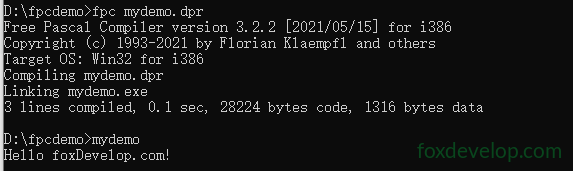
첫 번째 명령어 fpc xxxxx.dpr은 dpr 소스 코드를 컴파일한 뒤 링크 과정을 거쳐 mydemo.exe를 생성합니다.
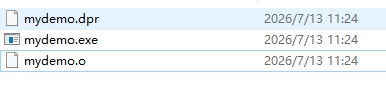
컴파일 단계에서 소스 코드는 .o 확장자의 기계 오브젝트 파일로 변환됩니다.
폴더 안에 .o 파일이 생성된 것을 확인할 수 있습니다.
링크 작업이 필요한 이유는 프로그램 실행에 운영체제 라이브러리가 필요하고 여러 유닛을 합쳐야 하기 때문이며 링커가 아래 업무를 처리합니다.
여러 유닛 및 라이브러리의 함수/변수 메모리 주소를 채워주기;
컴파일로 생성된 모든 오브젝트 파일을 병합하기;
시스템 라이브러리와 FPC 런타임 라이브러리를 연결하기;
메모리 주소 재배치하기;
exe, elf 등 실행 가능한 파일로 패키징하기.
한 줄로 요약하면: 흩어진 컴파일 결과와 각종 라이브러리를 통합해 완전히 실행 가능한 단일 프로그램으로 만드는 과정입니다.
첫 Free Pascal 예제