In the last lesson, we installed FPC (Free Pascal Compiler). Now let’s verify if the installation succeeded. Open the CMD terminal; you can search for CMD in the Start Menu to launch it.
Verify Installation Success
Next, enter the fpc command. If the output matches the content below, your installation is complete.
C:\Users\Jack>fpc
Free Pascal Compiler version 3.2.2 [2021/05/15] for i386
Copyright (c) 1993-2021 by Florian Klaempfl and others
C:\FPC\3.2.2\bin\i386-Win32\fpc.exe [options] <inputfile> [options]
 Only options valid for the default or selected platform are listed.
 Put + after a boolean switch option to enable it, - to disable it.
  @<x>   Read compiler options from <x> in addition to the default fpc.cfg
  -a     The compiler does not delete the generated assembler file
      -a5        Don't generate Big Obj COFF files for GNU Binutils older than 2.25 (Windows, NativeNT)
      -al        List sourcecode lines in assembler file
      -an        List node info in assembler file (-dEXTDEBUG compiler)
      -ao        Add an extra option to external assembler call (ignored for internal)
      -ar        List register allocation/release info in assembler file
      -at        List temp allocation/release info in assembler file
  -A<x>  Output format:
      -Adefault  Use default assembler
      -Aas       Assemble using GNU AS
      -Amacho    Mach-O (Darwin, Intel 32 bit) using internal writer
      -Anasm     Assemble using Nasm
      -Anasmcoff COFF (Go32v2) file using Nasm
*** press enter ***Code language: HTML, XML (xml)
Write Code
Now we will create our first Free Pascal sample. Create a folder on your C or D drive to store all Free Pascal source files.
D:\fpcdemo
The path above is the folder I created for demonstration.
Inside this folder, create a new text file and rename it to: mydemo.dpr
Open the file with Notepad and paste the following code:
program <strong>mydemo</strong>;
begin
  WriteLn('Hello foxDevelop.com!');
end.Code language: HTML, XML (xml)
Compile & Run
Use the cd command in terminal to navigate to D:\fpcdemo
Run this command: fpc mydemo.dpr
After executing the command, the compiler will compile and link the source code to produce an executable file named mydemo.exe inside the folder.
You can launch the program by typing the executable name “mydemo” without appending the .exe suffix.
The program will output: Hello foxDevelop.com!
D:\fpcdemo>fpc mydemo.dpr
Free Pascal Compiler version 3.2.2 [2021/05/15] for i386
Copyright (c) 1993-2021 by Florian Klaempfl and others
Target OS: Win32 for i386
Compiling mydemo.dpr
Linking mydemo.exe
3 lines compiled, 0.1 sec, 28224 bytes code, 1316 bytes data

D:\fpcdemo>mydemo
Hello foxDevelop.com!Code language: CSS (css)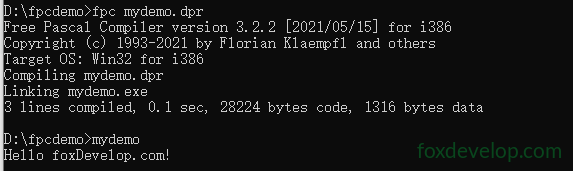
The command fpc xxxxx.dpr compiles the .dpr source file and proceeds to link and generate mydemo.exe.
During compilation, source code is converted into machine object files with the .o extension.
You may notice a .o file generated within your project folder.
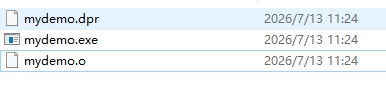
Linking is required because programs rely on OS libraries and need to combine multiple code units. This is exactly the job of the linker:
Fill in memory addresses for cross-unit and library functions/variables;
Merge all compiled object files together;
Bind system libraries and FPC runtime libraries;
Relocate memory addresses;
Package everything into executable formats such as exe or elf.
In short: Assemble fragmented compiled outputs and various libraries into a single fully functional executable program.