下面以一套簡單的越南語學習APP做示範,畫面會顯示越南語的輔音,底部則是功能選單。
我們使用 Tailwind 做網頁樣板。
關於 Tailwind 的用法,各位可以參考其他課程。
請修改 index.html,內容如下
<!DOCTYPE html>
<html lang="vi">
<head>
<meta charset="UTF-8">
<meta name="viewport" content="width=device-width, initial-scale=1.0, maximum-scale=1.0, user-scalable=no">
<title>Bảng phụ âm tiếng Việt</title>
<!-- Tailwind 內嵌CDN;離線使用建議打包後換成本地檔案 -->
<script src="https://cdn.tailwindcss.com"></script>
<script>
tailwind.config = {
theme: {
extend: {
colors: {
primary: '#2563eb',
bottomNav: '#ffffff',
cardBg: '#f8fafc'
}
}
}
}
</script>
<style type="text/tailwindcss">
@layer utilities {
.safe-bottom {
padding-bottom: calc(4rem + env(safe-area-inset-bottom));
}
.card-shadow {
box-shadow: 0 2px 8px rgba(0,0,0,0.08);
}
}
body {
/* 避免 Cordova 頁面滾動彈回效果 */
overscroll-behavior: none;
}
/* 底部 Tab 啟用樣式 */
.tab-active {
color: #2563eb;
}
</style>
</head>
<body class="bg-gray-100 font-sans text-gray-800">
<!-- 頁面容器 -->
<div id="app" class="max-w-md mx-auto bg-white min-h-screen relative safe-bottom">
<!-- 頂部標題列 -->
<header class="sticky top-0 bg-primary text-white px-4 py-3 shadow z-20">
<h1 class="text-lg font-bold text-center">Phụ Âm Tiếng Việt</h1>
</header>
<!-- 主要內容區 -->
<main class="p-4">
<!-- 頁面一:輔音 -->
<div id="page-consonant" class="page">
<h2 class="text-base font-medium mb-3 text-gray-600">Nhấn vào thẻ để xem chi tiết</h2>
<div id="consonant-grid" class="grid grid-cols-3 gap-3">
<!-- JS 動態產生輔音卡片 -->
</div>
</div>
<!-- 頁面二:我的最愛 -->
<div id="page-favorite" class="page hidden mt-4">
<h2 class="text-lg font-bold mb-4">Danh sách yêu thích</h2>
<div id="favorite-grid" class="grid grid-cols-3 gap-3">
<p class="col-span-3 text-center text-gray-400 py-10">Chưa có từ yêu thích</p>
</div>
</div>
<!-- 頁面三:設定 -->
<div id="page-setting" class="page hidden mt-4">
<h2 class="text-lg font-bold mb-4">Cài đặt</h2>
<div class="space-y-3">
<div class="bg-cardBg p-4 rounded-lg card-shadow">
<p>Ứng dụng học phụ âm tiếng Việt</p>
<p class="text-sm text-gray-500 mt-1">Cordova + TailwindCSS</p>
</div>
</div>
</div>
</main>
<!-- ========== 底部導覽列 ========== -->
<nav class="fixed bottom-0 left-1/2 -translate-x-1/2 w-full max-w-md bg-bottomNav border-t border-gray-200 flex z-30" style="padding-bottom: env(safe-area-inset-bottom);">
<button class="tab-btn flex-1 py-3 flex flex-col items-center tab-active" data-target="page-consonant">
<svg xmlns="http://www.w3.org/2000/svg" width="24" height="24" viewBox="0 0 24 24" fill="none" stroke="currentColor" stroke-width="2">
<rect x="3" y="3" width="18" height="18" rx="2"/>
<path d="M3 9h18M9 21V9"/>
</svg>
<span class="text-xs mt-1">Phụ âm</span>
</button>
<button class="tab-btn flex-1 py-3 flex flex-col items-center text-gray-500" data-target="page-favorite">
<svg xmlns="http://www.w3.org/2000/svg" width="24" height="24" viewBox="0 0 24 24" fill="none" stroke="currentColor" stroke-width="2">
<path d="M20.84 4.61a5.5 5.5 0 0 0-7.78 0L12 5.67l-1.06-1.06a5.5 5.5 0 0 0-7.78 7.78l1.06 1.06L12 21.23l7.78-7.78 1.06-1.06a5.5 5.5 0 0 0 0-7.78z"/>
</svg>
<span class="text-xs mt-1">Yêu thích</span>
</button>
<button class="tab-btn flex-1 py-3 flex flex-col items-center text-gray-500" data-target="page-setting">
<svg xmlns="http://www.w3.org/2000/svg" width="24" height="24" viewBox="0 0 24 24" fill="none" stroke="currentColor" stroke-width="2">
<circle cx="12" cy="12" r="3"/>
<path d="M19.4 15a1.65 1.65 0 0 0 .33 1.82l.06.06a2 2 0 0 1 0 2.83 2 2 0 0 1-2.83 0l-.06-.06a1.65 1.65 0 0 0-1.82-.33 1.65 1.65 0 0 0-1 1.51V21a2 2 0 0 1-2 2 2 2 0 0 1-2-2v-.09A1.65 1.65 0 0 0 9 19.4a1.65 1.65 0 0 0-1.82.33l-.06.06a2 2 0 0 1-2.83 0 2 2 0 0 1 0-2.83l.06-.06a1.65 1.65 0 0 0 .33-1.82 1.65 1.65 0 0 0-1.51-1H3a2 2 0 0 1-2-2 2 2 0 0 1 2-2h.09A1.65 1.65 0 0 0 4.6 9a1.65 1.65 0 0 0-.33-1.82l-.06-.06a2 2 0 0 1 0-2.83 2 2 0 0 1 2.83 0l.06.06a1.65 1.65 0 0 0 1.82.33H9a1.65 1.65 0 0 0 1-1.51V3a2 2 0 0 1 2-2 2 2 0 0 1 2 2v.09a1.65 1.65 0 0 0 1 1.51 1.65 1.65 0 0 0 1.82-.33l.06-.06a2 2 0 0 1 2.83 0 2 2 0 0 1 0 2.83l-.06.06a1.65 1.65 0 0 0-.33 1.82V9a1.65 1.65 0 0 0 1.51 1H21a2 2 0 0 1 2 2 2 2 0 0 1-2 2h-.09a1.65 1.65 0 0 0-1.51 1z"/>
</svg>
<span class="text-xs mt-1">Cài đặt</span>
</button>
</nav>
</div>
<!-- ========== 彈窗:顯示輔音詳細資訊 ========== -->
<div id="modal" class="fixed inset-0 bg-black/50 z-50 hidden flex items-center justify-center p-4">
<div class="bg-white rounded-xl w-full max-w-sm p-5 relative">
<button id="close-modal" class="absolute top-3 right-3 text-gray-400 text-xl">×</button>
<h3 id="modal-char" class="text-4xl font-bold text-primary text-center py-4"></h3>
<div class="space-y-2 text-gray-700">
<p><span class="font-semibold">Phiên âm:</span> <span id="modal-pronounce"></span></p>
<p><span class="font-semibold">Giải thích:</span> <span id="modal-desc"></span></p>
</div>
<button id="btn-fav" class="w-full mt-5 bg-primary text-white py-2 rounded-lg">Thêm yêu thích</button>
</div>
</div>
<!-- Cordova js (只會在實體裝置執行) -->
<script src="cordova.js"></script>
<script src="js/main.js"></script>
</body>
</html>Code language: HTML, XML (xml)在 www/js/main.js 建立 main.js 檔案
貼上以下內容
// 越南語輔音資料
const consonants = [
    {char: "b", pronounce: "/ɓ/", desc: "Phụ âm bật môi"},
    {char: "c", pronounce: "/k/", desc: "Phụ âm vòm ngạc cứng"},
    {char: "ch", pronounce: "/tɕ/", desc: "Phụ âm xát vòm"},
    {char: "d", pronounce: "/ɗ/", desc: "Phụ âm bật răng lợi"},
    {char: "đ", pronounce: "/ɗ/", desc: "Phụ âm đệm răng lợi"},
    {char: "g", pronounce: "/ɣ/", desc: "Phụ âm xát vòm ngạc"},
    {char: "gh", pronounce: "/ɣ/", desc: "Dùng trước e, i"},
    {char: "h", pronounce: "/h/", desc: "Phụ âm thanh hơi"},
    {char: "k", pronounce: "/k/", desc: "Phụ âm tắc ngạc cứng"},
    {char: "kh", pronounce: "/x/", desc: "Phụ âm xát ngạc cứng"},
    {char: "l", pronounce: "/l/", desc: "Phụ âm bên răng lợi"},
    {char: "m", pronounce: "/m/", desc: "Phụ âm mũi môi"},
    {char: "n", pronounce: "/n/", desc: "Phụ âm mũi răng lợi"},
    {char: "ng", pronounce: "/ŋ/", desc: "Phụ âm mũi ngạc mềm"},
    {char: "ngh", pronounce: "/ŋ/", desc: "Dùng trước e,i"},
    {char: "nh", pronounce: "/ɲ/", desc: "Phụ âm mũi vòm ngạc"},
    {char: "p", pronounce: "/p/", desc: "Phụ âm tắc môi không bật"},
    {char: "ph", pronounce: "/f/", desc: "Phụ âm xát môi răng"},
    {char: "q", pronounce: "/kw/", desc: "Luôn đi với u"},
    {char: "r", pronounce: "/r/", desc: "Phụ âm rung răng lợi"},
    {char: "s", pronounce: "/s/", desc: "Phụ âm xát răng lợi"},
    {char: "t", pronounce: "/t/", desc: "Phụ âm tắc răng lợi"},
    {char: "th", pronounce: "/θ/", desc: "Phụ âm xát răng"},
    {char: "v", pronounce: "/v/", desc: "Phụ âm xát môi răng"},
    {char: "x", pronounce: "/s/", desc: "Phụ âm xát răng lợi"}
];

// 我的最愛清單儲存在 localStorage
let favList = JSON.parse(localStorage.getItem("vn_consonant_fav")) || [];

// DOM 元素
const gridEl = document.getElementById("consonant-grid");
const favGridEl = document.getElementById("favorite-grid");
const modal = document.getElementById("modal");
const modalChar = document.getElementById("modal-char");
const modalPro = document.getElementById("modal-pronounce");
const modalDesc = document.getElementById("modal-desc");
const btnFav = document.getElementById("btn-fav");
const closeModal = document.getElementById("close-modal");

let currentItem = null;

// 繪製輔音卡片
function renderCards(){
    gridEl.innerHTML = "";
    consonants.forEach(item=>{
        const div = document.createElement("div");
        div.className = "bg-cardBg rounded-lg py-5 text-center card-shadow active:scale-95 transition-transform";
        div.innerHTML = `<span class="text-2xl font-bold text-gray-800">${item.char}</span>`;
        div.onclick = ()=> openModal(item);
        gridEl.appendChild(div);
    })
}

// 繪製我的最愛頁面
function renderFav(){
    favGridEl.innerHTML = "";
    if(favList.length === 0){
        favGridEl.innerHTML = `<p class="col-span-3 text-center text-gray-400 py-10">Chưa có từ yêu thích</p>`;
        return;
    }
    favList.forEach(item=>{
        const div = document.createElement("div");
        div.className = "bg-cardBg rounded-lg py-5 text-center card-shadow active:scale-95 transition-transform";
        div.innerHTML = `<span class="text-2xl font-bold text-gray-800">${item.char}</span>`;
        div.onclick = ()=> openModal(item);
        favGridEl.appendChild(div);
    })
}

// 開啟詳細彈窗
function openModal(item){
    currentItem = item;
    modalChar.innerText = item.char;
    modalPro.innerText = item.pronounce;
    modalDesc.innerText = item.desc;
    updateFavButton();
    modal.classList.remove("hidden");
}

// 關閉彈窗
closeModal.onclick = ()=>{
    modal.classList.add("hidden");
}
modal.onclick = (e)=>{
    if(e.target === modal) modal.classList.add("hidden");
}

// 更新收藏按鈕文字
function updateFavButton(){
    const exist = favList.find(x=>x.char === currentItem.char);
    if(exist){
        btnFav.innerText = "Xóa khỏi yêu thích";
    }else{
        btnFav.innerText = "Thêm yêu thích";
    }
}
btnFav.onclick = ()=>{
    const idx = favList.findIndex(x=>x.char === currentItem.char);
    if(idx >=0){
        favList.splice(idx,1);
    }else{
        favList.push(currentItem);
    }
    localStorage.setItem("vn_consonant_fav", JSON.stringify(favList));
    updateFavButton();
    renderFav();
}

// ========== Tab 頁面切換 ==========
const tabBtns = document.querySelectorAll(".tab-btn");
const pages = document.querySelectorAll(".page");
tabBtns.forEach(btn=>{
    btn.onclick = ()=>{
        const targetId = btn.dataset.target;
        // 清除全部tab的啟用狀態
        tabBtns.forEach(b=>{
            b.classList.remove("tab-active");
            b.querySelector("svg").classList.add("text-gray-500");
        })
        btn.classList.add("tab-active");
        btn.querySelector("svg").classList.remove("text-gray-500");

        // 隱藏所有頁面
        pages.forEach(p=>p.classList.add("hidden"));
        document.getElementById(targetId).classList.remove("hidden");
    }
})

// 網頁載入完成初始化
document.addEventListener("DOMContentLoaded", ()=>{
    renderCards();
    renderFav();
})

// Cordova 就緒事件(手機端)
document.addEventListener("deviceready", ()=>{
    console.log("Cordova ready");
}, false);Code language: JavaScript (javascript)
重新編譯並執行
D:\cordovademo\hello>cordova run android
APP 裡就會顯示如下畫面
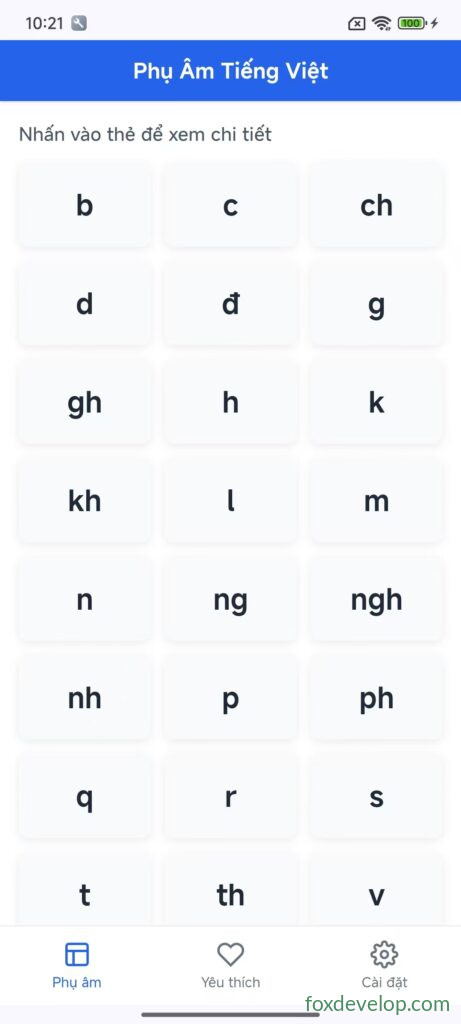
卡片可以點擊,底部選單也能夠切換頁籤。
接下來要實作點擊卡片播放音效的功能,請看下面章節。
越南語學習APP介面範例
Previous: Cordova 命令列工具(CLI)(參考手冊)
Next: 播放音訊