Here we’ll take a simple Vietnamese‑learning app as an example. The UI displays Vietnamese consonants, with a menu bar at the bottom.
We are using Tailwind for our web template.
You can refer to other tutorials to learn more about Tailwind.
Update index.html with the following content
<!DOCTYPE html>
<html lang="vi">
<head>
<meta charset="UTF-8">
<meta name="viewport" content="width=device-width, initial-scale=1.0, maximum-scale=1.0, user-scalable=no">
<title>Bảng phụ âm tiếng Việt</title>
<!-- Tailwind embedded CDN; replace with local files after build for offline use -->
<script src="https://cdn.tailwindcss.com"></script>
<script>
tailwind.config = {
theme: {
extend: {
colors: {
primary: '#2563eb',
bottomNav: '#ffffff',
cardBg: '#f8fafc'
}
}
}
}
</script>
<style type="text/tailwindcss">
@layer utilities {
.safe-bottom {
padding-bottom: calc(4rem + env(safe-area-inset-bottom));
}
.card-shadow {
box-shadow: 0 2px 8px rgba(0,0,0,0.08);
}
}
body {
/* prevent cordova overscroll bounce */
overscroll-behavior: none;
}
/* active tab style for bottom navigation */
.tab-active {
color: #2563eb;
}
</style>
</head>
<body class="bg-gray-100 font-sans text-gray-800">
<!-- Page container -->
<div id="app" class="max-w-md mx-auto bg-white min-h-screen relative safe-bottom">
<!-- Top header bar -->
<header class="sticky top-0 bg-primary text-white px-4 py-3 shadow z-20">
<h1 class="text-lg font-bold text-center">Phụ Âm Tiếng Việt</h1>
</header>
<!-- Main content area -->
<main class="p-4">
<!-- Page 1: Consonants -->
<div id="page-consonant" class="page">
<h2 class="text-base font-medium mb-3 text-gray-600">Nhấn vào thẻ để xem chi tiết</h2>
<div id="consonant-grid" class="grid grid-cols-3 gap-3">
<!-- Consonant cards rendered by JS -->
</div>
</div>
<!-- Page 2: Favorites -->
<div id="page-favorite" class="page hidden mt-4">
<h2 class="text-lg font-bold mb-4">Danh sách yêu thích</h2>
<div id="favorite-grid" class="grid grid-cols-3 gap-3">
<p class="col-span-3 text-center text-gray-400 py-10">Chưa có từ yêu thích</p>
</div>
</div>
<!-- Page3: Settings -->
<div id="page-setting" class="page hidden mt-4">
<h2 class="text-lg font-bold mb-4">Cài đặt</h2>
<div class="space-y-3">
<div class="bg-cardBg p-4 rounded-lg card-shadow">
<p>Ứng dụng học phụ âm tiếng Việt</p>
<p class="text-sm text-gray-500 mt-1">Cordova + TailwindCSS</p>
</div>
</div>
</div>
</main>
<!-- ========== Bottom navigation bar ========== -->
<nav class="fixed bottom-0 left-1/2 -translate-x-1/2 w-full max-w-md bg-bottomNav border-t border-gray-200 flex z-30" style="padding-bottom: env(safe-area-inset-bottom);">
<button class="tab-btn flex-1 py-3 flex flex-col items-center tab-active" data-target="page-consonant">
<svg xmlns="http://www.w3.org/2000/svg" width="24" height="24" viewBox="0 0 24 24" fill="none" stroke="currentColor" stroke-width="2">
<rect x="3" y="3" width="18" height="18" rx="2"/>
<path d="M3 9h18M9 21V9"/>
</svg>
<span class="text-xs mt-1">Phụ âm</span>
</button>
<button class="tab-btn flex-1 py-3 flex flex-col items-center text-gray-500" data-target="page-favorite">
<svg xmlns="http://www.w3.org/2000/svg" width="24" height="24" viewBox="0 0 24 24" fill="none" stroke="currentColor" stroke-width="2">
<path d="M20.84 4.61a5.5 5.5 0 0 0-7.78 0L12 5.67l-1.06-1.06a5.5 5.5 0 0 0-7.78 7.78l1.06 1.06L12 21.23l7.78-7.78 1.06-1.06a5.5 5.5 0 0 0 0-7.78z"/>
</svg>
<span class="text-xs mt-1">Yêu thích</span>
</button>
<button class="tab-btn flex-1 py-3 flex flex-col items-center text-gray-500" data-target="page-setting">
<svg xmlns="http://www.w3.org/2000/svg" width="24" height="24" viewBox="0 0 24 24" fill="none" stroke="currentColor" stroke-width="2">
<circle cx="12" cy="12" r="3"/>
<path d="M19.4 15a1.65 1.65 0 0 0 .33 1.82l.06.06a2 2 0 0 1 0 2.83 2 2 0 0 1-2.83 0l-.06-.06a1.65 1.65 0 0 0-1.82-.33 1.65 1.65 0 0 0-1 1.51V21a2 2 0 0 1-2 2 2 2 0 0 1-2-2v-.09A1.65 1.65 0 0 0 9 19.4a1.65 1.65 0 0 0-1.82.33l-.06.06a2 2 0 0 1-2.83 0 2 2 0 0 1 0-2.83l.06-.06a1.65 1.65 0 0 0 .33-1.82 1.65 1.65 0 0 0-1.51-1H3a2 2 0 0 1-2-2 2 2 0 0 1 2-2h.09A1.65 1.65 0 0 0 4.6 9a1.65 1.65 0 0 0-.33-1.82l-.06-.06a2 2 0 0 1 0-2.83 2 2 0 0 1 2.83 0l.06.06a1.65 1.65 0 0 0 1.82.33H9a1.65 1.65 0 0 0 1-1.51V3a2 2 0 0 1 2-2 2 2 0 0 1 2 2v.09a1.65 1.65 0 0 0 1 1.51 1.65 1.65 0 0 0 1.82-.33l.06-.06a2 2 0 0 1 2.83 0 2 2 0 0 1 0 2.83l-.06.06a1.65 1.65 0 0 0-.33 1.82V9a1.65 1.65 0 0 0 1.51 1H21a2 2 0 0 1 2 2 2 2 0 0 1-2 2h-.09a1.65 1.65 0 0 0-1.51 1z"/>
</svg>
<span class="text-xs mt-1">Cài đặt</span>
</button>
</nav>
</div>
<!-- ========== Modal for consonant detail ========== -->
<div id="modal" class="fixed inset-0 bg-black/50 z-50 hidden flex items-center justify-center p-4">
<div class="bg-white rounded-xl w-full max-w-sm p-5 relative">
<button id="close-modal" class="absolute top-3 right-3 text-gray-400 text-xl">×</button>
<h3 id="modal-char" class="text-4xl font-bold text-primary text-center py-4"></h3>
<div class="space-y-2 text-gray-700">
<p><span class="font-semibold">Phiên âm:</span> <span id="modal-pronounce"></span></p>
<p><span class="font-semibold">Giải thích:</span> <span id="modal-desc"></span></p>
</div>
<button id="btn-fav" class="w-full mt-5 bg-primary text-white py-2 rounded-lg">Thêm yêu thích</button>
</div>
</div>
<!-- Cordova js (runs only on physical device) -->
<script src="cordova.js"></script>
<script src="js/main.js"></script>
</body>
</html>Code language: HTML, XML (xml)Create the main.js file under www/js/main.js
Paste the code below
// Vietnamese consonant dataset
const consonants = [
    {char: "b", pronounce: "/ɓ/", desc: "Phụ âm bật môi"},
    {char: "c", pronounce: "/k/", desc: "Phụ âm vòm ngạc cứng"},
    {char: "ch", pronounce: "/tɕ/", desc: "Phụ âm xát vòm"},
    {char: "d", pronounce: "/ɗ/", desc: "Phụ âm bật răng lợi"},
    {char: "đ", pronounce: "/ɗ/", desc: "Phụ âm đệm răng lợi"},
    {char: "g", pronounce: "/ɣ/", desc: "Phụ âm xát vòm ngạc"},
    {char: "gh", pronounce: "/ɣ/", desc: "Dùng trước e, i"},
    {char: "h", pronounce: "/h/", desc: "Phụ âm thanh hơi"},
    {char: "k", pronounce: "/k/", desc: "Phụ âm tắc ngạc cứng"},
    {char: "kh", pronounce: "/x/", desc: "Phụ âm xát ngạc cứng"},
    {char: "l", pronounce: "/l/", desc: "Phụ âm bên răng lợi"},
    {char: "m", pronounce: "/m/", desc: "Phụ âm mũi môi"},
    {char: "n", pronounce: "/n/", desc: "Phụ âm mũi răng lợi"},
    {char: "ng", pronounce: "/ŋ/", desc: "Phụ âm mũi ngạc mềm"},
    {char: "ngh", pronounce: "/ŋ/", desc: "Dùng trước e,i"},
    {char: "nh", pronounce: "/ɲ/", desc: "Phụ âm mũi vòm ngạc"},
    {char: "p", pronounce: "/p/", desc: "Phụ âm tắc môi không bật"},
    {char: "ph", pronounce: "/f/", desc: "Phụ âm xát môi răng"},
    {char: "q", pronounce: "/kw/", desc: "Luôn đi với u"},
    {char: "r", pronounce: "/r/", desc: "Phụ âm rung răng lợi"},
    {char: "s", pronounce: "/s/", desc: "Phụ âm xát răng lợi"},
    {char: "t", pronounce: "/t/", desc: "Phụ âm tắc răng lợi"},
    {char: "th", pronounce: "/θ/", desc: "Phụ âm xát răng"},
    {char: "v", pronounce: "/v/", desc: "Phụ âm xát môi răng"},
    {char: "x", pronounce: "/s/", desc: "Phụ âm xát răng lợi"}
];

// Save favorite list into localStorage
let favList = JSON.parse(localStorage.getItem("vn_consonant_fav")) || [];

// DOM references
const gridEl = document.getElementById("consonant-grid");
const favGridEl = document.getElementById("favorite-grid");
const modal = document.getElementById("modal");
const modalChar = document.getElementById("modal-char");
const modalPro = document.getElementById("modal-pronounce");
const modalDesc = document.getElementById("modal-desc");
const btnFav = document.getElementById("btn-fav");
const closeModal = document.getElementById("close-modal");

let currentItem = null;

// Render consonant cards
function renderCards(){
    gridEl.innerHTML = "";
    consonants.forEach(item=>{
        const div = document.createElement("div");
        div.className = "bg-cardBg rounded-lg py-5 text-center card-shadow active:scale-95 transition-transform";
        div.innerHTML = `<span class="text-2xl font-bold text-gray-800">${item.char}</span>`;
        div.onclick = ()=> openModal(item);
        gridEl.appendChild(div);
    })
}

// Render favorites page
function renderFav(){
    favGridEl.innerHTML = "";
    if(favList.length === 0){
        favGridEl.innerHTML = `<p class="col-span-3 text-center text-gray-400 py-10">Chưa có từ yêu thích</p>`;
        return;
    }
    favList.forEach(item=>{
        const div = document.createElement("div");
        div.className = "bg-cardBg rounded-lg py-5 text-center card-shadow active:scale-95 transition-transform";
        div.innerHTML = `<span class="text-2xl font-bold text-gray-800">${item.char}</span>`;
        div.onclick = ()=> openModal(item);
        favGridEl.appendChild(div);
    })
}

// Open detail popup
function openModal(item){
    currentItem = item;
    modalChar.innerText = item.char;
    modalPro.innerText = item.pronounce;
    modalDesc.innerText = item.desc;
    updateFavButton();
    modal.classList.remove("hidden");
}

// Close popup
closeModal.onclick = ()=>{
    modal.classList.add("hidden");
}
modal.onclick = (e)=>{
    if(e.target === modal) modal.classList.add("hidden");
}

// Toggle favourite button text
function updateFavButton(){
    const exist = favList.find(x=>x.char === currentItem.char);
    if(exist){
        btnFav.innerText = "Xóa khỏi yêu thích";
    }else{
        btnFav.innerText = "Thêm yêu thích";
    }
}
btnFav.onclick = ()=>{
    const idx = favList.findIndex(x=>x.char === currentItem.char);
    if(idx >=0){
        favList.splice(idx,1);
    }else{
        favList.push(currentItem);
    }
    localStorage.setItem("vn_consonant_fav", JSON.stringify(favList));
    updateFavButton();
    renderFav();
}

// ========== Tab page switching ==========
const tabBtns = document.querySelectorAll(".tab-btn");
const pages = document.querySelectorAll(".page");
tabBtns.forEach(btn=>{
    btn.onclick = ()=>{
        const targetId = btn.dataset.target;
        // Remove active state from all tabs
        tabBtns.forEach(b=>{
            b.classList.remove("tab-active");
            b.querySelector("svg").classList.add("text-gray-500");
        })
        btn.classList.add("tab-active");
        btn.querySelector("svg").classList.remove("text-gray-500");

        // Hide all pages
        pages.forEach(p=>p.classList.add("hidden"));
        document.getElementById(targetId).classList.remove("hidden");
    }
})

// Initialize on page load
document.addEventListener("DOMContentLoaded", ()=>{
    renderCards();
    renderFav();
})

// Cordova ready event (for mobile devices)
document.addEventListener("deviceready", ()=>{
    console.log("Cordova ready");
}, false);Code language: JavaScript (javascript)
Rebuild and run your project
D:\cordovademo\hello>cordova run android
You should see the following UI inside your app
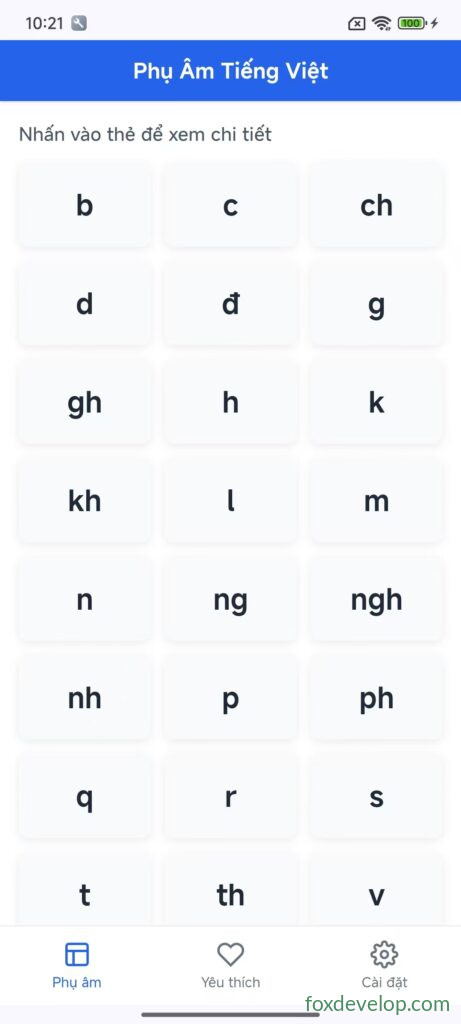
Cards are clickable and you can switch tabs from the bottom menu bar.
Next we will add audio playback when tapping a card. Check out the next section.
Vietnamese learning app UI example