In the sample projects we walked through over the last two lessons, opening the solution in Visual Studio always spawns two separate windows: a black command-line console, plus our main graphical ImGui window. Most of the time, we only want the GUI window to show up without the extra console.
Remove the Black Console Popup
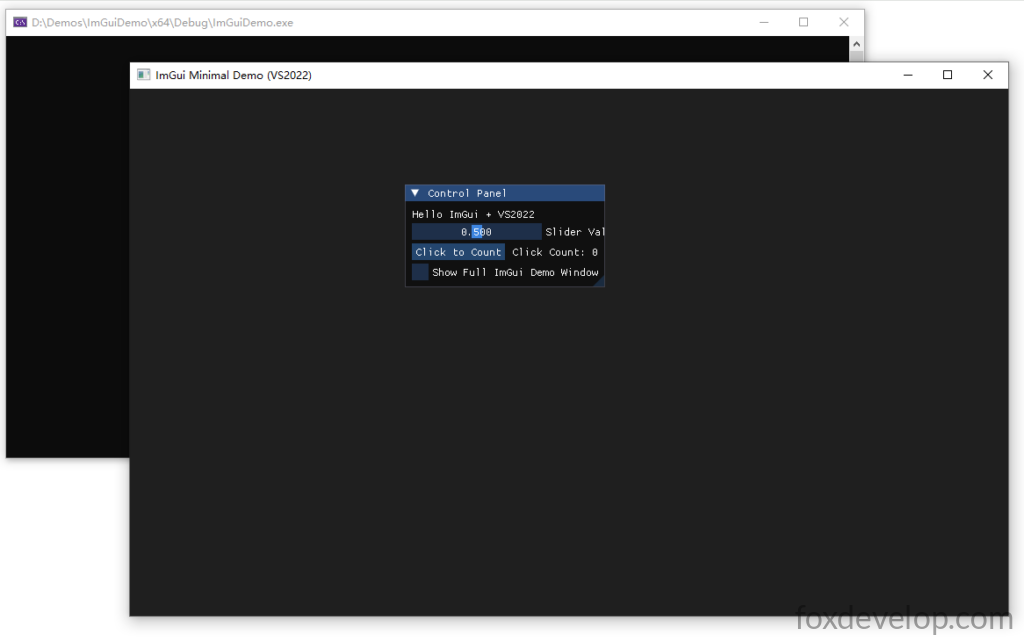
The screenshot above shows the dual-window setup we’re trying to fix. Here’s how to fully disable the console window from launching alongside your ImGui app.
First, paste this line at the very top of your source file, before all your include headers:
#pragma comment(linker, "/SUBSYSTEM:windows /ENTRY:mainCRTStartup")Code language: C++ (cpp)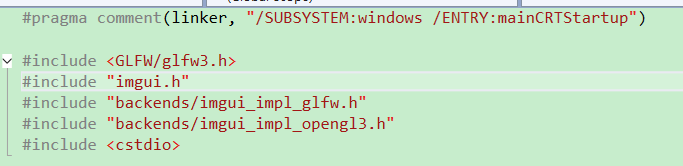
If you skip adding this pragma line, you’ll hit linker errors later on. After inserting it, right-click your project name inside the Solution Explorer panel and select Properties from the dropdown menu.

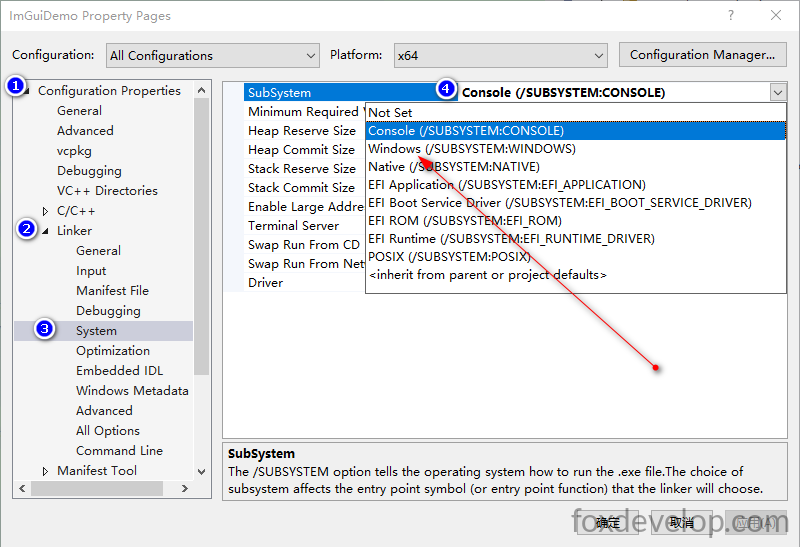
Navigate through the property tree to Configuration Properties → Linker → System
Set the SubSystem field value to Windows
Hit OK to save your settings and run the program again. The black command-line window will no longer launch, leaving just a clean standalone GUI application.
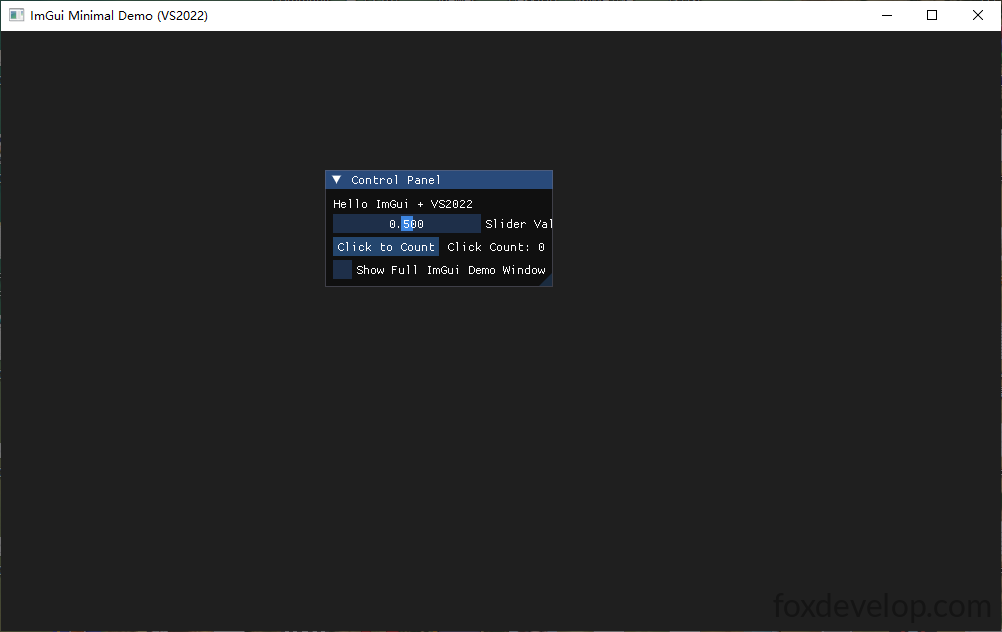
Right now all our UI widgets are locked inside a small floating “Control Panel” window. Next, we’ll adjust the code so this panel stretches to fill the entire GLFW host window.
Make UI Controls Fill the Entire Main Window
Locate this original line of code in your render loop:
ImGui::Begin("Control Panel");Code language: PHP (php)Replace that single line with the full block below:
        // Core configuration for fullscreen ImGui panel
        // Force the child panel to cover the whole GLFW window
        // 1. Sync window position and size with the outer GLFW frame every frame
        ImGui::SetNextWindowPos(ImVec2(0, 0));
        ImGui::SetNextWindowSize(io.DisplaySize);

        // 2. Remove all window decorations: borders, drag handles, resizing, saved layout states
        ImGuiWindowFlags window_flags = ImGuiWindowFlags_NoDecoration
            | ImGuiWindowFlags_NoMove
            | ImGuiWindowFlags_NoResize
            | ImGuiWindowFlags_NoSavedSettings;

        // 3. Strip rounded corners and outer border to eliminate gaps against the host window edge
        ImGui::PushStyleVar(ImGuiStyleVar_WindowRounding, 0.0f);
        ImGui::PushStyleVar(ImGuiStyleVar_WindowBorderSize, 0.0f);

        // 4. Spawn the borderless fullscreen panel (title bar will be hidden)
        ImGui::Begin("Control Panel", nullptr, window_flags);Code language: C++ (cpp)
This snippet handles resizing the ImGui panel to perfectly match the GLFW window dimensions, plus disables extra decorative elements to create a seamless fullscreen GUI surface.
Directly underneath your existing ImGui::End(); call, add this line:
ImGui::PopStyleVar(2);Code language: CSS (css)PushStyleVar temporarily overrides global ImGui style parameters by pushing modified values onto a style stack.
Earlier we called PushStyleVar twice to adjust corner rounding and border thickness:
ImGui::PushStyleVar(ImGuiStyleVar_WindowRounding, 0.0f);
ImGui::PushStyleVar(ImGuiStyleVar_WindowBorderSize, 0.0f);Code language: CSS (css)
PopStyleVar(2) pops both modified style entries off the stack, reverting all styling back to the original global defaults.
Here’s the complete modified main function source code with all changes integrated:
#pragma comment(linker, "/SUBSYSTEM:windows /ENTRY:mainCRTStartup")

#include <GLFW/glfw3.h>
#include "imgui.h"
#include "backends/imgui_impl_glfw.h"
#include "backends/imgui_impl_opengl3.h"
#include <cstdio>

int main()
{
    // Initialize GLFW
    if (!glfwInit())
    {
        printf("GLFW initialization failed\n");
        return -1;
    }

    // OpenGL 3.3
    const char* glsl_version = "#version 330";
    glfwWindowHint(GLFW_CONTEXT_VERSION_MAJOR, 3);
    glfwWindowHint(GLFW_CONTEXT_VERSION_MINOR, 3);
    glfwWindowHint(GLFW_OPENGL_PROFILE, GLFW_OPENGL_CORE_PROFILE);

    // Create window
    GLFWwindow* window = glfwCreateWindow(1000, 600, "ImGui Minimal Demo (VS2022)", nullptr, nullptr);
    if (!window)
    {
        glfwTerminate();
        return -1;
    }
    glfwMakeContextCurrent(window);
    glfwSwapInterval(1); // VSync enable

    // Initialize ImGui
    IMGUI_CHECKVERSION();
    ImGui::CreateContext();
    ImGuiIO& io = ImGui::GetIO();
    ImGui::StyleColorsDark();

    // Bind GLFW + OpenGL3 backend
    ImGui_ImplGlfw_InitForOpenGL(window, true);
    ImGui_ImplOpenGL3_Init(glsl_version);

    // UI state variables
    float slider_value = 0.5f;
    int click_count = 0;
    bool show_full_demo = false;

    // Main render loop
    while (!glfwWindowShouldClose(window))
    {
        glfwPollEvents();

        // Start new ImGui frame
        ImGui_ImplOpenGL3_NewFrame();
        ImGui_ImplGlfw_NewFrame();
        ImGui::NewFrame();

        // Core configuration for fullscreen ImGui panel
        // Force the child panel to cover the whole GLFW window
        // 1. Sync window position and size with the outer GLFW frame every frame
        ImGui::SetNextWindowPos(ImVec2(0, 0));
        ImGui::SetNextWindowSize(io.DisplaySize);

        // 2. Remove all window decorations: borders, drag handles, resizing, saved layout states
        ImGuiWindowFlags window_flags = ImGuiWindowFlags_NoDecoration
            | ImGuiWindowFlags_NoMove
            | ImGuiWindowFlags_NoResize
            | ImGuiWindowFlags_NoSavedSettings;

        // 3. Strip rounded corners and outer border to eliminate gaps against the host window edge
        ImGui::PushStyleVar(ImGuiStyleVar_WindowRounding, 0.0f);
        ImGui::PushStyleVar(ImGuiStyleVar_WindowBorderSize, 0.0f);

        // 4. Spawn the borderless fullscreen panel (title bar will be hidden)
        ImGui::Begin("Control Panel", nullptr, window_flags);

        ImGui::Text("Hello ImGui + VS2022");
        ImGui::SliderFloat("Slider Value", &slider_value, 0.f, 1.f);

        if (ImGui::Button("Click to Count"))
            click_count++;
        ImGui::SameLine();
        ImGui::Text("Click Count: %d", click_count);

        ImGui::Checkbox("Show Full ImGui Demo Window", &show_full_demo);

        ImGui::End();

        // 5. Pop the two pushed style overrides to restore original global styling
        ImGui::PopStyleVar(2);
        // End of modified section

        if (show_full_demo)
            ImGui::ShowDemoWindow(&show_full_demo);

        // Render ImGui draw data
        ImGui::Render();
        int width, height;
        glfwGetFramebufferSize(window, &width, &height);
        glViewport(0, 0, width, height);
        glClearColor(0.12f, 0.12f, 0.12f, 1.f);
        glClear(GL_COLOR_BUFFER_BIT);
        ImGui_ImplOpenGL3_RenderDrawData(ImGui::GetDrawData());

        glfwSwapBuffers(window);
    }

    // Cleanup resources
    ImGui_ImplOpenGL3_Shutdown();
    ImGui_ImplGlfw_Shutdown();
    ImGui::DestroyContext();
    glfwDestroyWindow(window);
    glfwTerminate();
    return 0;
}
Code language: PHP (php)
Run the project once more after applying all these edits, and your app will look like the screenshot below:
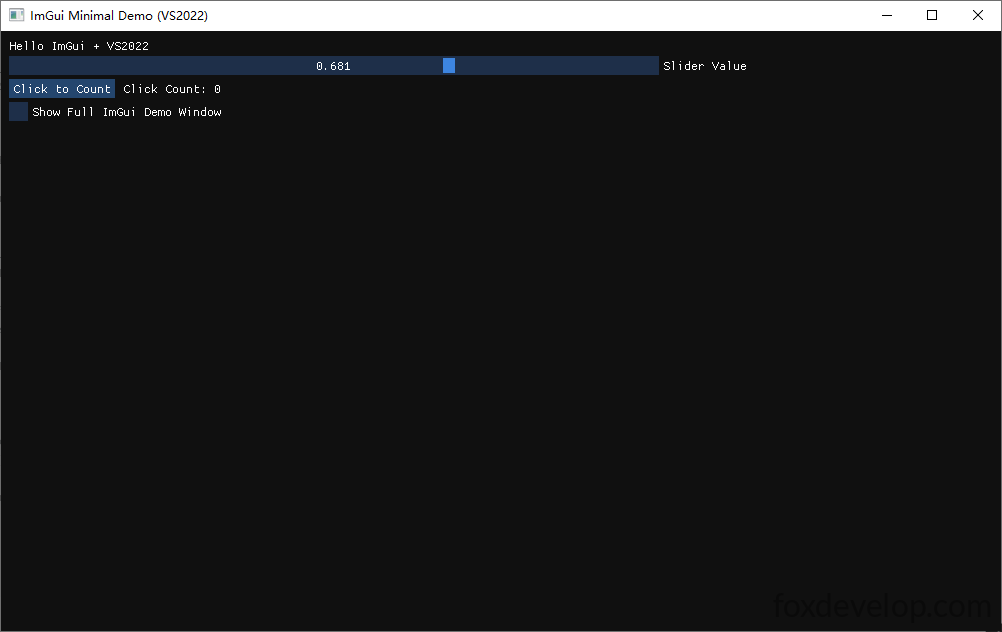
This layout matches the clean borderless GUI window style you’d expect from a standard desktop graphical program.