Console Output
Write / WriteLn
To print strings in Pascal, use the built-in procedures Write or WriteLn; WriteLn automatically appends a line break at the end.
This is an extremely versatile built-in procedure in Pascal: it accepts any number of arguments of any data type, automatically converts values to strings when printing, and supports special formatting syntax to control numeric padding width and floating-point precision.
WriteLn('Hello world!');

// Output integer expression
WriteLn('You can output an integer: ', 3 * 4);

// Right-align integer with total width of 10 characters
WriteLn('You can pad an integer: ', 666:10);

// Float format: total width 1, 4 decimal places
WriteLn('You can output a float: ', Pi:1:4);Code language: JavaScript (javascript)
Manual Line Breaks
LineEnding Constant
To manually insert line breaks inside a single string, use the LineEnding constant provided by the Free Pascal standard library; Castle Game Engine also provides the shorter alias constant NL.
Pascal strings do not parse backslash escape sequences (\n has no effect). The following example is incorrect:
// Wrong: \n will not be recognized as a line break
WriteLn('One line.\nSecond line.');Code language: JavaScript (javascript)
Two valid approaches:
// Concatenate line break constant
WriteLn('One line.' + LineEnding + 'Second line.');

// Separate two WriteLn calls (cleaner and recommended)
WriteLn('One line.');
WriteLn('Second line.');Code language: JavaScript (javascript)
Important Notes
WriteLn only works for console applications
Write/WriteLn only function within console applications. You must add the compiler directive at the top of your main program file:
{$apptype CONSOLE}Code language: PHP (php)Do not use GUI mode:
{$apptype GUI} // Calling WriteLn directly in GUI programs will throw errorsCode language: PHP (php)- Unix/Linux/macOS: GUI programs may not crash when printing in some scenarios, but output will be meaningless;
- Windows: Executing WriteLn directly in GUI graphical applications triggers runtime errors.
Castle Game Engine Logging Standards
When developing with Castle Game Engine, never use WriteLn directly for debug output. Use dedicated logging functions instead:
WriteLnLog: Regular debug logsWriteLnWarning: Warning logs
The engine automatically routes logs to the appropriate output targets:
- Unix systems: Standard console output (stdout);
- Windows GUI game applications: Written to local log files;
- Android platforms: Integrated with native Android system logs, viewable via
adb logcat.
Terminology Reference Table
| Original English Term | Pascal Chinese Definition |
|---|---|
| Write / WriteLn | 无換行輸出 / 帶換行輸出 |
| LineEnding | 系統換行常數(跨平台相容) |
| NL | Castle 簡寫換行常數 |
| padding | 數值占位填充、對齊寬度 |
| precision | 浮點數小數精度 |
| {$apptype CONSOLE} | 控制台應用編譯指令 |
| {$apptype GUI} | 圖形介面應用編譯指令 |
| adb logcat | Android 日誌檢視工具 |
| standard output | 標準輸出串流(stdout) |
Full Example Code for This Section
{$ifdef FPC} {$mode objfpc}{$H+}{$J-} {$endif}
{$ifdef MSWINDOWS} {$apptype CONSOLE} {$endif}
{$R+}

begin

  WriteLn('Hello world!');

  // Output integer expression
  WriteLn('You can output an integer: ', 3 * 4);

  // Right-align integer with total width of 10 characters
  WriteLn('You can pad an integer: ', 666:10);

  // Float format: total width 1, 4 decimal places
  WriteLn('You can output a float: ', Pi:1:4);

  // Wrong: \n will not be recognized as a line break
  // WriteLn('One line.\nSecond line.');

  // Concatenate line break constant
  WriteLn('One line.' + LineEnding + 'Second line.');

  // Separate two WriteLn calls (cleaner and recommended)
  WriteLn('One line.');
  WriteLn('Second line.');

end.Code language: PHP (php)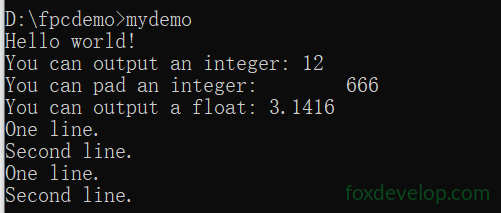
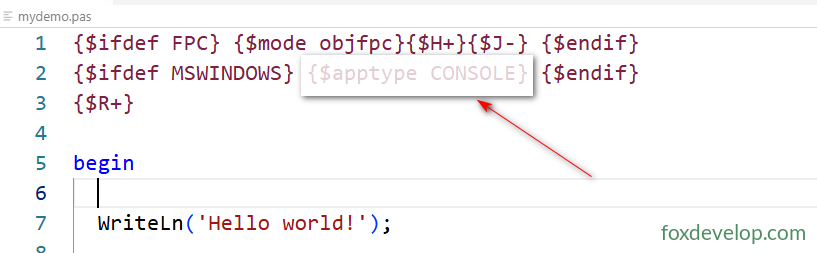
Remember to include the above compiler directive for this to work