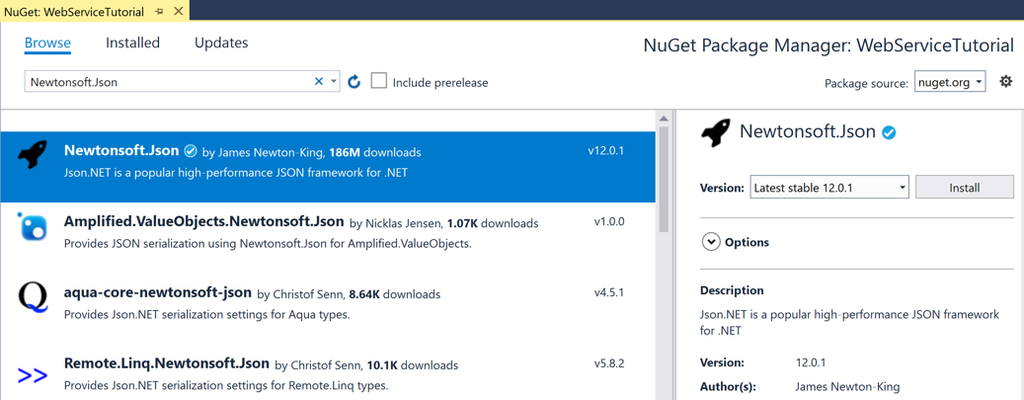
项目名称:
WebServiceTutorialNuGet包:Newtonsoft.Json(用于JSON序列化/反序列化) 接口:OpenWeatherMap 天气API(需要自己注册获取API Key)
1. 创建项目
Visual Studio → 新建 Xamarin.Forms 空白应用,命名 WebServiceTutorial NuGet管理器安装 Newtonsoft.Json,安装到共享项目、Android、iOS项目。
2. Constants.cs 常量类(API地址+密钥)
namespace WebServiceTutorial
{
    public static class Constants
    {
        public const string OpenWeatherMapEndpoint = "https://api.openweathermap.org/data/2.5/weather";
        // 替换成你自己申请的密钥
        public const string OpenWeatherMapAPIKey = "INSERT_API_KEY_HERE";
    }
}
Code language: JavaScript (javascript)
3. WeatherData.cs JSON模型类(映射接口返回JSON)
using Newtonsoft.Json;

namespace WebServiceTutorial
{
    public class WeatherData
    {
        [JsonProperty("name")]
        public string Title { get; set; }

        [JsonProperty("weather")]
        public Weather[] Weather { get; set; }

        [JsonProperty("main")]
        public Main Main { get; set; }

        [JsonProperty("visibility")]
        public long Visibility { get; set; }

        [JsonProperty("wind")]
        public Wind Wind { get; set; }
    }

    public class Main
    {
        [JsonProperty("temp")]
        public double Temperature { get; set; }

        [JsonProperty("humidity")]
        public long Humidity { get; set; }
    }

    public class Weather
    {
        [JsonProperty("main")]
        public string Visibility { get; set; }
    }

    public class Wind
    {
        [JsonProperty("speed")]
        public double Speed { get; set; }
    }
}
Code language: JavaScript (javascript)
[JsonProperty("json字段名")]:把服务端JSON字段映射到C#属性,名字可以不一样。
4. RestService.cs HTTP请求服务类
using System;
using System.Diagnostics;
using System.Net.Http;
using System.Threading.Tasks;
using Newtonsoft.Json;

namespace WebServiceTutorial
{
    public class RestService
    {
        HttpClient _client;

        public RestService()
        {
            _client = new HttpClient();
        }

        public async Task<WeatherData> GetWeatherDataAsync(string uri)
        {
            WeatherData weatherData = null;
            try
            {
                HttpResponseMessage response = await _client.GetAsync(uri);
                if (response.IsSuccessStatusCode)
                {
                    string content = await response.Content.ReadAsStringAsync();
                    weatherData = JsonConvert.DeserializeObject<WeatherData>(content);
                }
            }
            catch (Exception ex)
            {
                Debug.WriteLine("\tERROR {0}", ex.Message);
            }
            return weatherData;
        }
    }
}
Code language: JavaScript (javascript)HttpClient:发送HTTP GET请求response.IsSuccessStatusCode:判断2xx成功状态码JsonConvert.DeserializeObject:JSON字符串转C#对象
5. MainPage.xaml UI界面(Grid布局 + 数据绑定)
<?xml version="1.0" encoding="utf-8"?>
<ContentPage xmlns="http://xamarin.com/schemas/2014/forms"
             xmlns:x="http://schemas.microsoft.com/winfx/2009/xaml"
             x:Class="WebServiceTutorial.MainPage">
    <Grid Margin="20,35,20,20">
        <Grid.ColumnDefinitions>
            <ColumnDefinition Width="0.4*" />
            <ColumnDefinition Width="0.6*" />
        </Grid.ColumnDefinitions>
        <Grid.RowDefinitions>
            <RowDefinition Height="40" />
            <RowDefinition Height="40" />
            <RowDefinition Height="40" />
            <RowDefinition Height="40" />
            <RowDefinition Height="40" />
            <RowDefinition Height="40" />
            <RowDefinition Height="40" />
        </Grid.RowDefinitions>

        <Entry x:Name="cityEntry"
               Grid.ColumnSpan="2"
               Text="Seattle" />

        <Button Grid.ColumnSpan="2"
                Grid.Row="1"
                Text="Get Weather"
                Clicked="OnButtonClicked" />

        <Label Grid.Row="2" Text="Location:" />
        <Label Grid.Row="2" Grid.Column="1" Text="{Binding Title}" />

        <Label Grid.Row="3" Text="Temperature:" />
        <Label Grid.Row="3" Grid.Column="1" Text="{Binding Main.Temperature}" />

        <Label Grid.Row="4" Text="Wind Speed:" />
        <Label Grid.Row="4" Grid.Column="1" Text="{Binding Wind.Speed}" />

        <Label Grid.Row="5" Text="Humidity:" />
        <Label Grid.Row="5" Grid.Column="1" Text="{Binding Main.Humidity}" />

        <Label Grid.Row="6" Text="Visibility:" />
        <Label Grid.Row="6" Grid.Column="1" Text="{Binding Weather[0].Visibility}" />
    </Grid>
</ContentPage>
Code language: HTML, XML (xml)
BindingContext:页面绑定上下文,赋值WeatherData对象后,{Binding xxx}自动读取属性。
6. MainPage.xaml.cs 后台代码
using System;
using Xamarin.Forms;

namespace WebServiceTutorial
{
    public partial class MainPage : ContentPage
    {
        RestService _restService;

        public MainPage()
        {
            InitializeComponent();
            _restService = new RestService();
        }

        async void OnButtonClicked(object sender, EventArgs e)
        {
            if (!string.IsNullOrWhiteSpace(cityEntry.Text))
            {
                WeatherData weatherData = await _restService.GetWeatherDataAsync(GenerateRequestUri(Constants.OpenWeatherMapEndpoint));
                BindingContext = weatherData;
            }
        }

        string GenerateRequestUri(string endpoint)
        {
            string requestUri = endpoint;
            requestUri += $"?q={cityEntry.Text}";
            requestUri += "&units=imperial"; // imperial=华氏度 | units=metric 摄氏度
            requestUri += $"&APPID={Constants.OpenWeatherMapAPIKey}";
            return requestUri;
        }
    }
}
Code language: PHP (php)
运行流程
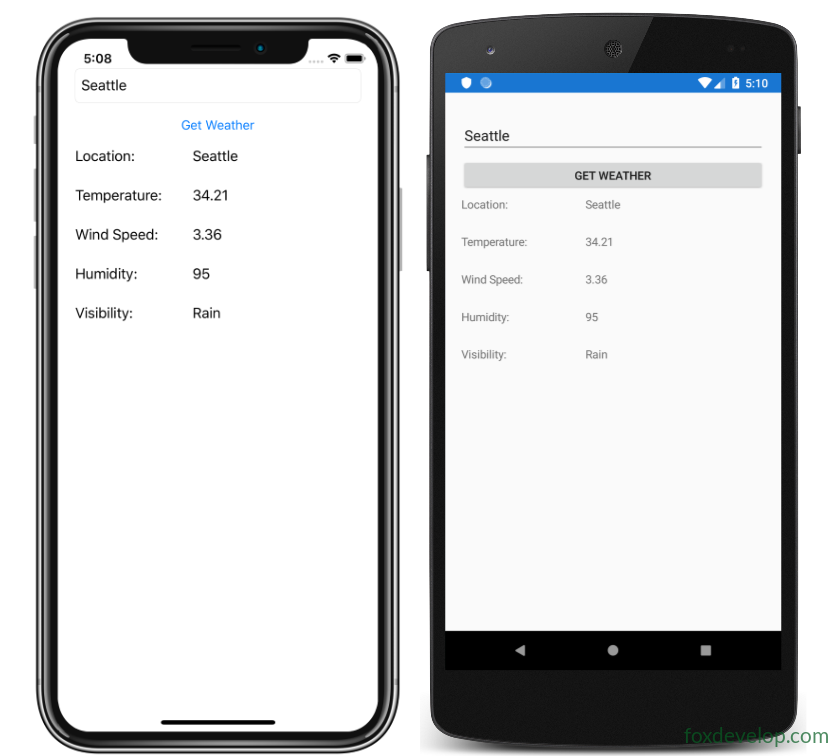
- 输入城市名称,点击【Get Weather】按钮触发
OnButtonClicked GenerateRequestUri拼接完整请求URL(城市、单位、API密钥)RestService.GetWeatherDataAsync发起GET网络请求- 获取JSON字符串 → Newtonsoft.Json反序列化为
WeatherData对象 - 将
weatherData赋值给页面BindingContext,界面Label自动绑定展示数据
Previous: Xamarin.Forms SQLite.NET 本地数据库