新建项目
启动 Visual Studio,新建名为 LabelTutorial 的 Xamarin.Forms 空白应用。
修改 MainPage.xaml,基础Label
双击打开 MainPage.xaml,删除原有模板代码,替换为:
<?xml version="1.0" encoding="utf-8"?>
<ContentPage xmlns="[http://xamarin.com/schemas/2014/forms](http://xamarin.com/schemas/2014/forms)"
             xmlns:x="[http://schemas.microsoft.com/winfx/2009/xaml](http://schemas.microsoft.com/winfx/2009/xaml)"
             x:Class="LabelTutorial.MainPage">
    <StackLayout Margin="20,35,20,20">
        <Label Text="Welcome to Xamarin.Forms!"
               HorizontalOptions="Center" />
        <Label Text="Welcome to Xamarin.Forms2222!"
               HorizontalOptions="Center" />
    </StackLayout>
</ContentPage>
Code language: HTML, XML (xml)
说明: 页面使用StackLayout布局,内部放置Label控件。
Text:Label要展示的文字内容HorizontalOptions="Center":标签水平居中
修改Label,设置文本样式
修改第一个Label,增加字体、颜色、下划线等外观属性:
<Label Text="Welcome to Xamarin.Forms!"
       TextColor="Blue"
       FontAttributes="Italic"
       FontSize="22"
       TextDecorations="Underline"
       HorizontalOptions="Center" />
Code language: HTML, XML (xml)
属性说明:
TextColor:文字颜色FontAttributes:字体样式,可选None、Bold、Italic,可组合FontSize:字体大小,可以写数字,也可以用枚举:Small、Medium、LargeTextDecorations:文本装饰,Underline下划线、Strikethrough删除线
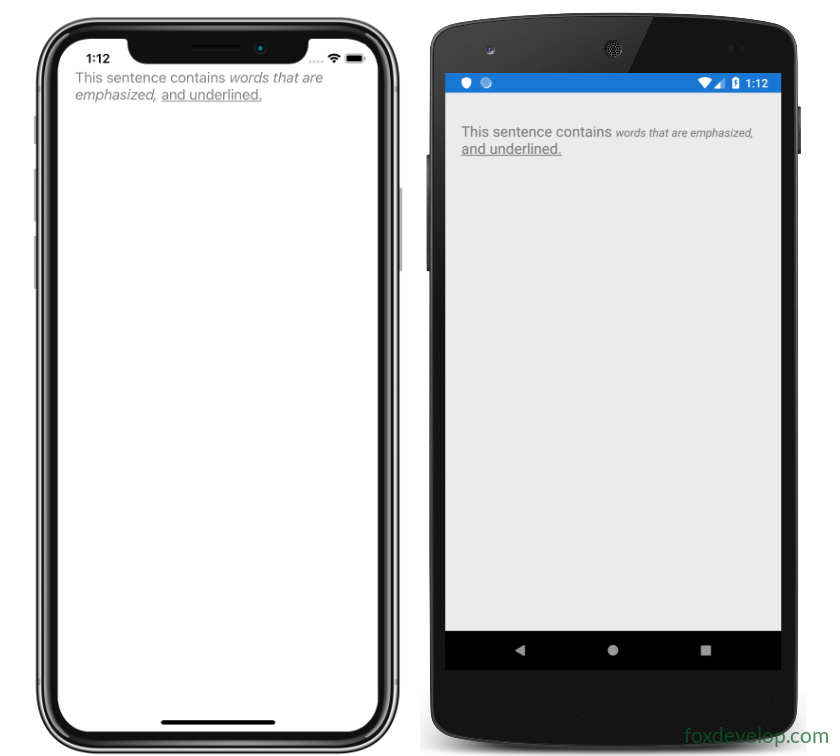
FormattedString + Span,同一个Label内多种文字格式
单个Label内部实现一段文字多种样式,使用FormattedString和Span:
<Label TextColor="Gray"
       FontSize="Medium">
    <Label.FormattedText>
        <FormattedString>
            <Span Text="This sentence contains " />
            <Span Text="words that are emphasized, "
                  FontAttributes="Italic" />
            <Span Text="and underlined."
                  TextDecorations="Underline" />
        </FormattedString>
    </Label.FormattedText>
</Label>
Code language: HTML, XML (xml)
说明:
Label.FormattedText用来承载多段不同格式文本Span代表文本片段,每个Span可以单独设置字体、颜色、装饰- 没有单独设置属性的Span,会继承外层Label的样式
Previous: Xamarin.Forms StackLayout使用
Next: Xamarin.Forms 按钮教程