1. res Directory Structure
The res/ directory is organized into subdirectories by resource type:
| Directory | Purpose |
|---|---|
drawable | General images (e.g., backgrounds, illustrations) |
mipmap-prefixed | App icons (Launcher Icons) |
values | Strings, styles, colors, etc. |
layout | Layout files |
2. Why Are There So Many mipmap and drawable Folders?
To support various screen densities, Android provides multiple directories:
drawable-hdpi      → High density
drawable-xhdpi     → Extra-high density
drawable-xxhdpi    → Extra-extra-high density
drawable-xxxhdpi   → Highest density
The same applies to mipmap, with folders like mipmap-hdpi, mipmap-xhdpi, mipmap-xxhdpi, etc.
How it works: Prepare different resolutions of the same image and place them in the corresponding folders. At runtime, the system automatically selects and loads the most suitable set based on the device’s screen density.
3. How to Reference Resources
3.1 String Resources
Defined in res/values/strings.xml:
<resources>
    <string name="app_name">My Application</string>
</resources>Code language: HTML, XML (xml)
References are used differently depending on the context:
| Context | Reference Format | Example |
|---|---|---|
| In XML files | @string/app_name | android:text="@string/app_name" |
| In Java code | R.string.app_name | getString(R.string.app_name) |
3.2 Referencing Images and Icons
Note: You cannot use Java syntax like R.mipmap.xxx directly in XML!
| Resource Type | In XML | In Java Code |
|---|---|---|
| Icon (mipmap) | @mipmap/ic_launcher | R.mipmap.ic_launcher |
| Image (drawable) | @drawable/bg_image | R.drawable.bg_image |
| Layout | — | R.layout.activity_main |
| String | @string/app_name | R.string.app_name |
Side-by-side example:

<!-- In XML: use @ prefix -->
android:icon="@mipmap/school"Code language: HTML, XML (xml)
// In Java: use R. prefix
setContentView(R.layout.activity_main);Code language: JavaScript (javascript)4. Resource References in AndroidManifest.xml
Open AndroidManifest.xml. Inside the application tag, you’ll already see several resource references:
<application
    android:allowBackup="true"
    android:icon="@mipmap/ic_launcher"
    android:label="@string/app_name"
    android:roundIcon="@mipmap/ic_launcher_round"
    android:supportsRtl="true"
android:theme="@style/AppTheme">Code language: HTML, XML (xml)| Attribute | Referenced Resource | Purpose |
|---|---|---|
android:icon | @mipmap/ic_launcher | App icon |
android:label | @string/app_name | App name |
android:roundIcon | @mipmap/ic_launcher_round | Round app icon |
android:theme | @style/AppTheme | App theme |
5. Hands-on Exercise: Change App Name and Icon
Step 1: Change the App Name
Open res/values/strings.xml:
<resources>
    <string name="app_name">FoxDevelop</string>
</resources>Code language: HTML, XML (xml)
After saving, the app name on your device’s home screen will become “FoxDevelop”.
Step 2: Prepare the Icon File
- Download a PNG icon

- File naming rules: Do not use hyphens
-; only use underscores_, lowercase letters, or numbers- ✅
school_bell.png - ❌
school-bell.png
- ✅
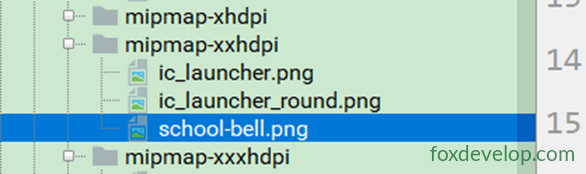

Step 3: Place in the Correct Directory
Copy the icon file into res/mipmap-xxhdpi/ (or the corresponding mipmap folder for your target resolution).
Step 4: Modify AndroidManifest.xml
<application
    android:icon="@mipmap/school_bell"
    android:roundIcon="@mipmap/school_bell"
    ... >Code language: HTML, XML (xml)
Step 5: Run Again
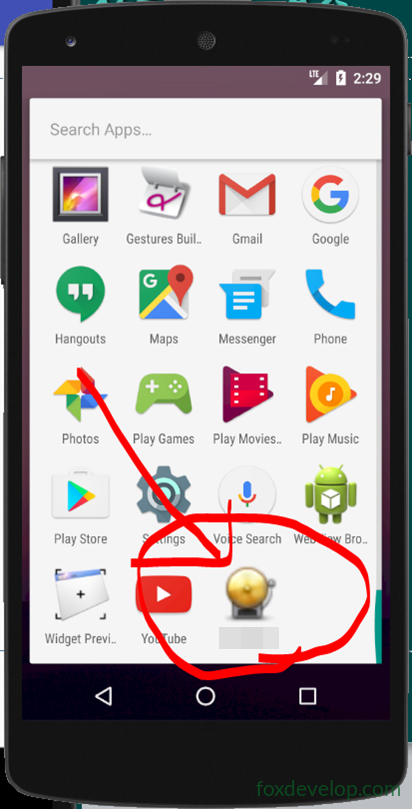
Click the ▶ Run button to deploy to the emulator. You should see:
- The app name on the home screen changes to “FoxDevelop”
- The app icon becomes the
school_bell.pngyou set
6. Summary
| Key Point | Description |
|---|---|
| Resource reference rule | XML uses @type/name, Java uses R.type.name |
| Multi-resolution adaptation | Place images for different resolutions in separate folders; the system picks automatically |
| Change app name | Modify app_name in res/values/strings.xml |
| Change app icon | Replace the PNG in the mipmap folder and update android:icon in AndroidManifest.xml |
| File naming convention | Only lowercase letters, numbers, and underscores; no hyphens |
Remember this in one sentence: XML uses
@, Java usesR.; icons go in mipmap, images in drawable, strings in values.
Resource res files and how to change app name and icon