本节课,我们来学习菜单的显示,我们要开发一个类似txt记事本的功能,顶部有一个菜单,菜单中有一个保存的子菜单,点击保存子菜单,则保存下方文本框中输入的文本。这里会出现乱码,所以读者会学到如何设置语言,如果不设置,可能非英文的字体会乱码的。
保存的时候,弹出一个文件保存对话框,读者会选择保存目录,然后设置文件名。之后就可以保存文件。
下面看最后运行的界面截图:
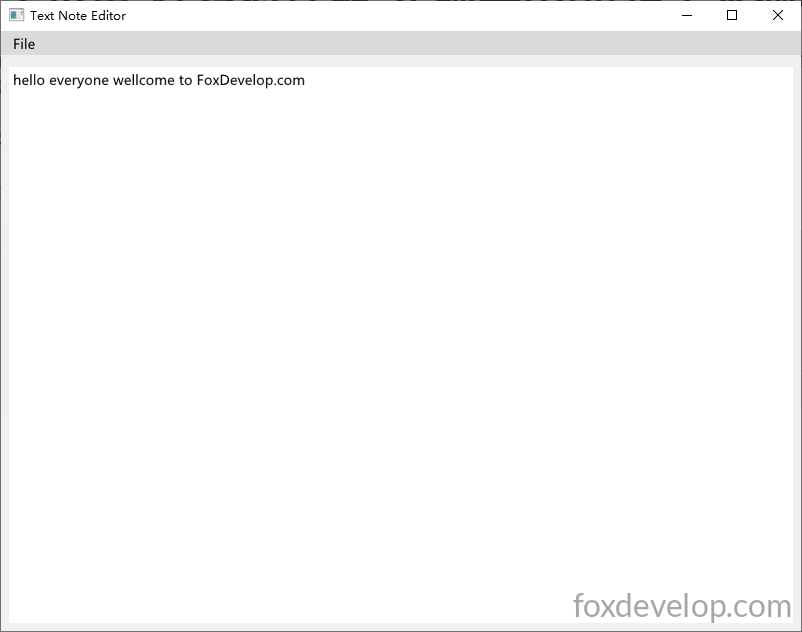
和我们的windows的记事本类似,基本编辑功能,保存。程序编译后非常小巧
在release下编译,只有645kb

我们看程序的代码
#pragma comment(linker, "/SUBSYSTEM:windows /ENTRY:mainCRTStartup")
#pragma execution_character_set("utf-8")

#include <GLFW/glfw3.h>
#include "imgui.h"
#include "backends/imgui_impl_glfw.h"
#include "backends/imgui_impl_opengl3.h"
#include <cstdio>
#include <string>
#include <fstream>
#include <windows.h>
#include <io.h>
#include <commdlg.h>  // 需要这个头文件

// 文本缓冲区配置
const int TEXT_BUFFER_MAX = 4096;
std::string editor_text;

// 文件保存函数 UTF8带BOM
// 把文件写入到文件中
bool SaveTextToFile(const char* filepath, const std::string& text)
{
    std::ofstream out_file(filepath, std::ios::out | std::ios::binary);
    if (!out_file.is_open())
        return false;
    const unsigned char utf8_bom[] = { 0xEF, 0xBB, 0xBF };
    out_file.write((char*)utf8_bom, sizeof(utf8_bom));
    out_file << text.c_str(); // 只输出到\0为止的有效文本
    out_file.close();
    return true;
}

// 显示保存文件对话框,返回用户选择的文件路径
bool ShowSaveFileDialog(char* out_path, DWORD out_size)
{
    OPENFILENAMEA ofn;   // 注意这里用 A 版本
    ZeroMemory(&ofn, sizeof(ofn));
    ofn.lStructSize = sizeof(ofn);
    ofn.hwndOwner = nullptr;
    ofn.lpstrFilter = "Text Files\0*.txt\0All Files\0*.*\0"; //后缀是txt或者所有类型
    ofn.lpstrFile = out_path;
    ofn.nMaxFile = out_size;
    ofn.Flags = OFN_PATHMUSTEXIST | OFN_FILEMUSTEXIST | OFN_OVERWRITEPROMPT;
    ofn.lpstrDefExt = "txt";

    return GetSaveFileNameA(&ofn);   // 调用 ANSI 版本
}

// 设置字体,如果读者输入文本的时候是??的乱码
// 则需要在这里增加你所在环境的语言字体路径,或者使用系统默认字体路径
void SetupFont(ImGuiIO& io)
{
    // 常见中文字体路径(Windows)
    const char* font_path = "C:/Windows/Fonts/msyh.ttc"; // 微软雅黑
    float font_size = 18.0f;

    // 加载简体中文常用字范围
    ImVector<ImWchar> ranges;
    ImFontGlyphRangesBuilder builder;
    builder.AddRanges(io.Fonts->GetGlyphRangesChineseSimplifiedCommon());
    builder.BuildRanges(&ranges);

    // 添加字体
    io.Fonts->AddFontFromFileTTF(font_path, font_size, nullptr, ranges.Data);

    // 如果需要多语言支持,可以额外添加:
    // io.Fonts->AddFontFromFileTTF(font_path, font_size, nullptr, io.Fonts->GetGlyphRangesJapanese());
    // io.Fonts->AddFontFromFileTTF(font_path, font_size, nullptr, io.Fonts->GetGlyphRangesKorean());
}


int main()
{
    SetConsoleOutputCP(65001);
    // 关键:扩容并全部填充0,清空内存脏数据,解决????问号
    editor_text.resize(TEXT_BUFFER_MAX, '\0');

    if (!glfwInit())
    {
        printf("GLFW init failed\n");
        return -1;
    }

    const char* glsl_version = "#version 330";
    glfwWindowHint(GLFW_CONTEXT_VERSION_MAJOR, 3);
    glfwWindowHint(GLFW_CONTEXT_VERSION_MINOR, 3);
    glfwWindowHint(GLFW_OPENGL_PROFILE, GLFW_OPENGL_CORE_PROFILE);

    GLFWwindow* window = glfwCreateWindow(800, 600, "Text Note Editor", nullptr, nullptr);
    if (!window)
    {
        glfwTerminate();
        return -1;
    }
    glfwMakeContextCurrent(window);
    glfwSwapInterval(1);

    IMGUI_CHECKVERSION();
    ImGui::CreateContext();
    ImGuiIO& io = ImGui::GetIO();
    ImGui::StyleColorsLight();

    SetupFont(io); // 设置字体,解决乱码问题

    ImGui_ImplGlfw_InitForOpenGL(window, true);
    ImGui_ImplOpenGL3_Init(glsl_version);

    bool show_save_success = false;
    bool show_save_fail = false;

	char path[MAX_PATH] = "";// 保存文件路径缓冲区

    while (!glfwWindowShouldClose(window))
    {
        glfwPollEvents();

        // Ctrl+S 保存快捷键
        if (io.KeyCtrl && ImGui::IsKeyPressed(ImGuiKey_S))
        {
            if (ShowSaveFileDialog(path, MAX_PATH))
            {
                if (SaveTextToFile(path, editor_text))
                    show_save_success = true;
                else
                    show_save_fail = true;
            }
        }

        ImGui_ImplOpenGL3_NewFrame();
        ImGui_ImplGlfw_NewFrame();
        ImGui::NewFrame();

        ImGui::SetNextWindowPos(ImVec2(0, 0));
        ImGui::SetNextWindowSize(io.DisplaySize);

        ImGuiWindowFlags window_flags = ImGuiWindowFlags_NoDecoration
            | ImGuiWindowFlags_NoMove
            | ImGuiWindowFlags_NoResize
            | ImGuiWindowFlags_NoSavedSettings
            | ImGuiWindowFlags_MenuBar;   // 显示菜单栏 必须设置,否则不显示

        ImGui::PushStyleVar(ImGuiStyleVar_WindowRounding, 0.0f);
        ImGui::PushStyleVar(ImGuiStyleVar_WindowBorderSize, 0.0f);

        ImGui::Begin("Text Note Editor", nullptr, window_flags);

        // 顶部菜单栏
        if (ImGui::BeginMenuBar())
        {
            if (ImGui::BeginMenu("File"))
            {
				if (ImGui::MenuItem("Save", "Ctrl+S")) // 菜单栏保存 前面是文字 后面是快捷键提示
                {
					//和前面学的按钮一样,点击了菜单会进入到这里
					if (ShowSaveFileDialog(path, MAX_PATH)) //显示保存文件对话框
                    {
						if (SaveTextToFile(path, editor_text)) // 保存文件
                            show_save_success = true; //保存成功 设置show_save_success 为true 后面根据这个进行提示
                        else
                            show_save_fail = true;
                    }
                }

                ImGui::Separator();

                if (ImGui::MenuItem("Exit", "Esc")) // 退出菜单
                {
					glfwSetWindowShouldClose(window, true); // 设置窗口关闭标志,退出程序
                }
                ImGui::EndMenu();
            }
            ImGui::EndMenuBar();
        }

        ImGui::Spacing();

        ImVec2 multiline_size = ImGui::GetContentRegionAvail();
        // 修复问号核心:传入固定缓冲区最大值,内存已全置0无脏数据
        ImGui::InputTextMultiline("##text_editor", &editor_text[0], TEXT_BUFFER_MAX, multiline_size);

	// 根据前面的结果显示保存成功或失败的弹窗
        if (show_save_success)
        {
            //这行代码不会绘制任何窗口、不会执行 BeginPopupModal
	    ImGui::OpenPopup("Save Success");// 给 ImGui 内部状态打标记 告诉它要显示一个弹窗 传入字符串 "Save Success" 作为弹窗唯一 ID
            show_save_success = false;
        }
        if (show_save_fail)
        {
			ImGui::OpenPopup("Save Failed");// 同上 设置弹窗标记,准备下面显示
            show_save_fail = false;
        }

	// 成功的弹窗显示
        if (ImGui::BeginPopupModal("Save Success", nullptr, ImGuiWindowFlags_AlwaysAutoResize))
        {
            ImGui::Text("Text saved successfully!");
            if (ImGui::Button("OK", ImVec2(120, 0)))
                ImGui::CloseCurrentPopup();
            ImGui::EndPopup();
        }

	// 失败的弹窗显示
        if (ImGui::BeginPopupModal("Save Failed", nullptr, ImGuiWindowFlags_AlwaysAutoResize))
        {
            ImGui::Text("Path invalid or no write permission!");
            if (ImGui::Button("OK", ImVec2(120, 0)))
                ImGui::CloseCurrentPopup();
            ImGui::EndPopup();
        }

        ImGui::End();
        ImGui::PopStyleVar(2);

        ImGui::Render();
        int width, height;
        glfwGetFramebufferSize(window, &width, &height);
        glViewport(0, 0, width, height);
        glClearColor(0.12f, 0.12f, 0.12f, 1.f);
        glClear(GL_COLOR_BUFFER_BIT);
        ImGui_ImplOpenGL3_RenderDrawData(ImGui::GetDrawData());

        glfwSwapBuffers(window);
    }

    ImGui_ImplOpenGL3_Shutdown();
    ImGui_ImplGlfw_Shutdown();
    ImGui::DestroyContext();
    glfwDestroyWindow(window);
    glfwTerminate();
    return 0;
}Code language: C++ (cpp)
小编已经把基本的功能封装成函数了,上面几个函数是用来写入文件,文件选择,和设置语言的。
然后界面的显示,和之前相比,主要是多了菜单和多行文本编辑框
菜单栏
if (ImGui::BeginMenuBar())
{
    if (ImGui::BeginMenu("File"))
    {Code language: C++ (cpp)
菜单显示在这里,里面一个一级菜单if (ImGui::BeginMenu(“File”)) 一个if
里面是子菜单项,下面是官方例子
if (ImGui::BeginMenuBar())
{
    if (ImGui::BeginMenu("File"))
    {
        if (ImGui::MenuItem("Open..", "Ctrl+O")) { /* Do stuff */ }
        if (ImGui::MenuItem("Save", "Ctrl+S"))   { /* Do stuff */ }
        if (ImGui::MenuItem("Close", "Ctrl+W"))  { my_tool_active = false; }
        ImGui::EndMenu();
    }
    ImGui::EndMenuBar();
}
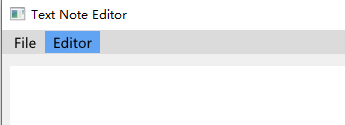
如果要多个菜单
if (ImGui::BeginMenuBar())
{
    if (ImGui::BeginMenu("File"))
    {
	if (ImGui::MenuItem("Save", "Ctrl+S")) // 菜单栏保存 前面是文字 后面是快捷键提示
        {
	    //和前面学的按钮一样,点击了菜单会进入到这里
	   if (ShowSaveFileDialog(path, MAX_PATH)) //显示保存文件对话框
            {
		if (SaveTextToFile(path, editor_text)) // 保存文件
                    show_save_success = true; //保存成功 设置show_save_success 为true 后面根据这个进行提示
                else
                    show_save_fail = true;
            }
        }

        ImGui::Separator();

        if (ImGui::MenuItem("Exit", "Esc")) // 退出菜单
        {
			glfwSetWindowShouldClose(window, true); // 设置窗口关闭标志,退出程序
        }
        ImGui::EndMenu();
    }

    if (ImGui::BeginMenu("Editor"))
    {
        if (ImGui::MenuItem("Copy", "Ctrl + c"))
        {

        }
        ImGui::EndMenu();
    }

    ImGui::EndMenuBar();
}Code language: C++ (cpp)
并排写多个if (ImGui::BeginMenu(“xxxx”)) 就可以。
提示
ImGuiWindowFlags window_flags = ImGuiWindowFlags_NoDecoration
    | ImGuiWindowFlags_NoMove
    | ImGuiWindowFlags_NoResize
    | ImGuiWindowFlags_NoSavedSettings
    | ImGuiWindowFlags_MenuBar;   // 显示菜单栏 必须设置,否则不显示Code language: JavaScript (javascript)
最后的ImGuiWindowFlags_MenuBar 一定要加上,否则菜单是不会显示的。
多行文本
多行文本,很简单
ImVec2 multiline_size = ImGui::GetContentRegionAvail();
// 修复问号核心:传入固定缓冲区最大值,内存已全置0无脏数据
ImGui::InputTextMultiline("##text_editor", &editor_text[0], TEXT_BUFFER_MAX, multiline_size);Code language: C++ (cpp)
调用InputTextMultiline 就可以。multiline_size 是尺寸,根据区域自动设置。
提示框
然后是提示框,提示框是通过给imgui设置标记,然后再后面根据标记显示出来 。例如
if (show_save_success)
{
    ImGui::OpenPopup("Save Success");Code language: CSS (css)
这里根据show_save_success的值,然后给ImGui::OpenPopup(“Save Success”); 设置弹窗标记”Save Success”
下方根据标记显示提示框
if (ImGui::BeginPopupModal("Save Success", nullptr, ImGuiWindowFlags_AlwaysAutoResize))
{
    ImGui::Text("Text saved successfully!");
    if (ImGui::Button("OK", ImVec2(120, 0)))
        ImGui::CloseCurrentPopup();
    ImGui::EndPopup();
}Code language: PHP (php)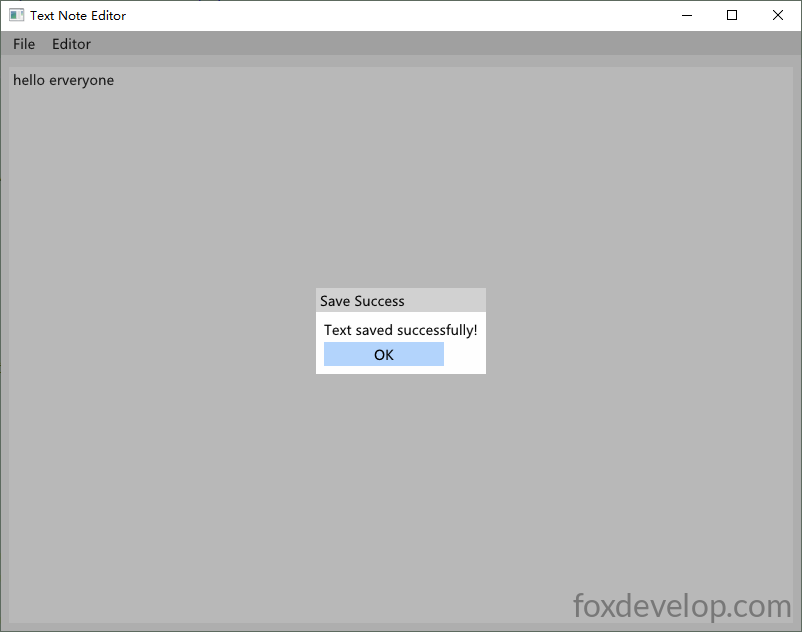
ok,本节课就给大家介绍到这里。
Previous: 使用Imgui实现一个简单加法计算器
Next: Imgui常用控件的使用