This section covers the definition, syntax, specifications and serialization of Properties
What is a Property
property is syntactic sugar in Pascal. Externally it behaves like a field, but internally it actually invokes getter for reading / setter for writing. It is used to encapsulate private fields, unify read-write logic and attach side effects.
- Read-write controllable property: Extra logic executes automatically on assignment or value retrieval (UI redraw, component synchronization, value validation);
- Read-only property: Readable from outside with no direct assignment allowed; data is modified internally via dedicated methods.
program Demo;
{$ifdef FPC} {$mode objfpc}{$H+}{$J-} {$endif}
{$ifdef MSWINDOWS} {$apptype CONSOLE} {$endif}
uses
  SysUtils;

type
  TWebPage = class
  private
    FURL: string;
    FColorRGB: Integer;
    procedure SetColorRGB(const Value: Integer);
  public
    property URL: string read FURL;
    property ColorRGB: Integer read FColorRGB write SetColorRGB;

    procedure Load(const AnURL: string);
    procedure PrintStatus;
  end;

procedure TWebPage.Load(const AnURL: string);
begin
  FURL := AnURL;
  Writeln('Load page: ', AnURL);
end;

procedure TWebPage.SetColorRGB(const Value: Integer);
begin
  if FColorRGB <> Value then
  begin
    FColorRGB := Value;
    Writeln('Color updated, value = ', Value);
    Writeln('Sync component color to ', Value);
  end;
end;

procedure TWebPage.PrintStatus;
begin
  Writeln('==== Page Info ====');
  Writeln('URL(read-only): ', URL);
  Writeln('ColorRGB(rw): ', ColorRGB);
  Writeln('==================');
  Writeln;
end;

var
  Page: TWebPage;
begin
  Page := TWebPage.Create;
  try
    Page.Load('https://www.foxdevelop.com/');
    Page.ColorRGB := 255;
    Page.PrintStatus;

    Page.ColorRGB := 255;
    Page.PrintStatus;

    Page.ColorRGB := 65535;
    Page.PrintStatus;

    // Page.URL := 'test'; // Compile error, URL is read-only
  finally
    Page.Free;
  end;
  Readln;
end.Code language: HTML, XML (xml)
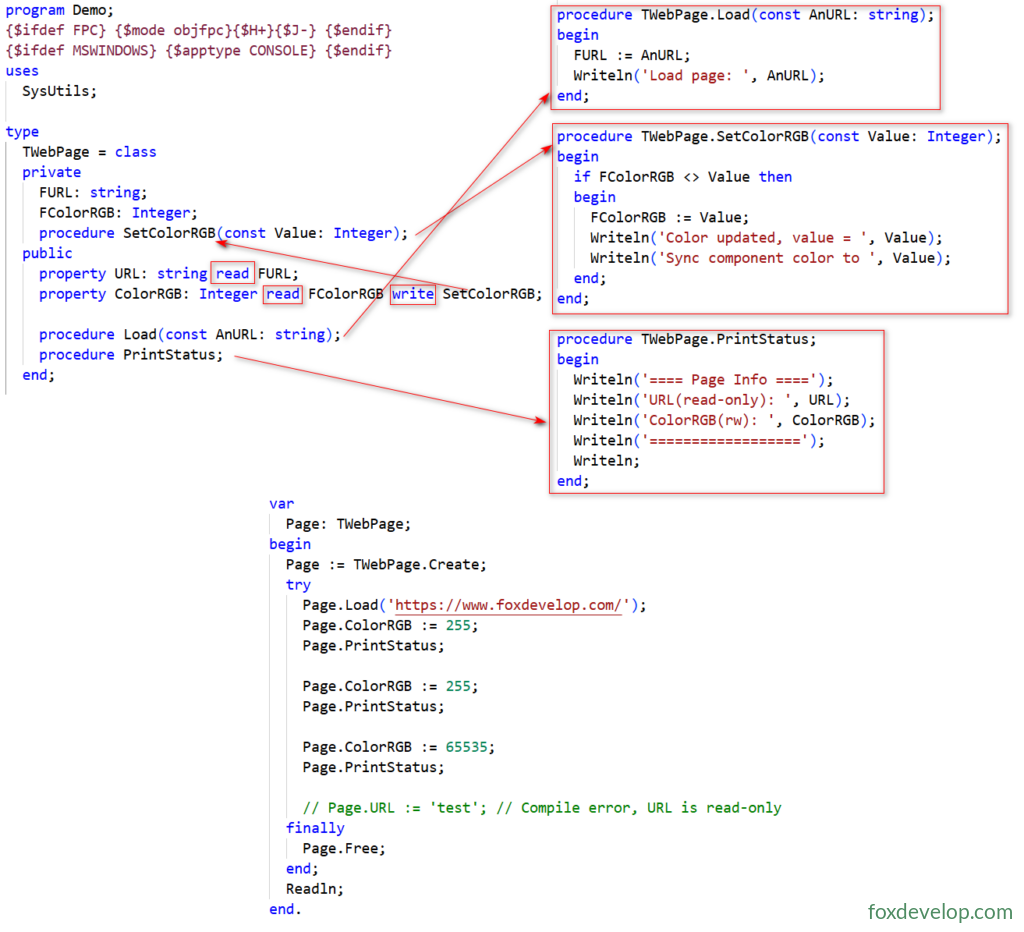
In TWebPage, the URL property is read-only; modifications are performed via the Load procedure.
The FColorRGB property supports reading, while writing/modification relies on the SetColorRGB procedure.
PrintStatus is a regular procedure used to output internal information of TWebPage.
Execution Output
Load page: https://www.foxdevelop.com/
Color updated, value = 255
Sync component color to 255
==== Page Info ====
URL(read-only): https://www.foxdevelop.com/
ColorRGB(rw): 255
==================

==== Page Info ====
URL(read-only): https://www.foxdevelop.com/
ColorRGB(rw): 255
==================

Color updated, value = 65535
Sync component color to 65535
==== Page Info ====
URL(read-only): https://www.foxdevelop.com/
ColorRGB(rw): 65535
==================Code language: JavaScript (javascript)
2. Three Core Declaration Rules for Properties
Declaring a property requires a mandatory read accessor and an optional write accessor:
read read source (choose one of two):
- Direct binding to a private field (fastest, no extra function overhead)
- Parameterless getter function with return type matching the property exactly
write write source (optional; omitted means read-only): choose one of two
- Direct binding to a private field
- Single-argument setter function with parameter type matching the property exactly
Extra modifiers for serialization only: default, stored
The compiler enforces strict type matching checks:
- Integer property: getter must return Integer with no parameters / read bound to Integer private field
- String property: setter must accept a const string parameter
Published Properties & Serialization
1. What is Serialization
Write complete object data to streams (files/memory/JSON), allowing object reconstruction from the stream later;
Lazarus form .lfm and Delphi .dfm form files fully rely on this underlying mechanism.
- Core prerequisite: Properties must be placed in the
publishedsection to be recognized by RTTI (Run-Time Type Information) - Supporting utility units:
LResources: Read and write LFM form filesFpJsonRtti/CastleComponentSerialize: Object JSON serialization
2. Serialization-Specific Modifiers
default <constant>: Mark default value of the property
- Only used for serialization logic: If property value equals default after object construction, skip storage during serialization to reduce file size
- No automatic initialization: Manually assign the default value to the field inside the constructor
stored <boolean/method>: Control whether to save the property during serialization
stored True: Default value, write property to file on serializationstored False: Never persist this propertystored IsNeedSave: Dynamically determine storage via boolean method call
Serialization Example
type
  TWebPage = class
  private
    FColor: TColor;
    function SetColor(const Value: TColor): TColor;
  published
    // default clBlack means black as default; constructor must manually assign FColor := clBlack
    property Color: TColor read FColor write SetColor default clBlack;
    // stored False will not save data to lfm/json
    property TempCache: string read FTemp write FTemp stored False;
  end;