统一美化App界面,资源字典 ResourceDictionary,分为应用级资源(App.xaml,全局所有页面可用) 和页面级资源(仅当前页面生效)
隐式样式(不指定x:Key,对TargetType对应控件自动生效)、静态资源 {StaticResource}
1. 修改 App.xaml(应用程序全局资源)
双击打开 App.xaml,替换全部代码:
<?xml version="1.0" encoding="utf-8"?>
<Application xmlns="[http://xamarin.com/schemas/2014/forms](http://xamarin.com/schemas/2014/forms)"
             xmlns:x="[http://schemas.microsoft.com/winfx/2009/xaml](http://schemas.microsoft.com/winfx/2009/xaml)"
             x:Class="Notes.App">
    <Application.Resources>
        <Thickness x:Key="PageMargin">20</Thickness>

        <!-- 颜色资源 -->
        <Color x:Key="AppBackgroundColor">AliceBlue</Color>
        <Color x:Key="NavigationBarColor">#1976D2</Color>
        <Color x:Key="NavigationBarTextColor">White</Color>

        <!-- 隐式样式:导航栏样式,全局生效 -->
        <Style TargetType="{x:Type NavigationPage}">
            <Setter Property="BarBackgroundColor"
                    Value="{StaticResource NavigationBarColor}" />
            <Setter Property="BarTextColor"
                    Value="{StaticResource NavigationBarTextColor}" />
        </Style>

        <!-- 隐式样式:所有ContentPage页面背景,ApplyToDerivedTypes="True"作用于派生页面 -->
        <Style TargetType="{x:Type ContentPage}"
               ApplyToDerivedTypes="True">
            <Setter Property="BackgroundColor"
                    Value="{StaticResource AppBackgroundColor}" />
        </Style>
    </Application.Resources>
</Application>
Code language: HTML, XML (xml)
代码说明
x:Key="PageMargin":带Key的资源,需要手动用{StaticResource PageMargin}引用- Color:定义全局颜色变量
Style TargetType="xxx":隐式样式,不需要给控件手动指定Style,该类型控件自动套用样式ApplyToDerivedTypes="True":所有继承自ContentPage的页面(NotesPage、NoteEntryPage)都会自动应用背景色- 应用级资源:整个项目所有页面都可以读取
2. 修改 NotesPage.xaml(页面级资源)
打开 NotesPage.xaml,替换代码:
<?xml version="1.0" encoding="UTF-8"?>
<ContentPage xmlns="[http://xamarin.com/schemas/2014/forms](http://xamarin.com/schemas/2014/forms)"
             xmlns:x="[http://schemas.microsoft.com/winfx/2009/xaml](http://schemas.microsoft.com/winfx/2009/xaml)"
             x:Class="Notes.NotesPage"
             Title="Notes">
    <ContentPage.Resources>
        <!-- 页面内隐式样式:仅本页面ListView生效 -->
        <Style TargetType="{x:Type ListView}">
            <Setter Property="BackgroundColor"
                    Value="{StaticResource AppBackgroundColor}" />
        </Style>
    </ContentPage.Resources>

    <ContentPage.ToolbarItems>
        <ToolbarItem Text="+"
                     Clicked="OnNoteAddedClicked" />
    </ContentPage.ToolbarItems>

    <ListView x:Name="listView"
              Margin="{StaticResource PageMargin}"
              ItemSelected="OnListViewItemSelected">
        <ListView.ItemTemplate>
            <DataTemplate>
                <TextCell Text="{Binding Text}"
                          TextColor="Black"
                          Detail="{Binding Date}" />
            </DataTemplate>
        </ListView.ItemTemplate>
    </ListView>
</ContentPage>
Code language: HTML, XML (xml)
代码说明
ContentPage.Resources:页面级资源字典,只在NotesPage页面内有效,别的页面访问不到这里定义的样式- ListView的Margin不再写死20,改成
Margin="{StaticResource PageMargin}",读取App.xaml全局定义的20边距 - 隐式ListView样式:只作用于当前页面的ListView
3. 配套:NoteEntryPage.xaml(页面级样式,原文提到的Editor、Button隐式样式)
文档描述:给NoteEntryPage添加Editor、Button隐式样式,仅该页面使用
<?xml version="1.0" encoding="UTF-8"?>
<ContentPage xmlns="[http://xamarin.com/schemas/2014/forms](http://xamarin.com/schemas/2014/forms)"
             xmlns:x="[http://schemas.microsoft.com/winfx/2009/xaml](http://schemas.microsoft.com/winfx/2009/xaml)"
             x:Class="Notes.NoteEntryPage"
             Title="Note Entry">
    <ContentPage.Resources>
        <!-- 仅当前页面生效的隐式样式 -->
        <Style TargetType="{x:Type Editor}">
            <Setter Property="TextColor" Value="#333333"/>
        </Style>
        <Style TargetType="{x:Type Button}">
            <Setter Property="BackgroundColor" Value="#2196F3"/>
            <Setter Property="TextColor" Value="White"/>
        </Style>
    </ContentPage.Resources>

    <StackLayout Margin="{StaticResource PageMargin}">
        <Editor Placeholder="Enter your note"
                Text="{Binding Text}"
                HeightRequest="100" />
        <Grid>
            <Grid.ColumnDefinitions>
                <ColumnDefinition Width="*" />
                <ColumnDefinition Width="*" />
            </Grid.ColumnDefinitions>
            <Button Text="Save"
                    Clicked="OnSaveButtonClicked" />
            <Button Grid.Column="1"
                    Text="Delete"
                    Clicked="OnDeleteButtonClicked"/>
        </Grid>
    </StackLayout>
</ContentPage>
Code language: HTML, XML (xml)
重点:
StackLayout Margin="{StaticResource PageMargin}",复用App全局的PageMargin,不再写死20
总结
- ResourceDictionary 资源字典:集中存放颜色、尺寸、样式,便于统一修改UI
- 应用级资源(App.xaml):全局,所有页面可用
- 页面级资源(ContentPage.Resources):只当前页面生效,适合页面独有的控件样式
- 静态资源引用
{StaticResource Key名}:读取资源字典里定义好的值 - 隐式样式:
TargetType指定控件类型,不需要写Style=”{…}”,同类型控件自动套用 - ApplyToDerivedTypes=”True”:让样式作用于继承该类的派生页面
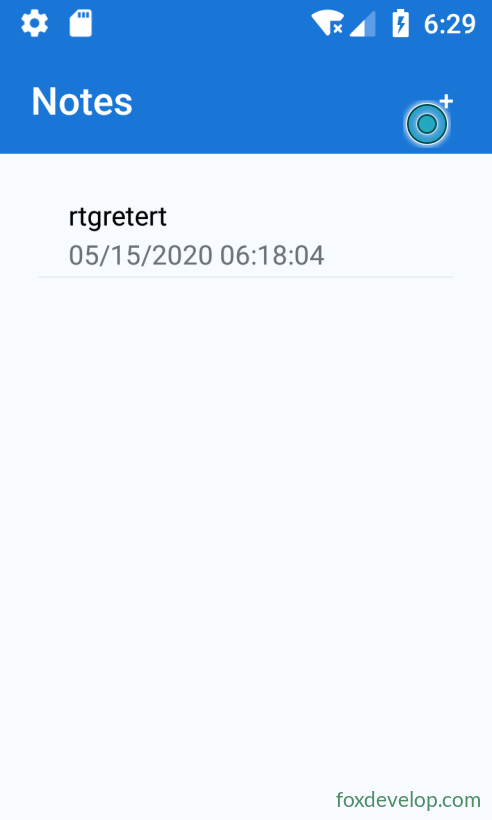
运行效果
- 导航栏背景蓝色,文字白色
- 所有页面背景:AliceBlue(浅蓝)
- NotesPage页面ListView背景和页面背景保持一致,边距统一20
- NoteEntryPage的Editor、Button自动套用页面内定义的样式
Previous: 将数据存储在本地 SQLite.NET 数据库中
Next: 便签项目介绍