PropertyGrid 属性表格控件
PropertyGrid 是一种可以展示和编辑对象属性的控件。我们可以预先定义一个类,类中包含属性,然后将该类的实例绑定到 PropertyGrid 上,即可在界面中以表格形式查看和修改属性值。
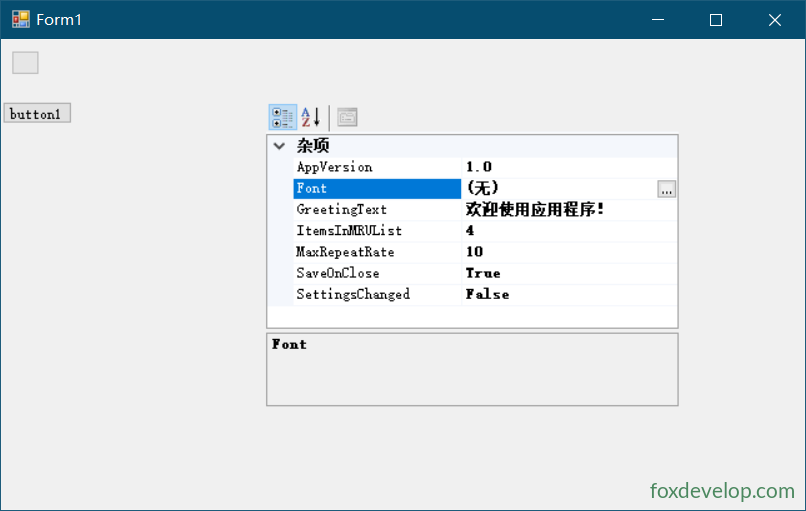
定义实体类
public class AppSettings
{
    private bool saveOnClose = true;
    private string greetingText = "欢迎使用应用程序!";
    private int itemsInMRU = 4;
    private int maxRepeatRate = 10;
    private bool settingsChanged = false;
    private string appVersion = "1.0";
    private Font font;

    public bool SaveOnClose
    {
        get { return saveOnClose; }
        set { saveOnClose = value; }
    }

    public string GreetingText
    {
        get { return greetingText; }
        set { greetingText = value; }
    }

    public int MaxRepeatRate
    {
        get { return maxRepeatRate; }
        set { maxRepeatRate = value; }
    }

    public int ItemsInMRUList
    {
        get { return itemsInMRU; }
        set { itemsInMRU = value; }
    }

    public bool SettingsChanged
    {
        get { return settingsChanged; }
        set { settingsChanged = value; }
    }

    public string AppVersion
    {
        get { return appVersion; }
        set { appVersion = value; }
    }

    public Font Font
    {
        get { return font; }
        set { font = value; }
    }
}Code language: JavaScript (javascript)
绑定对象到 PropertyGrid
AppSettings appSetting = new AppSettings();

private void Form1_Load(object sender, EventArgs e)
{
    this.propertyGrid1.SelectedObject = appSetting;
}Code language: JavaScript (javascript)
运行后,PropertyGrid 会自动读取 AppSettings 类的所有公共属性,以分类表格的形式展示出来,用户可以直接在界面上修改各个属性的值。
常用属性
| 属性 | 说明 |
|---|---|
SelectedObject | 要显示和编辑的对象 |
SelectedObjects | 多个选中对象(支持同时编辑多个对象) |
PropertySort | 属性排序方式(NoSort、Alphabetical、Categorized、CategorizedAlphabetical) |
HelpVisible | 是否显示底部帮助说明区域 |
ToolbarVisible | 是否显示工具栏 |
LargeButtons | 工具栏按钮是否大尺寸 |
BackColor | 背景色 |
LineColor | 分隔线颜色 |
HelpBackColor | 帮助区域背景色 |
this.propertyGrid1.PropertySort = PropertySort.CategorizedAlphabetical;
this.propertyGrid1.HelpVisible = true;
this.propertyGrid1.ToolbarVisible = true;Code language: JavaScript (javascript)
使用特性(Attribute)增强显示
通过为属性添加特性,可以控制 PropertyGrid 中的显示名称、描述、分类和只读状态:
using System.ComponentModel;

public class AppSettings
{
    private bool saveOnClose = true;

    [Category("常规")]
    [Description("关闭时是否自动保存")]
    [DisplayName("关闭时保存")]
    public bool SaveOnClose
    {
        get { return saveOnClose; }
        set { saveOnClose = value; }
    }

    [Category("常规")]
    [Description("欢迎文本")]
    [ReadOnly(true)]
    public string GreetingText { get; set; } = "欢迎使用应用程序!";

    [Category("性能")]
    [Description("最大重复率")]
    public int MaxRepeatRate { get; set; } = 10;

    [Browsable(false)]  // 在 PropertyGrid 中隐藏该属性
    public bool SettingsChanged { get; set; }
}Code language: JavaScript (javascript)| 特性 | 说明 |
|---|---|
Category | 属性分组 |
Description | 底部帮助区域的描述文本 |
DisplayName | 显示名称 |
ReadOnly | 是否只读 |
Browsable | 是否在 PropertyGrid 中可见 |
DefaultValue | 默认值标记 |
常用事件
| 事件 | 说明 |
|---|---|
PropertyValueChanged | 属性值被用户修改时触发 |
PropertyTabChanged | 属性选项卡切换时触发 |
SelectedObjectsChanged | 选中对象改变时触发 |
private void propertyGrid1_PropertyValueChanged(object sender, PropertyValueChangedEventArgs e)
{
    string propertyName = e.ChangedItem.Label;
    object newValue = e.ChangedItem.Value;
    MessageBox.Show($"属性 {propertyName} 已修改为 {newValue}");
}Code language: JavaScript (javascript)
Previous: ProgressBar 进度条控件
Next: RadioButton 单选按钮控件