NativePHP, Xcode veya Android Studio’yu saatlerce yapılandırma zahmetinden kurtarır. Sadece iOS veya Android telefonunuza Jump uygulamasını yüklemeniz yeterlidir.
Laravel – Geliştiriciler için kullanışlı araç paketi
Yeni bir Laravel projesi oluşturmak için bu komutları çalıştırın
laravel new my-app --using=nativephp/mobile-starter

cd my-app

php artisan native:jumpCode language: JavaScript (javascript)
Not: Bu komutları çalıştırmadan önce Laravel’in önceden yüklenmiş olması gereklidir.
Laravel Nasıl Yüklenir?
Laravel tam olarak nedir?
Laravel, son derece popüler ve kullanımı kolay bir PHP web çerçevesidir. Kullanıcı girişi & kaydı, dosya yükleme, e-posta gönderimi, veritabanı işlemleri ve form doğrulaması için yerleşik araçlara sahiptir. PHP ile geliştirme sürecini önemli ölçüde hızlandırır.
Laravel, PHP altyapısı üzerinde çalışır bu yüzden öncelikle PHP’yi yüklediğinizden emin olun. Ayrıca sürüm gereksinimlerine dikkat edin; eski PHP sürümleri güncel Laravel sürümleriyle uyumlu değildir.
PHP ≥ 8.1 (Önerilen sürümler: 8.2 ~ 8.4)
PHP Yükleme
PHP yükleme ile ilgili detaylı rehberimi inceleyebilirsiniz:
PHP Ortamı Yükleyin – FoxDevelop
Composer Yükleme
Composer, PHP için paket yöneticisidir. .NET’teki NuGet veya Java’daki Maven/Gradle ile benzer işlevlere sahiptir.
Composer yükleme adımlarını içeren özel öğretici içeriğime göz atın.
PHP Paket Yöneticisi Composer Yükleyin – FoxDevelop
PHP ve Composer kurulumları tamamlandıysa Laravel yüklemesine devam edebiliriz.
CMD penceresini açın ve öncelikle program sürümlerini kontrol edin.
PHP sürüm gereksinimi: PHP ≥ 8.1 (Tercih edilen 8.2 / 8.5), php -v komutunu çalıştırın
Composer sürüm gereksinimi: Composer ≥ 2.5, composer -V komutunu çalıştırın
Ardından PHP’nin zorunlu eklentilerini denetleyin:
php -m | findstr mbstring
php -m | findstr openssl
php -m | findstr pdo
Çin’deki kullanıcılar indirme hızını artırmak için Alibaba aynasını kullanabilir. Bu komutu CMD’ye yapıştırın:
composer config -g repo.packagist composer https://mirrors.aliyun.com/composer/Code language: JavaScript (javascript)Şimdi create-project komutu ile yüklemeyi başlatın:
composer create-project laravel/laravel myproject
cd myproject
Bu adımda zip eklentisinin eksikliği nedeniyle hata aldım. Eğer yükleme sorunsuz gerçekleşirse aşağıdaki sorun giderme bölümünü atlayıp buraya geçebilirsiniz.
Alınan hata mesajı aşağıdaki gibidir:
C:\Users\xxxx>composer create-project laravel/laravel myproject
Creating a "laravel/laravel" project at "./myproject"
Installing laravel/laravel (v12.10.0)
    Failed to download laravel/laravel from dist: The zip extension and unzip/7z commands are both missing, skipping.
The php.ini used by your command-line PHP is: D:\php8.2\php.ini
    Now trying to download from source
  - Syncing laravel/laravel (v12.10.0) into cacheCode language: JavaScript (javascript)
Zip eklentisinin devre dışı olduğunu teyit etmek için CMD’de aşağıdaki kontrol komutunu çalıştırın:
php -m | findstr zipKomut çıktısı boş geliyorsa zip eklentisi hala kapalı demektir.
Zip eklentisini etkinleştirmek için php.ini dosyasını düzenleyin
PHP yapılandırma dosyasının yolu: D:\php8.2\php.ini
;extension=zip satırını bulun ve başındaki noktalı virgül işaretini kaldırın.
Tekrar CMD’de php -m | findstr zip komutunu çalıştırın; geçerli bir çıktı almanız eklentinin aktif olduğunu gösterir.
Yüklemeyi tekrar deneyin
Yükleme komutunu bir kez daha çalıştırın:
composer create-project laravel/laravel myprojectYükleme yine başarısız oldu ve aşağıdaki günlükler alındı:
composer create-project laravel/laravel myproject
Creating a "laravel/laravel" project at "./myproject"
Installing laravel/laravel (v12.10.0)
  - Downloading laravel/laravel (v12.10.0)
    Failed downloading laravel/laravel, trying the next URL (404: The "https://mirrors.aliyun.com/composer/dists/laravel/laravel/76396a056d552b8a34077f151775037ac44b431a.zip" file could not be downloaded (HTTP/2 404 ))
  - Downloading laravel/laravel (v12.10.0)
  - Installing laravel/laravel (v12.10.0): Extracting archive
Created project in C:\Users\maiwu\myproject
> @php -r "file_exists('.env') || copy('.env.example', '.env');"
Loading composer repositories with package information
Updating dependencies
Your requirements could not be resolved to an installable set of packages.

  Problem 1
    - Root composer.json requires laravel/tinker ^2.10.1, it is satisfiable by laravel/tinker[v2.10.1, v2.10.2, v2.11.0, v2.11.1] from composer repo (https://repo.packagist.org) but laravel/tinker[2.x-dev] from composer repo (https://mirrors.aliyun.com/composer) has higher repository priority. The packages from the higher priority repository do not match your minimum-stability and are therefore not installable. That repository is canonical so the lower priority repo's packages are not installable. See https://getcomposer.org/repoprio for details and assistance.
  Problem 2
    - Root composer.json requires phpunit/phpunit ^11.5.3, found phpunit/phpunit[11.5.3, ..., 11.5.44] but these were not loaded, because they are affected by security advisories ("PKSA-z3gr-8qht-p93v", "PKSA-z3gr-8qht-p93v"). Go to https://packagist.org/security-advisories/ to find advisory details. To ignore the advisories, add them to the audit "ignore" config. To turn the feature off entirely, you can set "block-insecure" to false in your "audit" config.
  Problem 3
    - Root composer.json requires laravel/sail ^1.41 -> satisfiable by laravel/sail[v1.41.0, ..., v1.46.0].
    - laravel/sail[v1.41.0, ..., v1.46.0] require symfony/yaml ^6.0|^7.0 -> found symfony/yaml[v6.0.0, ..., v6.4.30, v7.0.0, ..., v7.4.1] but these were not loaded, because they are affected by security advisories ("PKSA-v5yj-8nmz-sk2q", "PKSA-ft77-7h5f-p3r6", "PKSA-b14r-zh1d-vdrc", "PKSA-v5yj-8nmz-sk2q", "PKSA-ft77-7h5f-p3r6", "PKSA-b14r-zh1d-vdrc"). Go to https://packagist.org/security-advisories/ to find advisory details. To ignore the advisories, add them to the audit "ignore" config. To turn the feature off entirely, you can set "block-insecure" to false in your "audit" config.
  Problem 4
    - Root composer.json requires laravel/framework ^12.0 -> satisfiable by laravel/framework[v12.1.1, ..., v12.40.0].
    - laravel/framework[v12.1.1, ..., v12.12.0] require league/commonmark ^2.6 -> found league/commonmark[2.6.0] but these were not loaded, because they are affected by security advisories ("PKSA-21fb-n1x5-5nf7", "PKSA-2cx9-ynrq-qdk3", "PKSA-rqc2-tcc6-nc79", "PKSA-21fb-n1x5-5nf7", "PKSA-2cx9-ynrq-qdk3", "PKSA-rqc2-tcc6-nc79"). Go to https://packagist.org/security-advisories/ to find advisory details. To ignore the advisories, add them to the audit "ignore" config. To turn the feature off entirely, you can set "block-insecure" to false in your "audit" config.
    - laravel/framework[v12.13.0, ..., v12.40.0] require league/commonmark ^2.7 -> satisfiable by league/commonmark[2.7.0, ..., 2.8.2] from composer repo (https://repo.packagist.org) but league/commonmark[dev-main, 2.7.x-dev, 2.8.x-dev, 2.9.x-dev (alias of dev-main)] from composer repo (https://mirrors.aliyun.com/composer) has higher repository priority. The packages from the higher priority repository do not match your minimum-stability and are therefore not installable. That repository is canonical so the lower priority repo's packages are not installable. See https://getcomposer.org/repoprio for details and assistance.Code language: PHP (php)
Sorunun nedeni: Alibaba Composer aynası düzgün çalışmıyor.
Önce hatalı proje klasörünü silin, ardından resmi kaynağa geri dönün:
rmdir /s /q myproject
composer config -g --unset repos.packagist
composer create-project laravel/laravel myproject --no-auditCode language: PHP (php)
Yükleme hala başarısız olursa kalan dosyaları tekrar temizleyin:
- Downloading phpunit/php-code-coverage (11.0.12)
  - Downloading phar-io/version (3.2.1)
  - Downloading phar-io/manifest (2.0.4)
  - Downloading myclabs/deep-copy (1.13.4)
  - Downloading phpunit/phpunit (11.5.55)
 110/111 [===========================>]  99%A connection timeout was encountered. If you intend to run Composer without connecting to the internet, run the command again prefixed with COMPOSER_DISABLE_NETWORK=1 to make Composer run in offline mode.
    Failed to download laravel/pint from dist: The "https://codeload.github.com/laravel/pint/legacy.zip/0770e9b7fafd50d4586881d456d6eb41c9247a80" file could not be written to C:\Users\maiwu\myproject/vendor/composer/tmp-60f6b8b4815321558e13bb1ac74423ee.zip: Failed to open stream: Permission denied
    Now trying to download from source
  - Syncing laravel/pint (v1.29.1) into cache
Cloning failed using an ssh key for authentication, enter your GitHub credentials to access private repos
You need to provide a GitHub access token.
Tokens will be stored in plain text in "C:/Users/maiwu/AppData/Roaming/Composer/auth.json" for future use by Composer.
Due to the security risk of tokens being exfiltrated, use tokens with short expiration times and only the minimum permissions necessary.

Carefully consider the following options in order:

1. When you don't use 'vcs'  type 'repositories'  in composer.json and do not need to clone source or download dist files
from private GitHub repositories over HTTPS, use a fine-grained token with read-only access to public information.
Use the following URL to create such a token:
https://github.com/settings/personal-access-tokens/new?name=Composer+on+DESKTOP-1OHC5Q4+2026-05-27+0946

2. When all relevant _private_ GitHub repositories belong to a single user or organisation, use a fine-grained token with
repository "content" read-only permissions. You can start with the following URL, but you may need to change the resource owner
to the right user or organisation. Additionally, you can scope permissions down to apply only to selected repositories.
https://github.com/settings/personal-access-tokens/new?contents=read&name=Composer+on+DESKTOP-1OHC5Q4+2026-05-27+0946

3. A "classic" token grants broad permissions on your behalf to all repositories accessible by you.
This may include write permissions, even though not needed by Composer. Use it only when you need to access
private repositories across multiple organisations at the same time and using directory-specific authentication sources
is not an option. You can generate a classic token here:
https://github.com/settings/tokens/new?scopes=repo&description=Composer+on+DESKTOP-1OHC5Q4+2026-05-27+0946

For additional information, check https://getcomposer.org/doc/articles/authentication-for-private-packages.md#github-oauth
Token (hidden):Code language: PHP (php)
Ardından düzenlenmiş yükleme komutunu çalıştırın:
composer create-project laravel/laravel myproject --no-dev --no-auditGitHub token istemeden ve ek bağımlılıklar olmadan Laravel yükleyin:
pint/phpunit paketlerini atlamak için –no-dev ve –no-audit parametrelerini ekleyin, bu paketler GitHub’dan kaynak kod indirilmesine neden olur.
Aşağıdaki çıktıyı gördüğünüzde yükleme başarıyla tamamlanmış demektir:
- Installing league/commonmark (2.8.2): Extracting archive
  - Installing laravel/framework (v12.61.0): Extracting archive
75 package suggestions were added by new dependencies, use `composer suggest` to see details.
Package sebastian/code-unit is abandoned, you should avoid using it. No replacement was suggested.
Package sebastian/code-unit-reverse-lookup is abandoned, you should avoid using it. No replacement was suggested.
Generating optimized autoload files
> Illuminate\Foundation\ComposerScripts::postAutoloadDump
> @php artisan package:discover --ansi

   INFO  Discovering packages.

  laravel/tinker .............................................................................................................................. DONE
  nesbot/carbon ............................................................................................................................... DONE
  nunomaduro/termwind ......................................................................................................................... DONECode language: JavaScript (javascript)
Şimdi yeni oluşturulan projeyi test edelim. Yukarıdaki komut tüm kaynak dosyaları içeren myproject klasörünü oluşturacaktır.
CMD penceresini açık tutun ve aşağıdaki iki komutu çalıştırın:
cd myproject
php artisan serve
CMD pencereniz aşağıdaki gibi görünecektir:
C:\Users\xxxx>cd myproject
C:\Users\xxxx\myproject>php artisan serve
   INFO  Server running on [http://127.0.0.1:8000].
   Press Ctrl+C to stop the server
Code language: JavaScript (javascript)
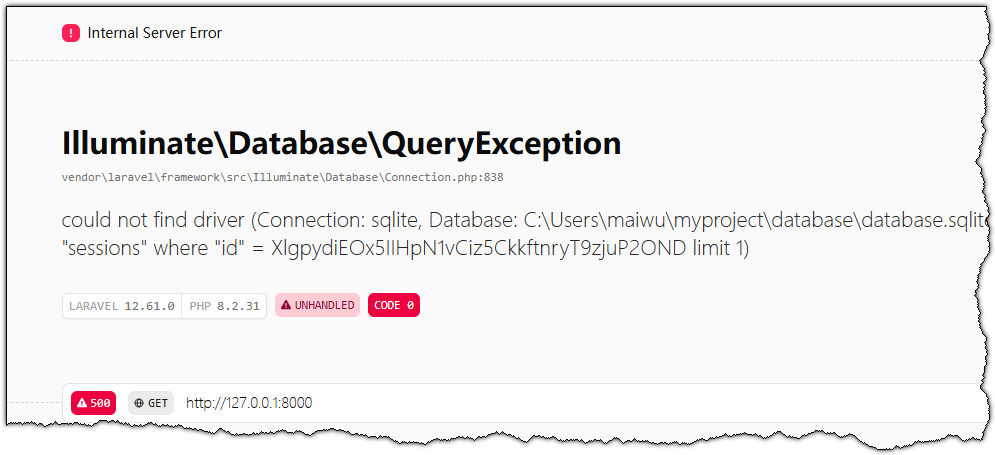
Tarayıcınızın adres çubuğuna http://127.0.0.1:8000 adresini yapıştırarak Laravel’in varsayılan ana sayfasını görüntüleyin.