NativePHP membantu Anda tidak perlu menghabiskan waktu berjam-jam untuk mengatur Xcode atau Android Studio. Anda hanya perlu memasang aplikasi Jump di ponsel iOS atau Android.
Laravel – Rangka kerja ringkas untuk pengembang
Jalankan perintah berikut untuk membuat proyek Laravel baru
laravel new my-app --using=nativephp/mobile-starter

cd my-app

php artisan native:jumpCode language: JavaScript (javascript)
Catatan: Anda harus sudah menginstal Laravel terlebih dahulu sebelum menjalankan perintah di atas.
Cara Menginstal Laravel?
Apa sebenarnya Laravel?
Laravel adalah kerangka kerja web PHP yang sangat populer dan mudah digunakan. Kerangka ini dilengkapi dengan alat bawaan untuk login & pendaftaran pengguna, unggah berkas, pengiriman email, operasi basis data, dan validasi formulir. Laravel mampu mempercepat proses pengembangan aplikasi PHP secara signifikan.
Karena Laravel berjalan di atas PHP, pastikan Anda telah memasang PHP terlebih dahulu. Perhatikan juga persyaratan versi; versi PHP yang sudah kedaluwarsa tidak dapat digunakan bersama Laravel terbaru.
PHP ≥ 8.1 (disarankan 8.2 ~ 8.4)
Menginstal PHP
Lihat panduan lengkap saya untuk menginstal PHP:
Menginstal Lingkungan PHP – FoxDevelop
Menginstal Composer
Composer berfungsi sebagai manajer paket untuk PHP, setara dengan NuGet pada .NET atau Maven/Gradle untuk Java.
Lihat tutorial terpisah saya untuk langkah-langkah pemasangan Composer.
Menginstal Manajer Paket PHP Composer – FoxDevelop
Setelah PHP dan Composer siap digunakan, kita bisa lanjut menginstal Laravel.
Buka CMD dan periksa versi perangkat lunak terlebih dahulu.
Persyaratan versi PHP: PHP ≥ 8.1 (disarankan 8.2 / 8.5), jalankan perintah php -v
Persyaratan versi Composer: Composer ≥ 2.5, jalankan perintah composer -V
Selanjutnya periksa ekstensi PHP yang dibutuhkan:
php -m | findstr mbstring
php -m | findstr openssl
php -m | findstr pdo
Pengguna di Tiongkok dapat beralih ke sumber cermin Alibaba untuk mengatasi kecepatan unduh yang lambat. Salin perintah ini ke dalam CMD:
composer config -g repo.packagist composer https://mirrors.aliyun.com/composer/Code language: JavaScript (javascript)Sekarang mulai proses pemasangan dengan perintah create-project:
composer create-project laravel/laravel myproject
cd myproject
Saya mengalami kesalahan karena ekstensi zip tidak terpasang pada langkah ini. Jika pemasangan berjalan lancar, lewati bagian pemecahan masalah di bawah dan langsung menuju halaman ini.
Pesan kesalahan yang muncul seperti berikut:
C:\Users\xxxx>composer create-project laravel/laravel myproject
Creating a "laravel/laravel" project at "./myproject"
Installing laravel/laravel (v12.10.0)
    Failed to download laravel/laravel from dist: The zip extension and unzip/7z commands are both missing, skipping.
The php.ini used by your command-line PHP is: D:\php8.2\php.ini
    Now trying to download from source
  - Syncing laravel/laravel (v12.10.0) into cacheCode language: JavaScript (javascript)
Jalankan perintah pemeriksaan di CMD untuk memastikan ekstensi zip belum tersedia:
php -m | findstr zipJika tidak ada hasil yang ditampilkan, berarti ekstensi zip masih dinonaktifkan.
Mengedit php.ini untuk mengaktifkan ekstensi zip
Lokasi berkas konfigurasi PHP saya: D:\php8.2\php.ini
Cari baris ;extension=zip dan hapus tanda titik koma di awal baris.
Jalankan kembali perintah php -m | findstr zip di CMD; hasil yang valid menandakan ekstensi telah aktif.
Coba lakukan pemasangan kembali
Jalankan perintah pemasangan sekali lagi:
composer create-project laravel/laravel myprojectPemasangan kembali mengalami kegagalan dengan catatan log di bawah ini:
composer create-project laravel/laravel myproject
Creating a "laravel/laravel" project at "./myproject"
Installing laravel/laravel (v12.10.0)
  - Downloading laravel/laravel (v12.10.0)
    Failed downloading laravel/laravel, trying the next URL (404: The "https://mirrors.aliyun.com/composer/dists/laravel/laravel/76396a056d552b8a34077f151775037ac44b431a.zip" file could not be downloaded (HTTP/2 404 ))
  - Downloading laravel/laravel (v12.10.0)
  - Installing laravel/laravel (v12.10.0): Extracting archive
Created project in C:\Users\maiwu\myproject
> @php -r "file_exists('.env') || copy('.env.example', '.env');"
Loading composer repositories with package information
Updating dependencies
Your requirements could not be resolved to an installable set of packages.

  Problem 1
    - Root composer.json requires laravel/tinker ^2.10.1, it is satisfiable by laravel/tinker[v2.10.1, v2.10.2, v2.11.0, v2.11.1] from composer repo (https://repo.packagist.org) but laravel/tinker[2.x-dev] from composer repo (https://mirrors.aliyun.com/composer) has higher repository priority. The packages from the higher priority repository do not match your minimum-stability and are therefore not installable. That repository is canonical so the lower priority repo's packages are not installable. See https://getcomposer.org/repoprio for details and assistance.
  Problem 2
    - Root composer.json requires phpunit/phpunit ^11.5.3, found phpunit/phpunit[11.5.3, ..., 11.5.44] but these were not loaded, because they are affected by security advisories ("PKSA-z3gr-8qht-p93v", "PKSA-z3gr-8qht-p93v"). Go to https://packagist.org/security-advisories/ to find advisory details. To ignore the advisories, add them to the audit "ignore" config. To turn the feature off entirely, you can set "block-insecure" to false in your "audit" config.
  Problem 3
    - Root composer.json requires laravel/sail ^1.41 -> satisfiable by laravel/sail[v1.41.0, ..., v1.46.0].
    - laravel/sail[v1.41.0, ..., v1.46.0] require symfony/yaml ^6.0|^7.0 -> found symfony/yaml[v6.0.0, ..., v6.4.30, v7.0.0, ..., v7.4.1] but these were not loaded, because they are affected by security advisories ("PKSA-v5yj-8nmz-sk2q", "PKSA-ft77-7h5f-p3r6", "PKSA-b14r-zh1d-vdrc", "PKSA-v5yj-8nmz-sk2q", "PKSA-ft77-7h5f-p3r6", "PKSA-b14r-zh1d-vdrc"). Go to https://packagist.org/security-advisories/ to find advisory details. To ignore the advisories, add them to the audit "ignore" config. To turn the feature off entirely, you can set "block-insecure" to false in your "audit" config.
  Problem 4
    - Root composer.json requires laravel/framework ^12.0 -> satisfiable by laravel/framework[v12.1.1, ..., v12.40.0].
    - laravel/framework[v12.1.1, ..., v12.12.0] require league/commonmark ^2.6 -> found league/commonmark[2.6.0] but these were not loaded, because they are affected by security advisories ("PKSA-21fb-n1x5-5nf7", "PKSA-2cx9-ynrq-qdk3", "PKSA-rqc2-tcc6-nc79", "PKSA-21fb-n1x5-5nf7", "PKSA-2cx9-ynrq-qdk3", "PKSA-rqc2-tcc6-nc79"). Go to https://packagist.org/security-advisories/ to find advisory details. To ignore the advisories, add them to the audit "ignore" config. To turn the feature off entirely, you can set "block-insecure" to false in your "audit" config.
    - laravel/framework[v12.13.0, ..., v12.40.0] require league/commonmark ^2.7 -> satisfiable by league/commonmark[2.7.0, ..., 2.8.2] from composer repo (https://repo.packagist.org) but league/commonmark[dev-main, 2.7.x-dev, 2.8.x-dev, 2.9.x-dev (alias of dev-main)] from composer repo (https://mirrors.aliyun.com/composer) has higher repository priority. The packages from the higher priority repository do not match your minimum-stability and are therefore not installable. That repository is canonical so the lower priority repo's packages are not installable. See https://getcomposer.org/repoprio for details and assistance.Code language: PHP (php)
Penyebab: Sumber cermin Composer milik Alibaba tidak berfungsi dengan normal.
Hapus folder proyek yang bermasalah terlebih dahulu, kemudian kembalikan ke sumber resmi:
rmdir /s /q myproject
composer config -g --unset repos.packagist
composer create-project laravel/laravel myproject --no-auditCode language: PHP (php)
Pemasangan masih gagal, bersihkan sisa berkas sekali lagi:
- Downloading phpunit/php-code-coverage (11.0.12)
  - Downloading phar-io/version (3.2.1)
  - Downloading phar-io/manifest (2.0.4)
  - Downloading myclabs/deep-copy (1.13.4)
  - Downloading phpunit/phpunit (11.5.55)
 110/111 [===========================>]  99%A connection timeout was encountered. If you intend to run Composer without connecting to the internet, run the command again prefixed with COMPOSER_DISABLE_NETWORK=1 to make Composer run in offline mode.
    Failed to download laravel/pint from dist: The "https://codeload.github.com/laravel/pint/legacy.zip/0770e9b7fafd50d4586881d456d6eb41c9247a80" file could not be written to C:\Users\maiwu\myproject/vendor/composer/tmp-60f6b8b4815321558e13bb1ac74423ee.zip: Failed to open stream: Permission denied
    Now trying to download from source
  - Syncing laravel/pint (v1.29.1) into cache
Cloning failed using an ssh key for authentication, enter your GitHub credentials to access private repos
You need to provide a GitHub access token.
Tokens will be stored in plain text in "C:/Users/maiwu/AppData/Roaming/Composer/auth.json" for future use by Composer.
Due to the security risk of tokens being exfiltrated, use tokens with short expiration times and only the minimum permissions necessary.

Carefully consider the following options in order:

1. When you don't use 'vcs'  type 'repositories'  in composer.json and do not need to clone source or download dist files
from private GitHub repositories over HTTPS, use a fine-grained token with read-only access to public information.
Use the following URL to create such a token:
https://github.com/settings/personal-access-tokens/new?name=Composer+on+DESKTOP-1OHC5Q4+2026-05-27+0946

2. When all relevant _private_ GitHub repositories belong to a single user or organisation, use a fine-grained token with
repository "content" read-only permissions. You can start with the following URL, but you may need to change the resource owner
to the right user or organisation. Additionally, you can scope permissions down to apply only to selected repositories.
https://github.com/settings/personal-access-tokens/new?contents=read&name=Composer+on+DESKTOP-1OHC5Q4+2026-05-27+0946

3. A "classic" token grants broad permissions on your behalf to all repositories accessible by you.
This may include write permissions, even though not needed by Composer. Use it only when you need to access
private repositories across multiple organisations at the same time and using directory-specific authentication sources
is not an option. You can generate a classic token here:
https://github.com/settings/tokens/new?scopes=repo&description=Composer+on+DESKTOP-1OHC5Q4+2026-05-27+0946

For additional information, check https://getcomposer.org/doc/articles/authentication-for-private-packages.md#github-oauth
Token (hidden):Code language: PHP (php)
Selanjutnya jalankan perintah pemasangan yang telah diperbaiki:
composer create-project laravel/laravel myproject --no-dev --no-auditPasang Laravel tanpa permintaan token GitHub dan dependensi tambahan:
Tambahkan parameter –no-dev dan –no-audit untuk melewati paket pint/phpunit yang memicu pengunduhan kode sumber dari GitHub:
Pemasangan berhasil jika Anda melihat tampilan yang serupa dengan ini:
- Installing league/commonmark (2.8.2): Extracting archive
  - Installing laravel/framework (v12.61.0): Extracting archive
75 package suggestions were added by new dependencies, use `composer suggest` to see details.
Package sebastian/code-unit is abandoned, you should avoid using it. No replacement was suggested.
Package sebastian/code-unit-reverse-lookup is abandoned, you should avoid using it. No replacement was suggested.
Generating optimized autoload files
> Illuminate\Foundation\ComposerScripts::postAutoloadDump
> @php artisan package:discover --ansi

   INFO  Discovering packages.

  laravel/tinker .............................................................................................................................. DONE
  nesbot/carbon ............................................................................................................................... DONE
  nunomaduro/termwind ......................................................................................................................... DONECode language: JavaScript (javascript)
Sekarang kita akan menguji proyek yang baru dibuat. Perintah sebelumnya akan membuat folder myproject yang berisi seluruh berkas kode sumber.
Tetap buka jendela CMD yang ada dan jalankan dua baris perintah berikut:
cd myproject
php artisan serve
Tampilan jendela CMD akan seperti ini:
C:\Users\xxxx>cd myproject
C:\Users\xxxx\myproject>php artisan serve
   INFO  Server running on [http://127.0.0.1:8000].
   Press Ctrl+C to stop the server
Code language: JavaScript (javascript)
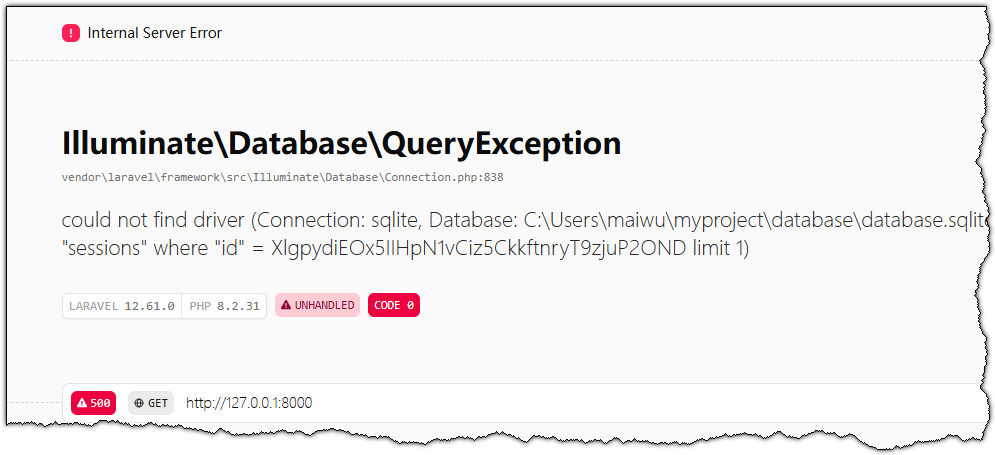
Salin alamat http://127.0.0.1:8000 ke bilah alamat peramban untuk melihat halaman utama bawaan Laravel.