NativePHP ช่วยคุณประหยัดเวลาในการติดตั้ง Xcode หรือ Android Studio เพียงแค่ติดตั้งแอปพลิเคชัน Jump บนโทรศัพท์ iOS หรือ Android ก็เพียงพอแล้ว
Laravel – แพลตฟอร์มพัฒนาที่เรียบง่ายสำหรับนักพัฒนา
รันคำสั่งเหล่านี้เพื่อสร้างโปรเจกต์ Laravel ใหม่
laravel new my-app --using=nativephp/mobile-starter

cd my-app

php artisan native:jumpCode language: JavaScript (javascript)
หมายเหตุ: คุณต้องติดตั้ง Laravel ไว้ก่อนจึงจะรันคำสั่งเหล่านี้ได้
วิธีติดตั้ง Laravel?
Laravel คืออะไรกันแน่?
Laravel เป็นเฟรมเวิร์กเว็บ PHP ที่ได้รับความนิยมและใช้งานง่าย มีเครื่องมือในตัวสำหรับระบบล็อกอิน สมัครสมาชิก อัปโหลดไฟล์ ส่งอีเมล จัดการฐานข้อมูลและตรวจสอบฟอร์ม ช่วยเพิ่มความรวดเร็วในการพัฒนา PHP ได้เป็นอย่างมาก
เนื่องจาก Laravel ทำงานบน PHP ให้ติดตั้ง PHP ก่อน นอกจากนี้ให้ตรวจสอบเงื่อนไขเวอร์ชัน PHP เวอร์ชันเก่าจะไม่สามารถใช้งานร่วมกับ Laravel เวอร์ชันล่าสุดได้
PHP ≥ 8.1 (แนะนำเวอร์ชัน 8.2 ถึง 8.4)
ติดตั้ง PHP
อ่านคู่มือเฉพาะทางเกี่ยวกับการติดตั้ง PHP ได้ที่นี่:
ติดตั้งสภาพแวดล้อม PHP – FoxDevelop
ติดตั้ง Composer
Composer คือตัวจัดการแพ็กเกจของ PHP มีลักษณะคล้ายกับ NuGet ใน .NET หรือ Maven และ Gradle ในระบบ Java
ขั้นตอนการติดตั้งสามารถอ้างอิงจากบทช่วยสอนแยกอีกหน้าได้
ติดตั้ง Composer ตัวจัดการแพ็กเกจ PHP – FoxDevelop
เมื่อติดตั้ง PHP และ Composer เรียบร้อยแล้ว เราจะสามารถดำเนินการติดตั้ง Laravel ต่อได้
เปิด CMD และตรวจสอบเวอร์ชันซอฟต์แวร์ก่อน
เงื่อนไขเวอร์ชัน PHP: PHP ≥ 8.1 (แนะนำ 8.2 / 8.5) ให้รันคำสั่ง php -v
เงื่อนไขเวอร์ชัน Composer: Composer ≥ 2.5 ให้รันคำสั่ง composer -V
ต่อไปตรวจสอบส่วนขยาย PHP ที่จำเป็น:
php -m | findstr mbstring
php -m | findstr openssl
php -m | findstr pdo
ผู้ใช้ในประเทศจีนสามารถเปลี่ยนไปใช้มิเรอร์ของอาลีบาบาเพื่อแก้ปัญหาดาวน์โหลดช้า วางคำสั่งนี้ลงใน CMD:
composer config -g repo.packagist composer https://mirrors.aliyun.com/composer/Code language: JavaScript (javascript)ตอนนี้เริ่มติดตั้งด้วยคำสั่ง create-project:
composer create-project laravel/laravel myproject
cd myproject
เกิดข้อผิดพลาดเนื่องจากไม่มีส่วนขยาย zip หากการติดตั้งของคุณทำงานได้ปกติ ให้ข้ามขั้นตอนแก้ไขปัญหาด้านล่างและไปที่ จุดนี้
ข้อความแจ้งเตือนข้อผิดพลาดมีดังนี้:
C:\Users\xxxx>composer create-project laravel/laravel myproject
Creating a "laravel/laravel" project at "./myproject"
Installing laravel/laravel (v12.10.0)
    Failed to download laravel/laravel from dist: The zip extension and unzip/7z commands are both missing, skipping.
The php.ini used by your command-line PHP is: D:\php8.2\php.ini
    Now trying to download from source
  - Syncing laravel/laravel (v12.10.0) into cacheCode language: JavaScript (javascript)
รันคำสั่งตรวจสอบนี้บน CMD เพื่อยืนยันว่าไม่มีส่วนขยาย zip:
php -m | findstr zipหากไม่มีข้อความแสดง แปลว่าส่วนขยาย zip ยังไม่ได้เปิดใช้งาน
แก้ไขไฟล์ php.ini เพื่อเปิดใช้งานส่วนขยาย zip
ที่อยู่ไฟล์คอนฟิก PHP ของฉัน: D:\php8.2\php.ini
ค้นหาบรรทัด ;extension=zip และลบเครื่องหมายอัฒภาคที่อยู่ด้านหน้าออก
รันคำสั่ง php -m | findstr zip อีกครั้งบน CMD หากแสดงข้อมูล แปลว่าส่วนขยายทำงานเรียบร้อยแล้ว
ลองติดตั้งใหม่อีกครั้ง
รันคำสั่งติดตั้งอีกครั้ง:
composer create-project laravel/laravel myprojectเกิดความล้มเหลวในการติดตั้งอีกครั้ง บันทึกการทำงานดังนี้:
composer create-project laravel/laravel myproject
Creating a "laravel/laravel" project at "./myproject"
Installing laravel/laravel (v12.10.0)
  - Downloading laravel/laravel (v12.10.0)
    Failed downloading laravel/laravel, trying the next URL (404: The "https://mirrors.aliyun.com/composer/dists/laravel/laravel/76396a056d552b8a34077f151775037ac44b431a.zip" file could not be downloaded (HTTP/2 404 ))
  - Downloading laravel/laravel (v12.10.0)
  - Installing laravel/laravel (v12.10.0): Extracting archive
Created project in C:\Users\maiwu\myproject
> @php -r "file_exists('.env') || copy('.env.example', '.env');"
Loading composer repositories with package information
Updating dependencies
Your requirements could not be resolved to an installable set of packages.

  Problem 1
    - Root composer.json requires laravel/tinker ^2.10.1, it is satisfiable by laravel/tinker[v2.10.1, v2.10.2, v2.11.0, v2.11.1] from composer repo (https://repo.packagist.org) but laravel/tinker[2.x-dev] from composer repo (https://mirrors.aliyun.com/composer) has higher repository priority. The packages from the higher priority repository do not match your minimum-stability and are therefore not installable. That repository is canonical so the lower priority repo's packages are not installable. See https://getcomposer.org/repoprio for details and assistance.
  Problem 2
    - Root composer.json requires phpunit/phpunit ^11.5.3, found phpunit/phpunit[11.5.3, ..., 11.5.44] but these were not loaded, because they are affected by security advisories ("PKSA-z3gr-8qht-p93v", "PKSA-z3gr-8qht-p93v"). Go to https://packagist.org/security-advisories/ to find advisory details. To ignore the advisories, add them to the audit "ignore" config. To turn the feature off entirely, you can set "block-insecure" to false in your "audit" config.
  Problem 3
    - Root composer.json requires laravel/sail ^1.41 -> satisfiable by laravel/sail[v1.41.0, ..., v1.46.0].
    - laravel/sail[v1.41.0, ..., v1.46.0] require symfony/yaml ^6.0|^7.0 -> found symfony/yaml[v6.0.0, ..., v6.4.30, v7.0.0, ..., v7.4.1] but these were not loaded, because they are affected by security advisories ("PKSA-v5yj-8nmz-sk2q", "PKSA-ft77-7h5f-p3r6", "PKSA-b14r-zh1d-vdrc", "PKSA-v5yj-8nmz-sk2q", "PKSA-ft77-7h5f-p3r6", "PKSA-b14r-zh1d-vdrc"). Go to https://packagist.org/security-advisories/ to find advisory details. To ignore the advisories, add them to the audit "ignore" config. To turn the feature off entirely, you can set "block-insecure" to false in your "audit" config.
  Problem 4
    - Root composer.json requires laravel/framework ^12.0 -> satisfiable by laravel/framework[v12.1.1, ..., v12.40.0].
    - laravel/framework[v12.1.1, ..., v12.12.0] require league/commonmark ^2.6 -> found league/commonmark[2.6.0] but these were not loaded, because they are affected by security advisories ("PKSA-21fb-n1x5-5nf7", "PKSA-2cx9-ynrq-qdk3", "PKSA-rqc2-tcc6-nc79", "PKSA-21fb-n1x5-5nf7", "PKSA-2cx9-ynrq-qdk3", "PKSA-rqc2-tcc6-nc79"). Go to https://packagist.org/security-advisories/ to find advisory details. To ignore the advisories, add them to the audit "ignore" config. To turn the feature off entirely, you can set "block-insecure" to false in your "audit" config.
    - laravel/framework[v12.13.0, ..., v12.40.0] require league/commonmark ^2.7 -> satisfiable by league/commonmark[2.7.0, ..., 2.8.2] from composer repo (https://repo.packagist.org) but league/commonmark[dev-main, 2.7.x-dev, 2.8.x-dev, 2.9.x-dev (alias of dev-main)] from composer repo (https://mirrors.aliyun.com/composer) has higher repository priority. The packages from the higher priority repository do not match your minimum-stability and are therefore not installable. That repository is canonical so the lower priority repo's packages are not installable. See https://getcomposer.org/repoprio for details and assistance.Code language: PHP (php)
สาเหตุ: มิเรอร์ Composer ของอาลีบาบาใช้งานไม่ปกติ
ลบโฟลเดอร์โปรเจกต์ที่ผิดพลาดออกก่อน จากนั้นเปลี่ยนกลับไปใช้แหล่งที่มาทางการ:
rmdir /s /q myproject
composer config -g --unset repos.packagist
composer create-project laravel/laravel myproject --no-auditCode language: PHP (php)
การติดตั้งยังคงล้มเหลว ให้ลบไฟล์ที่เหลือทิ้งอีกครั้ง:
- Downloading phpunit/php-code-coverage (11.0.12)
  - Downloading phar-io/version (3.2.1)
  - Downloading phar-io/manifest (2.0.4)
  - Downloading myclabs/deep-copy (1.13.4)
  - Downloading phpunit/phpunit (11.5.55)
 110/111 [===========================>]  99%A connection timeout was encountered. If you intend to run Composer without connecting to the internet, run the command again prefixed with COMPOSER_DISABLE_NETWORK=1 to make Composer run in offline mode.
    Failed to download laravel/pint from dist: The "https://codeload.github.com/laravel/pint/legacy.zip/0770e9b7fafd50d4586881d456d6eb41c9247a80" file could not be written to C:\Users\maiwu\myproject/vendor/composer/tmp-60f6b8b4815321558e13bb1ac74423ee.zip: Failed to open stream: Permission denied
    Now trying to download from source
  - Syncing laravel/pint (v1.29.1) into cache
Cloning failed using an ssh key for authentication, enter your GitHub credentials to access private repos
You need to provide a GitHub access token.
Tokens will be stored in plain text in "C:/Users/maiwu/AppData/Roaming/Composer/auth.json" for future use by Composer.
Due to the security risk of tokens being exfiltrated, use tokens with short expiration times and only the minimum permissions necessary.

Carefully consider the following options in order:

1. When you don't use 'vcs'  type 'repositories'  in composer.json and do not need to clone source or download dist files
from private GitHub repositories over HTTPS, use a fine-grained token with read-only access to public information.
Use the following URL to create such a token:
https://github.com/settings/personal-access-tokens/new?name=Composer+on+DESKTOP-1OHC5Q4+2026-05-27+0946

2. When all relevant _private_ GitHub repositories belong to a single user or organisation, use a fine-grained token with
repository "content" read-only permissions. You can start with the following URL, but you may need to change the resource owner
to the right user or organisation. Additionally, you can scope permissions down to apply only to selected repositories.
https://github.com/settings/personal-access-tokens/new?contents=read&name=Composer+on+DESKTOP-1OHC5Q4+2026-05-27+0946

3. A "classic" token grants broad permissions on your behalf to all repositories accessible by you.
This may include write permissions, even though not needed by Composer. Use it only when you need to access
private repositories across multiple organisations at the same time and using directory-specific authentication sources
is not an option. You can generate a classic token here:
https://github.com/settings/tokens/new?scopes=repo&description=Composer+on+DESKTOP-1OHC5Q4+2026-05-27+0946

For additional information, check https://getcomposer.org/doc/articles/authentication-for-private-packages.md#github-oauth
Token (hidden):Code language: PHP (php)
จากนั้นรันคำสั่งติดตั้งที่แก้ไขแล้ว:
composer create-project laravel/laravel myproject --no-dev --no-auditติดตั้ง Laravel โดยไม่ให้แจ้งขอ GitHub token และข้ามแพ็กเกจที่ไม่จำเป็น:
เพิ่มพารามิเตอร์ –no-dev และ –no-audit เพื่อข้าม pint และ phpunit ที่จะเรียกดาวน์โหลดโค้ดจาก GitHub
หากแสดงข้อความคล้ายตัวอย่างด้านล่าง แปลว่าการติดตั้งสำเร็จแล้ว:
- Installing league/commonmark (2.8.2): Extracting archive
  - Installing laravel/framework (v12.61.0): Extracting archive
75 package suggestions were added by new dependencies, use `composer suggest` to see details.
Package sebastian/code-unit is abandoned, you should avoid using it. No replacement was suggested.
Package sebastian/code-unit-reverse-lookup is abandoned, you should avoid using it. No replacement was suggested.
Generating optimized autoload files
> Illuminate\Foundation\ComposerScripts::postAutoloadDump
> @php artisan package:discover --ansi

   INFO  Discovering packages.

  laravel/tinker .............................................................................................................................. DONE
  nesbot/carbon ............................................................................................................................... DONE
  nunomaduro/termwind ......................................................................................................................... DONECode language: JavaScript (javascript)
ตอนนี้มาทดสอบโปรเจกต์ที่สร้างใหม่ คำสั่งก่อนหน้านี้จะสร้างโฟลเดอร์ myproject เพื่อเก็บไฟล์ซอร์สทั้งหมด
ใช้หน้าต่าง CMD เดิม รันคำสั่งสองบรรทัดนี้:
cd myproject
php artisan serve
หน้าจอ CMD จะแสดงดังนี้:
C:\Users\xxxx>cd myproject
C:\Users\xxxx\myproject>php artisan serve
   INFO  Server running on [http://127.0.0.1:8000].
   Press Ctrl+C to stop the server
Code language: JavaScript (javascript)
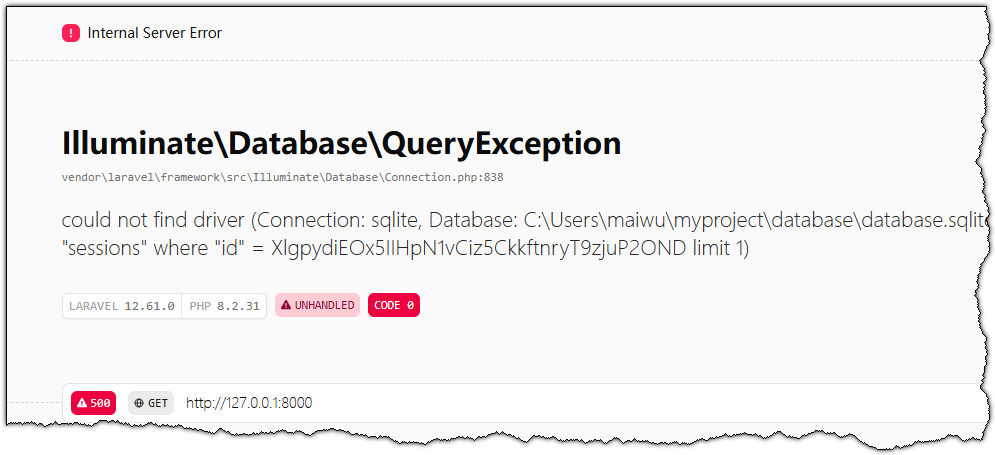
วางลิงก์ http://127.0.0.1:8000 ลงในแถบที่อยู่เบราว์เซอร์ เพื่อเข้าชมหน้าแรกเริ่มต้นของ Laravel