01 – 認識 Fragment(碎片)
課程介紹
這堂課需要大家具備 Android 基礎。
如果沒有基礎,會很難往下學習。
Fragment 翻譯成中文是「碎片」或「片段」。
其實稱為「片段」會更貼切。
它是一種嵌入在 Activity 裡的 UI 片段,
能讓程式更合理且充分利用大螢幕空間,
所以非常適合在平板電腦上使用。
它跟 Activity 很類似,同樣有版面配置,也有自己的生命週期,
可以把它想成是迷你版的 Activity。
當我們要開發一個新聞應用程式時,
如果是手機螢幕,我們可能會設計成這樣:
一個列表 Activity,點進去是新聞詳情 Activity。
但如果是平板,我們可能就不會這樣做,否則會導致大片空白,這樣不好。
更好的設計方案是:把列表和內容詳情分別放在同一個 Activity 的兩個片段中。
建立平板模擬器
為了更好地測試我們的平板應用程式,我們要再建立一個平板模擬器。
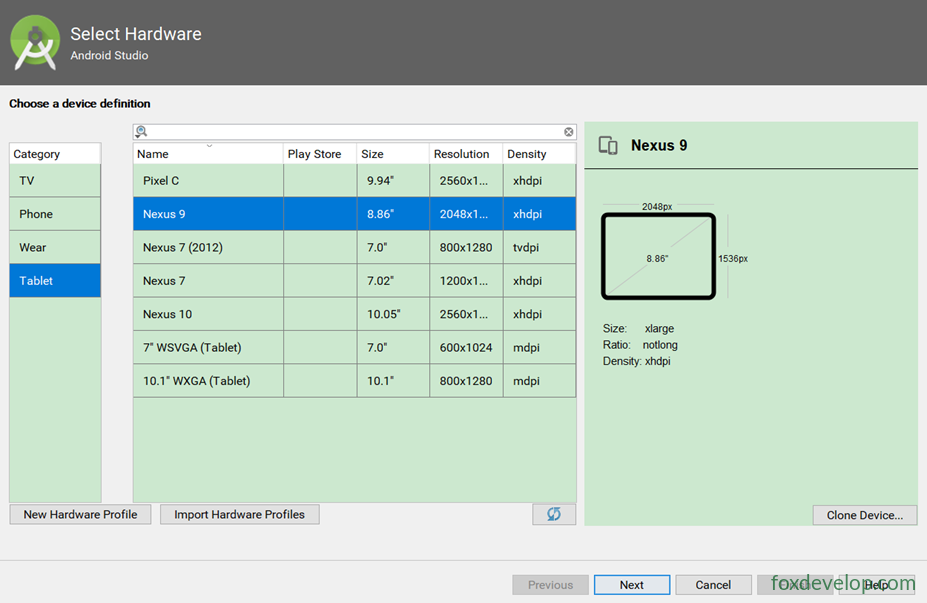
02 – 碎片的第一個範例
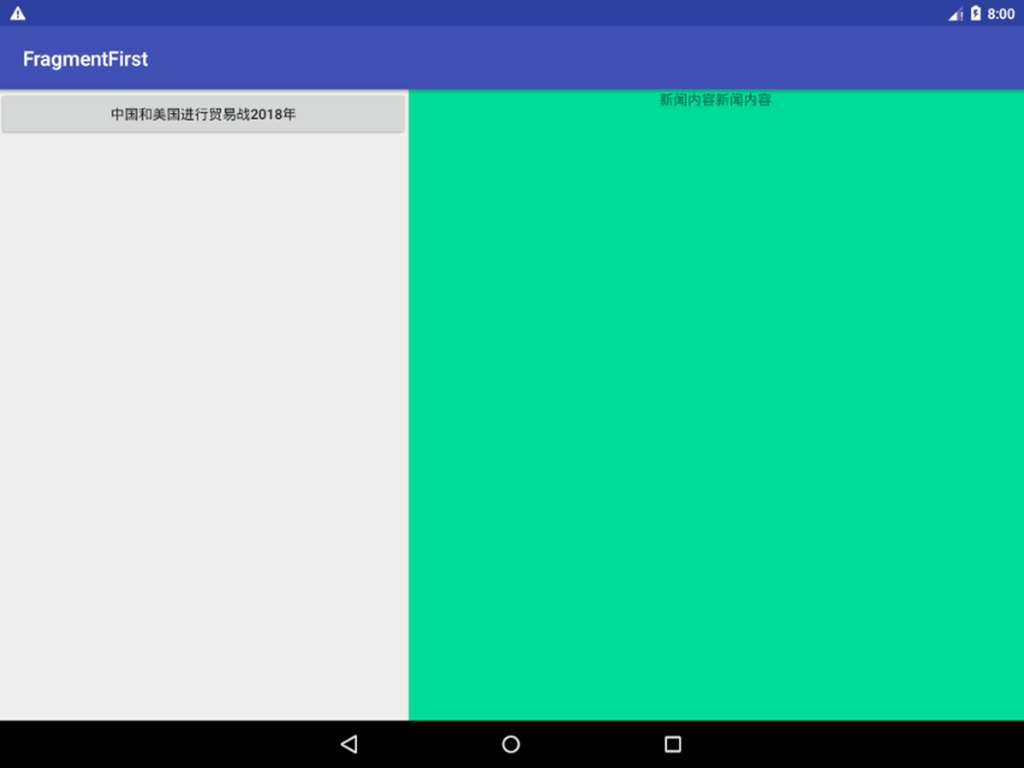
在一個 Activity 中加入兩個碎片,然後讓兩個碎片平分 Activity 的空間。
新增一個 FragmentFirst 新專案。
加入兩個佈局:一個作為左側的碎片,
newlist.xml
另一個是右側的碎片佈局 newdetail.xml。
左側碎片
<?xml version="1.0" encoding="utf-8"?>
<LinearLayout xmlns:android="http://schemas.android.com/apk/res/android"
    android:orientation="vertical" android:layout_width="match_parent"
    android:layout_height="match_parent">
    <Button
        android:id="@+id/buttondialog"
        android:layout_width="match_parent"
        android:layout_height="wrap_content"
        android:text="2018 年中美貿易戰" />
</LinearLayout>Code language: HTML, XML (xml)
右側碎片
<?xml version="1.0" encoding="utf-8"?>
<LinearLayout xmlns:android="http://schemas.android.com/apk/res/android"
    android:orientation="vertical" android:layout_width="match_parent"
    android:layout_height="match_parent"
    android:background="#0ddb97"
    >
    <TextView
        android:layout_width="wrap_content"
        android:layout_height="wrap_content"
        android:layout_gravity="center_horizontal"
        android:text="新聞內容新聞內容" />
</LinearLayout>Code language: HTML, XML (xml)
新增碎片類別
新增一個 NewListFragment。
繼承自 android.support.v4.app.Fragment。
然後覆寫 onCreateView 方法,讓這個碎片使用 newlist 的 xml。
public class NewListFragment extends Fragment {
    @Nullable
    @Override
    public View onCreateView(@NonNull LayoutInflater inflater, @Nullable ViewGroup container,
                             @Nullable Bundle savedInstanceState) {
        View view = inflater.inflate(R.layout.newlist,container,false);
        return view;
    }
}Code language: PHP (php)
用同樣的方式新增新聞詳情碎片。
NewDetailFragment 也是繼承
android.support.v4.app.Fragment。
public class NewDetailFragment extends Fragment {
    @Nullable
    @Override
    public View onCreateView(@NonNull LayoutInflater inflater, @Nullable ViewGroup container, @Nullable Bundle savedInstanceState) {
        View view = inflater.inflate(R.layout.newdetail,container,false);
        return view;
    }
}Code language: PHP (php)
在主活動視圖中呼叫碎片
使用 android:name=”com.foxdevelop.” 屬性來設定要使用哪個碎片。
主視圖中加入碎片視圖時,id 不能少。
<?xml version="1.0" encoding="utf-8"?>
<LinearLayout xmlns:android="http://schemas.android.com/apk/res/android"
    android:orientation="horizontal" android:layout_width="match_parent"
    android:layout_height="match_parent">
    <fragment
        android:id="@+id/newlist_fragment"
        android:layout_width="0dp"
        android:layout_height="match_parent"
        android:layout_weight="2"
        android:name="com.foxdevelop.www.fragmentfirst.NewListFragment"
        />
    <fragment
        android:id="@+id/newdetail_fragment"
        android:layout_width="0dp"
        android:layout_height="match_parent"
        android:layout_weight="3"
        android:name="com.foxdevelop.www.fragmentfirst.NewDetailFragment"
        />
</LinearLayout>Code language: HTML, XML (xml)
03 – 動態加入碎片
碎片真正強大的地方在於:它可以在程式執行時,動態地加入 Activity 中。
根據具體情況動態加入碎片,我們就能在程式介面中打造更多樣化的設計。
例如我們的新聞,有些是圖片新聞,有些是文字新聞,有些是影片新聞。這時候可以根據不同的新聞類型,使用不同的碎片視圖。
我們新增一個 new_picture 的視圖。
<?xml version="1.0" encoding="utf-8"?>
<LinearLayout xmlns:android="http://schemas.android.com/apk/res/android"
    android:orientation="vertical" android:layout_width="match_parent"
    android:layout_height="match_parent">
    <ImageView
        android:layout_width="match_parent"
        android:layout_height="match_parent"
        android:src="@drawable/birdsee"
        />
</LinearLayout>Code language: HTML, XML (xml)
為了區別,它會顯示一張圖片。
新增圖片碎片類別
public class NewImageFragment extends Fragment {
    @Nullable
    @Override
    public View onCreateView(@NonNull LayoutInflater inflater, @Nullable ViewGroup container,
                             @Nullable Bundle savedInstanceState) {
        View view = inflater.inflate(R.layout.new_picture,container,false);
        return view;
    }
}Code language: PHP (php)
在主視圖中使用 FrameLayout
這裡我們使用一個框架佈局(FrameLayout)。
<?xml version="1.0" encoding="utf-8"?>
<LinearLayout xmlns:android="http://schemas.android.com/apk/res/android"
    android:orientation="horizontal" android:layout_width="match_parent"
    android:layout_height="match_parent">
    <fragment
        android:id="@+id/newlist_fragment"
        android:layout_width="0dp"
        android:layout_height="match_parent"
        android:layout_weight="2"
        android:name="com.foxdevelop.www.fragmentfirst.NewListFragment"
        />

    <FrameLayout
        android:id="@+id/framelayout"
        android:layout_width="0dp"
        android:layout_height="match_parent"
        android:layout_weight="3"
        ></FrameLayout>
</LinearLayout>Code language: HTML, XML (xml)
左側加入兩個按鈕
<?xml version="1.0" encoding="utf-8"?>
<LinearLayout xmlns:android="http://schemas.android.com/apk/res/android"
    android:orientation="vertical" android:layout_width="match_parent"
    android:layout_height="match_parent">
    <Button
        android:id="@+id/buttondialog"
        android:layout_width="match_parent"
        android:layout_height="wrap_content"
        android:text="2018 年中美貿易戰" />
    <Button
        android:id="@+id/buttonpicture"
        android:layout_width="match_parent"
        android:layout_height="wrap_content"
        android:text="圖片新聞" />
</LinearLayout>Code language: HTML, XML (xml)
在主活動中為按鈕加入事件
透過為按鈕加入事件,然後在事件中根據不同的按鈕,動態加入不同的碎片。
package com.foxdevelop.www.fragmentfirst;

import android.support.v4.app.Fragment;
import android.support.v4.app.FragmentManager;
import android.support.v7.app.AppCompatActivity;
import android.os.Bundle;
import android.view.View;
import android.widget.Button;

public class MainActivity extends AppCompatActivity implements View.OnClickListener {

    @Override
    protected void onCreate(Bundle savedInstanceState) {
        super.onCreate(savedInstanceState);
        setContentView(R.layout.activity_main);
        // 為兩個按鈕綁定事件
        Button b1 = (Button)findViewById(R.id.buttonarticle);
        b1.setOnClickListener(this);
        Button b2 = (Button)findViewById(R.id.buttonpicture);
        b1.setOnClickListener(this);
    }

    @Override
    public void onClick(View view) {
        // 根據不同的按鈕,設定不同的碎片
        switch (view.getId())
        {
            case R.id.buttonarticle:
                setFragement(new NewDetailFragment());
                break;
            case R.id.buttonpicture:
                setFragement(new NewImageFragment());
                break;
            default:
                break;
        }
    }

    // 此方法用來設定框架佈局的碎片
    public void setFragement(Fragment fragement) {
        FragmentManager fragementManager = getSupportFragmentManager();
        // 開啟交易
        android.support.v4.app.FragmentTransaction fragmentTransaction = fragementManager.beginTransaction();
        fragmentTransaction.replace(R.id.framelayout,fragement);// 設定框架佈局使用傳入的碎片
        fragmentTransaction.commit();
    }
}Code language: JavaScript (javascript)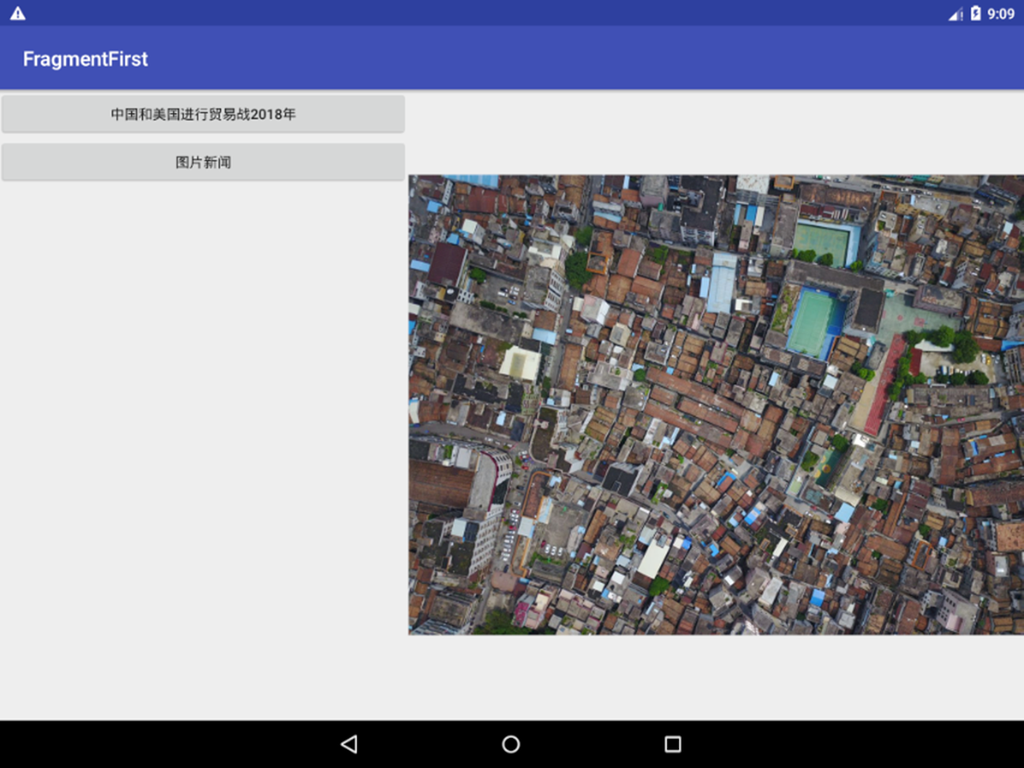
04 – 碎片中使用返回堆疊
關於什麼是返回堆疊,我們在基礎課程中有說明。
現在,在上一節的例子中,我們按下 back 鍵時,會發現應用程式直接退出主活動,然後結束程式。但這不是我們想要的效果,我們希望按返回鍵時,是回到上一個碎片。
要讓碎片支援返回堆疊其實很簡單,
只需要把交易加入到返回堆疊中就可以了。
// 此方法用來設定框架佈局的碎片
public void setFragement(Fragment fragement) {
    FragmentManager fragementManager = getSupportFragmentManager();
    // 開啟交易
    android.support.v4.app.FragmentTransaction fragmentTransaction = fragementManager.beginTransaction();
    fragmentTransaction.replace(R.id.framelayout,fragement);// 設定框架佈局使用傳入的碎片
    fragmentTransaction.addToBackStack(null);// 把交易加入到堆疊
    fragmentTransaction.commit();
}Code language: JavaScript (javascript)
05 – 碎片與活動的通信
碎片都是嵌入在活動中,但實際上它們的關係並沒有那麼緊密。
我們的碎片和活動其實是各自處於獨立的類別中。
它們之間沒有直接的方式可以通信。
為了方便通信,
FragmentManager 提供了一個類似 findViewById 的方法,用於從佈局中取得碎片的實例。
getFragmentManager android.support.v4.app.Fragment
需要轉型。這裡書本沒提到。
如果你匯入的是 android.support.v4.app.Fragment 套件(即 v4 套件)
import android.support.v4.app.Fragment;
那麼在取得 FragmentManager 時,應該使用
FragmentManager fm = getSupportFragmentManager();
對應的 fragment 也要匯入對應的套件!
// 在活動的 onCreate 方法中取得碎片實例
NewListFragment newListFragment = (NewListFragment)getSupportFragmentManager().findFragmentById(R.id.newlist_fragment);
Toast.makeText(this, newListFragment.getId()+"xxxx",Toast.LENGTH_LONG).show();Code language: JavaScript (javascript)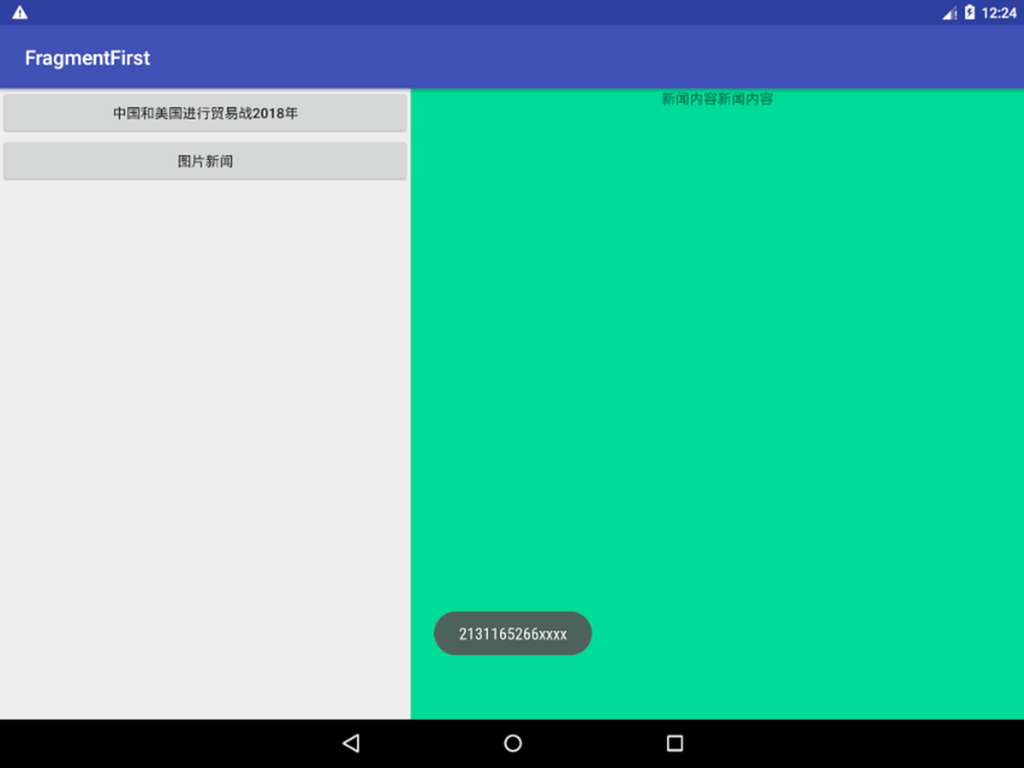
從碎片中取得活動
// 從碎片中取得活動
MainActivity mainActivity = (MainActivity) getActivity();
Toast.makeText(getContext(), mainActivity.getTitle(),Toast.LENGTH_LONG).show();Code language: JavaScript (javascript)
可以呼叫 getActivity 方法。
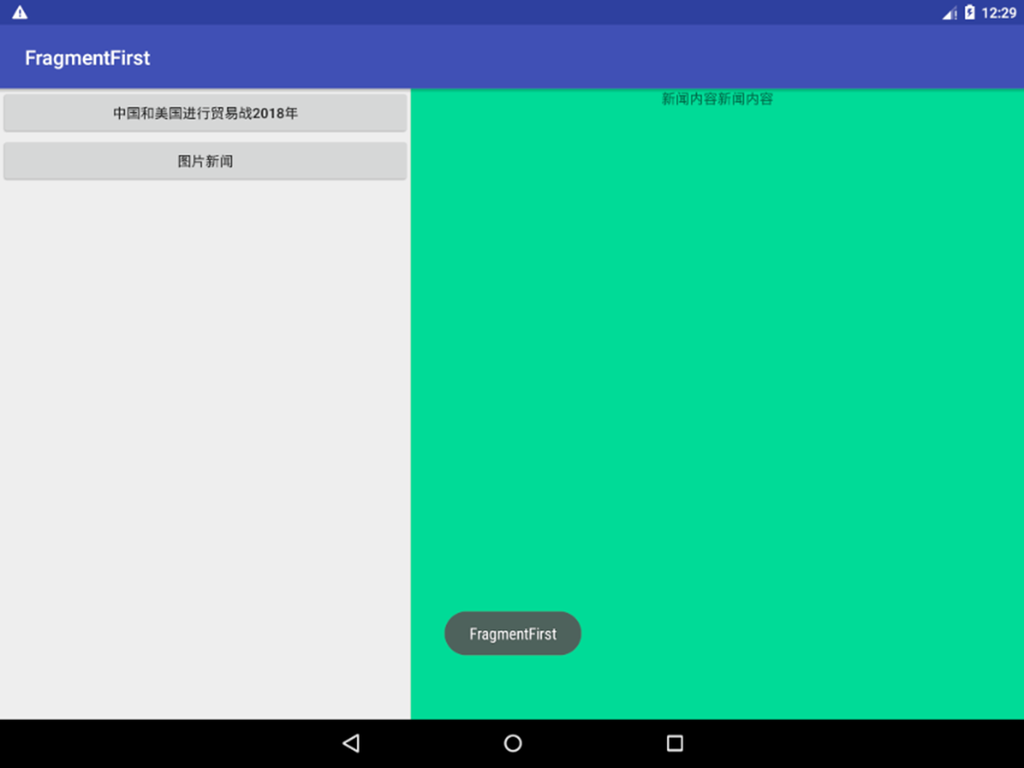
06 – 碎片的生命週期
碎片的生命週期跟活動基本上是一樣的。
碎片也有四種狀態。
執行中、暫停、停止、銷毀。
1. 執行中狀態:碎片是可見的,且所在的活動正處於執行中狀態,該碎片也處於活動狀態。
2. 暫停狀態
當另一個未佔滿螢幕的活動被加到堆疊頂端時,它所管理的可見碎片就會進入暫停狀態。
3. 停止狀態
當一個活動進入停止狀態,它相關的碎片也會進入停止狀態。或是透過 FragmentTransaction 的 remove 或 replace 方法將碎片從活動中移除,如果在交易提交前呼叫 addToBackStack 方法,則也會進入停止狀態。
總之,進入停止狀態的碎片對使用者來說是不可見的,且隨時可能被系統回收。
4. 銷毀狀態
碎片總是依附於活動,因此活動被銷毀,相關的碎片也會進入銷毀狀態。或是透過 FragmentTransaction 的 remove 或 replace 方法將碎片從活動中移除,如果在交易提交前沒有呼叫 addToBackStack 方法,則也會進入銷毀狀態。
跟活動一樣,Fragment 也提供了一系列的回呼方法,涵蓋生命週期的每個環節。活動有的,碎片中也幾乎都有。
同時,碎片也提供了一些額外的回呼方法。