먼저 지난 수업의 모든 컨트롤을 지우고 아무 컴포넌트도 없는 가장 간단한 빈 창을 생성합니다.
#pragma comment(linker, "/SUBSYSTEM:windows /ENTRY:mainCRTStartup")
#pragma execution_character_set("utf-8")

#include <GLFW/glfw3.h>
#include "imgui.h"
#include "backends/imgui_impl_glfw.h"
#include "backends/imgui_impl_opengl3.h"
#include <cstdio>
#include <string>
#include <fstream>
#include <windows.h>
#include <io.h>
#include <commdlg.h>  // 파일 대화상자에 필요한 헤더

#include <iostream>
using namespace std;

// 폰트 설정, 텍스트 입력시 ?? 깨짐 현상 해결
// 사용 환경에 맞는 다국어 폰트 경로를 추가하거나 시스템 기본 폰트 사용
void SetupFont(ImGuiIO& io)
{
    // Windows 자주 쓰이는 중국어 폰트 경로
    const char* font_path = "C:/Windows/Fonts/msyh.ttc"; // 마이크로소프트 야헤이
    float font_size = 18.0f;

    // 간체 중국 자주 쓰는 문자 범위 불러오기
    ImVector<ImWchar> ranges;
    ImFontGlyphRangesBuilder builder;
    builder.AddRanges(io.Fonts->GetGlyphRangesChineseSimplifiedCommon());
    builder.BuildRanges(&ranges);

    // 커스텀 폰트 로드
    io.Fonts->AddFontFromFileTTF(font_path, font_size, nullptr, ranges.Data);

    // 다국어 지원 추가 가능:
    // io.Fonts->AddFontFromFileTTF(font_path, font_size, nullptr, io.Fonts->GetGlyphRangesJapanese());
    // io.Fonts->AddFontFromFileTTF(font_path, font_size, nullptr, io.Fonts->GetGlyphRangesKorean());
}


int main()
{

    if (!glfwInit())
    {
        printf("GLFW 초기화 실패\n");
        return -1;
    }

    const char* glsl_version = "#version 330";
    glfwWindowHint(GLFW_CONTEXT_VERSION_MAJOR, 3);
    glfwWindowHint(GLFW_CONTEXT_VERSION_MINOR, 3);
    glfwWindowHint(GLFW_OPENGL_PROFILE, GLFW_OPENGL_CORE_PROFILE);

    GLFWwindow* window = glfwCreateWindow(800, 600, "창 제목", nullptr, nullptr);
    if (!window)
    {
        glfwTerminate();
        return -1;
    }
    glfwMakeContextCurrent(window);
    glfwSwapInterval(1);

    IMGUI_CHECKVERSION();
    ImGui::CreateContext();
    ImGuiIO& io = ImGui::GetIO();
    ImGui::StyleColorsLight();

    SetupFont(io); // 폰트 불러와 글자 깨짐 해결

    ImGui_ImplGlfw_InitForOpenGL(window, true);
    ImGui_ImplOpenGL3_Init(glsl_version);

    while (!glfwWindowShouldClose(window))
    {
        glfwPollEvents();

        ImGui_ImplOpenGL3_NewFrame();
        ImGui_ImplGlfw_NewFrame();
        ImGui::NewFrame();

        ImGui::SetNextWindowPos(ImVec2(0, 0));
        ImGui::SetNextWindowSize(io.DisplaySize);

        ImGuiWindowFlags window_flags = ImGuiWindowFlags_NoDecoration
            | ImGuiWindowFlags_NoMove
            | ImGuiWindowFlags_NoResize
            | ImGuiWindowFlags_NoSavedSettings;

        ImGui::PushStyleVar(ImGuiStyleVar_WindowRounding, 0.0f);
        ImGui::PushStyleVar(ImGuiStyleVar_WindowBorderSize, 0.0f);

        ImGui::Begin("창 제목", nullptr, window_flags);

        // 인터페이스 컨트롤 작성 영역 시작

        // 영역 끝

        ImGui::End();
        ImGui::PopStyleVar(2);

        ImGui::Render();
        int width, height;
        glfwGetFramebufferSize(window, &width, &height);
        glViewport(0, 0, width, height);
        glClearColor(0.12f, 0.12f, 0.12f, 1.f);
        glClear(GL_COLOR_BUFFER_BIT);
        ImGui_ImplOpenGL3_RenderDrawData(ImGui::GetDrawData());

        glfwSwapBuffers(window);
    }

    ImGui_ImplOpenGL3_Shutdown();
    ImGui_ImplGlfw_Shutdown();
    ImGui::DestroyContext();
    glfwDestroyWindow(window);
    glfwTerminate();
    return 0;
}Code language: C++ (cpp)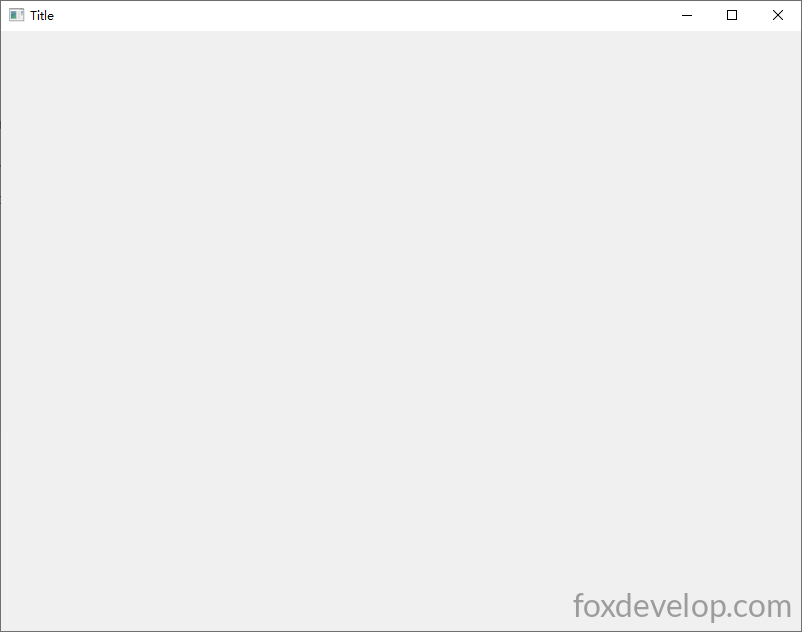
이제 하나씩 ImGui 컨트롤을 만들어보겠습니다.
텍스트 컨트롤
ImGui::Text("안녕하세요, %d", 123);Code language: PHP (php)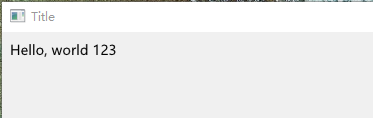
창 왼쪽 상단부터 왼쪽에서 오른쪽으로 텍스트가 출력됩니다.
버튼
        // 버튼을 표시하고 클릭하면 내부 코드 실행
        if (ImGui::Button("저장"))
        {
            // 클릭 후 여기 코드가 실행됨
        }Code language: PHP (php)
컨트롤 종류가 매우 많으니 아래 전체 예시로 모든 컨트롤을 한 번에 출력해보겠습니다.
#pragma comment(linker, "/SUBSYSTEM:windows /ENTRY:mainCRTStartup")
#pragma execution_character_set("utf-8")

#include <GLFW/glfw3.h>
#include "imgui.h"
#include "backends/imgui_impl_glfw.h"
#include "backends/imgui_impl_opengl3.h"
#include <cstdio>
#include <string>
#include <cstring>
#include <windows.h>
#include <io.h>
#include <iostream>
using namespace std;

// 폰트 설정, 텍스트 입력시 ?? 깨짐 현상 해결
// 사용 환경에 맞는 다국어 폰트 경로를 추가하거나 시스템 기본 폰트 사용
void SetupFont(ImGuiIO& io)
{
    // Windows 자주 쓰이는 중국어 폰트 경로
    const char* font_path = "C:/Windows/Fonts/msyh.ttc"; // 마이크로소프트 야헤이
    float font_size = 18.0f;

    // 간체 중국 자주 쓰는 문자 범위 불러오기
    ImVector<ImWchar> ranges;
    ImFontGlyphRangesBuilder builder;
    builder.AddRanges(io.Fonts->GetGlyphRangesChineseSimplifiedCommon());
    builder.BuildRanges(&ranges);

    // 커스텀 폰트 로드
    io.Fonts->AddFontFromFileTTF(font_path, font_size, nullptr, ranges.Data);

    // 다국어 지원 추가 가능:
    // io.Fonts->AddFontFromFileTTF(font_path, font_size, nullptr, io.Fonts->GetGlyphRangesJapanese());
    // io.Fonts->AddFontFromFileTTF(font_path, font_size, nullptr, io.Fonts->GetGlyphRangesKorean());
}

// ===================== 전역 컨트롤 바인딩 변수 =====================
char buf[256] = "한 줄 입력 테스트 문자";
char bufMulti[1024] = "여러 줄 텍스트 상자\n두 번째 줄\n세 번째 한자 테스트";
float fVal = 0.5f;
int iVal = 50;
bool checkBox1 = false;
bool checkBox2 = true;
int radioIdx = 0;
int comboSel = 0;
ImVec4 color = ImVec4(0.2f, 0.7f, 0.9f, 1.0f);
bool showPopupWin = false;
bool showModal = false;
int tabIndex = 0;
float progress = 0.35f;

int main()
{
    SetConsoleOutputCP(65001);
    if (!glfwInit())
    {
        printf("GLFW 초기화 실패\n");
        return -1;
    }

    const char* glsl_version = "#version 330";
    glfwWindowHint(GLFW_CONTEXT_VERSION_MAJOR, 3);
    glfwWindowHint(GLFW_CONTEXT_VERSION_MINOR, 3);
    glfwWindowHint(GLFW_OPENGL_PROFILE, GLFW_OPENGL_CORE_PROFILE);

    GLFWwindow* window = glfwCreateWindow(1000, 700, "ImGui 모든 자주 쓰는 컨트롤 예제", nullptr, nullptr);
    if (!window)
    {
        glfwTerminate();
        return -1;
    }
    glfwMakeContextCurrent(window);
    glfwSwapInterval(1);

    IMGUI_CHECKVERSION();
    ImGui::CreateContext();
    ImGuiIO& io = ImGui::GetIO();
    ImGui::StyleColorsLight();

    SetupFont(io);

    ImGui_ImplGlfw_InitForOpenGL(window, true);
    ImGui_ImplOpenGL3_Init(glsl_version);

    while (!glfwWindowShouldClose(window))
    {
        glfwPollEvents();

        ImGui_ImplOpenGL3_NewFrame();
        ImGui_ImplGlfw_NewFrame();
        ImGui::NewFrame();

        ImGui::SetNextWindowPos(ImVec2(0, 0));
        ImGui::SetNextWindowSize(io.DisplaySize);

        ImGuiWindowFlags window_flags = ImGuiWindowFlags_NoDecoration
            | ImGuiWindowFlags_NoMove
            | ImGuiWindowFlags_NoResize
            | ImGuiWindowFlags_NoSavedSettings;

        ImGui::PushStyleVar(ImGuiStyleVar_WindowRounding, 0.0f);
        ImGui::PushStyleVar(ImGuiStyleVar_WindowBorderSize, 0.0f);

        ImGui::Begin("메인 창", nullptr, window_flags);

        // ========== 1. 상단 메뉴바 ==========
        if (ImGui::BeginMenuBar())
        {
            if (ImGui::BeginMenu("파일"))
            {
                if (ImGui::MenuItem("새로 만들기", "Ctrl+N")) {}
                if (ImGui::MenuItem("저장", "Ctrl+S")) {}
                ImGui::Separator();
                if (ImGui::MenuItem("종료"))
                    glfwSetWindowShouldClose(window, true);
                ImGui::EndMenu();
            }
            if (ImGui::BeginMenu("도구"))
            {
                if (ImGui::MenuItem("팝업 예시 열기"))
                    showPopupWin = true;
                ImGui::EndMenu();
            }
            ImGui::EndMenuBar();
        }
        ImGui::Spacing();

        // ========== 2. 기본 텍스트 컨트롤 ==========
        ImGui::Text("===== 텍스트 계열 컨트롤 =====");
        ImGui::Text("일반 텍스트 안녕 %d", 123);
        ImGui::TextColored(ImVec4(1, 0, 0, 1), "빨간색 컬러 텍스트");
        ImGui::TextDisabled("회색 비활성 텍스트");
        ImGui::BulletText("불렛 텍스트 1");
        ImGui::BulletText("불렛 텍스트 2");
        ImGui::Spacing();

        // ========== 3. 버튼 계열 ==========
        ImGui::Text("===== 버튼 컨트롤 =====");
        if (ImGui::Button("일반 버튼"))
            cout << "일반 버튼 클릭됨" << endl;
        ImGui::SameLine();
        if (ImGui::SmallButton("작은 버튼"))
            cout << "작은 버튼 클릭됨" << endl;
        ImGui::SameLine();
        if (ImGui::Button("넓은 버튼", ImVec2(120, 0)))
            cout << "사용자 정의 너비 버튼 클릭됨" << endl;
        ImGui::Spacing();

        // ========== 4. 입력 상자 ==========
        ImGui::Text("===== 입력 컨트롤 =====");
        ImGui::InputText("한 줄 입력", buf, IM_ARRAYSIZE(buf));
        ImGui::InputTextWithHint("힌트 입력상자", "내용을 입력하세요...", buf, IM_ARRAYSIZE(buf));
        ImGui::InputFloat("실수 입력", &fVal);
        ImGui::InputInt("정수 입력", &iVal);
        ImGui::Spacing();
        ImGui::Text("여러 줄 텍스트 상자:");
        ImVec2 multiSize = ImVec2(500, 80);
        ImGui::InputTextMultiline("##multi", bufMulti, IM_ARRAYSIZE(bufMulti), multiSize);
        ImGui::Spacing();

        // ========== 5. 슬라이더, 드래그 바 ==========
        ImGui::Text("===== 슬라이더 / 드래그 컨트롤 =====");
        ImGui::SliderFloat("실수 슬라이더", &fVal, 0.0f, 1.0f);
        ImGui::SliderInt("정수 슬라이더", &iVal, 0, 100);
        ImGui::DragFloat("드래그 실수 바", &fVal, 0.01f);
        ImGui::DragInt("드래그 정수 바", &iVal, 1.0f);
        ImGui::Spacing();

        // ========== 6. 체크박스, 라디오 버튼 ==========
        ImGui::Text("===== 체크박스 & 라디오 버튼 =====");
        ImGui::Checkbox("체크박스 A", &checkBox1);
        ImGui::Checkbox("체크박스 B", &checkBox2);
        ImGui::Text("라디오 그룹:");
        ImGui::RadioButton("옵션1", &radioIdx, 0); ImGui::SameLine();
        ImGui::RadioButton("옵션2", &radioIdx, 1); ImGui::SameLine();
        ImGui::RadioButton("옵션3", &radioIdx, 2);
        ImGui::Spacing();

        // ========== 7. 드롭다운 콤보 ==========
        ImGui::Text("===== 드롭다운 콤보 =====");
        const char* items[] = { "옵션A", "옵션B", "옵션C", "옵션D" };
        ImGui::Combo("드롭 선택", &comboSel, items, IM_ARRAYSIZE(items));
        ImGui::Spacing();

        // ========== 8. 색상 선택기 ==========
        ImGui::Text("===== 색상 편집기 =====");
        ImGui::ColorEdit4("RGBA 색상", (float*)&color);
        ImGui::ColorButton("색상 미리보기 박스", color);
        ImGui::Spacing();

        // ========== 9. 진행 바, 구분선 ==========
        ImGui::Text("===== 진행 바 / 구분선 =====");
        ImGui::ProgressBar(progress, ImVec2(300, 0));
        ImGui::Text("진행 수치: %.2f", progress);
        ImGui::Separator(); // 가로 구분선
        ImGui::Spacing();

        // ========== 10. 접기 가능 트리 노드 ==========
        ImGui::Text("===== 접는 트리 패널 =====");
        if (ImGui::CollapsingHeader("접는 패널 클릭해서 펼치기"))
        {
            ImGui::Text("패널 내부 내용");
            ImGui::Button("패널 안 버튼");
        }
        if (ImGui::TreeNode("트리 노드"))
        {
            ImGui::BulletText("하위 항목1");
            ImGui::BulletText("하위 항목2");
            ImGui::TreePop();
        }
        ImGui::Spacing();

        // ========== 11. 탭 바 TabBar ==========
        ImGui::Text("===== 탭 페이지 Tab =====");
        ImGui::BeginTabBar("TabBar");
        if (ImGui::BeginTabItem("탭1"))
        {
            ImGui::Text("탭1 페이지 내용");
            ImGui::EndTabItem();
        }
        if (ImGui::BeginTabItem("탭2"))
        {
            ImGui::Text("탭2 페이지 내용");
            ImGui::EndTabItem();
        }
        ImGui::EndTabBar();
        ImGui::Spacing();

        // ========== 12. 테이블 Table ==========
        ImGui::Text("===== 테이블 컨트롤 =====");
        if (ImGui::BeginTable("table1", 3, ImGuiTableFlags_Borders))
        {
            ImGui::TableSetupColumn("번호");
            ImGui::TableSetupColumn("이름");
            ImGui::TableSetupColumn("수치");
            ImGui::TableHeadersRow();

            // 행1
            ImGui::TableNextRow();
            ImGui::TableNextColumn(); ImGui::Text("1");
            ImGui::TableNextColumn(); ImGui::Text("테스트A");
            ImGui::TableNextColumn(); ImGui::Text("%.2f", fVal);
            // 행2
            ImGui::TableNextRow();
            ImGui::TableNextColumn(); ImGui::Text("2");
            ImGui::TableNextColumn(); ImGui::Text("테스트B");
            ImGui::TableNextColumn(); ImGui::Text("%d", iVal);
            ImGui::EndTable();
        }
        ImGui::Spacing();

        // ========== 13. 오른쪽 클릭 메뉴 ==========
        ImGui::Text("===== 오른쪽 클릭 메뉴 (이 텍스트 위 우클릭) =====");
        if (ImGui::IsItemClicked(ImGuiMouseButton_Right))
            ImGui::OpenPopup("RightMenu");
        if (ImGui::BeginPopup("RightMenu"))
        {
            ImGui::MenuItem("우클릭 메뉴 항목1");
            ImGui::MenuItem("우클릭 메뉴 항목2");
            ImGui::Separator();
            ImGui::MenuItem("메뉴 닫기");
            ImGui::EndPopup();
        }
        ImGui::Spacing();

        // ========== 14. 일반 팝업 (비모달) ==========
        if (showPopupWin)
        {
            ImGui::OpenPopup("PopupWindow");
            showPopupWin = false;
        }
        if (ImGui::BeginPopup("PopupWindow"))
        {
            ImGui::Text("일반 팝업으로 메인 창 조작 가능");
            if (ImGui::Button("팝업 닫기"))
                ImGui::CloseCurrentPopup();
            ImGui::EndPopup();
        }

        // ========== 15. 모달 대화창 Modal ==========
        if (ImGui::Button("모달 팝업 열기"))
            showModal = true;
        if (showModal)
        {
            ImGui::OpenPopup("ModalDialog");
            showModal = false;
        }
        if (ImGui::BeginPopupModal("모달 대화상자", nullptr, ImGuiWindowFlags_AlwaysAutoResize))
        {
            ImGui::Text("모달은 메인 창을 잠그므로 먼저 닫아야 함");
            if (ImGui::Button("확인", ImVec2(120, 0)))
            {
                ImGui::CloseCurrentPopup();
            }
            ImGui::EndPopup();
        }

        ImGui::End();
        ImGui::PopStyleVar(2);

        ImGui::Render();
        int width, height;
        glfwGetFramebufferSize(window, &width, &height);
        glViewport(0, 0, width, height);
        glClearColor(0.12f, 0.12f, 0.12f, 1.f);
        glClear(GL_COLOR_BUFFER_BIT);
        ImGui_ImplOpenGL3_RenderDrawData(ImGui::GetDrawData());

        glfwSwapBuffers(window);
    }

    ImGui_ImplOpenGL3_Shutdown();
    ImGui_ImplGlfw_Shutdown();
    ImGui::DestroyContext();
    glfwDestroyWindow(window);
    glfwTerminate();
    return 0;
}Code language: C++ (cpp)
천천히 각 컨트롤의 사용법을 익혀보세요.
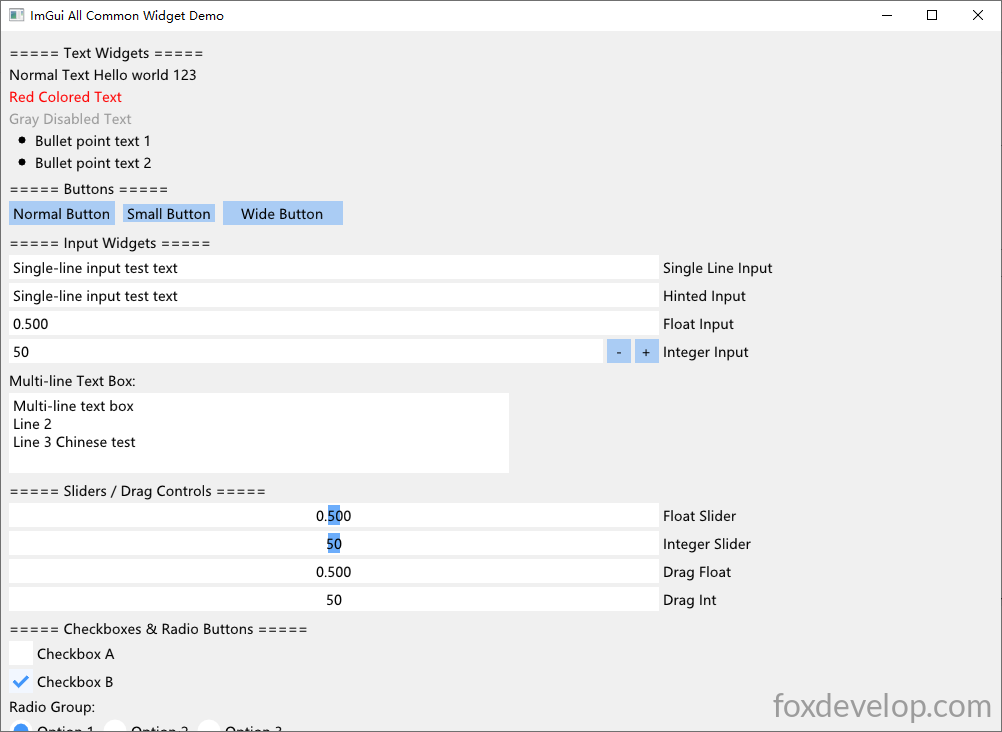
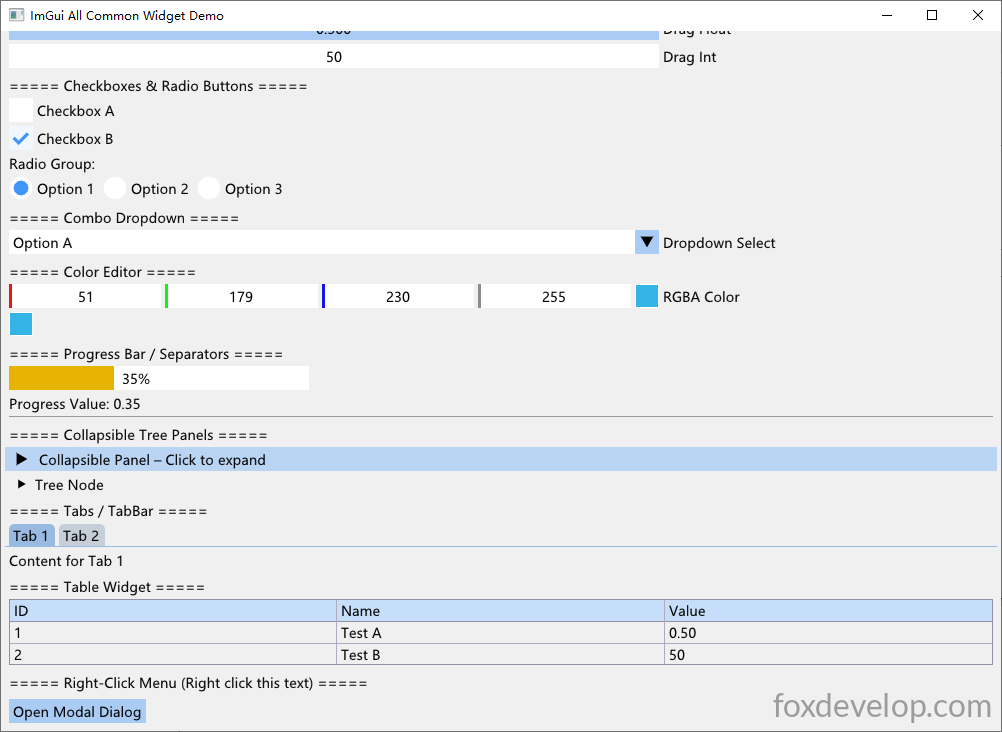
컨트롤 라이브러리가 매우 풍부해서 간단한 유틸리티 프로그램 개발에 충분합니다. 접는 트리, 탭 페이지, 각종 폼 컨트롤(한/여러 줄 텍스트, 라디오, 체크박스, 드롭다운), 진행 바, 접기 패널, 테이블, 우클릭 메뉴, 색상 선택기 등이 모두 포함되어 있으니 직접 테스트해보세요.
Previous: ImGui 메뉴 및 저장 대화상자 구현 – TXT 메모장 예제 제작